
Test Scenario Examples: 40 Ready-to-Use Scenarios by Category
Forty test scenario examples organized by category: login, checkout, search, notifications, permissions, network and accessibility. Each includes preconditions, steps and expected results.
Yuvan Sundrani · 29 min read
autosana.ai
A test scenario is a one-line statement describing a condition or user action to be verified, broad enough to cover multiple test cases but specific enough to be actionable. "Verify login with valid credentials" is a test scenario. "Enter username admin, password Test1234, click Submit, verify dashboard loads" is a test case derived from that scenario.
The distinction matters because scenarios drive coverage planning while test cases drive execution. A team writing test cases without scenarios first ends up with thorough coverage of the features they remembered and zero coverage of the ones they forgot.
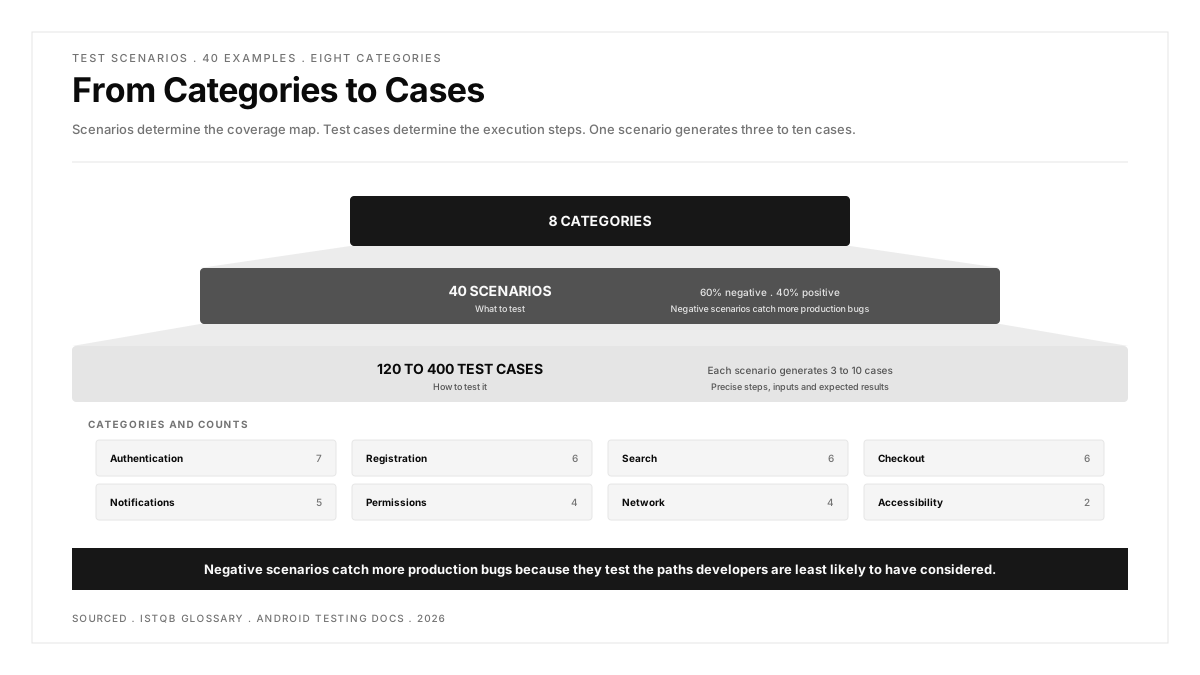
This guide provides 40 test scenarios organized into eight categories, each with the preconditions, high-level steps and expected result that a QA team needs to start writing detailed test cases.
Key Takeaways
- Test scenarios describe WHAT to test. Test cases describe HOW to test it. Scenarios come first and determine the coverage map.
- Every test scenario should pass three checks: it names the feature under test, it states the condition being verified, and someone unfamiliar with the project can understand it without additional context.
- The eight categories in this guide (authentication, registration, search, checkout, notifications, permissions, network and accessibility) cover the surface area of most consumer mobile and web applications.
- Negative scenarios (invalid input, denied permissions, lost connectivity) catch more production bugs than positive scenarios because they test the paths developers are least likely to have considered.
- A test scenario is not tied to a test case management tool. The format works in spreadsheets, in test plans, or in the description field of an automated test.
What makes a good test scenario?
Three qualities separate a useful scenario from one that wastes time.
Specific enough to act on. "Test the app" is not a scenario. "Verify that a user with an expired subscription cannot access premium content" is a scenario because it names the feature (subscription), the condition (expired), the user type (subscriber) and the expected behavior (blocked from premium content).
Broad enough to generate multiple test cases. A scenario reading "Verify login with valid credentials" produces test cases for email login, phone login, social login, SSO and biometric login. If a scenario can only produce one test case, it is already a test case.
Independent of implementation. "Verify the LoginButton component dispatches the AUTH_REQUEST action" is an implementation detail. "Verify that a registered user can log in with correct credentials" survives a complete frontend rewrite.
Authentication test scenarios
| # | Scenario | Precondition | Expected Result |
|---|---|---|---|
| 1 | Verify login with valid email and password | Registered account exists | User reaches the home screen and session persists across app restarts |
| 2 | Verify login fails with incorrect password | Registered account exists | Error message displays without revealing whether the email exists |
| 3 | Verify login fails with unregistered email | No account for the email | Same error message as incorrect password (prevents email enumeration) |
| 4 | Verify account locks after repeated failed attempts | Registered account exists | After 5 failed attempts, the account locks and the user receives a notification |
| 5 | Verify password reset flow completes | Registered account exists | User receives a reset link, sets a new password, and logs in with it |
| 6 | Verify session expires after the defined timeout | User is logged in | After the timeout period, the next action redirects to the login screen |
| 7 | Verify biometric login works after initial setup | Biometrics enrolled on device | User authenticates with fingerprint or face without entering credentials |
These scenarios feed into a broader functional testing strategy that verifies the application does what it is supposed to do.
Registration and onboarding test scenarios
| # | Scenario | Precondition | Expected Result |
|---|---|---|---|
| 8 | Verify registration with valid details | No existing account for the email | Account is created, confirmation email is sent, and the user reaches the onboarding flow |
| 9 | Verify registration rejects duplicate email | Account already exists for the email | Error message explains the email is already registered and offers a login link |
| 10 | Verify required fields show validation errors when empty | Registration form is open | Each required field displays a specific error when submitted empty |
| 11 | Verify email format validation | Registration form is open | Malformed emails (missing @, missing domain, spaces) are rejected with a clear message |
| 12 | Verify password strength requirements are enforced | Registration form is open | Passwords below the minimum length or missing required character types are rejected |
| 13 | Verify onboarding can be skipped and resumed later | New account created | User can dismiss onboarding, use the app, and access onboarding from settings |
Search and filtering test scenarios
| # | Scenario | Precondition | Expected Result |
|---|---|---|---|
| 14 | Verify search returns relevant results for a known term | Indexed content exists | Results match the query and display in relevance order |
| 15 | Verify search handles an empty query | Search field is focused | The app shows recent searches or popular items rather than an error |
| 16 | Verify search handles no results | No content matches the query | The app displays a clear “no results” message with suggestions |
| 17 | Verify filters narrow the result set correctly | Results are displayed | Applying a filter reduces results to only those matching the filter criteria |
| 18 | Verify filters can be combined and cleared | Results are displayed | Multiple filters apply simultaneously; clearing filters restores the full result set |
| 19 | Verify search works with special characters | Search field is focused | Characters like &, <, >, and quotes do not cause errors or unexpected behavior |
Checkout and payment test scenarios
| # | Scenario | Precondition | Expected Result |
|---|---|---|---|
| 20 | Verify complete purchase flow with a valid payment method | Items in cart, valid card saved | Order confirmation displays with correct total, and the order appears in order history |
| 21 | Verify checkout rejects an expired payment card | Expired card on file | Payment fails with a message explaining the card is expired and prompting an update |
| 22 | Verify cart persists across sessions | Items added to cart | Closing and reopening the app preserves cart contents |
| 23 | Verify price updates reflect in the cart | Prices changed by admin | Cart displays the current price, not the price at the time the item was added |
| 24 | Verify discount code applies correctly | Valid discount code exists | The discount reduces the total by the expected amount and the code displays in the summary |
| 25 | Verify checkout handles insufficient inventory | Item quantity exceeds stock | The app prevents the purchase and displays the available quantity |
Checkout flows involve multiple systems (cart, pricing, payment, inventory) and benefit from end-to-end testing that validates the full chain from tap to confirmation.
Notification test scenarios
| # | Scenario | Precondition | Expected Result |
|---|---|---|---|
| 26 | Verify push notification arrives for a triggered event | Notifications enabled, app in background | Notification appears in the device notification center with correct title and body |
| 27 | Verify tapping a notification opens the correct screen | Notification received | Tapping the notification launches the app to the relevant content, not the home screen |
| 28 | Verify notifications respect user preferences | User has disabled a notification category | Notifications in the disabled category do not arrive |
| 29 | Verify in-app notifications display correctly | User is actively using the app | Banner or modal appears with correct content and dismisses on user action or timeout |
| 30 | Verify notification delivery when the app is force-closed | App not running | Notification still arrives through the OS notification system |
Permission test scenarios
| # | Scenario | Precondition | Expected Result |
|---|---|---|---|
| 31 | Verify the app requests camera permission before first use | Permission not yet granted | The OS permission dialog appears with a clear explanation of why the app needs access |
| 32 | Verify the app functions with camera permission denied | Permission denied by user | The feature requiring the camera displays a message explaining the limitation and linking to settings |
| 33 | Verify the app requests location permission at the appropriate moment | Permission not yet granted | The permission request appears when the user initiates a location-dependent action, not at app launch |
| 34 | Verify the app handles permission revocation | Permission previously granted, then revoked in settings | The app detects the revocation and prompts the user rather than crashing |
Network condition test scenarios
| # | Scenario | Precondition | Expected Result |
|---|---|---|---|
| 35 | Verify the app handles complete loss of connectivity | Device goes offline mid-session | The app displays an offline indicator and queues actions for retry |
| 36 | Verify data syncs correctly when connectivity returns | Actions performed offline | Queued actions complete in order and the UI reflects the updated state |
| 37 | Verify the app handles slow network without timing out prematurely | Network throttled to 2G speeds | Core features remain usable, images load progressively, and no request times out before the server responds |
| 38 | Verify the app handles a network switch mid-request | Wi-Fi to mobile data during an upload | The upload retries or resumes rather than failing silently |
Network scenarios are the ones most teams skip under time pressure and most users experience in production. Testing across conditions is part of compatibility testing that goes beyond device models.
Accessibility test scenarios
| # | Scenario | Precondition | Expected Result |
|---|---|---|---|
| 39 | Verify all interactive elements are reachable via screen reader | VoiceOver or TalkBack enabled | Every button, link and input field is announced with a descriptive label |
| 40 | Verify the app is navigable with keyboard or switch control | External keyboard connected or switch access enabled | All primary flows can be completed without touch |
Accessibility heuristics provides the evaluation framework for auditing these scenarios beyond automated scans.
How to use these scenarios
During test planning: Use the categories as a coverage checklist. For each category, confirm your existing test suite covers the scenarios listed or mark them as out of scope with a documented reason.
When writing test cases: Each scenario generates multiple test cases. Scenario #1 (login with valid credentials) becomes separate cases for email login, phone login, social login and SSO. The scenario ensures coverage; the test cases ensure precision.
For regression suites: Select the scenarios that cover the highest-risk paths (authentication, checkout, notifications) and ensure those are automated. The remaining scenarios can run manually before major releases.
For new features: Before writing any test, write the scenarios first. The list of scenarios becomes the acceptance criteria. If the feature cannot be described as a set of scenarios, the requirements are not clear enough to test.
Teams using a test plan to organize their testing effort can embed these scenarios directly as the coverage section of the plan.
.png)
FAQs
What is the difference between a test scenario and a test case?
A test scenario describes what to verify at a high level: "Verify login fails with incorrect password." A test case describes how to verify it: enter email admin@example.com, enter password WrongPass, click Login, verify error message reads "Invalid credentials." Scenarios determine coverage. Test cases determine execution steps. One scenario typically generates three to ten test cases.
How many test scenarios does a typical app need?
The number depends on the application's complexity. A simple utility app might need 30 to 50 scenarios. A consumer app with authentication, payments, notifications and social features typically needs 100 to 200. An enterprise app with role-based access, workflows and integrations can reach 500 or more. The 40 scenarios in this guide cover the categories common to most consumer applications.
Should test scenarios be positive or negative?
Both. Positive scenarios verify that the feature works when used correctly. Negative scenarios verify that the feature handles misuse, errors and edge cases gracefully. In practice, negative scenarios catch more production bugs because they test the paths developers are least likely to have considered. A useful ratio is roughly 40% positive and 60% negative for critical features like authentication and payments.
Who writes test scenarios?
QA engineers write the majority, but the most useful scenarios come from collaboration between QA, developers and product managers. Developers know which code paths are fragile. Product managers know which features carry the most business risk. QA engineers know how to structure the scenarios for coverage and testability. The writing itself is fast. The conversation about what to include is where the value sits.
Can test scenarios be automated?
Test scenarios themselves are too broad to automate directly. The test cases derived from them are what gets automated. Scenario #20 (complete purchase flow) becomes an automated E2E test that adds an item, enters payment, submits the order and verifies the confirmation. The scenario stays in the planning document. The automation lives in the test suite. Mobile test automation covers the frameworks and approaches for turning scenarios into executable tests.
How often should test scenarios be updated?
Update scenarios when features change, when new features ship, and after every production incident that the existing scenarios would not have caught. A team that adds one to three scenarios per sprint based on what they learned keeps the list current without a dedicated maintenance effort. Delete scenarios for features that no longer exist rather than marking them as deprecated.