
Why Does Mobile Test Automation Fail So Often?
Teams spend their decision energy choosing a framework, then lose to device supply, test isolation, and CI. Here is where automation actually fails.
Yuvan Sundrani · 10 min read
autosana.ai
TL;DR
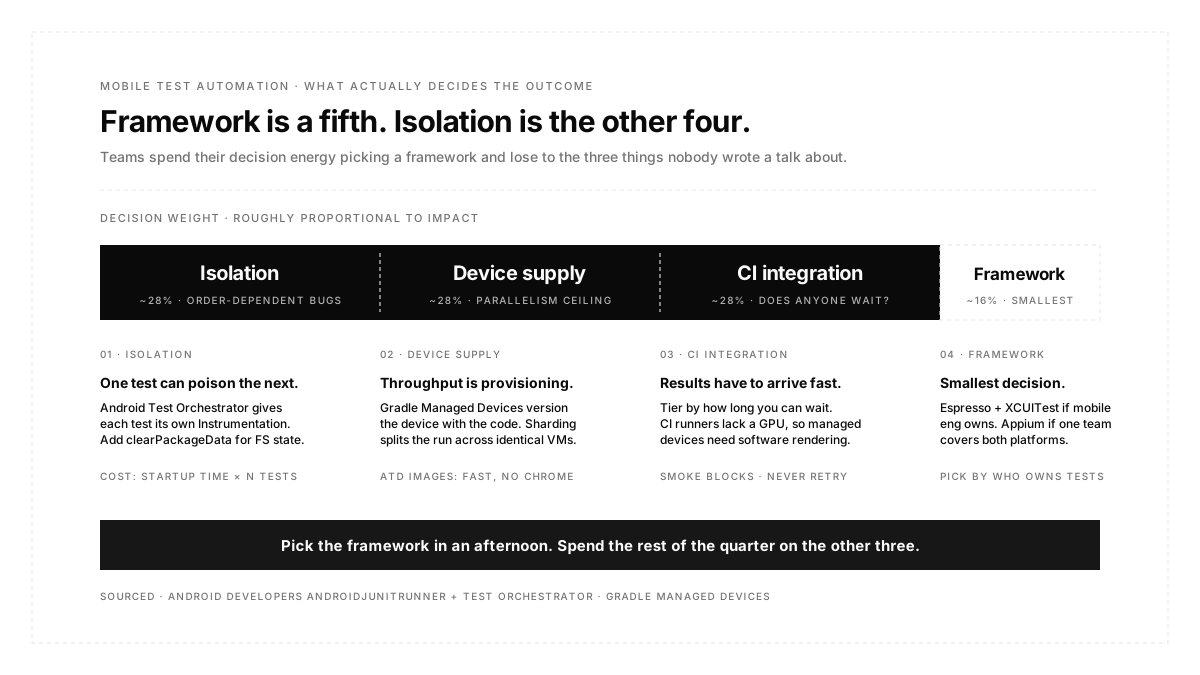
The framework choice is the smallest of the four decisions that determine whether mobile test automation works.
The other three are isolation (whether one test can poison the next), device supply (whether you can run fifty tests at once or only one), and CI integration (whether results arrive fast enough that anyone waits for them). Each has concrete mechanisms with published trade-offs, and each will sink a suite regardless of whether you picked Espresso, XCUITest, or Appium. This post is about those three.
Ask a team starting mobile automation what they are working on, and you will usually hear a framework name. Ask the same team eighteen months later what went wrong and you will hear about emulators that would not boot in CI, a suite that takes forty minutes, and a test that only fails when it runs after a different test.
None of those are framework problems. They are infrastructure problems, and they are the ones with the least written about them, because "how we chose Espresso" makes a better conference talk than "how we stopped tests from leaking state into each other."
The useful thing about these three problems is that they have specific, documented mechanisms rather than folklore. Here they are.
What is mobile test automation?
Mobile test automation is running tests against a mobile app without a human driving the device. Instrumented UI tests, end-to-end journeys, and API-level checks all count. The purpose is not to eliminate testing effort but to move repetitive verification off people and onto machines, so human attention goes to judgement instead of re-checking a login flow for the four hundredth time.
That framing sets the boundary. If a check has a stable, objective expected outcome and will run many times, automate it. If assessing it requires someone to decide whether the result is acceptable, it stays manual.
Isolation: what Android Test Orchestrator actually buys you
Test isolation is the problem where one test leaves a state behind that changes how the next test behaves. It produces failures that reproduce only in a particular order, which is the single most expensive kind of failure to diagnose.
On Android there is a specific tool for this, and its trade-off is documented rather than theoretical.
Each test gets its own instrumentation instance. With Android Test Orchestrator enabled, tests do not share a process, so most shared state is removed from the device's CPU and memory between tests. Adding the clearPackageData argument goes further and runs a package clear against both the test context and the app under test between invocations, which removes filesystem state as well as memory state.
Crashes stop being suite-ending events. Without the orchestrator, an app crash during test 236 of 500 terminates the whole run, and you restart from the beginning with no assertion results for the remaining tests. With it, a crash takes down only that test's instrumentation instance, and the rest of the suite continues, so you get complete results from a run that included a crash.
The cost is startup time, multiplied. Because the app process restarts after every single test case, the suite gets slower in direct proportion to how long your app takes to start. Google's Firebase documentation is explicit that this increased runtime can affect quota and billed time and can push runs past device timeout limits, and it notes the mitigation plainly: reduce your app's startup time and this overhead shrinks.
That last point is worth sitting with, because it connects two things teams usually treat separately. Cold start time is normally discussed as a user experience metric. Under an orchestrated suite, it is also a test infrastructure cost, paid once per test case. A three-second cold start across two hundred tests is ten minutes of pure process restart.
Two smaller details that catch people. Coverage generation is only supported in isolated mode, and it cannot be combined with the runner's own coverage file flag, because the generated files overwrite each other. And the orchestrator's default differs by tool: it is on by default in Flank and off by default in the gcloud CLI, so the same suite behaves differently depending on how it was launched.
The principle generalizes past Android. Autosana's guidance on parallelisable and isolated suites makes the same argument at the account layer rather than the process layer: provision a unique test account per session, because two tests mutating one user's data fail intermittently in a way that looks exactly like a real defect.
Device supply: the constraint that caps everything
You cannot make a UI test fast. You can only run more of them at once, which turns throughput into a device provisioning problem.
Devices as build configuration. Gradle Managed Devices let you declare virtual devices inside the build file under test options, and the build system creates, deploys, and tears them down around the test run. Available for API level 27 and up. The value is not convenience; it is that the device definition is versioned with the code, so every machine and every CI runner produces the same environment rather than whatever emulator someone left configured.
Sharding is one property. Setting the managed device shard count in Gradle properties spins up that many identical device instances and splits the test run across them. Four tests across two shards means two devices running two tests each. The warning in Google's own documentation is worth heeding: this is resource intensive, and if Gradle cannot provision the devices you asked for, the run fails with a timeout rather than degrading to fewer shards.
Automated Test Device images trade fidelity for speed. ATD images strip pre-installed apps and disable background services to cut CPU and memory use during instrumented tests. Faster and genuinely useful for the bulk of functional work. The catch is what got stripped: screenshot tests that depend on hardware rendering are not supported on ATDs, and because the images remove Google product apps, including Chrome, anything relying on Chrome or Chrome-backed Custom Tabs will not work. An authentication flow that opens a custom tab will fail on an ATD for reasons that have nothing to do with your app.
CI runners usually lack a GPU. On servers without hardware rendering, GitHub Actions, among them, managed devices need an explicit software rendering flag or the emulator will not come up. This is the single most common reason a managed device setup works locally and dies in CI.
Grouping tests so they can be pointed at this infrastructure is what suites are for, and firing them without anyone remembering is what automations do.
What to automate and what to leave alone
Automate the repetitive with objective outcomes. Regression, smoke, and cross-device functional passes. These run constantly, have a stable expected result, and cost real money to do by hand.
Automate setup aggressively, not just verification. Getting a user into a specific state by tapping through six screens costs six screens of runtime and adds six ways for the test to fail before reaching the thing it is testing. An API call or script that lands the state directly is faster and narrows the failure to the assertion. Hooks exist for exactly this.
Do not automate an interface that is still moving. A screen being redesigned weekly will generate more maintenance than the test generates value. Stabilize, then automate. This is the most common early mistake, and it produces a suite people resent before it ever pays off.
Do not automate judgement. Exploratory testing and usability assessment work because a human notices something nobody thought to assert on. No test catches a flow being confusing.
Choosing a framework, briefly
Since it matters least, keep the decision short. Espresso and XCUITest if mobile engineers own the tests, because running natively is faster and better synchronized. Appium if one team covers both platforms from outside the app repository. Detox if it is React Native. Maestro, if you want the lightest possible setup.
The one thing worth optimising for across all of them is what the tests are bound to. A test written against element identifiers breaks when someone renames a control, and that breakage arrives looking exactly like a real defect while consuming the triage budget real defects need. Autosana's approach is to write tests as natural-language flows that an agent interprets against the running app, so there is no identifier to maintain, but the same discipline applies inside any framework: assert on what a user would observe, not on how the interface is built.
Making it survive CI
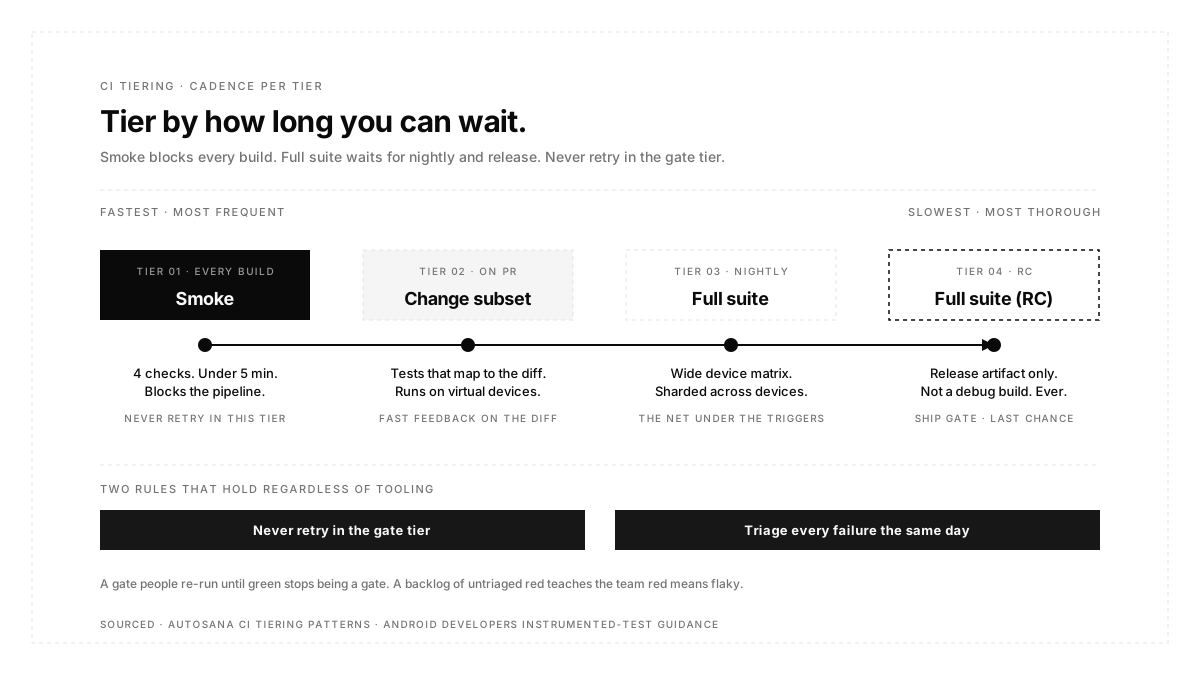
Tier by how long you can wait. Smoke on every build, under five minutes, blocking. A change-relevant subset on pull requests. The full suite nightly with wide device coverage. Full suite on the release candidate.
Two rules that hold regardless of tooling. Never retry in the gate tier, because a gate people re-run until green is not a gate. And triage every failure the same day, since a backlog of unexamined red is how a team learns to assume red means flaky, which is the point at which the entire investment stops returning anything.
Conclusion
Mobile test automation is usually described as a framework decision and is actually an infrastructure one. Isolation determines whether failures are diagnosable, device supply determines whether the suite can run at a useful size, and CI integration determines whether anyone reads the results. All three have documented mechanisms with real trade-offs, and none of them care which framework you chose. Pick the framework in an afternoon based on who owns the tests, then spend the remaining effort on the three problems that will actually decide the outcome.
FAQ
Should we enable Android Test Orchestrator?
For most suites, yes, because isolated crashes and cleared states remove a whole category of order-dependent failures. Budget for the runtime increase, since the app process restarts between every test, and know that the cost scales with your app's cold start time.
What is the difference between test isolation and test parallelism?
Isolation is whether tests can affect each other. Parallelism is how many run at once. You need isolation before parallelism is safe, because running interdependent tests concurrently converts occasional order-dependent failures into constant ones.
How many devices do we need to run tests in parallel?
As many as your shard count. Sharding splits a suite across identical device instances, so ten shards means ten devices running simultaneously. Provisioning is the limit, and a failed provision usually surfaces as a timeout rather than a smaller run.
Why do our emulator tests work locally but fail in CI?
Most often because the CI runner has no hardware rendering. Managed devices on servers like GitHub Actions need an explicit software rendering flag, without which the emulator never starts.
Are automated test device images worth using?
For the bulk of functional testing, yes, since they cut CPU and memory overhead. Not for screenshot tests that need hardware rendering, and not for anything using Chrome or custom tabs, since those images strip Google product apps.
What percentage of tests should be automated?
The wrong question. Automate everything repetitive with an objective outcome and nothing that requires judgement. That ratio falls out of what the app does rather than from a target.
Why does our automation keep breaking after UI changes?
Because the tests are bound to how the interface is built rather than to what a user does. An assertion on an element identifier is a dependency on a name nobody promised to keep.