
Test Plan: A One-Page Format Teams Actually Use
A test plan states scope, device matrix, entry and exit criteria, and owners. A one-page template, how to size it by release type, and what moves into CI configuration.
Yuvan Sundrani · 10 min read
autosana.ai
.png)
TL;DR
- A test plan states what gets tested this cycle, on which devices, by whom, and what must be true before release.
- IEEE 829 specified sixteen sections. A two-week sprint supports about one page, and the gap between those two facts is why inherited templates sit unopened.
- Seven components carry the weight: scope, device matrix, entry and exit criteria, ownership, environments, risks, and schedule.
- Autosana turns the device matrix and cadence sections of a test plan into suite configuration, so the plan gets executed rather than filed.
IEEE 829 specified sixteen sections for a test plan document. A two-week sprint leaves room for roughly one page of planning per cycle.
That mismatch explains the inherited template sitting unopened in a shared drive. An unread plan allocates zero effort, which returns the team to testing whatever seems urgent on the Thursday before release.
This guide covers the seven components worth keeping, a one-page format, and how the document changes when tests run continuously rather than in a phase.
What a Test Plan Is
A test plan is a cycle-specific document stating what will be tested, against which configurations, by whom, and what conditions gate release.
The ISTQB Foundation Level syllabus treats test planning as an ongoing activity rather than a one-time artifact. The ISO 29119 standard defines the process, and IEEE published the template most enterprise formats descend from.
A test plan differs from a test strategy in scope and lifespan. The strategy sets the approach across many releases and changes quarterly. The plan applies it to one release and changes every cycle.
Where a team maintains both, the plan can reference the strategy rather than restating it, which is where most of the sixteen sections disappear.
The Seven Components Worth Keeping
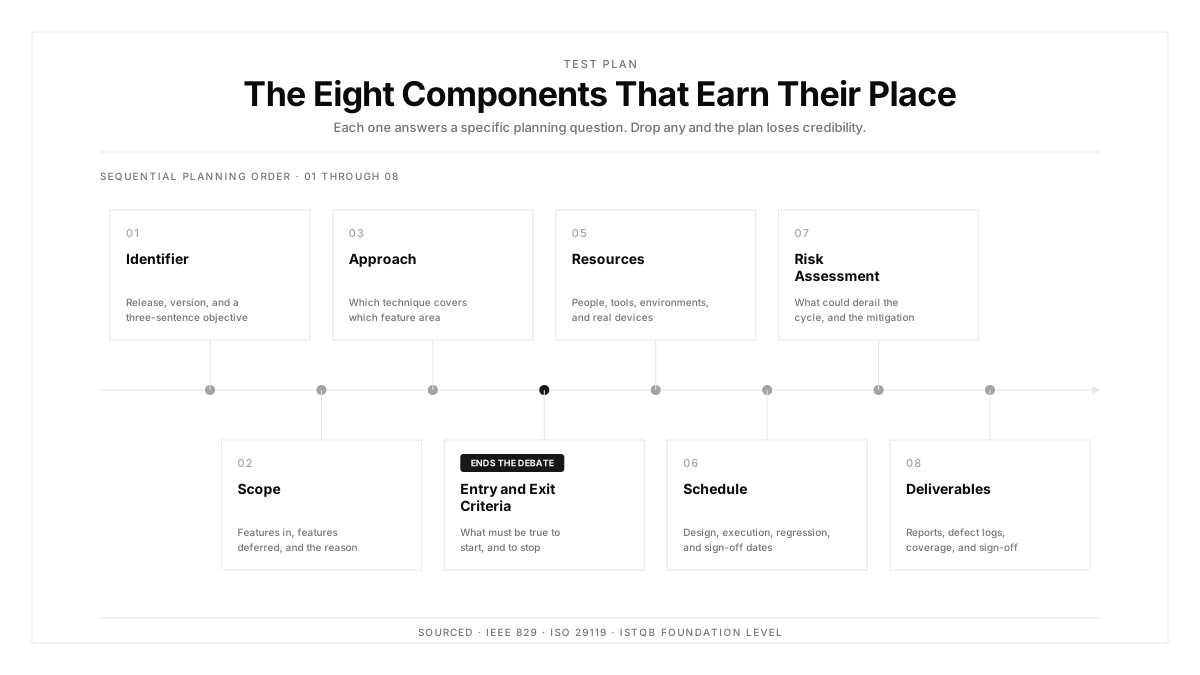
Scope comes first. Name the features in this cycle and, more usefully, name what is out of scope. The excluded list prevents the Thursday argument about whether something was meant to be covered.
The device matrix comes second, and on mobile it carries more weight than any other section. Specify models, OS versions, and vendor forks, derived from your own analytics rather than a market report.
Entry criteria define when testing starts: the build is deployed, blockers from the previous cycle are resolved, and the environment passes a smoke test.
Exit criteria define when it stops: planned cases executed, defects triaged, and any remaining issues formally accepted by a named person. Vague exit criteria are why cycles extend indefinitely.
Ownership assigns each test type to a person. Unassigned work in a plan is a prediction rather than a commitment.
Risks name what could derail the cycle, with a mitigation each. Device unavailability, a late dependency, and a holiday in the middle of the cycle are the recurring three.
Schedule maps activities to dates, including buffer for an app store rejection where relevant.
A One-Page Format
| Section | Content |
|---|---|
| Release | Version, target date, build identifier |
| In scope | Features and flows covered this cycle |
| Out of scope | Explicitly excluded areas, with reasons |
| Device matrix | Models, OS versions, browsers, tier assignment |
| Entry criteria | Conditions required before testing starts |
| Exit criteria | Conditions required before release |
| Test types | Functional, regression, API, UAT, performance, with owner each |
| Environments | Which environment each test type runs against |
| Risks | Threat, likelihood, mitigation |
| Schedule | Dates for each activity, with buffer |
Ten rows, one page. Anything a reader could find in the test strategy gets a reference rather than a copy.
The practice that keeps this current is writing it before the cycle starts rather than during. A test plan assembled midway gets shaped to describe what already happened.
Building the Device Matrix In
The device matrix section deserves separate attention, since it determines execution cost more than any other line in the plan.
Derive it from session data rather than market share. Pull device model, OS version, and screen density for the last 90 days, then sort by session count.
Tier the result. Tier one covers configurations representing the top 80 percent of sessions and receives the full suite. Tier two covers the next 15 percent and receives smoke plus critical paths. Tier three covers the remainder plus beta OS builds, checked monthly.
Add three forced inclusions regardless of traffic: your lowest supported OS version, one low-RAM budget device, and one device per vendor fork you support. Each catches a failure class that traffic-weighted selection misses.
Record the matrix in the test plan with tier assignments, so real device testing scope is explicit rather than decided ad hoc during the cycle. Mobile app testing cost follows directly from this table.
Adapting for CI/CD
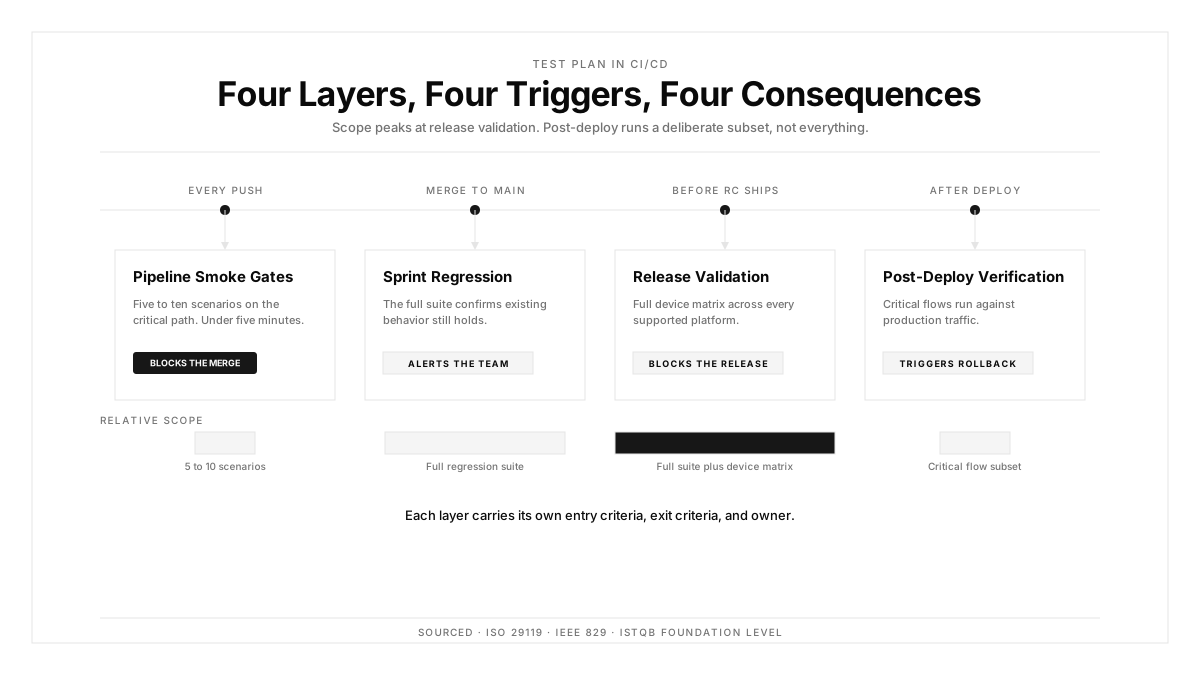
When tests run on every commit, the test plan changes character. It stops describing an execution window and starts describing configuration.
Three sections become automated. Test types map onto suites. Cadence maps onto triggers. The device matrix maps onto run configuration. Those three stop being prose and become settings, which is what keeps them accurate.
Three sections stay human. Scope requires judgment about what this release contains. Risks require someone to think about what might go wrong. Exit criteria require a person willing to hold the line when a date is under pressure.
The plan shrinks accordingly. A team running continuous execution through automations writes perhaps half a page per cycle, with the rest living in configuration that runs rather than in a document that describes.
That is the better outcome. A device matrix in a test plan is a claim, and the same matrix in suite configuration is a fact.
Plans by Release Type
A single template applied uniformly wastes effort on small releases and under-plans large ones. Three shapes cover most situations.
For a hotfix, the plan is four lines: the defect, the fix verification scope, the two devices it runs on, and who approves. Writing more than that delays a fix that is usually urgent.
For a standard sprint release, the one-page format above fits. Scope covers the sprint's stories, the device matrix runs tier one and tier two, and exit criteria reference the usual thresholds.
For a major release involving a migration, a platform version bump, or a redesign, expand three sections specifically. Risks grow because more can fail. The device matrix extends to tier three because rendering changes reach everywhere. And the schedule gains explicit buffer for an app store rejection.
The sizing rule: plan in proportion to what could go wrong, rather than in proportion to the template you inherited.
How Autosana Fits
We built Autosana so the executable parts of a test plan stop being prose.
Our suites map onto the test types section, with each suite carrying its own trigger and device scope. The cadence line in a plan becomes a schedule that runs.
Our flows describe user intent in plain language, so a scope item written in the plan translates into an executable case without a separate authoring step.
We run on real devices across iOS, Android, and web, executing the matrix in parallel. That keeps tier two and tier three coverage affordable, which is what usually gets cut when a plan meets a deadline.
Our environments configuration handles the environments section per run, covering backend target, locale, and network profile.
Automations trigger runs on schedule or from pipeline events, so entry criteria like a passing smoke check become a gate rather than a checklist item someone remembers.
Conclusion
Find your team's current test plan template and count its sections.
Then look at the last three cycles and count how many of those sections were filled in with something specific rather than copied forward. The difference is the part of the template doing no work, and deleting it costs nothing.
Keep scope, the device matrix, exit criteria, and owners. Move cadence and matrix into configuration that executes. A test plan worth the hour is one a reader can finish in two minutes and act on immediately.
.png)
FAQ
What is a test plan?
A test plan is a cycle-specific document stating what will be tested, on which devices and environments, by whom, and which conditions gate the start and end of testing.
What is the difference between a test plan and a test strategy?
A test strategy sets the approach across many releases and changes quarterly. A test plan applies that approach to one release and changes every cycle, referencing the strategy rather than restating it.
What should a test plan include?
Scope and explicit exclusions, the device matrix with tiers, entry and exit criteria, test types with named owners, environments, risks with mitigations, and a schedule carrying buffer.
How long should a test plan be?
One page for a standard sprint release, four lines for a hotfix, and a slightly expanded version for major releases. Plan in proportion to what could go wrong rather than to the template.
How do you build a device matrix for a test plan?
Pull 90 days of session data by model, OS version, and density. Tier by session share, then add your lowest supported OS, one low-RAM device, and one device per vendor fork.
How does a test plan change under CI/CD?
Test types, cadence, and device matrix move into suite configuration that executes. Scope, risks, and exit criteria stay human because each requires judgment rather than settings.
What makes exit criteria effective?
Specific, checkable conditions with a named person accountable: planned cases executed, defects triaged, and remaining issues formally accepted. Vague exit criteria are why cycles extend past their dates.
Who writes the test plan?
Usually a test lead or QA engineer, with input from product on scope and from engineering on risks. Write it before the cycle starts, since a plan assembled midway describes what already happened.