
Smoke Testing: How to Build a Gate You Can Actually Trust
A smoke suite has one job: decide whether deeper testing is worth starting. Here is how to keep it fast, honest, and small enough to stay trusted.
Yuvan Sundrani · 18 min read
autosana.ai
TL;DR
A smoke suite exists to answer one question: is this build worth testing further? That makes speed and reliability its only real design constraints, and coverage actively harmful. Most smoke suites fail by growing, because every new test looks individually justified. Two things keep one honest: a hard cap on runtime and treating launch success as a measured threshold rather than a yes or no, since a build that opens in nine seconds passes a boolean launch check and is still broken.
Ask five engineers on the same team what is in their smoke suite, and you will usually get five different answers, and at least two will start with "well, it used to be." Smoke suites are the part of a pipeline that nobody redesigns and everybody adds to. Someone ships a bug that reaches production, the retro asks how it got past the gate, and the fix is one more test in the smoke run. That is a reasonable response every single time it happens, and after two years the gate takes eleven minutes and nobody waits for it.
The interesting thing about smoke testing is not what goes in. It is what has to stay out, and why that is so hard to hold.
What is smoke testing?
Smoke testing is a shallow, broad check that a build is fundamentally functional, run before any deeper testing begins. The name comes from hardware: power the board, and see if smoke comes out.
The definition that matters is the decision it feeds. A smoke run answers whether the build is worth spending a test cycle on. It is not trying to find bugs. It is trying to avoid wasting an hour of pipeline time and a QA afternoon on an artifact that was broken before anyone touched it.
That framing settles most design arguments. If a test would not change the decision to proceed, it does not belong in the smoke suite, however valuable it is elsewhere.
Smoke testing vs sanity testing vs regression testing
These three get used interchangeably, and they answer different questions.
| Type | Question It Answers | Scope | When It Runs |
|---|---|---|---|
| Smoke | Is this build worth testing? | Broad and shallow | First, on every build |
| Sanity | Did this specific change work? | Narrow and deep | After a fix or feature |
| Regression | Did anything that worked stop working? | Broad and deep | On triggers, nightly |
Smoke is a gate. Sanity is a spot check on one area, usually unscripted and often manual. Regression is coverage, and it is the one that gets expensive, which is why selecting what to re-run is a separate problem with its own logic.
The practical confusion is between smoke and regression, and it has a simple test. If you would run it before deciding whether to continue, it is smoke. If you were to run it to decide whether to release, it would be a regression.
What belongs in a mobile smoke suit?
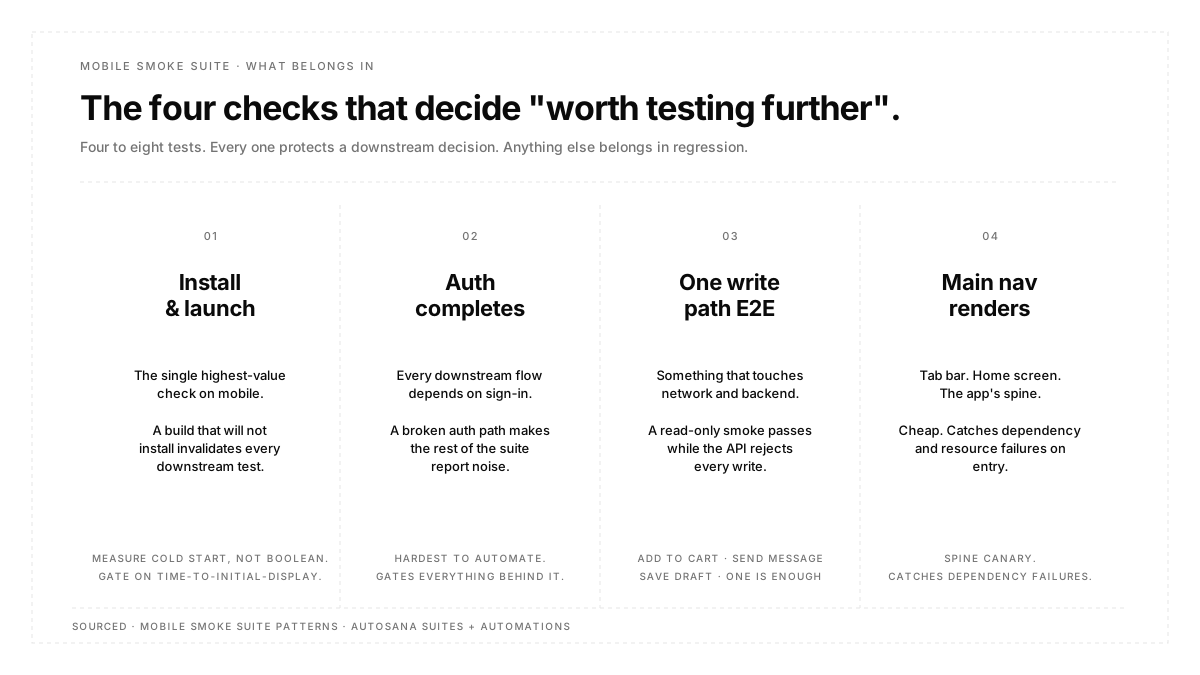
Four things, and they are the same for almost every app:
The app installs and launches. On mobile this is the single highest-value check because it is the one failure that invalidates everything downstream. A build that will not install is not a test failure; it is a build failure, and finding out in minute two beats finding out in minute forty.
Authentication completes. Almost every other flow depends on being signed in, so a broken auth path makes the rest of the suite report noise. If your sign-in involves a one-time code, this is the flow most likely to be excluded from smoke for being awkward to automate, which is exactly backwards: it gates everything.
One write path completes end-to-end. Something that touches the network and the backend and comes back. Add to cart, send a message, and save a draft. A read-only smoke suite passes happily while the API is rejecting every write.
The main navigation renders. Tab bar, home screen, whatever the app's spine is. Cheap, and it catches a large share of dependency and resource failures.
That is usually four to eight tests. If your smoke suite has thirty, it is a regression suite that runs early.
Launch success is not a yes or no
This is the part most smoke suites get wrong, and it is worth being specific about.
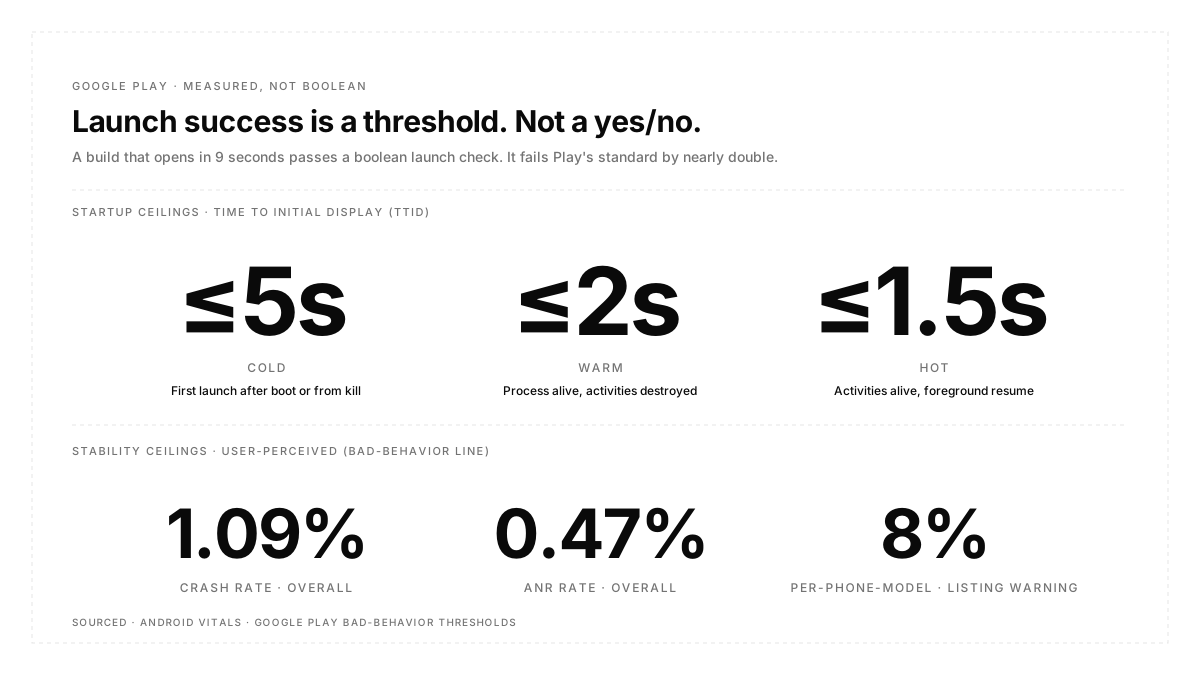
A boolean launch check asks whether the first screen appeared. Google Play does not grade it that way. Android vitals considers cold startup excessive at five seconds or longer, warm startup at two seconds, and hot startup at 1.5 seconds, measured as time to initial display, which is the time to render the app's first frame. TTID is reported automatically by the framework for every app, so this is not data you have to build.
Google's Android Vitals launch-time guide documents both the thresholds and the exact tracing hooks the framework surfaces, including how time-to-initial-display is measured across cold, warm, and hot start on real devices. The guide is also where the "excessive" line for cold start is defined, so a smoke gate that asserts on TTID has a first-party number to hold it against.
| Start Type | Excessive At | What It Means |
|---|---|---|
| Cold | 5s or longer | Process does not exist, everything loads fresh |
| Warm | 2s or longer | Process alive, activity rebuilt |
| Hot | 1.5s or longer | Everything resident, brought to foreground |
So a build that cold starts in nine seconds passes a launch check and is failing Play's standard by nearly double. Optimize for cold start, since Android's own guidance is that improving it improves the other two.
The stability thresholds work the same way and are worth knowing because they are what your smoke gate is ultimately protecting. Google Play's overall bad behavior thresholds are 1.09% for user-perceived crash rate and 0.47% for user-perceived ANR rate, with a per-phone-model threshold of 8% for both. Exceeding them reduces discoverability, and above the per-device threshold Play can show a warning on the store listing. The exact numbers Play enforces on both crash rate and ANR rate, plus the per-phone-model threshold and the discoverability consequences, are all published in Play Console's Android vitals help page. That page is the canonical reference for what a smoke gate is ultimately protecting on the store-listing side. A smoke suite that catches a crash on launch is directly defending a number that affects installs.
Practically: assert on a threshold, not on appearance. Autosana captures startup and rendering metrics on every run through performance monitoring, so the timing data exists whether or not you gate on it. Gating on it is the step most teams skip.
How to run smoke tests in CI/CD
Smoke runs on every build, before anything else, and its results block the rest of the pipeline. That is the whole design.
Three rules make it hold:
Cap the runtime and enforce the cap. Pick a number; five minutes is a reasonable default, and treat exceeding it as a defect in the suite rather than a fact about the suite. Without a cap, there is no forcing function to ever remove a test.
Never retry a smoke test. Retries are defensible in a large regression suite where you are trading precision for throughput. In a gate they are indefensible, because a flaky gate teaches people to re-run until green, and a gate that gets re-run until green is not a gate. If a smoke test is flaky, it is broken, and it comes out today.
Run it on the artifact you will ship. Not a debug build, not a variant with mocks wired in. The install step is part of what you are testing.
Group the four checks as a suite and fire it with an automation on new builds so nobody has to remember. Because flows are written as plain instructions rather than scripts bound to element identifiers, a smoke suite tends to survive UI churn better than a scripted one, which matters more here than anywhere else: a smoke test that breaks on a renamed button blocks every build until someone fixes it.
How to tell your smoke suite has stopped working
Three signals, in order of how bad they are.
Runtime is above the cap. The suite has drifted into regression territory. Move the extra tests down a tier rather than deleting them.
Anyone has re-run a red smoke build without a code change. This is the serious one. It means the team no longer believes the gate, and every build that shipped after that moment shipped unverified.
Escaped launch or auth failures. A build that reached production and could not sign in means the gate has a hole in the one place it must not.
Note that pass rate is not on this list. A smoke suite with a 100% pass rate for six months may be perfectly calibrated or may be asserting nothing, and the number cannot tell you which. Look at whether the failures it did produce were real, using the issue detail on the runs that went red.
Smoke testing best practices
Write the exclusion list, not just the inclusion list. Note explicitly what is deliberately not in smoke and why. It is the only defense against accretion, because the retro conversation is always about adding.
Give smoke its own test accounts. Sharing accounts with the regression suite means a regression run can break your gate.
Keep it platform-parallel, not platform-serial. iOS and Android smoke should run at the same time. Serializing them doubles the number of people who are waiting on.
Review the suite quarterly with a bias to removal. Ask of each test whether a failure here would actually stop you from proceeding. If not, it moves down.
Fail loudly and specifically. A smoke failure should say which of the four checks broke without anyone opening a log.
Conclusion
Smoke testing is the one part of a test strategy where less is the goal rather than a compromise. Four checks that always run and never lie are worth more than thirty that take eleven minutes and get re-run when they go red. Two habits keep it that way: cap the runtime and actually enforce the cap, and assert launch on a measured threshold rather than on whether a screen appeared. Everything else about a smoke suite is a consequence of holding those two lines, including the harder decision, which is what to take out when someone has a good reason to add something.
FAQ
Is smoke testing manual or automated?
Automated, almost always. It runs on every build, so anything manual becomes the bottleneck immediately. Sanity testing is the one that stays usefully manual.
How many tests should a smoke suite have?
Four to eight for most mobile apps. The real constraint is runtime rather than count, so pick a cap in minutes and let that decide.
What is the difference between smoke testing and sanity testing?
Smoke is broad and shallow and asks whether the build is worth testing. Sanity is narrow and deep and asks whether one specific change works. Smoke runs first and on everything; sanity runs after a fix.
Should a failing smoke test block the build?
Yes, that is its only purpose. A smoke suite that does not block is a report, and reports get skimmed.
Can smoke tests replace regression tests?
No. Smoke is designed to be shallow, so it will miss anything that is not on the critical path by construction. It decides whether regression is worth running.
Does smoke testing apply to web apps?
Yes, with different specifics. There is no install step, but first contentful paint plays the role cold start does, and the design logic is identical: few checks, hard runtime cap, no retries.