
What Makes Mobile App Testing Harder Than Web?
On mobile you control the app and almost nothing else. Here is how the device, OS, permissions, and store shape what testing has to cover.
Yuvan Sundrani · 18 min read
autosana.ai
TL;DR
Mobile app testing verifies that an app works on real hardware, under a real OS, on a real network, for a real user. What makes it structurally harder than web testing is that you ship one artifact into an environment you do not own: the device, the OS version, the permission state, the network, the background lifecycle, and the store that decides when your fix reaches anyone. Every difficult part of mobile testing traces back to that. This guide covers the types, the process, where to run tests, and the published numbers that define what passing means.
A web team that breaks something can fix it in an hour. Deploy, refresh, done. Every user is on the version you just shipped.
A mobile team that breaks something writes a fix, builds it, submits it, waits for review, and then waits again while users update on their own schedule, if they ever do. Months later a meaningful share of your install base is still running the broken version. Nothing about that is a testing problem in the narrow sense, and everything about it explains why mobile testing looks the way it does.
The organizing idea worth holding is this: on mobile you control the app and almost nothing else. The device belongs to the user. The OS version belongs to the manufacturer's update policy. Permissions belong to a dialog the user can decline. The network belongs to a train tunnel. The release schedule belongs to a review queue. Testing on mobile is mostly the discipline of covering the things you do not control.
What is mobile app testing?
Mobile app testing is the process of verifying that a mobile application behaves correctly, performs acceptably, and remains usable and secure across the devices, operating system versions, and network conditions its users actually have.
It covers native iOS and Android apps, cross-platform apps built with React Native or Flutter, and mobile web. The methods overlap with software testing generally, but the constraints do not, and the constraints are what shape the practice.
How mobile app testing differs from web testing
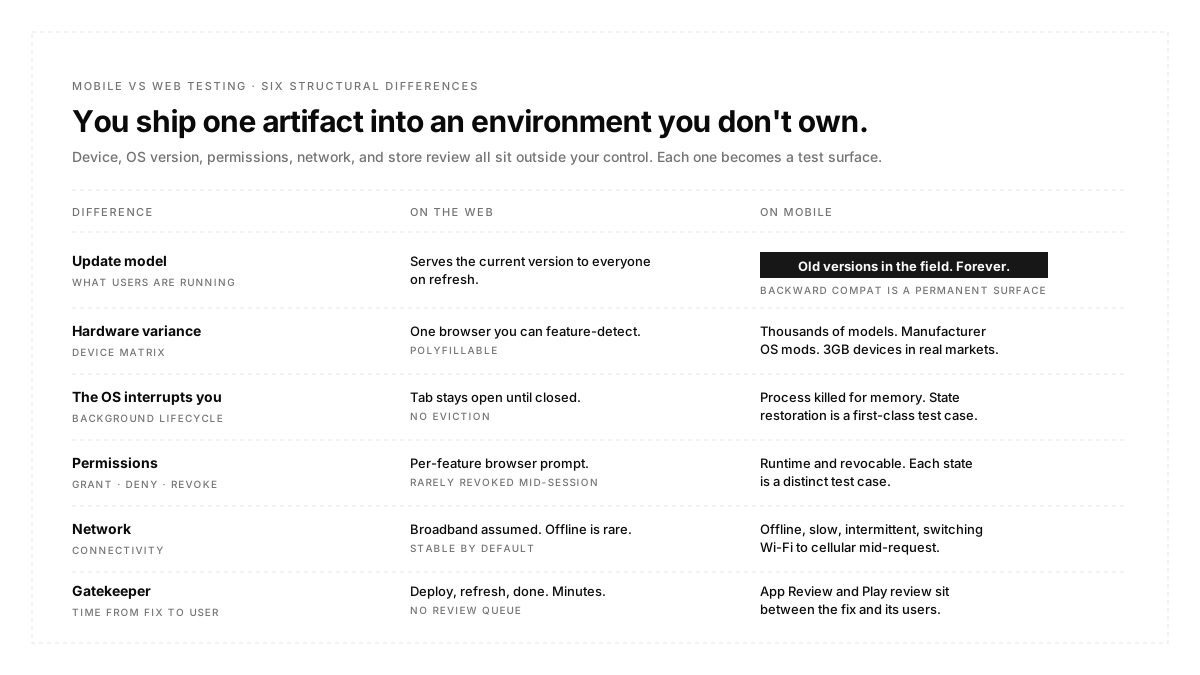
Six differences do most of the work.
You cannot force an update. Web serves the current version to everyone. Mobile leaves old versions in the field indefinitely, which means backward compatibility is a permanent test surface rather than a migration concern.
The hardware varies enormously. Screen sizes, chipsets, memory ceilings, and manufacturer OS modifications differ across thousands of Android device models. A layout that works on a flagship can break on a 3GB device that still represents a large share of users in many markets.
The OS interrupts you. Calls, notifications, low memory, and background limits can suspend or kill your process at any moment. State restoration after the system evicts your app is a first-class test case on mobile and does not exist on the web.
That one deserves an example, because teams consistently under-test it. A user starts a multi-step form and switches to another app to copy a code, and the system reclaims memory while your app is backgrounded. When they return, the OS relaunches the process and recreates the screen. Whether the form still holds their input, whether the session is still valid, and whether the app returns to the right step are three separate assertions, and all three are commonly wrong in apps that pass every other functional test. The reliable way to cover it is to force the condition rather than wait for it, since a developer device with plenty of free memory will almost never reproduce it naturally.
Permissions are runtime and revocable. A user can decline location, deny notifications, or revoke camera access after granting it. Each of those is a distinct app state that needs coverage.
The network is hostile. Not just offline, but slow, intermittent, and switching between Wi-Fi and cellular mid-request.
A gatekeeper stands between your fix and your users. App review and play review add latency; you have to plan around, and both platforms publish quality bars that affect your store visibility.
Types of mobile app testing
The taxonomy is long, so it is more useful grouped by what question each type answers.
Does it do the right thing? Functional testing covers features against requirements. Regression testing re-verifies what already worked after a change. Smoke testing is the shallow gate that decides whether deeper testing is worth starting.
Is it usable? UI testing checks that the interface renders and responds correctly across screen sizes and orientations. Usability testing asks whether a real person can complete the task. Accessibility testing verifies the app works with screen readers, larger text, and sufficient contrast.
Is it fast and stable enough? Performance testing covers startup, rendering, memory, and CPU. Load testing covers the backend under concurrency. Stability testing covers crashes and unresponsiveness over long sessions.
Is it safe? Security testing covers data at rest and in transit, authentication, and the permission surface. On mobile this includes checks that do not exist on web, such as whether sensitive data is written to unprotected local storage.
Does it survive the real world? Compatibility testing covers device and OS combinations. Interrupt testing covers calls, notifications, and low-memory kills. Network testing covers offline, throttled, and switching conditions. Installation testing covers fresh install, upgrade from an older version, and reinstall.
Most teams need coverage in every group and depth in only two or three, chosen by what failure would cost them.
The mobile app testing process
The sequence is conventional. The mobile-specific content sits inside each step.
Plan. Decide scope, and decide the device matrix, which is the decision most likely to be made by accident. Pick devices from your own analytics rather than from a list of current flagships.
Design. Write test cases against user-visible outcomes rather than interface structure. A case that asserts a user reaches the order confirmation screen survives a redesign. A case that asserts a specific element identifier exists does not, and that breakage arrives looking exactly like a real defect.
Set up the environment. Builds, test accounts, seed data, backend environment, and feature flag state. Flag state is the item most often left unspecified and the one most likely to make a green run unreproducible.
Execute. Smoke first as a gate, then functional and regression, then the non-functional passes. Run the release artifact rather than a debug build, because they behave differently in ways that matter.
Report and triage. Every failure gets classified as a real defect or a broken test the same day. A backlog of untriaged red is how a suite stops being believed.
Release and monitor. Store review, staged rollout, then field metrics. Production data is the only place you learn what your real device distribution does.
Where to run tests: emulators, simulators, and real devices
| Option | Strength | Blind Spot |
|---|---|---|
| Android Emulator | Fast, cheap, scriptable, parallel | Real GPU, thermals, and modem behaviour |
| iOS Simulator | Fastest iteration, easy CI | Not real hardware; some APIs differ |
| Physical Device | Fully accurate | Slow to scale, expensive to maintain |
| Cloud Device | Real hardware without the lab | Queueing, session cost |
The practical answer is layered. Emulators and simulators for the volume of functional and regression work, because speed is what lets you run tests often. Real hardware for anything touching performance, camera, sensors, biometrics, push delivery, or graphics, because those are exactly the areas where virtual devices diverge.
Autosana runs flows on both, including real iOS and Android hardware in the cloud, and on two devices at once for journeys that span a sender and a receiver. Getting a build into that environment has its own requirements, covered in the build guide.
Manual and automated mobile testing
The split is not a philosophical question; it is a question of what repeats.
Automate anything you will run more than a handful of times with a stable expected outcome: regression, smoke, cross-device functional passes, performance capture. These are repetitive, objective, and expensive to do by hand.
Keep a manual for exploratory testing, first-pass usability, and anything where the assertion is a judgement. A human notices that a flow is confusing. No assertion catches that, because nobody thought to write it.
The common failure is automating too early. A feature whose interface is still changing weekly will generate more test maintenance than test value. Stabilise, then automate.
Autosana's approach to the automated half is to write tests as natural-language flows that an agent interprets against the running app, which keeps tests readable and decoupled from element identifiers. Grouping them into suites and firing them with automations on new builds is what turns a test set into a gate.
Mobile app testing tools and frameworks
The landscape divides into three layers.
Platform-native frameworks. Espresso for Android and XCUITest for iOS. Fastest and most reliable, because they run inside or alongside the app with privileged access. The cost is that they are platform-specific, so you maintain two suites.
Cross-platform frameworks. Appium is the long-standing option, driving both platforms through a WebDriver-style protocol. Maestro and Detox are newer, with Detox aimed at React Native. One suite, at the cost of a layer of indirection.
Device infrastructure. Emulator and simulator farms, cloud real-device providers, and CI runners. This is a separate purchase from the framework and is usually the larger operational cost.
Choose the framework by who maintains the tests. A mobile team that lives in Kotlin and Swift will do better with native frameworks. A QA team supporting both platforms will do better with one cross-platform suite.
The numbers that define passing
This is the part most testing guides leave vague, and both platforms publish specifics.
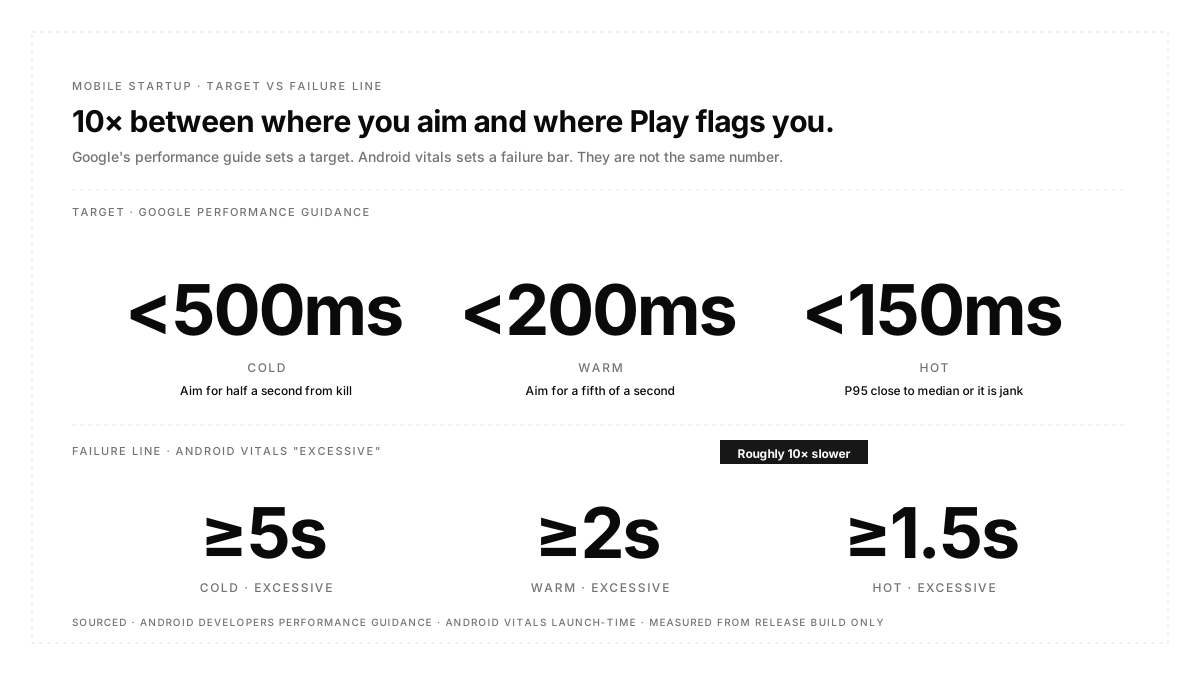
Android vitals treat startup as excessive when cold start reaches five seconds, warm start reaches two seconds, or hot start reaches 1.5 seconds, measured as time to initial display, which the framework reports automatically for every app.
That is the failure bar, not the target. Google's own performance guidance sets the goals roughly ten times tighter: cold start under 500ms, warm under 200ms, hot under 150ms. The same page adds a subtler criterion that most teams never measure: P95 and P99 startup latency should sit very close to the median, because a wide tail means lock contention or unnecessary I/O on the startup path.
Two more numbers from that guidance are worth building into a test plan. At 60 Hz a frame budget is 16.7ms, and missing it is what jank is. And performance must not be measured on a debug build, since debug variants have severe performance impact; release builds can be made profileable instead.
On the release side, Google Play requires personal developer accounts created after 13 November 2023 to run a closed test with at least twelve testers opted in continuously for fourteen days before applying for production access. That is a floor on your release calendar rather than a testing policy.
Autosana captures memory, CPU, and frame rendering on every run through performance monitoring, including slow frame counts and render time percentiles, which is the data the P95 point above depends on. Startup timing is not part of that set, so cold start belongs to Android vitals and the benchmarking libraries rather than to your functional suite. Worth knowing that iOS figures there are measured from the simulator, so they are useful for comparing builds and catching regressions rather than as absolute numbers.
Testing deep links and app links
Deep links are worth calling out separately because they fail quietly and because the failure usually sits in configuration rather than in code.
On Android, app links are deep links verified against your website, and Google documents four recurring causes of verification failure. Adding automatic verification to intent filters for URLs the app cannot actually handle breaks the scope. Unverified protocol switches are treated as a security risk, so a redirect from HTTP to HTTPS, or from a bare domain to the www subdomain, without verifying the destination will fail, and one failure causes every automatically verified link for that app to fail. Adding non-verifiable links for testing purposes can stop the system verifying at all. And servers that cannot reliably reach client apps break verification outright.
Read that third and second point together, because they describe a common own goal: a developer adds a test link or leaves a redirect unverified, and the entire deep link surface for the app silently stops working while every individual link still looks correct in the manifest.
The testable version is to verify each entry point as its own case, from a cold start and from a warm one, with the app installed and not installed, and to treat any change to redirects or domain configuration as a trigger to re-run those cases. Notification-launched deep links deserve their own case, since they combine two of the least reliable surfaces on the platform.
Common mobile app testing challenges
Device fragmentation makes exhaustive coverage impossible, so it becomes a sampling problem. Choose by install base, not by novelty.
Flaky tests on mobile come overwhelmingly from synchronization, meaning the test acts before the app has finished working. Fixed waits are the usual culprit and the usual bad fix.
Test data collisions appear as soon as tests run in parallel. Two tests mutating one account fail intermittently in a way that looks exactly like a real defect.
Store latency compresses every schedule. Build in review time or discover it during a launch.
Debug and release divergence hides an entire class of defects, from performance to transport security policy, until the artifact users actually get is the one under test.
Mobile app testing best practices
Build the device matrix from analytics. Your top ten real devices beat any generic list.
Test the release artifact. Debug builds behave differently in performance, optimization, and network policy.
Give every test its own data. Provision per session rather than sharing accounts.
Assert on thresholds, not appearance. A screen that renders in nine seconds passes a boolean check and fails the platform's bar.
Include upgrade installs. Fresh install is the easy path; upgrading over an old version with existing local data is where migration bugs live.
Cover permission denial explicitly. The declined state is a real state that real users are in.
Conclusion
Mobile testing gets described as a harder version of web testing, but the difficulty is not one of degree. It comes from a structural fact, which is that you ship one artifact into an environment owned by someone else and cannot recall it. Device, OS version, permission state, network, and store review are all outside your control, and each one becomes a test surface precisely because of that. Build the device matrix from what your users hold, gate on the numbers the platforms publish rather than on whether a screen appeared, and keep human attention for the judgements no assertion can make.

FAQ
What are the main types of mobile app testing?
Functional, regression, smoke, UI and usability, accessibility, performance, security, compatibility, interrupt, network, and installation testing. Most teams need some coverage of all and depth in a few.
What is the difference between mobile app testing and web testing?
Web serves one current version to everyone in a browser you can feature-detect. Mobile ships an artifact into hardware and an OS you do not control, leaves old versions in the field, and puts a review queue between a fix and its users.
What is a good app startup time?
Google's guidance is to aim for cold start under 500ms, warm under 200ms, and hot under 150ms. Android vitals only flags startup as excessive at five, two, and 1.5 seconds respectively, so the failure bar is far looser than the target.
How do I test an app that needs a permission the tester might deny?
Cover both states as separate cases. The denied path is a real state with real users in it, and on Android denied notification permission means the OS drops your notifications silently.
How long does mobile app testing take?
The testing itself scales with scope, but the release calendar is often set by external gates: store review latency and, for newer personal Play accounts, a mandatory fourteen-day closed test.
Do I need to test old OS versions?
Yes, down to your stated minimum. Behaviour on Android is frequently gated on the version an app targets, so a build can behave differently across OS levels with no source change at all.