
Compatibility Testing: The Most Underinvested Layer in Mobile QA
Compatibility testing verifies software across devices, OS versions, browsers, and networks. Types, how to build a device matrix from analytics, and mobile specifics.
Yuvan Sundrani · 11 min read
autosana.ai
.png)
TL;DR
- Compatibility testing verifies that software behaves correctly across the devices, operating systems, browsers, screen sizes, and network conditions your users actually have.
- Android 14 alone spans screen widths from 320dp to beyond 480dp, refresh rates from 60Hz to 144Hz, and several vendor OS forks that each change layout and background behavior.
- A compatibility testing matrix built from your own analytics beats a generic device list, because coverage should follow your traffic rather than the market.
- Autosana runs one intent-based flow across real iOS, Android, and web devices in parallel, which makes broad compatibility testing affordable on every commit.
Android 14 runs on phones with screen widths from 320dp to beyond 480dp, refresh rates between 60Hz and 144Hz, and at least four widely deployed vendor OS forks. Your team ships one binary to all of them.
Compatibility testing is the work of confirming that binary behaves the same way everywhere it lands. It gets cut first when schedules tighten, which is why the resulting bugs arrive as one-star reviews instead of failed builds.
This guide covers the types of compatibility testing, how to size a device matrix from your own data, where automation pays off, and what makes mobile the hardest case.
What Is Compatibility Testing?
Compatibility testing verifies that an application works correctly across the combinations of hardware, operating system, browser, and network its users bring. It is a non-functional discipline, since the feature logic stays constant while the environment varies.
The ISO 29119 standard groups it with portability characteristics, covering adaptability to different environments and co-existence with other software on the same device.
Two directions matter. Backward compatibility confirms the current build still works on older OS versions you support. Forward compatibility confirms it survives the next OS release, which is why beta OS testing belongs in the calendar every summer.
Why Compatibility Testing Is the Biggest Gap in Mobile QA
Functional testing answers whether a feature works. Compatibility testing answers whether it works for the person holding a three-year-old Galaxy A-series on a congested network. Teams invest heavily in the first question and lightly in the second.
Three structural reasons drive the gap.
The matrix grows multiplicatively. Six devices times four OS versions times three screen densities is 72 combinations, and running a full suite against each is expensive enough that teams quietly reduce the list.
Failures are invisible internally. Engineering laptops and company phones skew new and high-end, so the configurations that break rarely appear in the office.
Attribution is poor. A crash on one vendor's OS fork reads as a generic stability issue in aggregate dashboards, so the compatibility root cause stays hidden until someone segments by device.
The cost shows up in reviews. A layout defect affecting 4 percent of installs produces a steady trickle of one-star ratings that drags the store average down without ever tripping a threshold alert.
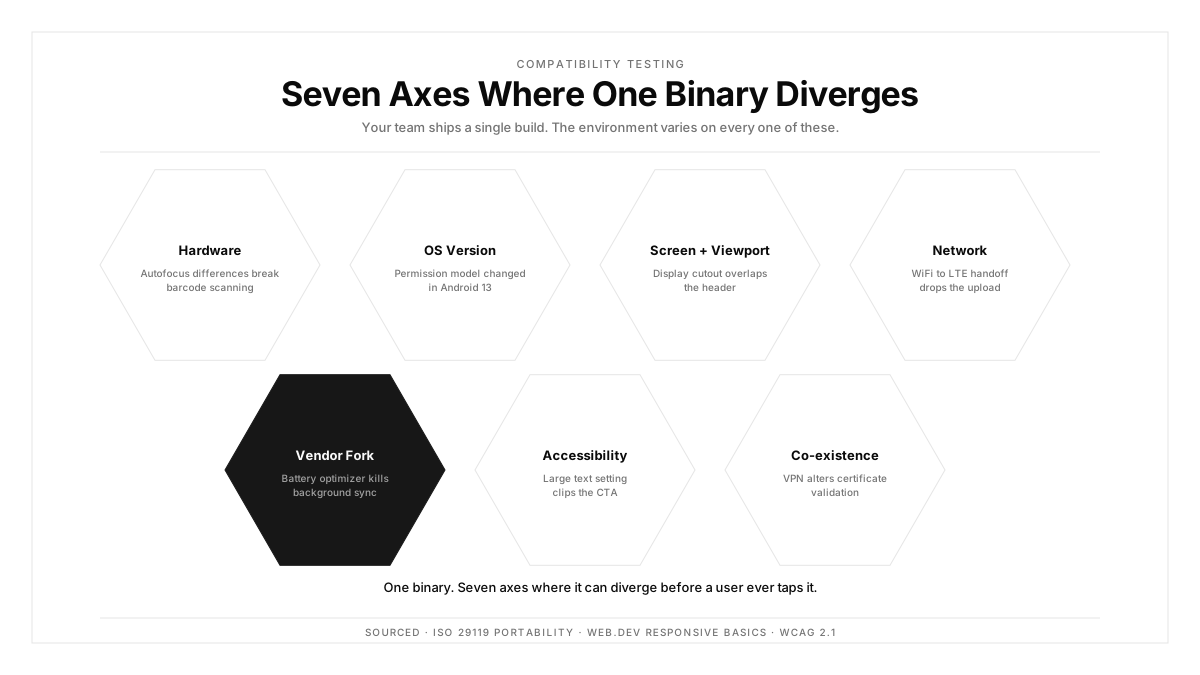
Compatibility Testing Types
Hardware compatibility testing covers screen size and density, RAM tiers, CPU architecture, and available sensors. A barcode scanner depending on autofocus behaves differently on a budget camera module.
Operating system compatibility testing spans supported OS versions plus vendor forks. Samsung One UI, Xiaomi MIUI, and OnePlus OxygenOS each modify padding, gesture regions, and background process limits.
Browser compatibility testing applies to web and hybrid apps, covering Chrome, Safari, Firefox, and Edge across desktop and mobile. Safari on iOS remains the common source of divergence, since every iOS browser uses the WebKit engine underneath.
Screen and viewport compatibility testing verifies layout across widths, aspect ratios, display cutouts, and text scaling. The responsive design fundamentals from web.dev apply equally to mobile web and native layouts.
Network compatibility testing covers WiFi, 5G, LTE, and degraded 3G conditions, plus transitions between them. Performance testing overlaps here, since throughput and latency shift behavior.
Accessibility compatibility testing confirms the app works with screen readers, large text settings, and high contrast modes. WCAG 2.1 provides the criteria, and many jurisdictions now treat them as legal requirements.
Software co-existence testing checks behavior alongside other apps: battery savers that suspend background work, VPNs that alter network paths, and password managers that inject into input fields.
How to Build a Compatibility Testing Matrix
Start from your analytics rather than a market share report. Pull device model, OS version, and screen density for the last 90 days, then sort by session count.
Tier the result:
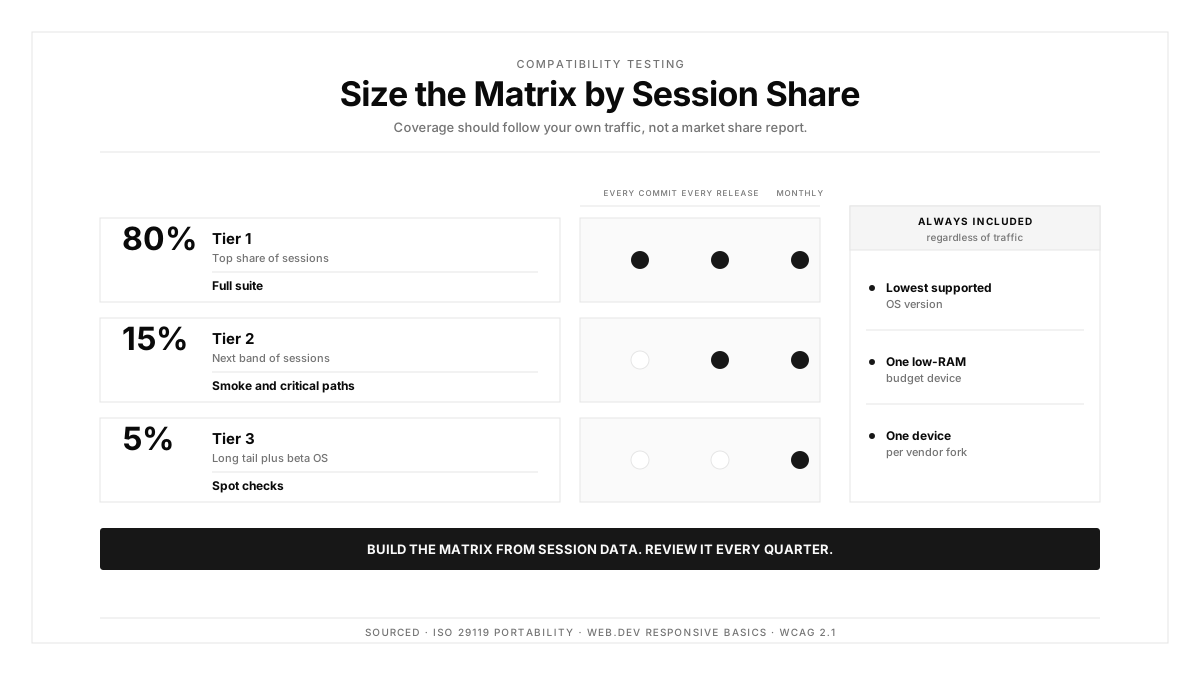
- Tier 1 covers configurations representing the top 80 percent of sessions. Full suite, every release.
- Tier 2 covers the next 15 percent. Smoke and critical paths, every release.
- Tier 3 covers the remaining 5 percent plus beta OS builds. Spot checks, monthly.
Add three forced inclusions regardless of traffic. Keep your lowest supported OS version, since it decays silently. Keep one budget device with limited RAM, because memory pressure behavior differs sharply. Keep one device per major vendor fork you support.
Review the matrix quarterly. Device distributions shift after each flagship launch and each OS rollout, so a matrix set once drifts away from reality within two quarters.
Multi-device testing across a tiered matrix keeps compatibility testing cost proportional to the traffic each configuration represents.
Manual vs Automated Compatibility Testing
| Aspect | Manual | Automated |
|---|---|---|
| Cost per configuration | High, scales linearly | Low after authoring |
| Matrix breadth achievable | Narrow | Wide |
| Visual and layout defects | Strong | Strong with screenshot comparison |
| Gesture and haptic feel | Strong | Limited |
| Repeatability per release | Weak | Strong |
| Regression on old OS versions | Often skipped | Runs every time |
Automate the breadth. Functional flows, layout checks, and API-level branching run well across a wide matrix, and they are exactly the checks humans skip under deadline pressure.
Keep manual the judgment calls. Whether a gesture feels responsive on a low-refresh screen, and whether a cramped layout still reads clearly.
The practical split: automated compatibility testing carries Tier 1 and Tier 2 on every release, with a short manual pass reserved for new features on two or three representative devices.
Mobile Compatibility Testing: The Hardest Problem
Vendor OS forks create the deepest divergence. Aggressive battery optimization on some Android skins terminates background services that stock Android keeps alive, so a sync feature passing on a Pixel silently fails elsewhere.
Screen geometry keeps expanding. Display cutouts, curved edges, foldable inner and outer displays, and variable refresh rates each add layout cases. A foldable transitions between two screen geometries during a session, which exercises configuration change handling that most suites skip.
OS upgrade cycles move fast on iOS and slowly on Android, so both ends of the range stay populated. A meaningful share of Android users sit two or more major versions behind.
WebView versions drift independently of the OS on Android, meaning hybrid app behavior changes without an OS update. Mobile UI testing has to account for that moving dependency.
Running this on emulators covers layout and API branching. Vendor forks, thermal behavior, and real sensors require real device testing, which is the part teams defer.
How Autosana Fits
We built Autosana so the width of a compatibility matrix stops being the limiting factor.
One flow definition runs across every target. We execute the same intent-based test on iOS, Android, and web without separate suites per platform, which removes the authoring cost that usually caps matrix size.
We run on real devices covering vendor forks, and our multi-device testing executes your matrix in parallel rather than in sequence. A 20-configuration run finishes in the time a single sequential pass would take.
Because we anchor to user intent, a layout that shifts under One UI keeps the flow valid. Selector-based suites break on exactly these differences, which is the reason compatibility coverage usually stays narrow.
Our suites map to matrix tiers, so Tier 1 runs on every commit while Tier 3 runs on a schedule. Environments configuration handles locale, network profile, and backend target per run.
Every run records video and step-level results per device, so a failure that appears on two configurations out of twenty is immediately visible alongside the passing runs. Mobile app testing at this breadth catches the defects that otherwise surface as store reviews.
Conclusion
Open your analytics and find the configuration sitting at the 80th percentile of sessions. Then check whether your last release was tested on it.
The honest answer is usually that testing stopped somewhere around the 50th percentile, on whatever devices the team happened to own. That gap is where compatibility bugs live, and it is measurable rather than theoretical.
Build the matrix from session data, automate Tier 1 and Tier 2, and review the list every quarter. The store rating follows.
.png)
FAQ
What is compatibility testing?
Compatibility testing verifies that software behaves correctly across the hardware, operating systems, browsers, screen sizes, and network conditions its users have. The feature logic stays fixed while the environment varies.
What are the main types of compatibility testing?
Hardware, operating system, browser, screen and viewport, network, accessibility, and software co-existence. Mobile teams usually get the most value from OS version and vendor fork coverage.
How do you build a compatibility testing matrix?
Pull device, OS, and density data from your own analytics for the last 90 days. Tier configurations by session share, then add your lowest supported OS, one budget device, and one device per vendor fork.
What is the difference between backward and forward compatibility?
Backward compatibility confirms the current build still works on older OS versions you support. Forward compatibility confirms it survives upcoming OS releases, which makes beta OS testing part of the annual calendar.
Should compatibility testing be automated?
Automate the breadth: functional flows, layout checks, and API branching across a wide matrix. Keep manual review for gesture responsiveness and whether a dense layout still reads clearly.
Why do vendor OS forks matter so much?
Samsung One UI, Xiaomi MIUI, and similar forks change padding, gesture regions, and background process limits. A background sync that works on stock Android can be terminated by an aggressive battery optimizer elsewhere.
Can emulators handle compatibility testing?
Emulators cover layout, density, and API-level branching well. Vendor forks, thermal throttling, real sensors, and cellular handoff require physical hardware, so a mixed approach works best.
How often should the device matrix be reviewed?
Quarterly. Device distributions shift after flagship launches and OS rollouts, and a matrix left unchanged for two quarters usually stops matching where your traffic actually comes from.