
Real Device Testing: When Is a Simulator Not Enough?
Apple states simulator rendering performance has no relation to a device. Android's problem is the opposite one. What actually needs hardware.
Yuvan Sundrani · 23 min read
autosana.ai
TL;DR
iOS and Android fail virtual testing in opposite directions, and conflating them is why device strategies go wrong.
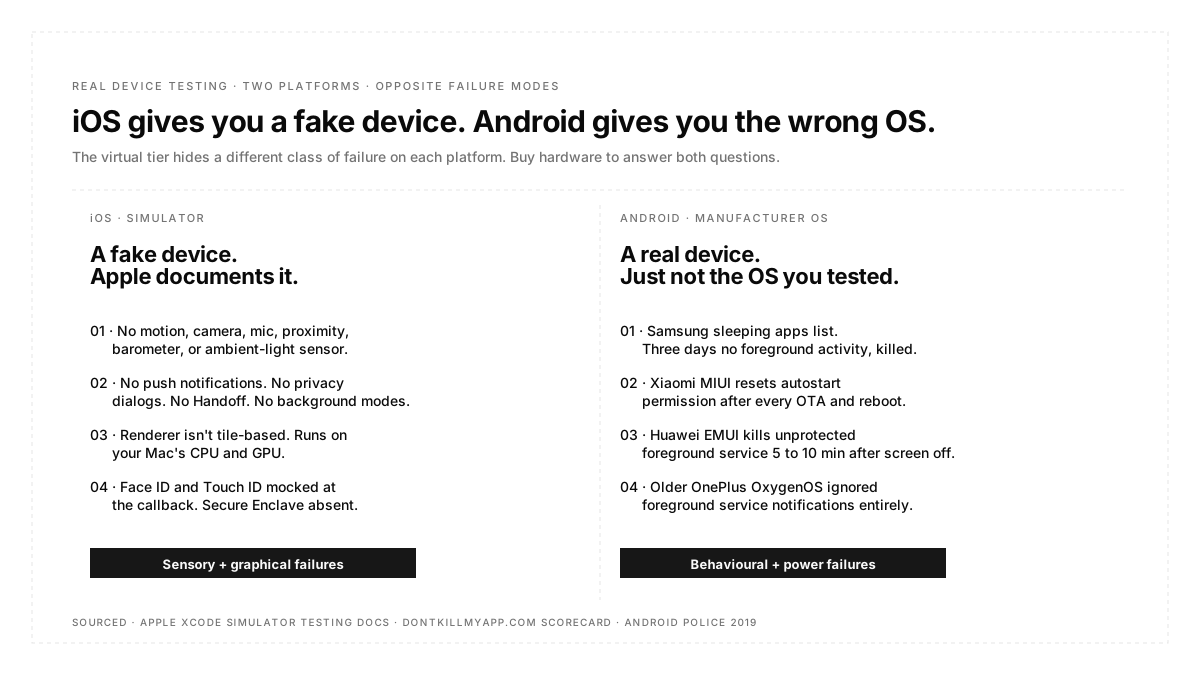
On iOS the simulator is not a device at all. It is iOS-flavored software running on your Mac, sharing the Mac kernel, using the Mac's CPU and GPU. Apple documents that its rendering performance has no relation to performance on actual hardware and that a list of sensors is simply absent.
On Android the emulator is closer to real, but the deeper problem is elsewhere: the operating system on your user's phone is not the operating system you tested against. Manufacturers ship power management layers below the API surface that kill your app regardless of whether your code is correct.
The first problem is solved by hardware. The second is solved only by hardware from the right manufacturers.
There is a category of bug report that reads "works on my machine" and means it literally. The app runs correctly in the simulator, correctly on the team's Pixel, and incorrectly on the Xiaomi handset a user in Jakarta is holding. Nothing about the code is different. Everything about the environment is.
Most writing about real device testing frames this as a fidelity gradient, with emulators at one end and physical hardware at the other, and advises using more real devices. That framing is right about the conclusion and wrong about the reason, and the reason matters because it tells you which devices.
The two platforms fail differently. iOS gives you a convincing fake. Android gives you a real device running software you have never seen. Those need different responses.
What real device testing is
Real device testing means executing your app on physical hardware running the manufacturer's shipped operating system, rather than on a simulator or emulator. It sits at the top of a three-tier hierarchy, above the emulator and simulator, and it is the only tier where what you observe is what a user would observe.
The reason it is not the only tier anyone uses is cost and speed. Physical devices are slow to provision, expensive to maintain, and hard to parallelize. Virtual devices are fast, cheap, and disposable. The engineering question is not which is better but which failures each one hides.
What Apple documents the Simulator does not do
Apple is unusually explicit here, which makes this the easy half.
The following hardware is not simulated, so any feature depending on it cannot be tested virtually at all:
| Hardware | Consequence for Testing |
|---|---|
| Motion, meaning accelerometer and gyroscope | Shake gestures, orientation logic, step counting, any motion-driven UI |
| Audio and video input, meaning camera and microphone | Scanning, capture, voice input, autofocus and low-light behaviour |
| Proximity sensor | Screen-off during calls and any proximity-triggered behaviour |
| Barometer | Altitude and pressure features |
| Ambient light sensor | Automatic appearance and brightness responses |
Alongside the sensors, Apple lists API-level gaps that catch teams by surprise because they are not obviously hardware. The Simulator does not support sending and receiving Apple push notifications, does not raise privacy alerts for access to Photos, Contacts, Calendar, and Reminders, does not support the background modes key, and does not support Handoff.
Read the privacy alerts item carefully, because it is the sneaky one. Your permission-request flow, the thing that decides whether a user ever grants photo library access, does not present its system dialog in that environment. An entire branch of your app's first-run experience is untestable there, and it is a branch a large share of users will hit.
Beyond Apple's list, the Secure Enclave is not virtualized, so Face ID and Touch ID are mocked at the callback level rather than exercised. A test can trigger a successful biometric result. It cannot tell you anything about how your app handles a real scan failing, or a user who has enrolled no biometrics, or a fallback to passcode.

The rendering difference is architectural, not a matter of degree.
This is the part most teams underrate, and Apple's own wording is the strongest available evidence.
The simulator does not use a tile-based deferred renderer. That is not a performance caveat; it is a different rendering architecture. Mobile GPUs are tile-based to conserve memory bandwidth and power; desktop GPUs are not. So the pipeline your frames go through in the simulator is not the pipeline they go through on an iPhone.
Two consequences follow directly, and Apple states both. The simulator does not provide a pixel-accurate match to the graphics hardware. And rendering performance in the simulator has no relation to the performance of rendering on an actual device.
Take that second sentence at face value. It means a frame rate measured in the simulator is not a slower or faster version of the real number. It is an unrelated number. Any jank investigation, any animation smoothness check, or any decision about whether a scroll performs acceptably is meaningless there.
The underlying reason is structural. The Simulator shares a kernel with macOS while running in its own Mach bootstrap context with its own set of processes. It executes on the Mac's CPU and GPU, not on an Apple silicon phone SoC with its thermal envelope and memory constraints. Which is why memory-management behavior also diverges: the memory pressure that terminates your app on a three-year-old iPhone does not exist on a Mac with 32 GB.
Android's problem is the opposite one.
The Android emulator is a closer approximation than the iOS Simulator in most respects. It runs a real Android system image. And that is precisely why the Android problem is not about the emulator at all.
The operating system on your user's device is not stock Android. It is a manufacturer's build, and several manufacturers ship aggressive power management layers that sit below the API surface and kill applications according to rules Google did not write, and your code cannot query.
The community project DontKillMyApp exists to document this and maintains a scorecard of offenders. The finding that prompted its creation is worth quoting for scale: HMD Global shipped a battery protection package on Android O and P that killed all background processes twenty minutes after the screen turned off, with alarm clocks and whitelisted apps included. Nokia ranked as the worst offender, followed by OnePlus, Xiaomi, Huawei, Meizu, Sony, Samsung, HTC, and then stock Android.
The specific behaviors are what make this untestable on a Pixel:
| Manufacturer Layer | Documented Behaviour |
|---|---|
| Samsung | Maintains a sleeping apps list; an app with no foreground activity for three days gets killed |
| Samsung | An OTA update can silently reset a battery optimisation exemption the user granted |
| Xiaomi, MIUI and HyperOS | Aggressive background service killing, with autostart permission reset after OTA updates and after reboots |
| Huawei, EMUI | Without inclusion in the protected apps list, a foreground service is stopped within five to ten minutes of the screen turning off |
| Huawei and Honor | PowerGenie monitors how often an app wakes the system |
| OnePlus, Older OxygenOS | Ignored foreground service notifications and killed the app anyway |
Three implications follow, and each one is a testing decision.
A foreground service is necessary and not sufficient. It protects you from stock Android's memory pressure. It does not protect you from a manufacturer's power manager, from a manual force stop, or from Doze without the right wake lock configuration. Testing on stock Android verifies the necessary condition and tells you nothing about the sufficient one.
There is no API to check any of this. You cannot query whether the user's device has your app on an autostart allowlist, and you cannot request it programmatically. The workaround the field has settled on is detecting the manufacturer at runtime and deep-linking the user into the correct settings screen, which means your app has manufacturer-specific code paths that only manufacturer-specific hardware can test.
Exemptions decay. A configuration that was correct at install time can be reset by an OTA update or a reboot. That makes it a persistent condition rather than a one-time setup step, and it means a test that passes immediately after configuration is not evidence the feature works next month.
If your app does anything in the background, meaning location tracking, sync, alarms, geofencing, or long-running uploads, testing on Pixel and emulator only is testing the one configuration where it works.
Deciding what needs hardware
Sorting by failure mode rather than by preference gives a short and defensible list.
| Test Type | Virtual Is Fine | Needs Hardware |
|---|---|---|
| Functional flows, most journeys | ✓ | Only for the exceptions below |
| Layout across sizes and densities | ✓ | Rarely |
| Dark mode, font scale, localisation | ✓ | Rarely |
| Rendering performance and jank | ✗ | Always, per Apple's own statement |
| Startup time and thermal behaviour | ✗ | Always |
| Camera, microphone, scanning | ✗ | Always |
| Biometrics beyond the happy path | ✗ | Always |
| Bluetooth, NFC, contactless payment | ✗ | Always |
| Real GPS drift and indoor positioning | ✗ | Always |
| Push notification delivery end to end | ✗ | Always |
| Permission dialogs on iOS | ✗ | Always |
| Background survival on Android | ✗ | Always, and on the right manufacturers |
| Manufacturer software layer behaviour | ✗ | Always, per manufacturer |
The pattern is that anything mediated by a radio, a sensor, a secure element, a thermal envelope, or a manufacturer's software layer belongs on hardware. Everything else runs faster and cheaper virtually, which is where the bulk of a suite should live.
Building the matrix
Because the two platforms fail differently, the two matrices are chosen differently.
For iOS, choose by age and tier. The hardware is homogeneous, so device count matters less than spread. The oldest supported model plus a current one covers most of what varies, since what you are sampling is chip generation, memory ceiling, and thermal headroom rather than software behaviour.
For Android, choose by manufacturer first and specification second. A Samsung, a Xiaomi, and one other high-volume manufacturer in your largest markets cover more real risk than three Pixels of different ages, because the variable that breaks apps is the software layer rather than the silicon. Pull the list from your own analytics and weight by install base, not by what is current.
Include one low-end device deliberately. Memory pressure, slow storage, and thermal throttling produce timing failures that no flagship reproduces, and in many markets that device represents the majority of the install base rather than an edge case.
Real device testing in CI
Physical hardware is the scarce resource, so the pipeline should treat it that way.
Run the bulk of the functional suite on virtual devices, where parallelism is cheap and provisioning is instant. Reserve hardware for the categories in the table above plus a smoke pass, and run the wide hardware matrix nightly and before release rather than per commit.
Two operational details matter more than they sound. Device state must be reset between sessions, because an app left signed in or a permission left granted by the previous run is exactly the kind of pollution that produces a failure nobody can reproduce. And remote hardware introduces latency into every interaction, so a suite tuned against a local emulator will need its assumptions rechecked when it first runs on a device cloud.
Autosana runs flows on real iOS and Android hardware in the cloud as well as on virtual devices, with suites sharing one device session across their flows so back-to-back runs start fast. For journeys that need two handsets at once, a sender and a receiver, multi-device testing drives both with one agent. Because flows describe what a user does rather than naming elements, the same flow runs on both tiers without a separate suite, which is what makes moving a test from emulator to hardware a scheduling decision rather than a rewrite.
One caveat worth stating from our own documentation rather than glossing: iOS performance figures captured during a run come from the simulator, which makes them useful for comparing builds and detecting regressions rather than as absolute numbers. Absolute iOS performance needs hardware, for exactly the architectural reason described earlier.
Best practices
Never accept a rendering measurement from a simulator. Apple says it has no relation to device performance. Treat a jank number from there as no data rather than as rough data.
Test the permission dialog on hardware. On iOS it does not appear in the Simulator, so the branch where a user declines has never run.
Pick Android devices by manufacturer before specification. The software layer is the variable that breaks apps.
Re-verify background behavior after OS updates. Exemptions reset, and a passing test from last quarter is not evidence about this one.
Reset device state between runs. Leftover sessions and granted permissions produce failures that reproduce only in one order.
Keep one device from the bottom of your install base. It will find timing bugs nothing else does.
Conclusion
Real device testing is usually argued for on grounds of realism, which is true and too vague to act on. The sharper version is that each platform hides a different class of failure behind virtualization. On iOS the hidden failures are sensory and graphical, because the sensors are absent and the renderer is a different architecture that Apple states bears no relation to device performance. On Android the hidden failures are behavioral, because the manufacturer's power management sits below the API and kills correct code on devices your team does not own. Buy hardware to answer those two questions specifically, run everything else virtually, and choose your Android devices by who made them.
FAQ
What is the difference between an emulator, a simulator, and a real device?
An emulator virtualizes hardware and runs a real system image, which is the Android model. A simulator runs the platform's software behavior on the host machine without emulating hardware, which is the iOS model. A real device is the shipped product running the manufacturer's operating system.
Can I test performance on a simulator?
Not meaningfully. Apple documents that rendering performance in the Simulator has no relation to performance on an actual device, because it does not use the tile-based deferred renderer that mobile GPUs use and executes on your Mac's CPU and GPU.
What can the iOS Simulator not do?
Motion sensors, camera and microphone input, proximity sensor, barometer, and ambient light sensor are not simulated. It also does not send or receive push notifications, does not present privacy alerts for Photos, Contacts, Calendar, and Reminders, and does not support background modes or handoff.
Is the Android emulator good enough?
For functional and layout work, usually yes, since it runs a real system image. It cannot reproduce manufacturer power management, so any app doing background work needs testing on Samsung, Xiaomi, and similar hardware.
Why does my app get killed on some Android phones and not others?
Because several manufacturers add power management below the API surface. Huawei stops unprotected foreground services within five to ten minutes of the screen being off, Samsung kills apps with no foreground activity for three days, and Xiaomi resets autostart permissions after updates.
How many real devices do I need?
Fewer than teams expect if chosen well. For iOS, the oldest supported model is a current one. For Android, one device each from the highest-volume manufacturers in your markets plus one low-end handset. Analytics should pick the list.
Should real device tests run on every commit?
No. Hardware is the scarce resource. Run a smoke pass on hardware per build, the wide matrix nightly and pre-release, and everything else on virtual devices where parallelism is cheap.
Do I still need real devices if I use a device cloud?
A device cloud is real devices, so that requirement is met. What changes is that you rent rather than maintain them, and that remote interaction adds latency your test timings should account for.