
Functional Testing: Verifying What the System Does
Functional testing checks whether a system produces the right output for a given input. The four levels, mobile and web examples, and where teams waste effort.
Yuvan Sundrani · 13 min read
autosana.ai
.png)
TL;DR
- Functional testing checks whether a system produces the correct output for a given input, measured against the requirement rather than against performance or usability.
- It runs at four levels: unit, integration, system, and acceptance, with smoke and regression suites cutting across all of them.
- The common waste is depth in the wrong place, where a settings screen accumulates cases while a payment retry path carries two.
- Autosana runs functional flows described in plain language across real iOS, Android, and web devices, so the same case verifies behavior on every target.
A checkout flow accepts an order, charges the card, and returns a confirmation number. Functional testing passes, because the system produced the correct output for the input it received.
That same flow takes 11 seconds on a mid-range Android phone. Users abandon it before the confirmation renders. The function works and the product fails, which is the boundary functional testing draws and the reason it needs a companion discipline.
This guide covers what functional testing verifies, the four levels it operates at, concrete examples for mobile and web, and where teams spend effort that returns little.
What Functional Testing Is
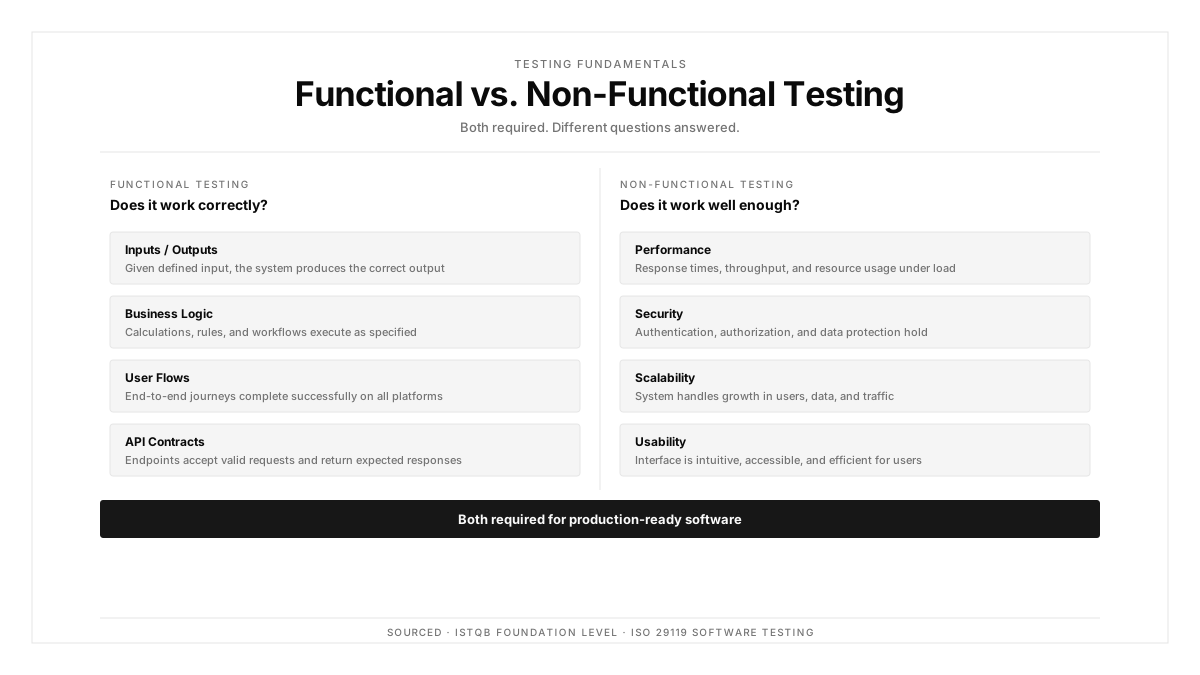
Functional testing verifies that a system behaves according to its functional requirements. You supply an input, the system produces an output, and the test compares that output to what the specification promised.
The ISTQB Foundation Level syllabus frames it as testing what the system does, distinct from how well it does it. The ISO 29119 standard treats functional suitability as one quality characteristic among several.
Three properties follow. The test derives from a requirement rather than from the implementation. It asserts an observable output. Internal code structure stays irrelevant to whether the test passes.
That last property is why functional testing usually runs as black box work, though the two terms describe different things. Functional testing names what you verify, and black box names how much of the implementation you can see while verifying it.
Functional Testing and Non-Functional Testing
| Dimension | Functional Testing | Non-Functional Testing |
|---|---|---|
| Question | Does it produce the right result? | How well does it produce it? |
| Derived from | Functional requirements | Quality attributes |
| Example assertion | Discount applies at 5001 rupees | Checkout completes within 2 seconds |
| Pass criterion | Binary correctness | A threshold |
| Typical failure | Wrong total displayed | Correct total shown too slowly |
The checkout example from the opening sits exactly on this line. Functional testing confirms the total is right. Non-functional testing confirms it arrives fast enough to matter.
Teams that measure only the first ship products that are correct and unusable, which generates support tickets that read like functionality complaints and get triaged as such.
The Four Levels
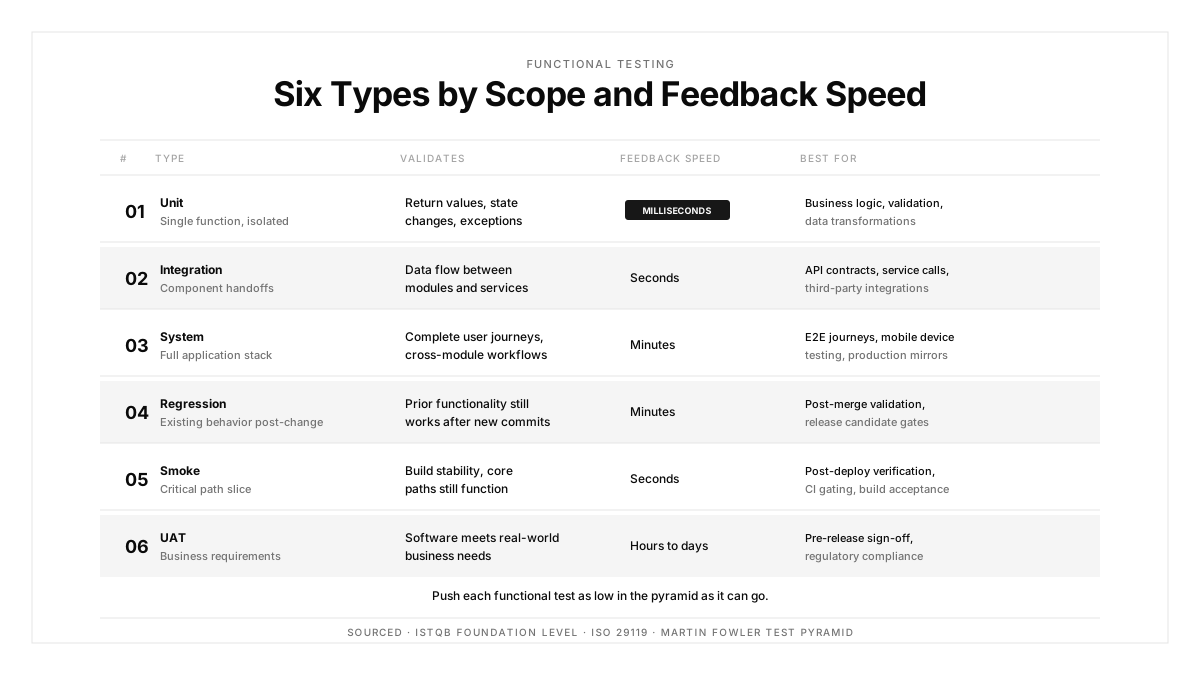
Unit
Individual functions or classes get verified in isolation, usually by the developer who wrote them. Execution takes milliseconds, so these run on every commit.
A discount calculator receiving 5001 and returning 4500.90 is a unit-level functional test.
Integration
Two or more components get verified together, checking the contract between them rather than the logic inside either. This is where mismatched units and shapes surface.
The calculator returns an amount in paise while the display layer expects rupees. Both units pass their own tests, and the integration test is what catches the hundredfold error.
API testing covers much of this level for service-oriented products.
System
The assembled application gets verified end to end against the requirements, in an environment resembling production. This is where user journeys crossing several services get exercised.
Acceptance
The business verifies the system against the criteria it agreed to, producing a release decision rather than a defect list. UAT is the common form.
Cutting across all four, smoke testing confirms a build is stable enough to bother testing, and regression testing confirms existing behavior survived a change. Martin Fowler's test pyramid governs the distribution: many fast tests low down, few slow ones at the top.
Functional Testing Examples
Mobile: a coupon field
Input a valid code and assert the discount applies and the total updates. Input an expired code and assert the rejection message names expiry specifically. Input a code below its minimum order value and assert the threshold appears in the message.
Input a code twice and assert the second attempt is refused. That fourth case is the one teams skip, and it is where double-discount defects live.
Web: a password reset
Request a reset for a registered address and assert an email arrives within the stated window. Request one for an unregistered address and assert the response reveals zero information about whether the account exists.
Use a link after expiry and assert the rejection. Use a link twice and assert the second use fails.
Mobile: offline order submission
Submit an order with connectivity disabled and assert the order queues locally with a visible pending state. Restore connectivity and assert the order submits exactly once.
That last assertion matters more than it appears, because retry logic that submits twice produces duplicate charges. Mobile app testing covering the offline branch catches a class of defect that is expensive to discover in production.
Where Functional Testing Effort Gets Wasted
Four patterns account for most of it.
Depth lands on low-value screens. A settings page accumulates thirty cases while the payment retry path carries two, because settings are easy to test and payment retry requires setup.
Happy paths dominate. A suite with ninety percent success-case coverage verifies the scenario users hit when everything works, which is the scenario least likely to break.
Assertions target implementation rather than outcome. A test checking that a particular internal method was called passes after a refactor that broke the user-visible result.
Duplicate coverage stacks across levels. The same discount rule gets verified at unit, integration, and system level, tripling the maintenance cost for one rule while other rules go unverified.
A useful audit: list your top ten revenue-carrying flows, count the error-branch cases each one has, and compare that with the case count on your three least valuable screens.
Choosing Tools
| Need | What to Look For |
|---|---|
| Unit level | Native framework for the language, fast runner, good assertion output |
| API level | Contract validation, data-driven inputs, environment switching |
| System level, web | Real browser execution, stable waiting, screenshot capture |
| System level, mobile | Real device execution, parallel runs, vendor OS coverage |
| All levels | Results surfaced on the pull request rather than buried in logs |
For mobile system-level work, the deciding factor is usually how well the tool handles the device matrix. A tool requiring separate suites per platform triples authoring cost, and that cost is what stops teams from covering error branches.
Automating Functional Tests
Automate cases that are deterministic, repeated, and objectively verifiable. Login, checkout, form validation, API contracts, and cross-platform regression all qualify.
Keep manual the work requiring judgment: exploratory sessions against new features, usability review, and one-time migration verification.
Structure automated functional testing in tiers by runtime. Unit and fast integration on every commit. Smoke and API checks on every pull request. Full system suites before merge or on a nightly schedule.
One trap deserves naming: automating against a vague requirement. A case asserting the dashboard loads correctly encodes whatever the author assumed, and it fails later for reasons unrelated to the product.
How Autosana Fits
We built Autosana for the system level, which is where functional testing costs the most and where mobile makes it hardest.
Our flows describe what the user does in plain language. One definition covers iOS, Android, and web, so the authoring cost for a functional case stays flat as targets multiply.
We execute on real devices, which covers the vendor OS differences and offline behavior that emulator-only runs exclude.
We organize flows into suites matched to cadence, and environments handles backend target, locale, and network profile per run. Automations trigger runs on your schedule or from pipeline events.
Because we anchor to intent, a functional case survives UI redesign. That keeps error-branch coverage viable, since those cases are the first to be abandoned when maintenance cost rises.
Conclusion
Pick your highest-value user flow and write down every way it can fail, including the branches that require setup to reach.
Then count how many of those branches have a functional test. The gap between the two numbers is where your next production defect is already waiting, and it is almost always in an error path rather than a success path.
Cover the failure branches on the flows that carry money. The settings screen can wait.
.png)
FAQ
What is functional testing?
Functional testing verifies that a system produces the correct output for a given input, measured against its functional requirements. Internal code structure stays irrelevant to whether the test passes.
How does functional testing differ from non-functional testing?
Functional testing asks whether the result is correct. Non-functional testing asks how well the system delivers it, covering speed, load behavior, security, and usability against thresholds rather than binary correctness.
What are the levels of functional testing?
Unit verifies individual functions, integration verifies contracts between components, system verifies the assembled application end to end, and acceptance verifies it against business criteria.
Is functional testing the same as black box testing?
They describe different things. Functional testing names what you verify. Black box names how much implementation detail you can see while verifying it. Most functional testing runs as black box work.
What are good functional testing examples?
A coupon applying at the right threshold, an expired reset link being refused, a duplicate coupon attempt failing, and an offline order queuing locally then submitting exactly once on reconnection.
Where do teams waste functional testing effort?
Depth on low-value screens, heavy happy-path coverage with thin error branches, assertions targeting internal methods instead of user-visible outcomes, and the same rule duplicated across three levels.
Which functional tests should be automated?
Deterministic, repeated, objectively verifiable cases: login, checkout, form validation, API contracts, and cross-platform regression. Keep exploratory, usability, and one-time migration checks manual.
How does functional testing work for mobile apps?
The same cases run across a device matrix, so authoring cost per case matters more than on web. Offline behavior, permission denial, and vendor OS differences each need explicit functional cases.