
UAT Testing on Mobile: Plan Around the Distribution
Mobile UAT rarely fails on methodology. It fails on build distribution. Here are the store constraints that decide what UAT you can actually run.
Yuvan Sundrani · 18 min read
autosana.ai
TL;DR
User acceptance testing checks whether software does what the business needs, judged by people who represent the user rather than the team that built it. On the web this is mostly a scheduling problem. On mobile it is a distribution problem: builds reach testers through Apple and Google infrastructure, and that infrastructure imposes review latency, a hard 90-day build expiry, tester caps, and, in Google's case, a minimum testing period before you can publish at all. Those constraints set your UAT calendar. Discovering them mid-cycle is how a two-week UAT becomes six.
The uncomfortable thing about mobile UAT is that the hard part has almost nothing to do with testing.
Writing acceptance criteria is work, but it is understood work. Recruiting representative users is a known problem with known answers. What catches teams out is the plumbing: the build has to get onto a stranger's phone, and on mobile that path runs through two companies with their own review queues, expiry rules, and minimum durations. A UAT plan that assumes the build simply appears is a plan with a two-week hole in it that nobody notices until the week it matters.
So this post covers the methodology briefly and the distribution properly.
What is UAT (user acceptance testing)?
User acceptance testing is the final validation stage where representative users, or a business proxy for them, confirm the software meets the requirement it was built for. The question is not whether the code works. It is whether the thing that works is the thing that was wanted.
That distinction is the entire reason the stage exists. A feature can pass every functional test and still be unacceptable because the flow is wrong, the wording is misleading, or the requirement was misread. No amount of automated coverage detects a correctly implemented misunderstanding.
Types of UAT
Alpha testing happens internally, with staff standing in for users. Fast, but the testers know too much to be representative.
Beta testing puts a pre-release build in front of real external users in their own environment. On mobile this is the dominant form of UAT, because the store infrastructure is built for it.
Business acceptance testing validates against commercial requirements: does this do what we said we would deliver?
Operational acceptance testing validates the supporting processes: support runbooks, monitoring, and rollback.
Regulatory or compliance acceptance testing validates against external rules and is the one with the least flexibility on timing.
UAT vs QA testing vs beta testing
| Aspect | QA Testing | UAT | Beta Testing |
|---|---|---|---|
| Question | Does it work correctly? | Is it what we needed? | How does it behave in the wild? |
| Who Runs It | The delivery team | Users or a business proxy | External users, self-directed |
| Environment | Controlled | Production-like | Real, uncontrolled |
| Scripted | Yes | Loosely, against acceptance criteria | No |
| Blocks Release | On defects | On acceptance | Rarely formally |
On mobile, UAT and beta collapse into each other in practice, because the same store mechanism delivers both. Worth keeping the questions separate even when the pipeline is shared: a beta that generates enthusiasm and no acceptance decision has not completed UAT.
Why mobile UAT is a distribution problem
Two platforms, two sets of rules, and they do not resemble each other.
iOS: TestFlight sets your calendar
Apple's beta distribution runs through TestFlight, and four properties of it will shape your schedule.
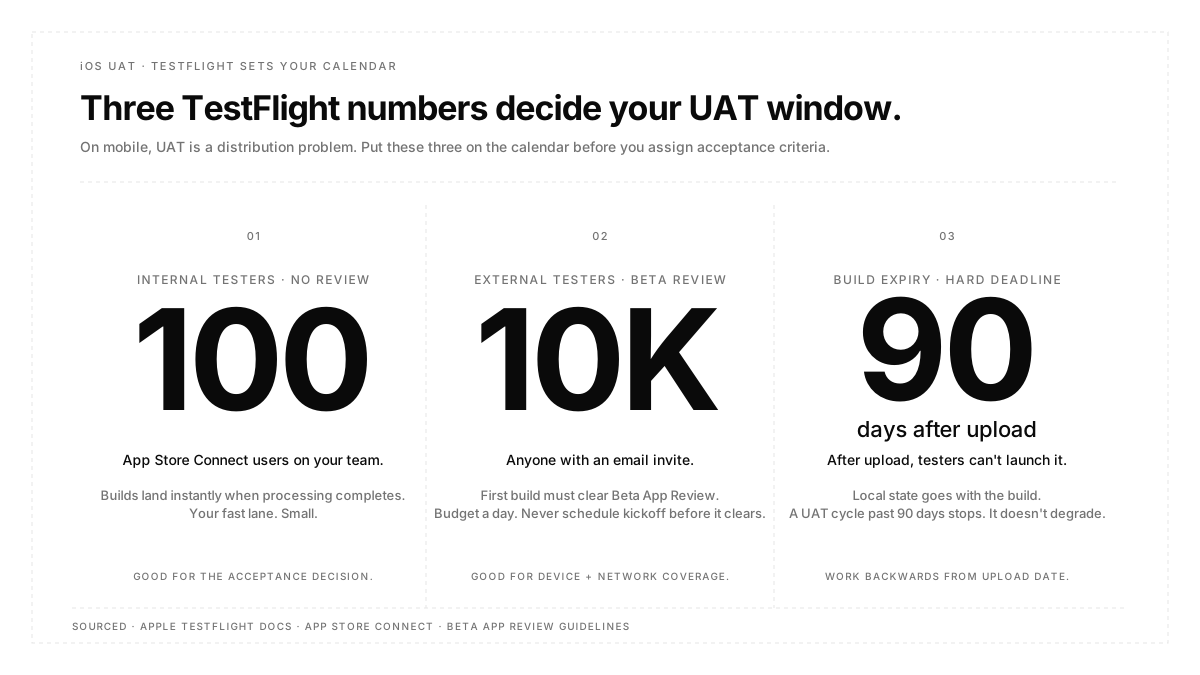
Internal testers are capped at 100, and they must be App Store Connect users on your team. They receive builds as soon as processing completes, with no review. This is your fast lane, and it is small.
External testers are capped at 10,000 and can be anyone with an email invite. The cost is that the first build of each version must clear Beta App Review before any external tester can install it. Budget at least a day for that, and never schedule a UAT kickoff against a build that has not cleared review.
Builds expire 90 days after upload. This is the constraint that surprises people. When a build expires, testers cannot launch it, and the local state goes with it. A UAT cycle that stretches past 90 days does not degrade gracefully; it stops, and your testers restart from a fresh install.
Changes to entitlements, encryption compliance, privacy labels, or the beta description can trigger a fresh review even within a version. So "we only changed the description" is not a safe assumption for timing.
The tester caps, the 90-day expiry, and the entitlement-change triggers that force a fresh Beta App Review are all published on Apple's TestFlight overview. The page is the first-party reference for calendar math on the iOS side, and it also documents which builds testers can opt back into if a UAT cycle slips past 90 days.
Android: Play tracks and a minimum duration
Google's structure is tracks rather than tester types. Internal testing distributes to up to 100 testers quickly. Closed testing goes to a controlled invited group. Open testing surfaces the build on Play for anyone to join.
The part that changes planning: personal developer accounts created after 13 November 2023 must run a closed test with at least 12 testers opted in continuously for the preceding 14 days before they can apply for production access. Organization accounts and personal accounts predating that date are exempt. The requirement started at 20 testers and was reduced to 12 in December 2024, which is why older guides disagree.
Read that as a floor on your release timeline rather than a testing policy. If it applies to you, there is a mandatory fourteen-day window with a live tester cohort between finishing development and publishing, and the clock is on continuous opt-in, so a cohort that drops below twelve resets your eligibility rather than pausing it.
The mechanics for each track, including how internal, closed, and open testing differ on tester count, review latency, and discoverability, are set out in Play Console's testing-tracks help page. That page is also where any future changes to the minimum-tester or minimum-day numbers will be recorded, which matters because both moved between 2023 and 2024.
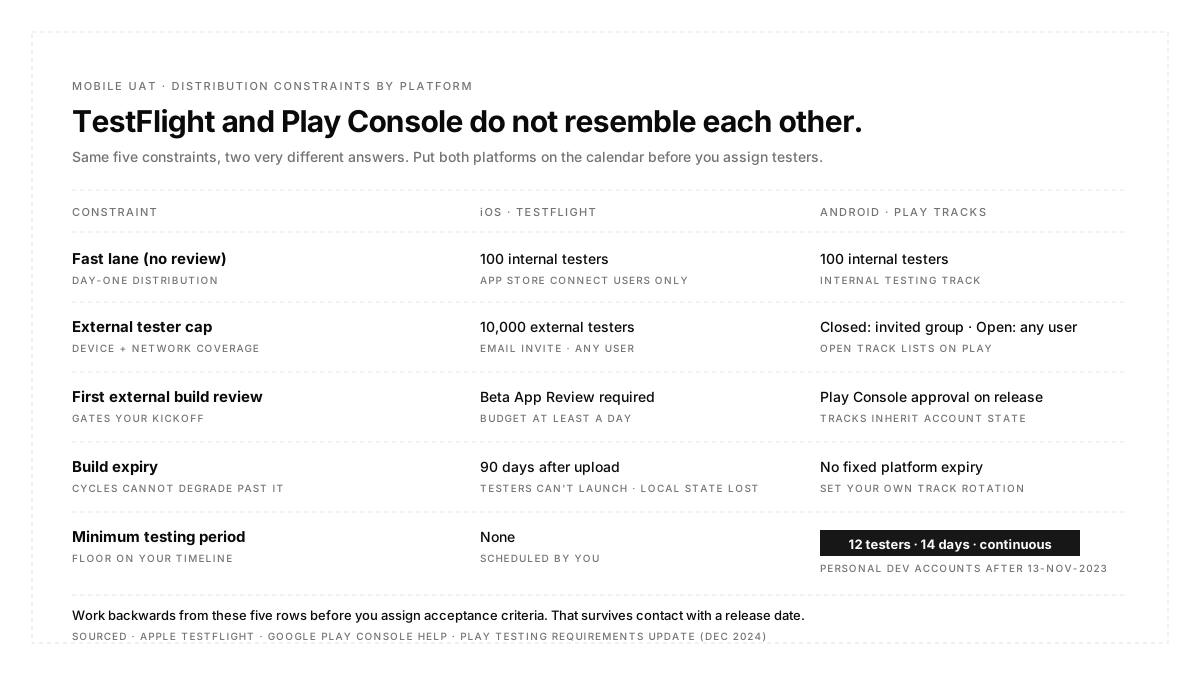
| Constraint | iOS | Android |
|---|---|---|
| Fast Internal Channel | 100 App Store Connect users | Internal track, 100 testers |
| Wider Channel | 10,000 external, review first | Closed or open track |
| Review Before Testers | Yes, first build per version | Release review, roughly 1 to 3 days |
| Build Expiry | 90 days, hard | No equivalent expiry |
| Mandatory Duration | None | 14 days continuous, new personal accounts |
How to run UAT on mobile
Work backwards from the distribution constraints. Put review latency, expiry dates, and any mandatory testing window on the calendar before you assign acceptance criteria to people. This inverts the usual order, and it is the only version that survives contact with a release date.
Point UAT at a production-like environment, not production. Testers doing real tasks generate real writes, and you want those isolated. Managing this as configuration rather than as separate builds is what environments are for.
Use internal channels for the acceptance decision and external ones for discovery. The 100-user fast lane, with no review latency, is where a business proxy can sign off inside a day. The 10,000-user channel is where you learn what real devices and real networks do to your app. Different questions, different channels.
Automate the confirmation, not the judgement. Whether a checkout completes is machine-checkable and should already be green before a human sees the build. Whether the checkout makes sense is what you are asking the human for. Running acceptance journeys as flows on real devices ahead of the UAT window means testers spend their attention on judgement rather than on rediscovering a broken button.
Collect device, OS, and build with every piece of feedback. UAT feedback without that context is frequently unreproducible, which converts a finding into an argument. Structured capture, whether through issue tracking on your automated runs or a required form field on manual reports, is cheaper than the follow-up conversation.
UAT entry and exit criteria
Entry: functional testing complete, no open critical defects, the build has cleared whatever review gates its channel requires, testers are recruited and have working access, and acceptance criteria are written down and agreed.
That fourth item fails more often than the rest combined. Access problems consume the first days of most UAT windows, and on iOS invitation email delivery has been unreliable for years, with public links as the usual workaround at the cost of controlling who installs.
Exit: every acceptance criterion has an explicit accepted or rejected verdict, rejections have an owner and a decision about whether they block, and the sign-off is recorded by a named person. A UAT that ends because the calendar ran out has not produced a decision; it has produced a deadline.
UAT best practices
Recruit for device diversity, not enthusiasm. Willing testers on flagship hardware will not surface the failures that matter.
Keep the tester cohort warm between cycles. Recruiting is the slow part, and on Android a lapsed cohort can reset a mandatory window.
Give testers tasks, not features. "Buy something using a saved card" surfaces more than "test the payments screen."
Set a feedback deadline inside the window. Feedback arriving after sign-off has nowhere to go.
Diary the 90-day expiry is the day you upload. It is the failure that looks like your app broke.
Conclusion
UAT asks a question no automated suite can answer, which is whether the thing you built is the thing that was wanted. That makes it worth protecting from the logistics that usually consume it. On mobile the logistics are specific and knowable in advance: a review queue before external testers, a hard ninety-day life on every iOS build, and for many Android accounts a fourteen-day minimum with a live cohort. Put those on the calendar first, get the functional confirmation done by the machine before the window opens, and spend the human attention on judgement.
FAQ
Who should perform UAT?
People who represent the user and did not build the software. Where real users are impractical, a product owner or business analyst acting as proxy is the normal substitute, with the tradeoff that a proxy shares more of the team's assumptions than a stranger does.
Is UAT the same as beta testing?
Not quite. Beta testing is unscripted exposure to real users. UAT is validation against agreed acceptance criteria and ends in a decision. On mobile they usually share the same distribution channel, which is why the terms get merged.
How long should UAT take?
On the web, days to two weeks. On mobile, add review latency and, if your Play account is subject to it, a fourteen-day continuous testing window. Plan the distribution before the duration.
Can UAT be automated?
The confirmation part can and should be. The acceptance judgement cannot, because the thing you are testing for is whether a human finds the result acceptable.
What happens if UAT finds a defect?
It gets triaged like any other, with the added question of whether it is a defect or a requirement misunderstanding. The second kind is the reason UAT exists and often costs more to resolve.
Do we need UAT if we have good automated coverage?
Yes. Automated coverage verifies the implementation matches the spec. UAT verifies the spec matched the need, which is a different failure and a more expensive one.