
API Testing for Mobile: What Passing Tests Do Not Tell You
Your API tests pass and the app still cannot reach the endpoint. Here is what API testing misses on mobile and how to cover the gap.
Yuvan Sundrani · 14 min read
autosana.ai
.png)
TL;DR
API testing verifies an interface directly, without a client. It is fast, cheap, and stable, which is why most teams have more of it than any other kind. It also has two blind spots specific to mobile: transport security policy is enforced by the device rather than by your test runner, so an endpoint your suite reaches happily can be unreachable from the app, and you cannot force-update a mobile client, so the contract that matters is the one the oldest version still in the wild expects, not the one in your current branch.
There is a particular kind of bug report that arrives with a screenshot of a green pipeline attached. The API suite passes. Every endpoint returns the right shape, the right codes, and the right latency. And the app on the tester's phone shows an empty screen with a spinner that never resolves.
That gap is not a gap in rigor. The API tests were correct about the thing they were testing. They were just testing a different question than the one the bug was about, and on mobile that difference has two specific shapes worth knowing by name.
What is API testing?
API testing exercises an application programming interface directly, sending requests and asserting on responses, without driving a user interface. You are checking contract and behavior: status codes, response shape, field types, error handling, authentication, and latency.
It sits below end-to-end testing and above unit testing. Its appeal is straightforward: no rendering, no device, no waiting for animation, so tests run in milliseconds and rarely flake. A well-built API suite is the cheapest reliable signal most teams have.
Types of API testing
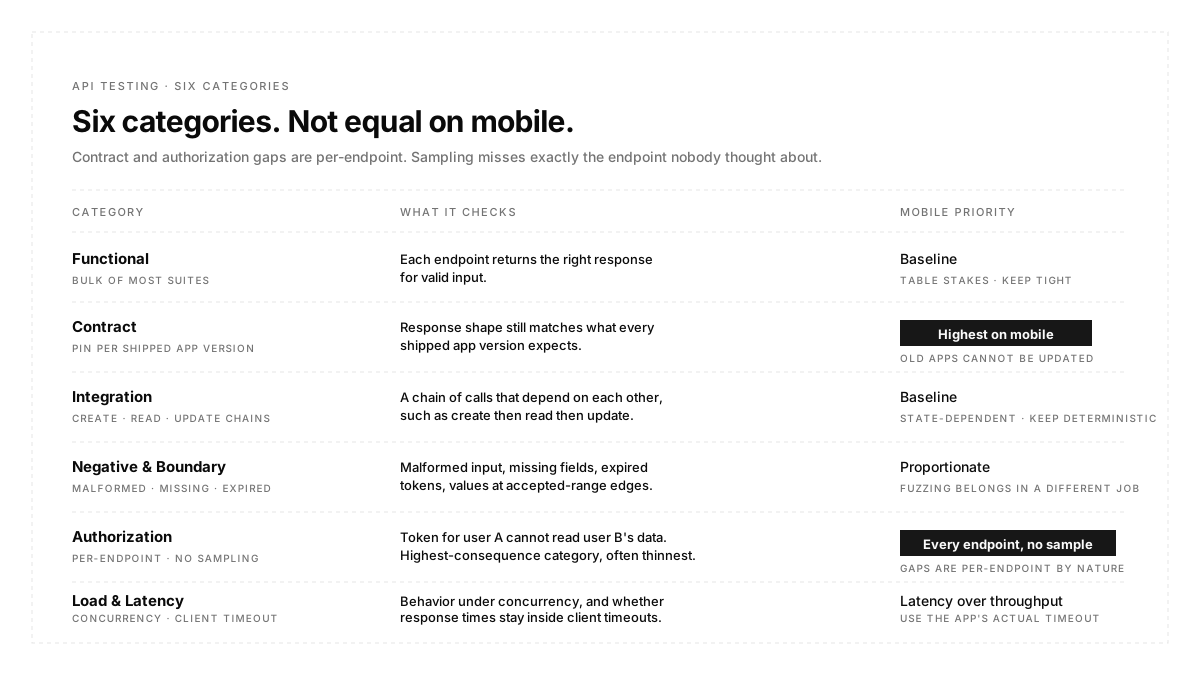
Six categories cover almost everything teams actually run:
Functional checks each endpoint return the correct response for valid input. The bulk of most suites.
Contract checks the response still matches the shape consumers expect. Distinct from functional, and the one mobile team under-invests in.
Integration checks a chain of calls that depend on each other, such as create, then read, then update.
Negative and boundary checks malformed input, missing fields, expired tokens, and values at the edges of accepted ranges.
Authorization checks that a token for one user cannot read another user's data. The highest-consequence category and often the thinnest.
Load and latency checks behavior under concurrency and whether response times stay inside what the client's timeouts assume.
API testing vs. end-to-end testing
They answer different questions, and the common mistake is treating one as a cheaper substitute for the other.
| Aspect | API Testing | End-to-End Testing |
|---|---|---|
| What It Tests | The interface contract | The user's journey through it |
| Speed | Milliseconds | Seconds to minutes |
| Stability | High | Depends on how tests are written |
| Catches | Wrong shape, code, or logic | Wrong wiring, state, or render |
| Misses | Whether the client can use it | Which layer actually broke |
An API test proves the server is right. An end-to-end test proves the product works. You need both because most shipped bugs live in the wiring between them, and no amount of API coverage reaches that wiring.
What API tests miss on mobile
Two blind spots, and both are structural rather than a matter of writing better assertions.
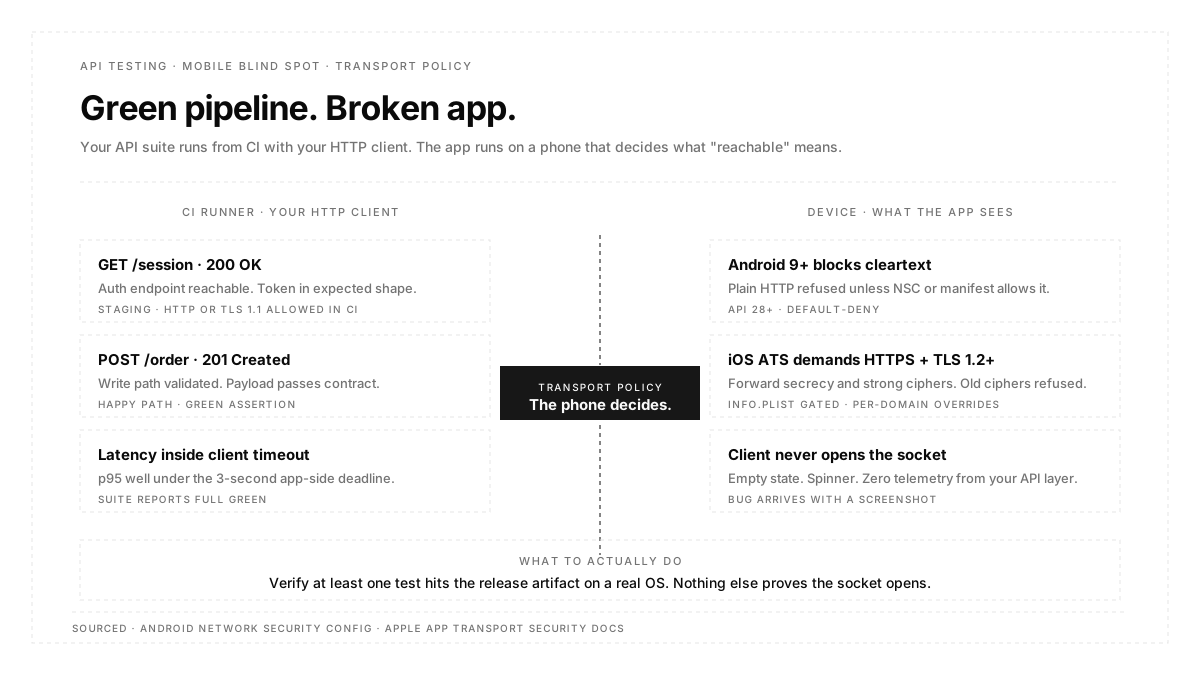
Transport policy is enforced on the device, not in your test runner.
Your API tests run from CI, using an HTTP client with whatever configuration you gave it. The app runs on a phone, and the phone has opinions.
Starting with Android 9 (API level 28), cleartext support is disabled by default, so plain HTTP is blocked unless the app opts back in through the usesCleartextTraffic manifest flag or a network security configuration file. On iOS, App Transport Security applies to connections made through the system networking APIs and requires HTTPS with TLS 1.2 or later, forward secrecy, and strong ciphers, with relaxations declared per domain in the app's Info.plist.
On the Android side, the defaults and per-domain overrides live in the Network Security Configuration guide, which is also the XML file most teams edit when a staging URL needs to keep cleartext through the release cycle. Any test that runs against the release artifact is running against exactly what that file declares, which is why a suite that passes on debug can still fail on release.
So a staging endpoint on plain HTTP is reachable from your test runner and unreachable from the app. So is an endpoint on TLS 1.1, or one whose cipher suite does not support forward secrecy, or one with a certificate the device does not accept. Your API suite is green, and the client cannot open the socket.
The reverse failure is worse and more common: a team adds a blanket cleartext exception or an arbitrary-loads flag to unblock local development, it survives into a release build, and now the transport policy you thought you were testing under is not the one shipping. Test the release artifact, not the debug variant, or this class of difference stays invisible.
Apple documents the full cipher, TLS-version, and forward-secrecy contract in Preventing Insecure Network Connections, including the exact NSAppTransportSecurity keys that go in Info.plist when a domain genuinely needs a relaxation. Reading it once is the fastest way to see which of your team's blanket exceptions are actually load-bearing and which were added to unblock a staging URL and forgotten.
The practical check is to look at what the client actually sent rather than what you think it sent. Autosana captures the HTTP requests made during a run, with method, URL, status, timing, and size, through network traffic, which is how you confirm a call fired at all rather than inferring it from a rendered screen.
Shipped clients cannot be updated.
Web has a comfortable property: the client is served fresh, so the version talking to your API is the one you deployed. Mobile does not work that way. Old app versions persist for months, sometimes years, and no amount of prompting fully clears them.
This inverts what contract testing is for. The contract that matters is not the one your current branch expects. It is the union of contracts expected by every app version with a meaningful install base. Which means:
Adding a field is safe if clients ignore unknown keys and unsafe if any shipped version deserializes strictly. Renaming a field is a breaking change even when you update every client in the repo, because you cannot update the ones on phones. Making an optional field required breaks old clients silently, usually as a crash rather than an error state. Changing an enum value breaks any client that switches on it exhaustively.
The testable version of this: keep the response contract for each supported app version, and run the contract suite against all of them on every API change. Not the current one. All of them.
How to test APIs for a mobile client
Three practices, in order of how much they pay back.
Pin the contract per client version and test against the set. This is the whole of the previous section, operationalized. It is also the only defense that scales, because reasoning case by case about which change is breaking fails as soon as you have four supported versions.
Use the API to set up state, not to verify behavior. The highest-value use of an API in a test suite is arranging the world before a user-facing test runs. Creating a user in a specific state through an endpoint is faster and more reliable than clicking through six screens to get there. Autosana's hooks exist for this, running scripts and API calls before, during, or after a flow, and they are usually where credentials and seed data belong rather than in the flow text.
Keep endpoints and credentials as configuration, not literals. Base URLs and tokens change per environment, and hard-coding them is how a suite ends up pointed at production. Environment variables and runtime variables cover the static and dynamic halves of this.
API testing in CI/CD
API tests are the fastest thing you own, so they run first and on everything. That part is uncontroversial.
The scheduling decision that gets missed is the contract suite. It should run on every backend change, not on every app change, because the failure mode it guards against originates server-side. If your app and API live in separate repositories with separate pipelines, this is easy to lose: the app pipeline runs contract tests nobody has changed, and the backend pipeline runs none.
For the end-to-end layer sitting above, flows describe what a user does rather than which endpoint fires, which is the right separation. The API suite owns the contract; the flow owns whether the product works when the contract is honored.
API testing best practices
Test authorization on every endpoint, not a sample. Authorisation gaps are per-endpoint by nature, so sampling misses exactly the endpoint nobody thought about.
Assert on shape and type, not just status. A 200 carrying a null where the client expects an array is a passing test and a crashing app.
Include the timeout the client actually uses. If the app gives up at three seconds, an endpoint that responds in four is broken regardless of what your suite's default timeout says.
Keep negative cases proportionate. Malformed input, expired tokens, and missing required fields cover most real failures. Exhaustive fuzzing belongs in a different job.
Version your test fixtures alongside the contract. Fixtures that drift from the pinned contract quietly stop testing the version they claim to.
Conclusion
API testing earns its place by being fast and stable, and the temptation is to let that cheapness stand in for coverage it cannot provide. Two questions keep it honest on mobile. Can the client actually open this connection, given that the device enforces a transport policy your test runner does not? And can every app version still in users' hands parse this response, given that none of them can be updated? Neither question is answerable from inside the API suite, which is the point. Pin the contract per version, verify the traffic the client really sent, and let the API layer do the narrow thing it does well.
FAQ
Is API testing the same as backend testing?
No. Backend testing covers internal logic, data access, and services that may never be exposed. API testing is scoped to the interface a client consumes, which is a subset.
Should API tests replace UI tests?
No. API tests are faster and more stable, so it is tempting, but they cannot see the wiring between client and server, which is where a large share of shipped bugs live.
What tools do teams use for API testing?
Postman and Newman for exploration and simple suites, REST Assured or requests-based frameworks inside a codebase, and Pact or similar for consumer-driven contracts. The choice matters far less than whether the contract is pinned per client version.
How do you test an API that needs authentication?
Obtain a token through the real auth endpoint in a setup step rather than pasting a long-lived token into the suite. Store the credentials as environment configuration.
Do API tests need to run on a device?
The API suite does not. But at least one test in your pipeline needs to exercise the endpoint from the release artifact on a real OS, because transport policy is enforced there and nowhere else.
How many API tests are enough?
Coverage of every endpoint for the happy path, every endpoint for authorization, and the contract for every supported client version. Depth beyond that has diminishing returns compared with moving effort to the end-to-end layer.