
Non-Functional Requirements: Turning Adjectives Into Thresholds
Non-functional requirements cover performance, reliability, security, and compatibility. The categories worth specifying and how to convert vague wording into testable thresholds.
Yuvan Sundrani · 10 min read
autosana.ai
.png)
TL;DR
- Non-functional requirements describe how well a system performs rather than what it does, covering speed, reliability, security, usability, and compatibility.
- A requirement phrased as an adjective is unfalsifiable. Largest Contentful Paint under 2.5 seconds is testable, while the app should feel fast is a recurring argument.
- Several non-functional requirements surface only on real hardware: thermal throttling, battery drain, memory pressure, and behavior across vendor OS forks.
- Autosana measures performance and network behavior during real-device runs, so non-functional requirements get verified in the same pass as functional ones.
Google's Core Web Vitals set Largest Contentful Paint at 2.5 seconds for a good rating, measured at the 75th percentile of page loads. That is a number a test can check and a team can fail.
Compare it with a requirement stating the app should feel fast. Six months later somebody asks whether 2.3 seconds to first screen is a defect, and both answers are defensible because the requirement settled nothing.
Non-functional requirements decide product quality more often than functional ones, and they are the requirements most likely to be written as adjectives. This guide covers the categories worth specifying and how to convert each into something testable.
What Non-Functional Requirements Are
Non-functional requirements describe qualities of a system rather than behaviors it performs. They constrain how well the system does its work.
The ISTQB Foundation Level syllabus treats non-functional testing as verification against these quality characteristics. The ISO 29119 standard maps them onto attributes including performance efficiency, reliability, security, usability, and portability.
Three properties distinguish them. They apply across features rather than to one. They are satisfied against a threshold rather than a binary outcome. And violating one produces a product that works correctly while users abandon it.
Functional and Non-Functional Side by Side
| Dimension | Functional Requirement | Non-Functional Requirement |
|---|---|---|
| Describes | What the system does | How well it does it |
| Satisfied by | Correct output | Meeting a threshold |
| Scope | One feature | Often the whole product |
| Example | Discount applies above 5000 rupees | Checkout completes within 2 seconds at p95 |
| Failure looks like | Wrong total shown | Correct total shown too slowly |
The second column is where support tickets originate that read like functionality complaints. A user reporting that checkout is broken often means checkout took eleven seconds and they gave up.
The Categories Worth Specifying
Performance
Response time, throughput, startup time, and frame rate. Specify at a percentile rather than an average, since averages conceal the tail where users actually suffer.
The web.dev performance guidance provides established thresholds worth adopting rather than inventing. For mobile, cold start time and sustained frame rate carry the most weight.
Scalability
Behavior as load rises. Specify the concurrent user count the system supports, the degradation curve past that point, and what happens at the limit.
A system that slows gracefully under load is a different product from one that returns errors, and the requirement should say which is intended.
Reliability
Uptime, crash-free session rate, and recovery time. Mobile teams track crash-free sessions and ANR rate on Android, both of which are visible in store consoles and are production-level results.
Specify what happens during a dependency failure. A payment provider timing out should produce a defined user-visible behavior rather than whatever the code happens to do.
Security
Authentication strength, data-at-rest and in-transit protection, session handling, and dependency scanning cadence. These convert well into testable statements because standards already define the thresholds.
Mobile app security testing covers verification, and the requirement side is about naming which controls apply to which data classes.
Usability and accessibility
Task completion rates, error rates, and conformance to accessibility criteria. Accessibility is the more testable of the two, since WCAG success criteria are specific and many jurisdictions treat them as obligations.
Contrast ratios, touch target sizes, screen reader labels, and behavior at large text settings all convert directly into checks. Mobile UI testing covers much of this surface.
Compatibility
Which devices, OS versions, browsers, and screen sizes the product supports. This is the category teams most often leave implicit, and an implicit device matrix means coverage follows whatever hardware the team owns.
Maintainability
Code coverage floors, complexity ceilings, build duration, and dependency freshness. These are non-functional requirements about the codebase rather than the running product, and they decay silently without a gate.
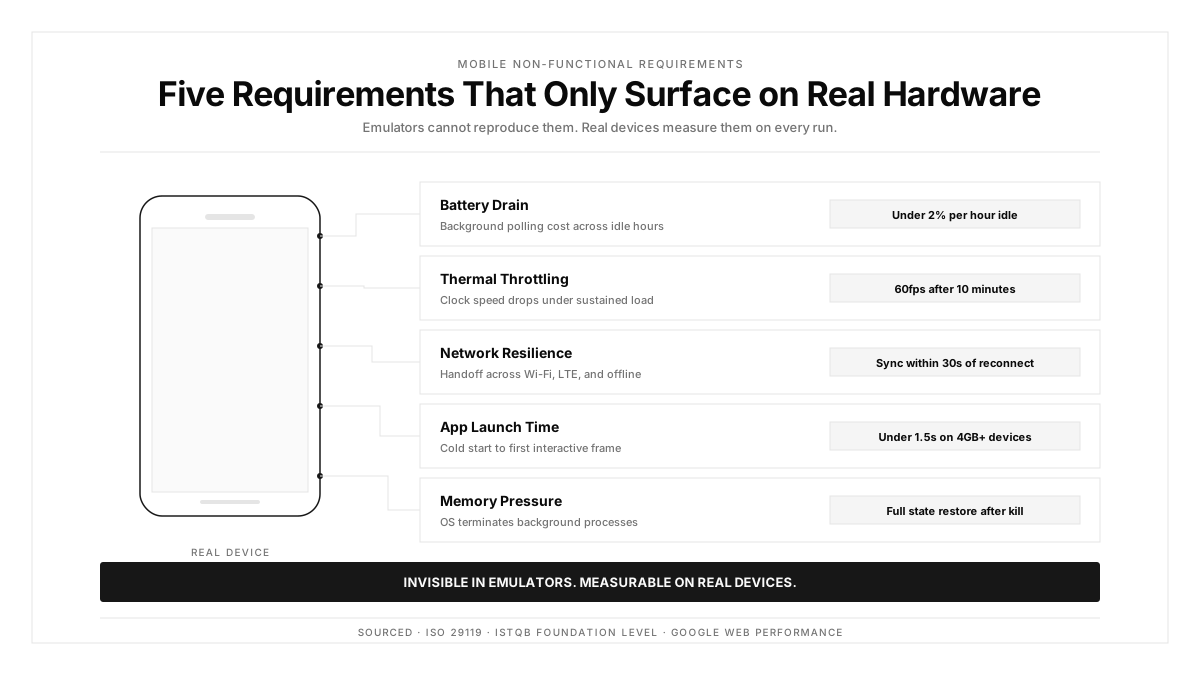
Non-Functional Requirements That Need Real Hardware
Four categories stay invisible until the software runs on a phone.
Thermal throttling appears after sustained work. A video export holding 60fps in an emulator drops sharply on a warm device, so any sustained-load requirement needs hardware verification.
Battery drain is measurable only on a real battery. A background sync interval that seems reasonable can halve a device's day, and users attribute that to your app specifically.
Memory pressure termination differs across devices. A budget phone with 3GB kills backgrounded apps far sooner than a flagship, which turns a state-restoration requirement into a device-dependent one.
Vendor OS forks change behavior. Aggressive battery optimization on some Android skins suspends background work that stock Android permits, which affects reliability requirements around sync and notification delivery.
Real device testing is the only path to verifying these, and mobile app testing programmes that skip it carry unverified non-functional requirements by default.
Converting Adjectives Into Thresholds
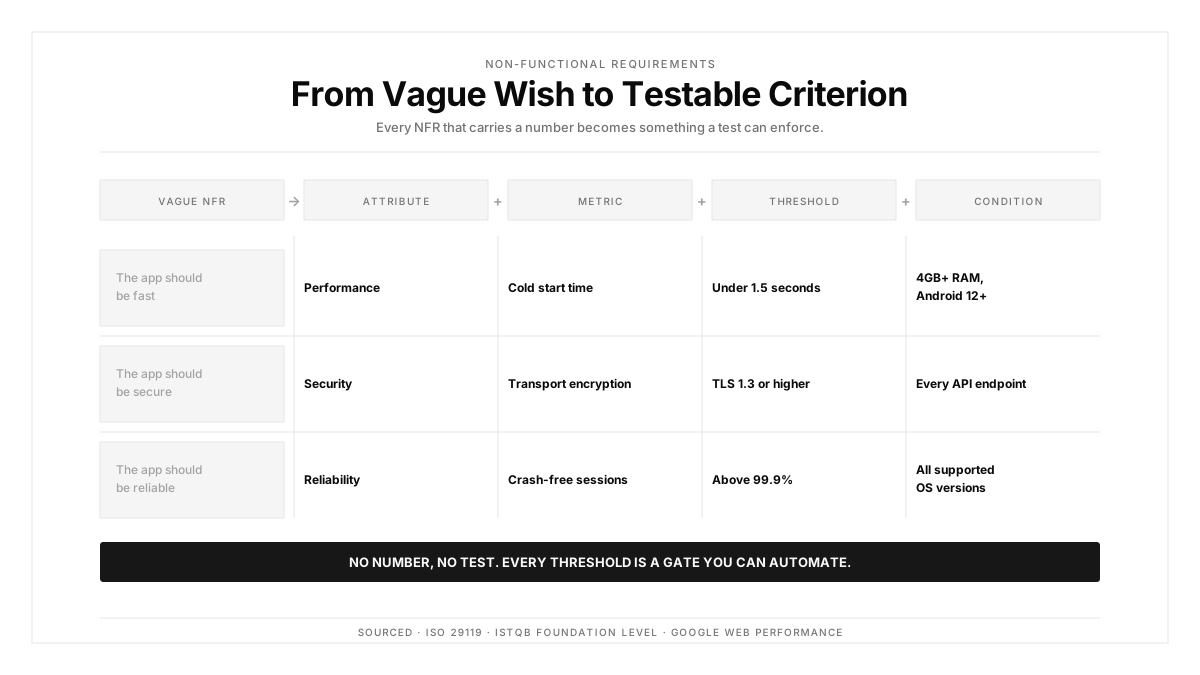
Four questions turn a vague requirement into a testable one.
What exactly gets measured? Name the metric and the measurement point. Time to first contentful paint differs from time to interactive, and a requirement saying load time picks neither.
At which percentile? An average hides the tail. Specify p95 or p99, because the users at the tail are the ones who churn.
Under which conditions? Device tier, network profile, data volume, and concurrent load all change the result. A threshold without conditions is unrepeatable.
What is the consequence of breaching it? A requirement with zero consequence is a preference. State whether breaching blocks release or opens a ticket.
Applied to the opening example:
The app should feel fast
becomes
Cold start to first interactive screen completes within 2.0 seconds at p95, on a mid-tier Android device over a 4G profile, measured across 100 launches. Breaching this blocks release.
That version is testable, repeatable, and settles the 2.3 second argument before it happens.
Measuring Them in Automated Tests
Performance requirements need instrumentation during a run rather than a separate exercise. Capture startup time, frame rate, and memory alongside the functional assertions already executing.
Network requirements need traffic capture. Payload sizes, request counts, and timing under a throttled profile all check against thresholds, and network traffic inspection makes them assertable.
Compatibility requirements are satisfied by matrix breadth rather than by a specific assertion. The requirement names the matrix, and the suite configuration executes against it.
Accessibility requirements convert into automated checks for contrast, labels, and target size, with manual review covering the judgment-dependent remainder.
One trap deserves naming: measuring non-functional requirements once before release. These metrics drift with every dependency update and feature addition, so the check belongs on a schedule with results tracked over time.
How Autosana Fits
We built Autosana so non-functional requirements get measured during the same runs that verify functional behavior.
Our performance monitoring captures startup time, frame rates, and crash-free sessions during real-device execution, which covers the thermal and memory categories that emulator runs exclude.
Our network traffic inspection surfaces request counts, payload sizes, and timing, so requirements about data usage and request efficiency become assertable rather than aspirational.
We run on real devices spanning vendor OS forks and device tiers, which is what makes battery, memory pressure, and throttling requirements verifiable at all.
Our environments configuration sets network profile and backend target per run, so the conditions clause in a well-written requirement maps onto a run configuration. Performance testing at this level runs on the same cadence as everything else.
Conclusion
Open your requirements and search for the words fast, simple, intuitive, responsive, and secure.
Every hit is a requirement that will produce an argument at some point, because it specifies a feeling rather than a threshold. Rewrite each one with a metric, a percentile, a set of conditions, and a consequence.
Start with the two or three that affect revenue directly. A checkout latency threshold written properly pays for the hour it takes within one release cycle.
.png)
FAQ
What are non-functional requirements?
Non-functional requirements describe how well a system performs rather than what it does. They cover performance, scalability, reliability, security, usability, compatibility, and maintainability, and are satisfied against thresholds.
How do non-functional requirements differ from functional ones?
A functional requirement is satisfied by correct output. A non-functional requirement is satisfied by meeting a threshold, applies across features rather than to one, and fails as a product that works correctly while users leave.
What are examples of non-functional requirements?
Cold start under 2.0 seconds at p95 on a mid-tier device, crash-free session rate above 99.5 percent, WCAG 2.1 AA conformance, and support for a named list of OS versions and device models.
How do you make a vague requirement testable?
Name the metric and measurement point, specify a percentile rather than an average, state the conditions including device tier and network profile, and define the consequence of breaching it.
Why specify percentiles instead of averages?
An average conceals the tail. A mean response time of 1.2 seconds can hide a p99 of nine seconds, and the users experiencing nine seconds are the ones who abandon the product.
Which non-functional requirements need real devices?
Thermal throttling under sustained load, battery drain, memory pressure termination, and behavior across vendor OS forks. Each is a hardware property that emulators approximate poorly or skip entirely.
How often should non-functional requirements be measured?
On a schedule rather than once before release. These metrics drift with every dependency update and feature addition, so results are worth tracking as a trend rather than a single pass or fail.
Who owns non-functional requirements?
Product owns the thresholds since they reflect business tolerance, engineering owns achieving them, and QA owns verification. Leaving ownership unassigned is why they stay written as adjectives.