
What Does Mobile App Security Testing Actually Find?
Most mobile security findings come from platform defaults rather than code flaws. Here is what to test, and how OWASP MASVS maps the ground.
Yuvan Sundrani · 13 min read
autosana.ai

TL;DR
Mobile app security testing verifies that an app protects data at rest and in transit, authenticates properly, and does not expose more of itself to the device and other apps than it intends. The threat model differs from web in one decisive way: the attacker has your binary and controls the runtime. In practice most findings are not clever exploits against your logic. They are platform defaults nobody changed in manifests, backups, logs, and transport configuration. OWASP MASVS is the map, and its eight categories are the right structure for a test plan.
A pattern shows up in nearly every first mobile penetration test. The report comes back, the team braces for something exotic, and the top findings are a component that was exported without anyone deciding it should be, an access token sitting in plaintext in local storage, and a debug logging call that survived into the release build.
None of those are exploits in the interesting sense. All three are defaults, or the absence of a decision. That is what makes mobile security testing tractable: the highest-value work is not adversarial creativity; it is systematically checking what the platform does when you do not tell it otherwise.
What is mobile app security testing?
Mobile app security testing is the assessment of a mobile application for weaknesses that could expose user data, allow unauthorized access, or let an attacker tamper with the app's behavior. It covers the client binary, the data it stores on the device, the channel it uses to talk to a backend, and the surface it exposes to the operating system and to other installed apps.
It overlaps with application security generally, but the client side carries far more weight here than it does on the web, for reasons worth being precise about.
Why the mobile threat model is different
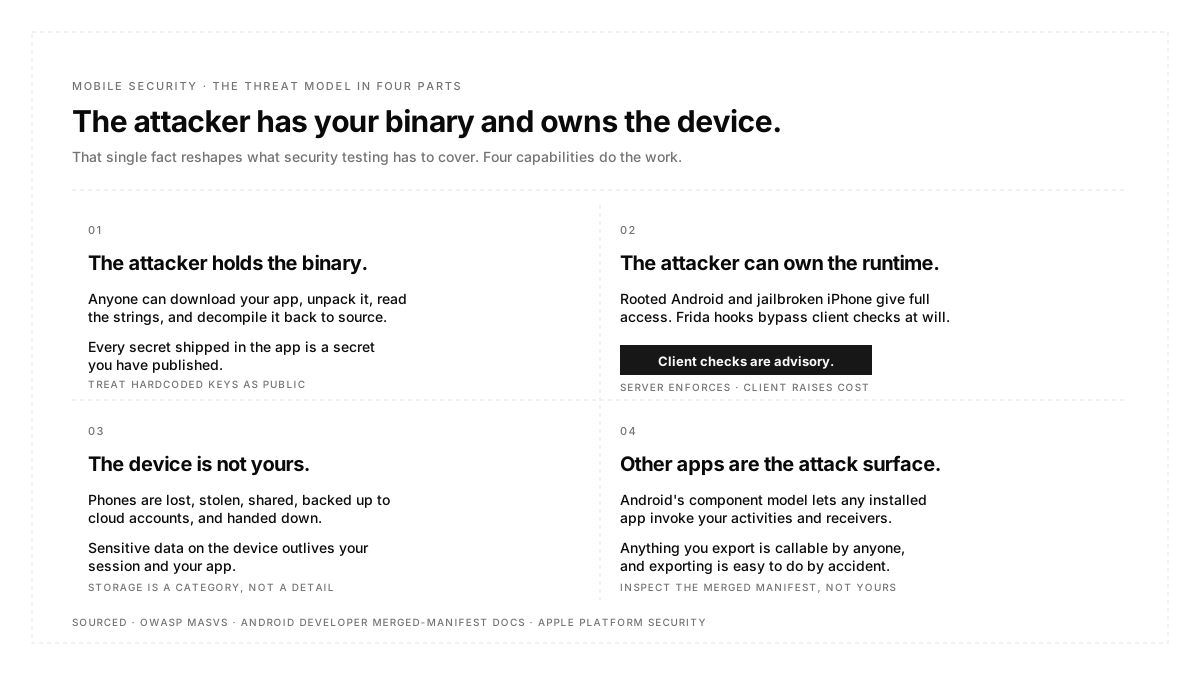
The attacker holds the binary. Anyone can download your app from the store, unpack it, read the strings, inspect the resources, and decompile it back into approximate source. This is not an edge case; it is the normal condition. Every secret you ship inside the app is a secret you have published, including API keys, hardcoded endpoints, and encryption keys embedded in code. On the web, the equivalent would be handing an attacker your server binary before they start.
The attacker can own the runtime. A rooted Android device or a jailbroken iPhone gives full read access to your app's private storage, the ability to attach a debugger, and the ability to hook functions at runtime with tooling like Frida. Certificate pinning can be bypassed, root detection can be patched out, and local validation can be short-circuited. The practical conclusion is that no client-side check is a security control on its own. Anything that must be true has to be enforced by a server that the attacker does not control.
Data sits on hardware you do not manage. Devices are lost, stolen, shared, backed up to a cloud account, and handed down. Sensitive data written to the device outlives your session and your app, which is why storage is a first-class category rather than a detail of implementation.
Other apps are part of the attack surface. Android's component model lets applications invoke each other's activities, services, and receivers. Anything you export is callable by any other installed app, including ones you have never heard of, and exporting is easy to do by accident.
The OWASP MASVS categories
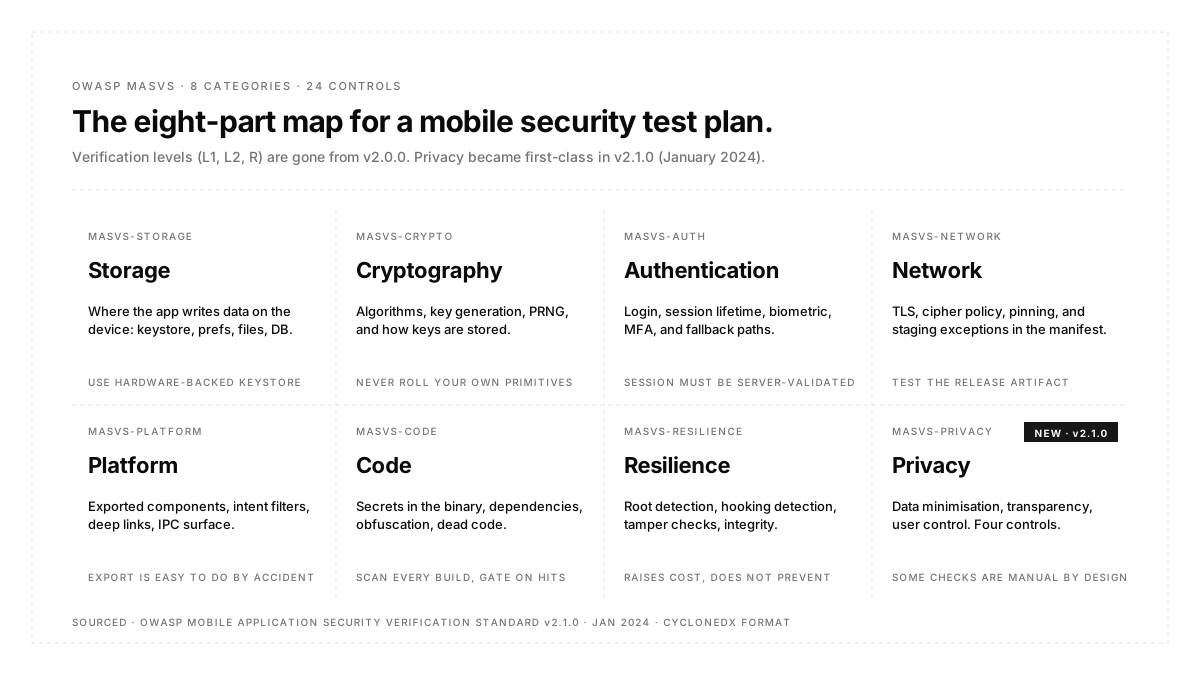
The OWASP Mobile Application Security Verification Standard is the reference framework and the right skeleton for a test plan. MASVS organizes requirements into eight categories: storage, cryptography, authentication, network, platform, code, resilience, and privacy, across twenty-four controls with individual identifiers, a finding that can point directly.
Two things about the current version are worth knowing, because a great deal of secondary writing about MASVS is out of date.
The verification levels are gone. Older material describes MASVS L1, L2, and R as tiers you certify against. As of v2.0.0 the standard no longer contains verification levels; they were reworked as MAS Testing Profiles and moved into the wider MAS project. If a vendor or a checklist is still quoting L1 and L2 as the current MASVS structure, it is working from the pre-2023 standard.
Privacy became a first-class category. MASVS-PRIVACY arrived in v2.1.0 with four controls covering minimizing access to sensitive data and resources, preventing identification of the user, being transparent about collection and usage, and offering users control over their data. Notably, OWASP's own framing is that some of these need manual checking rather than automation, since spotting an app collecting data it never disclosed requires comparing behaviour against the store listing and privacy policy.
The companion testing guide, MASTG, supplies the concrete test cases for each control, which is what turns the standard from a list of intentions into something a tester can execute.
Types of mobile app security testing
Static analysis of the app. Scanning source or the compiled artifact for hardcoded secrets, insecure API usage, weak cryptographic primitives, and dangerous manifest configuration. Cheap, fast, and easy to run on every build, which makes it the correct first investment. Its weakness is context: it will flag a hardcoded string that turns out to be a public key and miss a logic flaw that only appears at runtime.
Dynamic analysis of the running app. Observing the app in execution on a device, inspecting what it writes to storage, what it sends over the network, and how it behaves when the responses are manipulated. This is where transport problems, session handling errors, and authorisation gaps actually surface, because they only exist while the app is running against a real backend.
Dependency and supply chain scanning. Checking third-party SDKs and libraries for known vulnerabilities and for behavior you did not sign up for. Mobile apps carry a lot of embedded third-party code, analytics, advertising, and crash reporting, and each one runs with your app's permissions. A useful detail from the MASVS side is that the standard is now published in CycloneDX format, which makes it easier to wire into a pipeline alongside software bill of materials tooling.
Penetration testing. A human attacking the app with the runtime tools described earlier: rooting, hooking, proxying, and tampering. Expensive and periodic rather than continuous, and best spent on the parts of the app where a compromise would be worse, rather than spread evenly.
The platform defaults that leak
This is where the recurring findings live, and Android's exported-component history is the clearest illustration of why defaults matter more than code.
Exported components. Before Android 12, any activity, service, or broadcast receiver that declared an intent filter was automatically exported, meaning other apps could invoke it. That default was implicit and easy to miss, so components ended up publicly callable because a developer added an intent filter for an unrelated reason. From Android 12 (API level 31), an explicit android:exported value is mandatory whenever a component has an intent filter, and an app that omits it cannot be installed at all. The subtlety worth testing for is that the requirement applies to the merged manifest, so a third-party library declaring an intent filter without the attribute will break the install even when your own manifest is correct. Inspect the merged manifest rather than the one you wrote, and treat every exported component as an entry point that needs its own authorisation check.
Device backup. Application data can be swept into device backups and out to a cloud account, taking any unencrypted local storage with it. Android 12 tightened the default here too: for apps targeting API level 31 or higher, app data is excluded from what adb backup exports unless the app is marked debuggable. That improves the baseline but also means a workflow that depended on adb backup will silently stop working, and it does not remove the need to keep sensitive material out of ordinary storage in the first place.
Cleartext transport. From Android 9 (API level 28), cleartext support is off by default, and plain HTTP is blocked unless the app opts back in with a manifest flag or a network security configuration. The recurring failure is not the default, it is the exception someone added to unblock local development against an HTTP dev server, which then survives into a release build and quietly permits unencrypted traffic everywhere.
Logs, screenshots, and the clipboard. Debug logging that prints tokens or personal data, sensitive screens appearing in the OS task switcher snapshot, and credentials copied to a system clipboard readable by other apps are three variants of the same mistake, which is data leaving the app through a channel nobody classified as output.
What functional testing can and cannot verify
Being clear about the boundary matters, because conflating the two leaves real gaps.
An end-to-end functional tool is not a security scanner. It will not decompile your binary, hook a function at runtime, or find a hardcoded key. Those need the static and dynamic tooling described above, and there is no substitute.
What functional testing does cover well is the behavioural half of the security surface, the part that is about states rather than about the artifact. Whether logging out actually clears the session and local data. Whether an expired token forces re-authentication rather than showing a stale cached screen. Whether a user who declines a permission gets a sensible path rather than a broken one. Whether deep links into authenticated screens still demand authentication.
Two of those are easier with the right visibility. Autosana's network traffic capture records the requests a run actually made, with method, URL, status, and timing, which is how you confirm an authenticated call carried a token or that a screen did not quietly fetch over an unexpected endpoint. Running the same flows on real hardware matters here more than elsewhere, since transport policy and keystore behavior are enforced by the device rather than by an emulator image. Setting up the preconditions, an expired token or a specific account state, is what hooks are for.
How to run security testing in CI/CD
Every build: static analysis and dependency scanning. Both are fast enough to gate on without slowing the pipeline, and both catch the categories that recur across almost every assessment. Treat a new hardcoded secret or a newly vulnerable transitive dependency as a build failure rather than a warning, because warnings accumulate until nobody reads them. The one caution is tuning: a scanner that reports two hundred findings on its first run will be ignored by its third, so triage the initial backlog into real and accepted before you make it blocking.
Every release candidate: dynamic analysis against the release artifact. Never against a debug build. Debug variants differ in optimisation, logging verbosity, and network policy, so scanning one tells you about an application your users will never install. Android's own performance guidance makes the same point for a different reason, and the security case is stronger: a debug build may permit cleartext, expose backup data, and log material that the release build does not.
Every change to manifests, transport config, or dependencies: re-run the platform checks. These three files are where accidental exposure actually lives, and a diff touching them deserves the same scrutiny as a change to authentication code. This is also where a change nobody on your team made can reach you, since a dependency bump can alter the merged manifest and introduce an exported component you never declared.
Periodically, and before major launches: a human penetration test. Scope it to the flows where a compromise would cost the most rather than spreading effort evenly across the app. A tester with a rooted device and a week will find things no scanner will, and the value comes from depth on the parts that matter, not from breadth across parts that do not.
Best practices
Assume every client-side check is bypassable and enforce server-side. Root detection, jailbreak detection, and pinning raise cost for an attacker; they do not prevent a determined one. Anything that must hold has to hold on a server.
Ship no secrets in the binary. If a value must be secret, it belongs behind your backend, not inside an artifact you publish to a store.
Use the platform keystore for anything sensitive. Hardware-backed key storage exists on both platforms and is materially stronger than storing material in ordinary app storage or preferences.
Map findings to MASVS control identifiers. It turns a report into something trackable across audits, and it gives every finding a shared vocabulary between engineering and whoever is asking for compliance evidence.
Test the denied and revoked permission states. Users decline permissions and revoke them later, and both produce app states that ship untested more often than not.
Conclusion
Mobile security testing rewards systematic checking over cleverness, because the threat model is fixed and public: the attacker has your binary and can control the device it runs on. Start from that assumption, treat every client-side check as advisory, and work through what the platform does when nobody has told it otherwise. Use MASVS to structure the plan so findings have identifiers and coverage has a shape. Static and dependency analysis belong on every build, dynamic analysis on every release candidate, and human attention on the flows where a compromise would cost the most.

FAQ
What is the difference between MASVS and MASTG?
MASVS defines the requirements, organised into eight categories with numbered controls. MASTG supplies the test cases that verify them, with platform-specific procedures for Android and iOS. In short, one says what to verify and the other says how.
Are MASVS L1 and L2 still current?
No. Verification levels were removed in MASVS v2.0.0 and reworked as testing profiles within the wider OWASP MAS project. Material still presenting L1 and L2 as the current structure predates the 2023 refactor.
Can mobile app security testing be automated?
Partly. Static analysis, dependency scanning, and many dynamic checks automate well. Authorization logic, privacy disclosure accuracy, and business logic abuse generally need a human, because they require comparing behavior against intent.
How often should we run a mobile penetration test?
Annually for most products, and additionally before a major launch or after a significant architectural change. The continuous coverage should come from automated static and dynamic analysis in the pipeline, with the human test reserved for depth.
Is certificate pinning worth implementing?
It raises the cost of intercepting traffic meaningfully, and MASVS treats pinning as required for the strongest channel security. It is bypassable on a controlled device, so treat it as a defense in depth rather than as a guarantee.
What are the most common mobile security findings?
Sensitive data is stored unencrypted on the device, secrets are embedded in the binary, components are exposed to other apps unintentionally, transport validation is weak or absent, and debug behavior survives into release builds.
Do we need security testing if our app has no login?
Yes. Apps without authentication still store data, make network calls, embed third-party SDKs, expose components to the platform, and collect information subject to privacy disclosure. Removing the login removes one category, not the surface.