
iOS Test Automation: Frameworks, Strategies and Where Teams Get Stuck
iOS test automation from XCUITest to Appium to AI agents. Covers framework selection, simulator vs real device, CI integration, and the maintenance problems that stall most test suites.
Yuvan Sundrani · 14 min read
autosana.ai
iOS test automation is the practice of writing scripts that exercise an iOS application without manual interaction, verifying that screens render correctly, user flows complete successfully, and regressions do not reach production. The automation runs on simulators during development, on real devices before release, and in CI pipelines on every commit.
The technical barrier to iOS test automation is low. Xcode ships with XCUITest, which is free, well documented, and runs out of the box. The real barrier is maintenance. A test suite of 200 UI tests that passes today will need ongoing repair as accessibility identifiers change, SwiftUI view hierarchies shift between builds, and iOS updates alter framework behavior. Teams that underestimate this cost build a suite, watch it decay, and abandon it within a year.
This guide covers the frameworks available for iOS test automation, how to choose between them, where teams get stuck, and how to structure automation that lasts.
Key Takeaways
- iOS test automation works across three layers: unit tests (XCTest), integration tests (XCTest with dependency injection), and UI tests (XCUITest, Appium, or an AI agent). The layers differ in speed, stability and what they catch.
- XCUITest is the default choice for iOS-only teams. It is free, ships with Xcode, and runs 3 to 6 times faster than Appium because it calls Apple's APIs directly instead of routing through a translation layer.
- The dual-codebase problem is the primary cost of native test automation for cross-platform teams. XCUITest covers iOS. Espresso covers Android. Two frameworks, two languages, two maintenance budgets.
- Flaky tests are the single largest threat to an iOS test automation program. The three most common causes are time-based waits (sleep()), real network calls in tests, and accessibility identifier instability.
- CI infrastructure cost matters. macOS runners cost roughly 10 times the Linux rate on GitHub Actions, and simulator boot time adds 1.5 to 2.5 billed minutes per cold start before any test executes.
The three layers of iOS test automation
iOS test automation is not one activity. It spans three layers, each with different speed, stability and diagnostic value.
Unit tests (XCTest)
Unit tests call individual functions and verify return values. They run inside the app's own process with no UI rendering, no simulator launch, and no device requirement. A suite of 500 unit tests completes in seconds.
Unit tests catch logic bugs: wrong calculations, incorrect state transitions, failed data transformations. They cannot catch layout problems, navigation failures, or integration issues between components.
Integration tests (XCTest with real dependencies)
Integration tests verify that components work together: the view model fetches data from the repository, the repository parses the API response correctly, and the result propagates to the view. They run faster than UI tests because they do not launch the full app, but slower than unit tests because they involve multiple components and potentially real or mock network calls.
UI tests (XCUITest, Appium, or agent-based)
UI tests launch the full application and interact with it through the accessibility hierarchy. They verify what the user actually sees: a screen loads, a button triggers the correct navigation, a form submission shows a confirmation. UI tests are the slowest and most maintenance-intensive layer, but they catch the highest-impact bugs (a broken login flow, a payment that fails silently, a screen that renders blank on a specific device).
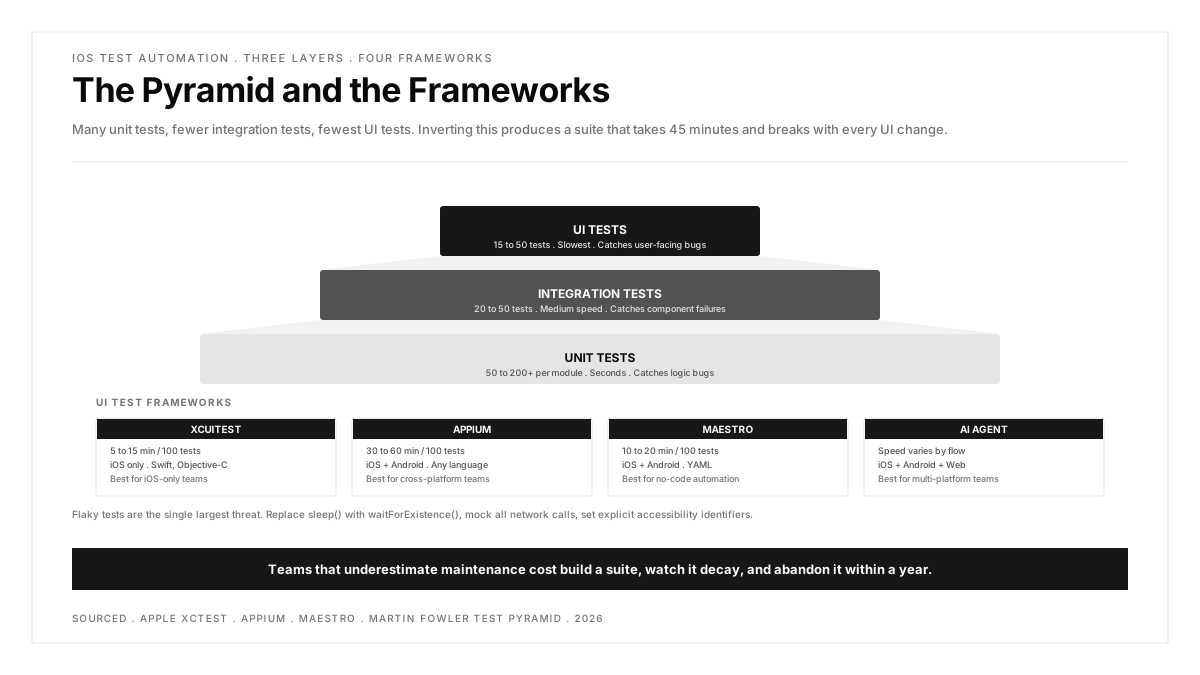
The standard allocation follows the testing pyramid: many unit tests, fewer integration tests, fewest UI tests. Inverting this produces a suite that takes 45 minutes and breaks with every UI change.
Choosing an iOS test automation framework
XCUITest
Apple's first-party UI testing framework. Tests are written in Swift or Objective-C, run inside Xcode, and execute against the accessibility hierarchy on simulators or real devices.
Strengths: Free, zero setup, 3 to 6 times faster than Appium, seamless Xcode integration, stable targeting through accessibility identifiers.
Weaknesses: iOS only (no Android, no web), Swift or Objective-C required, no built-in network mocking (the app must support a test mode), maintenance scales linearly with UI churn.
Best for: iOS-only teams with engineers who write Swift.
For a deep explanation of how the framework works, including code examples and best practices, see the XCUITest guide.
Appium
An open source cross-platform framework that drives iOS and Android apps through the WebDriver protocol. On iOS, Appium wraps XCUITest through a component called WebDriverAgent.
Strengths: One framework for iOS and Android, any programming language (Java, Python, JavaScript, Ruby), large ecosystem of plugins and community support.
Weaknesses: 50 to 200 milliseconds of translation overhead per command, complex setup (Appium server, WebDriverAgent, correct Xcode version), higher flakiness from inferred readiness (Appium cannot observe the main thread directly).
Best for: Cross-platform teams that need one test framework for both iOS and Android and accept the speed tradeoff.
For a detailed comparison of what breaks each approach and the maintenance implications, see the Appium vs XCTest comparison.
Maestro
A YAML-based mobile testing framework that requires no programming. Tests are defined in plain YAML files and run on iOS and Android.
Strengths: No code required, fast setup, simple syntax, built-in support for gestures and device interactions.
Weaknesses: Limited for complex test logic, smaller community than Appium, no web testing support.
Best for: Teams converting manual testing to automation without dedicated SDETs.
AI-based test agents
A newer category where an AI observes the rendered screen and drives the app based on intent rather than hard-coded selectors. One flow definition covers iOS, Android and web. When a button moves or an identifier changes, the agent re-anchors visually instead of failing.
Strengths: One flow for all platforms, self-healing when the UI changes, no framework-specific code, lower maintenance than selector-bound tests.
Weaknesses: Verification overhead (the agent decides rather than follows instructions exactly), less control than native frameworks for complex assertions, newer technology with less community knowledge.
Best for: Teams shipping iOS, Android and web that want cross-platform coverage without maintaining three separate test suites.
Framework comparison
| Framework | Speed (100 Tests) | Languages | Platforms | Maintenance Cost |
|---|---|---|---|---|
| XCUITest | 5 to 15 min | Swift, ObjC | iOS only | Medium (one codebase) |
| Appium | 30 to 60 min | Any | iOS + Android | High (platform branches) |
| Maestro | 10 to 20 min | YAML | iOS + Android | Low (simple flows only) |
| AI agent | Varies | Natural language | iOS + Android + Web | Low (intent-based) |
| Espresso | 5 to 15 min | Kotlin, Java | Android only | Medium (one codebase) |
Where iOS test automation gets stuck
Three problems cause more test suite abandonments than framework choice does.
Problem 1: Flaky tests
A test that passes and fails on the same code without changes is flaky. Flaky tests erode trust faster than missing tests because the team learns to ignore red builds. The three most common causes on iOS:
Time-based waits. sleep(3) is a guess. It wastes time when the UI is ready in 200 milliseconds and fails when the simulator is slow. Replace every sleep() with waitForExistence(timeout:).
Real network calls. Tests that hit real APIs fail when the API is slow, down, or rate-limited. Use launch arguments to put the app into a mock mode where network responses are deterministic.
Accessibility identifier instability. SwiftUI's dynamic view hierarchy can change identifiers between builds. Set explicit .accessibilityIdentifier() values on every element that tests interact with, and use the page object pattern to centralize element queries.
For a deeper look at detection and resolution, see the flaky tests guide.
Problem 2: The dual-codebase cost
Teams shipping both iOS and Android face a choice: write tests in XCUITest and Espresso (two codebases, two languages, two maintenance budgets) or use a cross-platform framework like Appium (slower, more complex setup, platform branches that drift apart over time).
Neither option is free. The dual-codebase approach costs headcount. The cross-platform approach costs speed and stability. AI-based agents attempt to solve this by defining one flow that runs on both platforms, but the technology is newer and requires verification that native frameworks do not.
Problem 3: CI infrastructure cost
macOS runners are expensive. GitHub Actions charges roughly 10 times the Linux rate for macOS minutes. A cold iOS simulator adds 1.5 to 2.5 billed minutes before the first test runs. Thirty parallel simulators each booting cold burns an hour of premium macOS time before any assertion executes.
Mitigations: cache the simulator state, use warm runner pools, run the full suite nightly rather than on every commit, and run a smaller smoke suite on every PR.
Structuring iOS test automation for the long term
Automate the critical paths first
Start with the flows that would cause the most damage if they broke: sign-in, sign-up, the primary feature loop, payment, and account recovery. Five well-maintained tests covering critical paths catch more regressions than 50 tests covering peripheral screens.
Adopt the testing pyramid
Many unit tests (fast, stable, cheap). Fewer integration tests (medium speed, medium maintenance). Fewest UI tests (slow, expensive, highest impact). The pyramid keeps feedback fast and maintenance bounded.
Use the page object pattern from day one
Encapsulate each screen in a class that exposes named actions and queries. When a screen changes, the page object updates in one place. Without this pattern, a single identifier change ripples through dozens of test files.
Run smoke tests on every PR, full suite nightly
A smoke suite of 10 to 15 tests covering the critical paths runs in 3 to 5 minutes and gates every PR. The full suite of 100+ tests runs nightly and reports regressions each morning. This structure balances developer feedback speed with comprehensive coverage.
Feed production crashes back into the suite
Every production crash that monitoring catches becomes a candidate for a new automated test. A crash on iPhone SE running iOS 16 during checkout becomes a test case that runs on that device and OS combination. Over time, the suite grows in exactly the places where the app has historically been fragile.
For a broader view of how regression testing fits into the development cycle, see the regression testing guide.
iOS test automation in CI
The standard approach for running iOS test automation in a CI pipeline:
- Build the app using xcodebuild build-for-testing or Fastlane's build_app
- Run unit and integration tests on every commit (fast, Linux-compatible where possible)
- Run UI smoke tests on every PR (10 to 15 tests on a simulator, 3 to 5 minutes)
- Run the full UI suite nightly on simulators with parallel execution
- Run critical flows on real devices before every release candidate
This structure keeps CI costs bounded while maintaining comprehensive coverage. For how to design a pipeline that survives the iOS build and test cycle, see the CI/CD pipeline guide.
For teams evaluating the broader landscape of tools available, the best iOS testing tools guide reviews ten tools by the role they play in the pipeline.
.png)
FAQs
What is the best iOS test automation framework?
XCUITest for iOS-only teams. It is free, ships with Xcode, and runs 3 to 6 times faster than cross-platform alternatives. For teams shipping both iOS and Android, the choice depends on whether the team prefers two fast native suites (XCUITest + Espresso) or one slower cross-platform suite (Appium or an AI agent). There is no universally best framework; the choice depends on the team's platform scope, engineering skills, and maintenance budget.
How many automated tests does an iOS app need?
There is no universal number. A reasonable starting point: 50 to 200 unit tests per module, 20 to 50 integration tests covering cross-component behavior, and 15 to 50 UI tests covering critical user flows. The right number depends on the app's complexity, the risk profile of each feature, and the team's capacity to maintain the suite. Coverage percentage is a misleading metric for UI tests; focus on covering the flows where a failure would cause the most user or business impact.
Can iOS tests run on Linux?
Unit tests written in pure Swift can run on Linux using Swift Package Manager. UI tests cannot because they require the iOS simulator, which only runs on macOS. Integration tests can run on Linux if they do not depend on UIKit or other Apple-only frameworks. For CI cost optimization, running unit tests on cheap Linux runners and reserving macOS runners for UI tests is a common pattern.
How do I reduce iOS test flakiness?
Three changes eliminate the majority of flaky tests. First, replace sleep() with waitForExistence(timeout:) or XCTNSPredicateExpectation. Second, mock all network calls so tests do not depend on backend availability. Third, set explicit accessibility identifiers on every element that tests interact with, and query by identifier rather than by visible label. Beyond these, run the suite 5 times on the same commit and quarantine any test that produces inconsistent results.
Should I test on simulators or real devices?
Both, at different stages. Simulators for speed during development and on every PR. Real devices for release validation, because simulators do not reproduce push notifications, biometric authentication, camera behavior, GPS location, thermal throttling, or memory pressure from other running apps. The recommended structure: simulators for breadth (every commit), real devices for depth (before each release). See the real device testing guide for details.
How long should an iOS UI test suite take?
A smoke suite (10 to 15 tests) should complete in 3 to 5 minutes. A full suite of 100 tests should complete in 10 to 15 minutes using parallel execution across 4 simulators. If the full suite takes more than 30 minutes, investigate: most of the time is likely consumed by sleep() calls, real network roundtrips, or serial execution that should be parallelized.