
CI/CD Pipeline: Designing One That Survives Mobile Testing
A CI/CD pipeline runs five stages from source to deploy. Why the test stage bottlenecks mobile, how to parallelize builds and devices, and how to handle flaky tests.
Yuvan Sundrani · 12 min read
autosana.ai
.png)
TL;DR
- A CI/CD pipeline automates the path from commit to deployable artifact through five stages: source, build, test, release, and deploy.
- Pipeline duration governs how often engineers use it. A 45-minute run allows roughly ten cycles in a working day across a whole team.
- The test stage is where mobile pipelines stall, because execution time scales with the device matrix rather than with test count.
- Autosana runs intent-based tests on real iOS and Android devices in parallel from your CI/CD pipeline, with results posted to the pull request.
Google's DevOps research places elite delivery performance at multiple deployments per day. A CI/CD pipeline taking 45 minutes end to end permits about ten complete runs in a working day, shared across every engineer on the team.
That arithmetic decides whether a pipeline gets used as designed or worked around. Engineers facing a 45-minute wait merge on the first green stage and treat the rest as a report to read later.
This guide covers the five stages of a CI/CD pipeline, why the test stage becomes the bottleneck on mobile, and the specific moves that keep total duration inside the range where people actually wait for it.
What a CI/CD Pipeline Is
A CI/CD pipeline is an automated sequence carrying a code change from commit to a deployable or deployed artifact. Continuous integration covers the first half, merging and verifying. Continuous delivery covers the second, packaging and releasing.
Red Hat's overview frames the distinction by where automation stops. Continuous delivery produces a release candidate a human approves. Continuous deployment ships it without that approval.
The unit of value is feedback latency. A CI/CD pipeline catching a regression four minutes after a push costs a context switch. The same regression found four days later costs an investigation.
The Five Stages
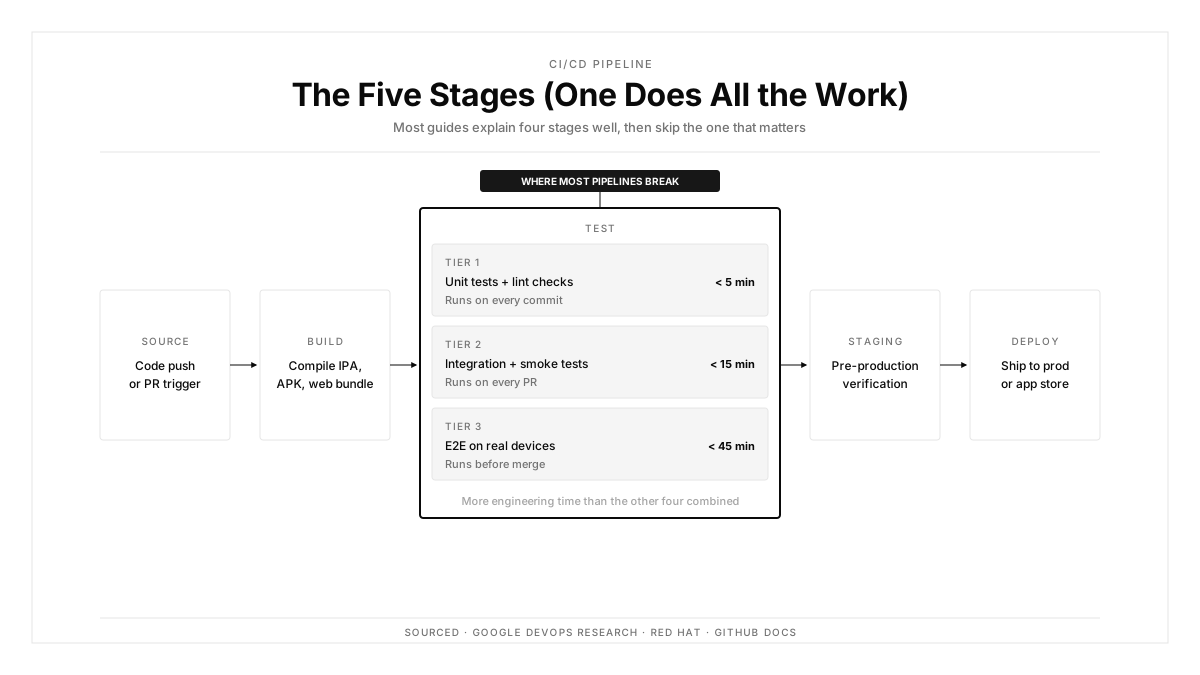
Source triggers on a push or pull request, checks out the code, and resolves dependencies. Caching decisions made here shape everything downstream, since a cold dependency resolution adds minutes before any work begins.
Build compiles and produces artifacts. For mobile this means an IPA from Xcode on a macOS runner and an APK or AAB from Gradle. These two builds have no dependency on each other, which makes them the first parallelization opportunity.
Test executes the suites. Unit tests run against the build output, and integration plus end-to-end suites run against deployed artifacts. This stage consumes the majority of pipeline time on most mobile projects.
Release versions, signs, and packages the artifact. iOS requires provisioning profiles and signing certificates. Android requires keystore access. Both mean secrets handling inside the CI/CD pipeline.
Deploy pushes to an environment or a distribution channel. Staging deploys are automatic. Store submissions add a review gate outside your control.
Why the Test Stage Breaks CI/CD Pipelines
Three properties make the test stage behave differently from the others.
Execution time scales with the device matrix rather than the test count. Forty tests across six device configurations is 240 executions. Adding a seventh device adds forty more, so the stage grows even when the suite stays fixed.
Failures are ambiguous. A build failure means the build broke. A test failure means the code broke, the test was wrong, the environment drifted, or the run was flaky. Each reading requires investigation, and the cost lands on a human.
Flakiness compounds. A suite of 200 tests each passing 99.5 percent of the time produces a red run roughly 63 percent of the time. Engineers respond by re-running, and the CI/CD pipeline stops functioning as a gate.
That last number explains most abandoned pipelines. Individually acceptable flake rates aggregate into a suite that fails more often than it passes.
Mobile-Specific Pipeline Constraints
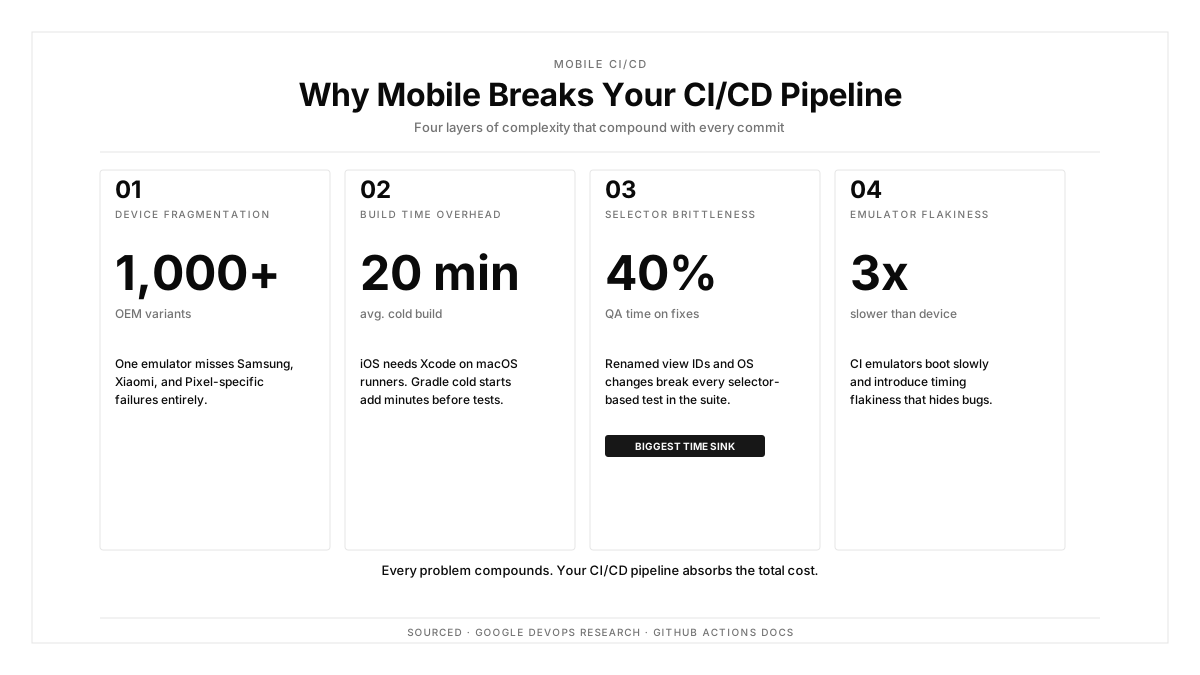
macOS runners cost substantially more per minute than Linux runners across major CI providers, and iOS builds require them. That cost shapes how often teams are willing to run full pipelines.
Gradle cold starts add minutes when the build cache misses. Warm caches across runs are worth more on mobile than on most backend projects.
Emulators inside throttled containers boot slowly and introduce timing flakiness. A test passing consistently on hardware can time out in CI purely from container CPU limits.
Signing artifacts need secure storage and rotation. Certificates expire, and an expired provisioning profile fails the release stage of an otherwise healthy CI/CD pipeline.
Store review sits after deployment and outside automation, usually clearing in 24 to 48 hours.
Building a CI/CD Pipeline That Handles Mobile Testing
Five structural decisions keep total duration workable.
Parallelize the platform builds. iOS and Android compile independently, so running them concurrently on separate runners removes the sequential penalty entirely. GitHub Actions handles this through matrix strategies, and GitHub integration connects test execution to those jobs.
Tier suites by runtime. Under five minutes for lint, type checks, and unit tests on every commit. Under fifteen minutes for integration, API checks, and smoke tests on every pull request. Longer regression suites before merge or on a nightly schedule.
Run device coverage in parallel rather than in sequence. Twenty configurations executed concurrently finish in roughly the time of one, which is what keeps the test stage from scaling with matrix width. Mobile test automation built for parallel real-device execution is the enabling piece here.
Cache aggressively and verify the cache actually hits. A cache configured but missing on every run is a silent multi-minute cost that survives for months.
Fail fast on cheap stages. Lint failures should stop the run before a macOS runner spins up, since paying for compute to discover a formatting error is pure waste.
Choosing Pipeline Tools
| Need | What to Check |
|---|---|
| macOS runner availability | Hourly cost, concurrency limits, Xcode versions offered |
| Parallelism | Concurrent job caps on your plan |
| Caching | Granularity, retention, and cross-branch reuse |
| Secrets handling | Encrypted storage, scoped access, rotation support |
| Device execution | Real hardware access and parallel run capacity |
| Reporting | Results surfaced on the pull request rather than in logs |
The last row matters more than it appears. A failure carrying a video replay attached to the pull request triages in seconds, while the same failure as a log line in a CI console takes minutes and often gets deferred.
For teams driving runs from outside a hosted CI, an API-based trigger covers custom orchestration, and hooks handle event-driven cases.
Handling Flaky Tests
Flakiness needs a policy rather than case-by-case judgment, because the default response is re-running and that habit is what kills pipeline trust.
Track pass rate per test across runs. A test below 98 percent is a defect in the test rather than an inconvenience.
Quarantine rather than delete. Move failing-intermittently tests to a non-blocking suite that still runs and still reports, so the signal survives while the gate stays usable.
Fix the root cause by category. Timing flakiness usually means a fixed wait where a condition wait belongs. Selector flakiness means the test is bound to implementation detail that shifts. Environment flakiness means state leaking between runs.
Cap quarantine duration. A test parked for a sprint gets fixed. A test parked for six months is dead weight with a maintenance cost.
Intent-based flows reduce the second category structurally, since anchoring to user goals survives the element changes that break selector-bound end-to-end suites.
Pipeline Security and Compliance
Signing material is the highest-value secret in a mobile CI/CD pipeline. A leaked Android keystore allows anyone to publish updates users accept as genuine.
Store secrets in the CI provider's encrypted store rather than in repository files, and scope them so pull requests from forks lack access. Rotate signing certificates before expiry rather than after a failed release stage.
Pin dependency versions and run dependency scanning inside the pipeline. A compromised transitive dependency reaches production through the same automation that provides your velocity.
Keep an audit trail linking each deployment to the commit, the approver, and the test results that gated it. Regulated environments require this, and it shortens incident investigation everywhere else.
Add performance checks to the gate where startup time or frame rate carry business impact, so regressions surface before release rather than in store reviews.
How Autosana Fits
We built Autosana for the test stage, which is where mobile CI/CD pipelines lose their duration budget.
Our CI/CD integration and GitHub integration trigger runs on commits and pull requests. Results arrive as pull request comments with session video, so triage happens where the code review already is.
We execute across real iOS and Android devices in parallel, which keeps the test stage roughly flat as the matrix widens. We organize flows into suites matching the tiering above, so fast checks stay fast.
We anchor tests to user intent, which removes the selector category of flakiness. A renamed element or a vendor layout shift keeps the flow valid.
For custom orchestration, our API for CI triggers runs from any system, and hooks fire on run events so you can gate deployments on results programmatically.
Conclusion
Time your own CI/CD pipeline end to end, then count how many runs that duration permits in a working day across your team size.
Where that number falls below the number of merges you want per day, the pipeline is the constraint on your delivery rate regardless of anything else. And check your suite's aggregate pass rate, because individually reasonable flake rates multiply into a gate that fails more often than it passes.
Parallelize the builds, tier the suites, and run devices concurrently. Those three moves usually recover more time than any tooling change.
.png)
FAQ
What is a CI/CD pipeline?
A CI/CD pipeline is an automated sequence taking a code change from commit to a deployable artifact through source, build, test, release, and deploy stages. It exists to shorten the time between introducing a defect and detecting it.
What are the five stages of a CI/CD pipeline?
Source checks out code and resolves dependencies. Build compiles artifacts. Test runs the suites. Release versions and signs. Deploy pushes to an environment or distribution channel.
Why does the test stage slow mobile pipelines down?
Execution time scales with the device matrix rather than the test count, failures carry ambiguous causes that need human investigation, and flakiness aggregates across a suite into frequent red runs.
How long should a CI/CD pipeline take?
Short enough that engineers wait for it. Fast checks under five minutes on every commit, pull request suites under fifteen, and longer regression work moved to merge gates or nightly schedules.
How do you handle flaky tests in a pipeline?
Track pass rate per test, quarantine anything below 98 percent into a non-blocking suite that still reports, fix by root cause category, and cap how long a test may stay quarantined.
What makes mobile CI/CD pipelines more expensive?
iOS builds require macOS runners that cost considerably more per minute than Linux, Gradle cold starts add time when caches miss, and emulators inside throttled containers introduce timing flakiness.
How should signing secrets be stored?
In the CI provider's encrypted secret store, scoped so fork-based pull requests lack access, with rotation scheduled ahead of certificate expiry rather than triggered by a failed release stage.
What is the difference between continuous delivery and continuous deployment?
Continuous delivery produces a release candidate that a human approves before shipping. Continuous deployment ships automatically once the pipeline passes. App store review pushes most mobile teams toward the first.