
APM Tools: What They Catch After Your Tests Pass
APM tools monitor production behaviour through metrics, traces, logs, and crashes. How mobile APM differs, which signals predict user harm, and how to feed findings back into tests.
Yuvan Sundrani · 15 min read
autosana.ai
TL;DR
- APM tools monitor a running application in production, reporting latency, error rates, crashes, and traces across every service behind a request.
- Mobile APM differs from backend APM in three ways that matter: the agent runs on hardware you control poorly, sampling is constrained by battery and data, and a fix takes days to reach users rather than minutes.
- Four signals predict user harm reliably: cold start time at a percentile, frame rendering time, ANR rate on Android, and crash-free sessions grouped by app version.
- APM reports what already happened to real users, so the useful configuration feeds every finding back into the suite rather than leaving it in a dashboard.
A release passes every suite, ships on Tuesday, and the crash-free session rate falls from 99.6 to 98.9 over the following week. Every test was green. The regression existed only on hardware and network conditions the test matrix lacked.
APM tools exist for that gap. They measure the running application against real users, on real devices, under conditions a pre-release environment approximates at best.
This guide covers what APM tools measure, how mobile APM differs from the backend kind, which signals actually predict user harm, how to size sampling and cost, and how to connect production evidence back to the suite.
What Do APM Tools Measure?
Application performance monitoring tools instrument a running application and report how it behaves in production. Four data types do most of the work, and each answers a different question at a different cost.
| Data type | Answers | Storage cost | Cardinality risk |
|---|---|---|---|
| Metrics | Is something wrong, and since when? | Low | High, if tagged carelessly |
| Traces | Where did the time go? | Medium, usually sampled | Low |
| Logs | What exactly happened at that moment? | High | Low |
| Crash reports | What broke, on which device and build? | Low | Low |
Metrics are numeric time series: request latency, error rate, throughput, memory. Cheap to collect and cheap to store, which makes them the backbone of alerting.
The cardinality caveat is worth stating, since it is where APM invoices grow unexpectedly. Every unique combination of tag values creates a separate time series. Tagging a latency metric by user identifier rather than by endpoint produces millions of series and a bill to match.
Traces follow one request across every service it touches, showing where the time went. A checkout taking 4 seconds decomposes into 120ms in the client, 80ms at the gateway, 3.2s in a downstream inventory call, and the remainder elsewhere. That decomposition is the whole value, since it converts an argument about whose fault it is into a measurement.
Logs carry detail for a specific moment, and modern APM tools correlate them to the trace that produced them so you reach the relevant lines rather than searching.
Crash and error reporting captures stack traces with device and OS context attached, which on mobile is frequently the only evidence available.
Google's DevOps research ties fast recovery to teams who can see production clearly, and that visibility is what APM tools are built to supply.
How Does Mobile APM Differ From Backend APM?
| Dimension | Backend APM | Mobile APM |
|---|---|---|
| Where the agent runs | Your infrastructure | A user's device |
| Sampling constraint | Cost | Battery, data allowance, storage |
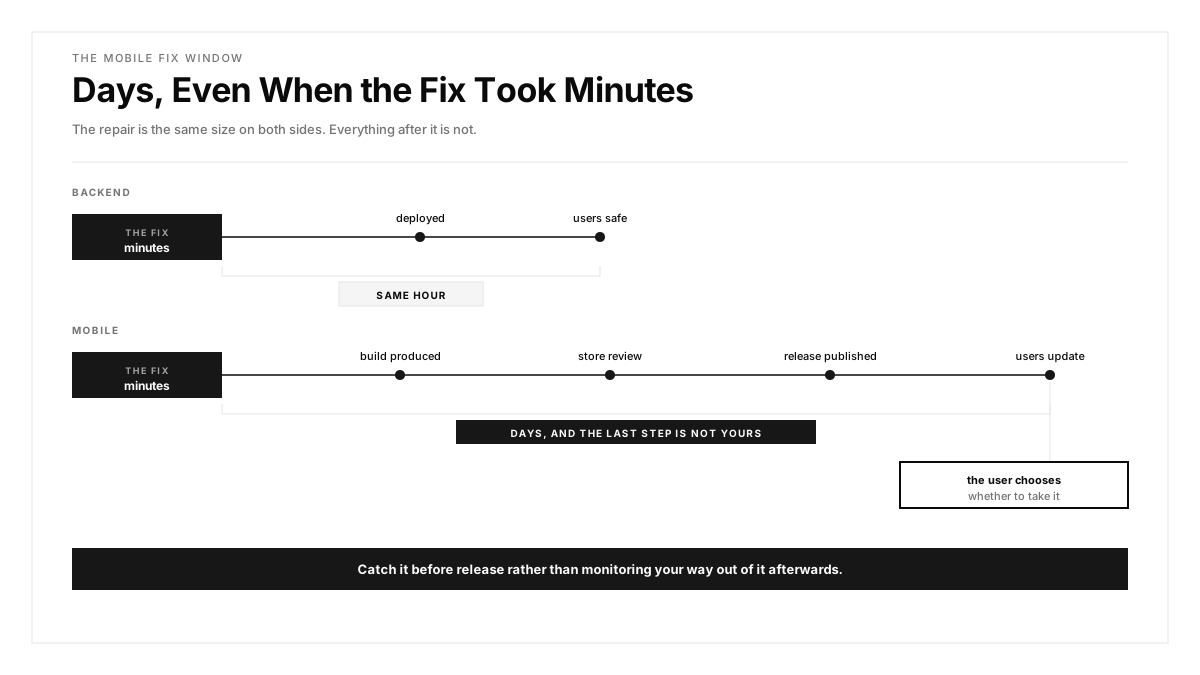
| Fix delivery | Minutes | Store review, then user update |
| Environment variance | Known and controlled | Thousands of device and OS combinations |
| Data arrival | Immediate | Delayed, batched, sometimes days late |
| Primary signals | Latency, error rate, saturation | Cold start, frame rendering, ANR, crash-free rate |
Three rows carry real consequences.
Fix delivery changes the economics completely. A backend regression gets corrected and deployed within the hour. A mobile regression needs a build, a review cycle, and then users choosing to update, so the window between detection and resolution runs to days even where the code change takes minutes. Testing in production through feature flags and staged rollout is the usual mitigation, since a flag reaches users faster than a binary does.
The data arrival row causes misreadings. A device offline for two days uploads its queued crash reports on reconnection, so yesterday's crash count rises tomorrow. Dashboards read during that window understate the problem, and a team declaring an incident resolved on day one frequently finds the figure climbing on day three.
The environment variance row is why aggregate numbers mislead on mobile. A crash affecting 4 percent of sessions could be spread evenly or concentrated entirely on one vendor's OS fork, and those are different investigations with different fixes.
Which APM Signals Are Worth Alerting On?
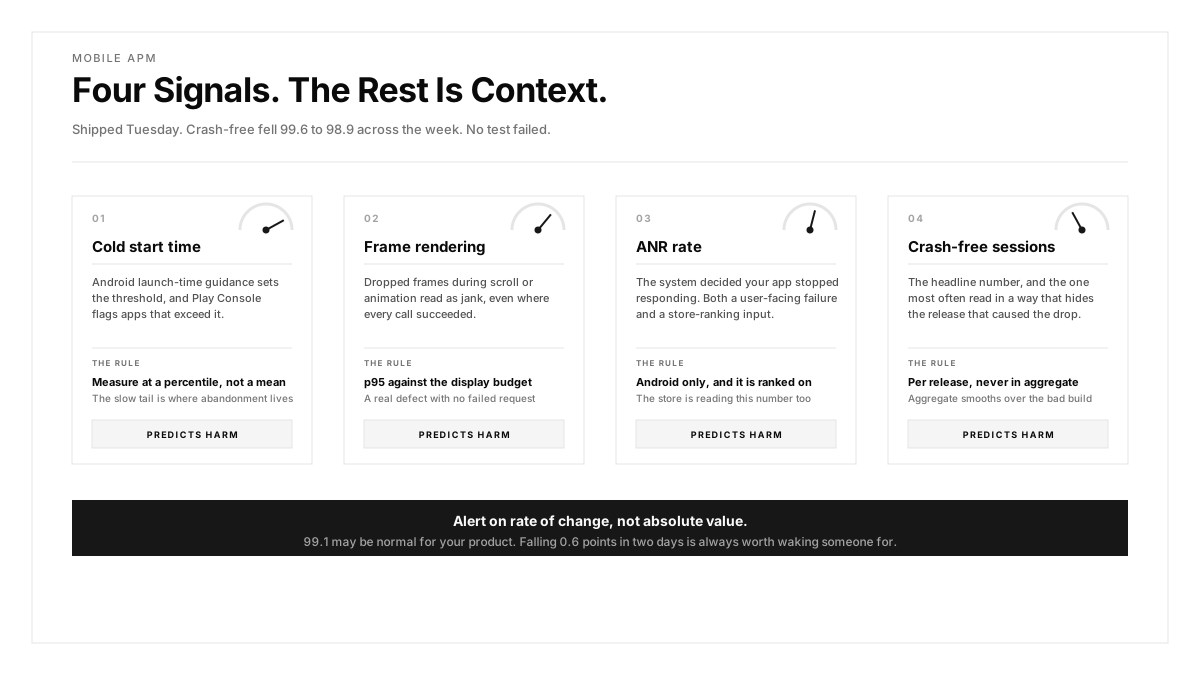
Four mobile signals predict user harm reliably. The rest supply context during an investigation rather than warranting a page.
Cold start time. Android's own guidance sets thresholds where startup becomes a user problem, and Play Console flags apps exceeding them. Measure at a percentile rather than a mean, since the slow tail is where abandonment lives. A p50 of 1.1 seconds alongside a p95 of 6 seconds describes a product that feels fast to half its users and broken to the rest.
Frame rendering. Dropped frames during scroll or animation read as jank. The web.dev performance guidance covers the equivalent budgets on the web side, and the reasoning carries across. A p95 frame time above the display budget is a genuine defect even where every call succeeds.
ANR rate on Android. The system has decided your app stopped responding. This is both a user-facing failure and a store ranking input, which makes it the one signal with a direct commercial channel.
Crash-free session rate. The headline number, and the one worth tracking per release rather than in aggregate, since aggregate smooths over the release that caused the drop.
How Should Alert Thresholds Be Set?
Set alerts on rate of change rather than absolute value. A crash-free rate of 99.1 percent may be entirely normal for a given product, while the same rate falling 0.6 points across two days always warrants attention.
Three further refinements reduce noise.
Alert on sustained breach rather than on a single sample. A thirty-second latency spike during a deploy is expected, so require the condition to hold across several evaluation windows before paging anybody.
Scale the threshold to traffic. A crash-free rate computed across 40 sessions carries enormous variance, so suppress alerts below a minimum session count or the overnight hours will page somebody for statistical noise.
Separate pageable from reviewable. A regression needing someone awake at 3am is rare. Most findings belong in a daily review, and mixing the two teaches people to ignore both.
How Much Should You Sample?
Sampling is where mobile APM cost and fidelity trade against each other, and the decision deserves more attention than it usually receives.
Full collection on every session is affordable for crash reports, which are rare and small. It becomes expensive for traces and prohibitive for verbose logging, both in invoice terms and in battery and data consumed on the user's device.
A workable arrangement varies the rate by what you are trying to learn.
During a staged rollout, sample aggressively. The first 1 percent of users receiving a release is the population you most need detail from, and the volume is small enough that full tracing costs little.
At full rollout, sample traces at a low rate and keep crash reporting at 100 percent. A 1 percent trace sample across millions of sessions still produces a statistically useful distribution.
Raise the rate on error paths. Tail-based sampling, where the decision happens after the trace completes, lets you keep every failed request while discarding most successful ones. This is the single configuration change that most improves the value of a trace budget.
Check what the SDK does when the network is unavailable. An agent that buffers indefinitely consumes storage on the device, while one that drops silently loses exactly the evidence from users on poor connections, who are often the ones having problems.
How Should You Compare APM Tools?
Feature lists converge quickly. Six properties differentiate in practice.
Mobile SDK weight and behaviour. The agent ships inside your app, so binary size, battery draw, and its own crash risk become your problem. Check the added binary size and ask what happens when the agent itself fails.
Sampling control without a release. You need the ability to change sampling rates remotely, since the moment you most want more detail is during an incident, and shipping a build then takes days.
Release correlation. The tool should group every signal by app version, because the recurring question is whether this release is worse than the last.
Device and OS breakdown. A crash concentrated on one vendor's OS fork is a different investigation from one spread evenly. Tools that flatten this cost you the diagnosis.
Trace continuity across the mobile boundary. Few tools follow a trace from the device through the gateway into backend services. Where yours does, a slow screen stops being a debate about ownership.
Price model. Most APM tools bill on data volume, so a chatty SDK at full sampling across millions of sessions becomes expensive quickly. Model the cost against your actual session count before committing, and ask specifically how custom metric cardinality is charged.
Our comparison of mobile testing tools covers the adjacent pre-release category, and the two toolchains answer different questions rather than competing.
How Do You Turn an APM Finding Into a Test?
APM tools report what already reached users. The value compounds when each report becomes a test, and the sequence has four steps.
Triage against existing coverage first. A production crash matching a flow your regression suite already covers points at a weakness in the test rather than a gap in the coverage map. A crash on a flow with zero coverage names your next piece of work directly.
Close the device gap second. Where a crash concentrates on configurations absent from your matrix, the matrix is the finding. Real device testing against those specific models costs less than a second incident on the same hardware.
Move the threshold left third. A latency budget existing only as an APM alert should also exist as a pre-release gate, so the regression fails a build rather than a dashboard. Mobile app performance testing covers how to measure it before release, and the threshold should match the production alert exactly so the two agree.
Record the escape point fourth. For each production finding, note the earliest stage that could have caught it. A pattern concentrating on one stage identifies where your process leaks, which is the measurement quality engineering practice depends on.
Testing asks whether this build is safe to ship. APM asks what the last build did to users. Teams running only the second are debugging in public, which on mobile carries a multi-day correction cycle.
How Autosana Fits
We sit on the pre-release side of this, measuring the same signals an APM tool reports afterwards.
Our performance monitoring captures startup time, frame rates, and crash-free sessions during runs on real hardware, so a regression in those numbers fails a run rather than appearing in a dashboard a week later.
Our network traffic inspection records request counts, payload sizes, and timing under a configured network profile, which covers the data-usage questions APM tools surface only after users have paid for the bandwidth.
Failures link to issues, and notifications route them to the owning team. Hooks fire on run events where you want to gate a deployment programmatically.
Because we run across real device and OS combinations, any configuration your APM tool flags in production can be added to the suite matrix and checked on every commit afterwards. That is the mechanism that converts a production finding into permanent coverage.
Conclusion
Open your APM dashboard and read crash-free session rate split by app version rather than in aggregate.
Where one release shows a visible drop, check two things: whether the responsible flow had test coverage, and whether the affected device sat in your matrix. One of those two is almost always the answer, and both are correctable before the next release.
Then take your most important latency alert and ask whether the same threshold exists as a pre-release gate. Where it lives only in production, you are monitoring a problem that a build could have refused.
.png)
FAQ
What are APM tools?
Application performance monitoring tools instrument a running application and report how it behaves in production, using metrics, distributed traces, correlated logs, and crash reporting with device context attached.
How does mobile APM differ from backend APM?
The agent runs on a user's device rather than your infrastructure, sampling is constrained by battery and data, data arrives late from offline devices, and fixes require a store review plus a user update rather than a same-hour deploy.
Which mobile APM signals matter most?
Cold start time at a percentile, frame rendering time, ANR rate on Android, and crash-free session rate tracked per app version. A p50 of 1.1 seconds beside a p95 of 6 seconds describes two different products.
Should alerts use absolute values or rate of change?
Rate of change. A crash-free rate of 99.1 percent may be normal for a given product, while a drop of 0.6 points over two days warrants attention regardless of the starting figure.
How much should mobile APM sample?
Keep crash reporting at 100 percent since it is cheap. Sample traces aggressively during staged rollout and lightly at full rollout, and use tail-based sampling to retain every failed request while discarding most successful ones.
What should you check when comparing APM tools?
SDK binary size and offline behaviour, remote sampling control without a release, grouping by app version, device and OS breakdown rather than flattened aggregates, trace continuity across the mobile boundary, and how custom metric cardinality is billed.
Do APM tools replace pre-release testing?
They answer a different question. APM reports what already reached users, while testing asks whether a build is safe to ship. Running only APM means debugging in public across a multi-day mobile correction cycle.
How do you turn an APM finding into a test?
Triage against existing coverage, add the affected device to the matrix, move the production threshold left into a pre-release gate, and record the earliest stage that could have caught the defect.