
Best Mobile Testing Tools in 2026: 10 Compared by Pipeline Role
Ten mobile testing tools reviewed by job: test authoring, device execution, CI integration, and observability. Honest pricing and tradeoffs from practitioners.
Yuvan Sundrani · 14 min read
autosana.ai
Key Takeaways
- Mobile testing tools serve four pipeline jobs: authoring (who writes the tests), execution surface (where they run across devices), CI integration (how results feed back to PRs), and observability (what breaks in production).
- Appium remains the most widely adopted open-source mobile testing framework, but its maintenance cost is high. Teams report spending 40%+ of QA time on flaky Appium tests caused by selector brittleness.
- Cloud device labs (BrowserStack, Firebase Test Lab, Kobiton) solve the device coverage problem but not the test authoring problem. You still need a framework or agent to write the tests.
- The 2026 shift: AI self-healing is moving from differentiator to default. Teams want tests that survive UI changes without manual selector updates.
- Autosana generates intent-based mobile test flows that run on real iOS and Android devices, self-heal across OEM skins and OS updates, and post session replay to every PR.
Which mobile testing tools are teams using in 2026?
| Tool | Pipeline Job | Best For | Platform | Pricing |
|---|---|---|---|---|
| Autosana | Test authoring (agent) | Teams wanting AI-generated mobile flows that self-heal across iOS, Android, and web | iOS + Android + Web | Contact for pricing |
| Appium | Test authoring (code) | QA engineers needing one open-source framework for iOS and Android | iOS + Android | Free, open source |
| Espresso | Test authoring (native) | Android teams needing fast in-process UI tests | Android only | Free (Android SDK) |
| XCUITest | Test authoring (native) | iOS teams aligned with Apple SDK updates | iOS only | Free (Xcode) |
| Maestro | Test authoring (simple) | Teams wanting YAML-based mobile flows without coding | iOS + Android | Free; paid cloud |
| BrowserStack App Automate | Execution surface | Enterprise teams needing 3,000+ real devices at scale | iOS + Android | From $225/mo |
| Firebase Test Lab | Execution surface | Android-first teams needing Google-hosted real devices | Android + iOS | Free tier; pay-per-use |
| Kobiton | Execution surface | Teams needing AI-driven session replay and device analytics | iOS + Android | Contact for pricing |
| Katalon | Test authoring (low-code) | Mixed teams needing both coded and keyword-driven mobile tests | iOS + Android + Web | Free; from $208/mo |
| Sentry | Observability | Teams tracking mobile crashes, ANRs, and performance in production | iOS + Android | Free tier; paid plans |
Test authoring tools
These write and maintain mobile tests. The tools differ in who creates the test, what language it uses, how much maintenance you absorb, and whether they cover one platform or multiple.
Autosana: best for cross-platform mobile E2E
Key Features:
- Intent-based flows generated from plain-English descriptions
- Runs natively on real iPhones, Android devices (Samsung, Pixel, Xiaomi, OnePlus), and web browsers from a single flow definition
- Self-heals when OEM skins change dialog layouts or OS updates alter permission flows
- Session replay posted to every PR via GitHub integration
- MCP server connects to coding agents (Cursor, Claude Code) so tests update when the code changes
Why teams pick it: A QA engineer on r/QualityAssurance described the mobile testing reality: "mobile testing seems to take longer. Every sprint, same feature scope." The debugging surface compounds: app state, OS version, device permissions, and cloud device slowness. Autosana absorbs that complexity. One flow definition handles all three platforms. When Samsung's One UI moves a permission dialog, the agent re-anchors visually instead of failing on a stale selector.
The tradeoff: Does not replace Espresso for unit-level Android UI tests or XCUITest for iOS-specific integration tests. Does not run performance profiling, memory leak detection, or accessibility audits. For single-platform teams with a dedicated SDET who owns the native test suite, the platform-native framework is simpler. The Gobi Maps case study shows where the agent layer pays off.
Appium: best open-source cross-platform framework
Key Features:
- Cross-platform automation for native, hybrid, and mobile web apps using the WebDriver protocol
- Supports Java, Python, Ruby, JavaScript, C# with any Selenium client
- No app modification required. Tests run on the final binary
- Large ecosystem with community plugins and cloud lab integrations
Why teams pick it: Appium is the standard. Teams with Selenium experience reuse their skills. A developer on r/androiddev described the testing landscape: Appium works across platforms, but the setup overhead and selector brittleness push teams toward alternatives. Appium's strength is universality. Its weakness is the maintenance cost of keeping selectors stable across OS versions and OEM skins.
The tradeoff: Setup complexity (Appium server, desired capabilities, driver management). Slower than native frameworks because tests run out-of-process. Selector-based tests break when view IDs change. The UiAutomator2 and XCUITest drivers add stability but not self-healing.
Where Autosana fits in: Autosana replaces the Appium E2E layer for teams tired of selector maintenance. Teams keep Appium for API-level testing or specific WebDriver-based workflows and layer Autosana for cross-platform regression.
Espresso: best native Android framework
Key Features:
- Google's first-party Android test framework with Android Studio integration
- In-process execution with automatic UI thread synchronization
- Direct view hierarchy access for fast, deterministic assertions
- Kotlin and Java with access to Google's Espresso APIs
Why teams pick it: Fastest Android test framework. Tests run in the same process as the app, eliminating the flakiness of cross-process tools. A commenter on r/softwaretesting noted the bias risk: "every test comes from that same mental model." Espresso is powerful but tests reflect what the developer thinks should work, not necessarily what the user experiences.
The tradeoff: Android only. Kotlin or Java required. Tests break when view IDs change or Jetpack Compose recomposition shifts the semantics tree. No iOS, no web, no cross-platform.
XCUITest: best native iOS framework
Key Features:
- Apple's official UI testing framework built into Xcode
- Direct communication with the iOS accessibility layer for reliable element identification
- Swift or Objective-C test authoring
- Immediate compatibility with new iOS and iPadOS releases
Why teams pick it: XCUITest is what Apple builds, maintains, and ships with Xcode. Tests update when Apple updates the accessibility layer. Faster than any third-party iOS wrapper.
The tradeoff: iOS and iPadOS only. No Android, no web. Tests break when accessibility identifiers change across SwiftUI updates. Cloud execution requires a third-party device lab.
Maestro: best simple mobile flows
Key Features:
- YAML-based test definitions with no coding required
- Built-in waiting and retry logic that reduces flakiness
- Visual element selection alongside accessibility-based selectors
- Local and cloud execution options
Why teams pick it: Maestro removes the coding barrier. QA engineers who cannot write Kotlin or Swift can author mobile tests in YAML. Setup is minimal compared to Appium. A practitioner on r/QualityAssurance described the value of simple automation: "purely automation" works for teams wanting fast regression without framework complexity.
The tradeoff: YAML simplicity limits complex assertions and data-driven testing. The Maestro cloud offering is separate from the open-source CLI. No web coverage. Less mature ecosystem than Appium.
Katalon: best low-code mobile testing
Key Features:
- Dual-mode: keyword-driven (low-code) and script-based (Groovy/Java)
- Built-in object repository with self-healing locators
- Mobile, web, API, and desktop testing in one platform
- Free tier with community support; paid plans from $208/mo
Why teams pick it: Katalon bridges the gap between QA engineers who want low-code simplicity and SDETs who need full scripting control. The self-healing locator feature reduces maintenance compared to raw Appium.
The tradeoff: Groovy as the scripting language limits the talent pool. The free tier has execution limits. Enterprise features (parallel execution, advanced analytics) require the paid plan. Tests are tied to the Katalon ecosystem.
Execution surface tools
These run your tests on devices. They do not write tests. You bring the framework (Appium, Espresso, XCUITest, Maestro) and they provide the device infrastructure.
BrowserStack App Automate: best enterprise device cloud
Key Features:
- 3,000+ real iOS and Android devices
- Parallel test execution across device/OS combinations
- CI/CD integration with Jenkins, GitHub Actions, CircleCI, Azure DevOps
- Video recordings, device logs, and network logs for debugging
- AI-powered test observability with failure analytics
Why teams pick it: BrowserStack is the largest cloud device lab. Teams that need to test on Samsung Galaxy S24, iPhone 15 Pro, Pixel 9, and Xiaomi 14 in the same CI run use BrowserStack because they cannot maintain that hardware in-house.
The tradeoff: Starts at $225/mo. Device queue times during peak hours. You still need a test framework to write the tests. BrowserStack runs them; it does not write them.
Firebase Test Lab: best for Android-first teams
Key Features:
- Google-hosted real Android devices and emulators
- Robo testing (automated crawling without scripts)
- Integration with Android Studio, Gradle, and Cloud Build
- Free tier: 15 virtual device tests/day, 5 physical device tests/day
Why teams pick it: Firebase Test Lab is free for light usage and integrates natively with the Android build system. The Robo test feature crawls the app without any test scripts, catching crashes and ANRs that structured tests miss.
The tradeoff: iOS support exists but is less mature than Android. Free tier limits are tight for teams with large test suites. Real-device availability is narrower than BrowserStack. No web testing.
Kobiton: best for session replay and device analytics
Key Features:
- Real iOS and Android device cloud with AI-driven session analysis
- Scriptless test automation with visual validation
- Manual and automated test support
- Session replay with step-by-step visual comparison across devices
Why teams pick it: Kobiton's session replay feature shows exactly how the app rendered on each device, making it easier to identify device-specific visual regressions without comparing screenshots manually.
The tradeoff: Contact-for-pricing model with no public transparency. Smaller device inventory than BrowserStack. The scriptless automation works for simple flows but lacks the depth of coded frameworks for complex scenarios.
Observability
Sentry: best for production mobile monitoring
Key Features:
- Real-time crash reporting with stack traces for iOS and Android
- ANR (Application Not Responding) detection on Android
- Performance monitoring with transaction tracing
- Release health tracking with crash-free session rates
- Free tier: 5K errors/mo, 10K transactions/mo
Why teams pick it: Testing catches bugs before release. Sentry catches the ones that escape. A DevOps engineer on r/devops described the gap: "flaky tests consumed 40% of QA time," meaning real bugs slip through while the team debugs false failures. Sentry closes the loop by catching production crashes that pre-release testing missed.
The tradeoff: Sentry is observability, not testing. It does not write tests, run them, or manage test cases. It complements every tool on this list but replaces none of them.
How to choose the right mobile testing tool
- Cross-platform team, high automation, wants AI-generated tests: Autosana
- QA team with Selenium/WebDriver skills: Appium + BrowserStack
- Android-only team with SDETs writing Kotlin: Espresso + Firebase Test Lab
- iOS-only team: XCUITest + BrowserStack or Xcode Cloud
- Non-coding QA team, simple flows: Maestro or Katalon
- Enterprise needing max device coverage: BrowserStack App Automate
- Production crash monitoring: Sentry alongside any authoring tool
Where mobile testing tools do not help
- Performance profiling. Instruments (iOS) and Android Profiler measure CPU, memory, and GPU at the frame level. Testing tools measure pass/fail.
- Accessibility audits. Accessibility Scanner (Android) and Xcode Accessibility Inspector check VoiceOver/TalkBack behavior. These require human judgment.
- Security scanning. OWASP ZAP, MobSF, and Burp Suite handle vulnerability detection on mobile binaries.
- App store compliance. Apple's App Store Review Guidelines and Google Play policies require manual review, not automation.
Conclusion
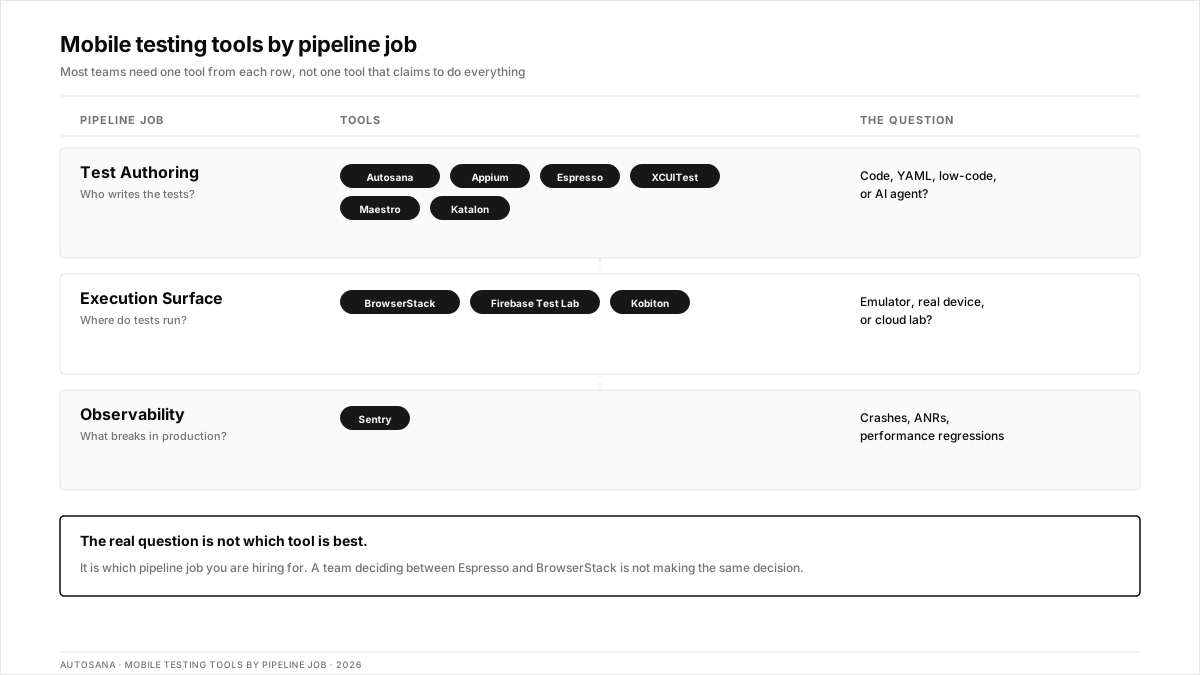
The best mobile testing tool depends on which pipeline job you are hiring for. Authoring tools (Autosana, Appium, Espresso, XCUITest, Maestro, and Katalon) write the tests. Execution tools (BrowserStack, Firebase, Kobiton) run them on devices. Observability tools (Sentry) catch what testing missed. Most teams need one from each category, not one tool that claims to do everything.
.png)
Frequently asked questions
What is the best free mobile testing tool?
Appium is the most capable free option for cross-platform mobile automation. Firebase Test Lab offers a free tier for Android testing (15 virtual, 5 physical device tests/day). Maestro is free for local execution. Espresso and XCUITest are free with their respective SDKs.
Can you test mobile apps without writing code?
Yes. Maestro uses YAML definitions. Katalon offers keyword-driven testing. Firebase Test Lab's Robo test crawls apps without scripts. Autosana generates intent-based flows from plain-English descriptions with no coding required.
What is the difference between mobile testing tools and mobile testing frameworks?
A framework (Appium, Espresso, XCUITest) provides the code library for writing tests. A tool may include the framework, device infrastructure, reporting, and CI integration in one platform. BrowserStack is a tool that runs tests written in frameworks. Autosana is a tool that generates and runs tests without requiring a framework.
How many real devices do you need for mobile testing?
Build a device matrix from your analytics covering the top 10-15 device/OS combinations that represent 80%+ of your user base. Include at least one device from each major OEM (Samsung, Pixel, Xiaomi for Android; iPhone, iPad for iOS).
Should you use emulators or real devices for mobile testing?
Both. Emulators for fast CI feedback on every commit (logic, layout, navigation). Real devices for release validation (biometrics, camera, GPS, OEM-specific behavior, battery impact). Never release-test on emulators only.
What is AI self-healing in mobile testing?
AI self-healing means the testing tool automatically updates element locators when the UI changes, instead of failing the test. Autosana uses visual intent rather than element IDs, so tests survive UI refactors, OEM skin changes, and OS updates without manual maintenance.
How do you integrate mobile testing tools with CI/CD?
Most tools offer CLI commands or APIs that trigger test runs from CI pipelines (Jenkins, GitHub Actions, GitLab CI, CircleCI). Autosana posts session replay directly to pull requests. BrowserStack and Firebase provide plugins for major CI platforms.
Is Appium still relevant in 2026?
Yes, Appium remains the most widely adopted open-source mobile testing framework. However, teams increasingly layer AI-native tools on top for E2E regression because Appium's selector-based approach requires significant maintenance when UIs change frequently.