
Testing in Production: Feature Flags, Canaries, and Why Mobile Has No Choice
Staging is an approximation of production, never a copy. How feature flags and canary releases build a safe control surface, and why app store review makes flags mandatory on mobile.
Yuvan Sundrani · 18 min read
autosana.ai
Staging is an approximation of production assembled by people who already knew what they were building. It has synthetic data, a fraction of the traffic, a simplified network, and none of the accumulated state that fifteen million real accounts produce. Some questions cannot be answered there, and pretending otherwise is how teams ship a change that passed everything and still took down checkout. Testing in production is the practice of answering those questions safely, with a control surface built in advance.
Key Takeaways
- Staging cannot answer questions about scale, real data distribution, third-party behaviour under load, or accumulated account state. Those are production questions and always were.
- Feature flags decouple deployment from release, which is useful on web and close to mandatory on mobile, where app store review puts days between a fix and its availability.
- Canary and feature flag operate at different layers. Canary shifts traffic at the infrastructure level, a flag switches behaviour at the application level, and mature teams run both.
- Every flagged change doubles the paths through your code, so CI must test both states. A suite that only covers the new path will pass while the rollback path is broken.
- Autosana runs intent-based flows on real devices against either flag state, so verifying both branches does not mean maintaining two parallel test suites.
What can staging genuinely not tell you?
The useful version of this argument is specific rather than philosophical. Four categories of question survive a perfect staging environment.
Scale and concurrency. A query that returns in 40 milliseconds against 10,000 staging rows may take 40 seconds against 80 million production rows with a different index distribution. Nothing about the code changed. The data did.
Real data shape. Production accounts accumulate history that nobody would think to seed. A user with 900 saved addresses, an order placed in a currency you stopped supporting, a profile created before a required field existed. These are not edge cases invented by a tester, they are the residue of years of real behaviour.
Third-party behaviour under real conditions. Sandbox payment processors, sandbox identity providers, and sandbox mapping services behave politely. Production versions rate-limit, degrade regionally, and occasionally change a response shape without telling you.
Device and network reality. Especially on mobile, where the population is a long tail of OEM skins, OS versions, and connection qualities that no staging matrix fully enumerates.
A tester on r/softwaretesting made the point that the environments teams trust most are the ones they configured themselves, which is also exactly why those environments fail to surprise them.
The reframe worth holding: testing in production is not a replacement for testing before production. It is the admission that the two answer different questions. Pre-release testing proves your logic is correct. Production testing proves your assumptions about the world were right. Teams that collapse the two in either direction get hurt.
How does the feature flag lifecycle actually work?
A feature flag separates the act of shipping code from the act of turning behaviour on. That separation is the entire control surface, and it has five stages.
| Stage | What Is True | Who Sees the New Path |
|---|---|---|
| Created | Code is merged, flag defaults off | Nobody |
| Dark launch | New path executes, result discarded | Nobody, but it runs |
| Staged rollout | Flag on for a growing cohort | 1%, then 5%, then 25% |
| Full rollout | Flag on for everyone | Everyone |
| Removed | Flag and dead branch deleted | Everyone, permanently |
Dark launch is the most underused stage. The new code path runs against real production traffic, and its output is thrown away rather than shown. You get genuine performance characteristics, genuine error rates, and genuine data-shape surprises with zero user exposure. For a risky rewrite, this is the cheapest real signal available.
Staged rollout is where the metric gates belong. Each step up should be conditional on error rate, latency, and at least one business metric holding steady. Promoting on a schedule rather than on evidence is a rollout in name only.
Removal is the stage everyone skips, and skipping it is how a codebase accumulates two hundred permanent flags nobody dares touch. Every live flag doubles the number of paths through the code it guards, so ten overlapping flags describe a combinatorial space no one is testing. Put an expiry date on the flag when you create it, in the ticket, the way you would with a quarantined test.
The kill switch is a flag used defensively rather than for rollout: a single toggle that disables a feature instantly without a deploy. Its value is measured in minutes of incident duration, and it only works if somebody has verified it recently. An untested kill switch is a comfort object.
Why are feature flags close to mandatory on mobile?
This is where mobile diverges sharply from web, and where most general-purpose advice stops being useful.
On web, a bad release can be rolled back in minutes. You revert the deploy and the next request serves the old code. Flags are a convenience.
On mobile, you cannot do that. A broken build is already installed on devices. Shipping a fix means submitting to app review, waiting for approval, and then waiting for users to actually update, which many never do. Realistically that is days before the fix reaches most of the affected population, and the users with the oldest versions are frequently the ones least likely to update.
So the ability to change behaviour without shipping a binary is not an efficiency gain on mobile. It is the only fast remediation that exists. A remotely controlled flag turns a multi-day app-store incident into a configuration change.
This has a design consequence worth stating. Flag evaluation must work when the app cannot reach your config service, which means every flag needs a safe default baked into the binary and sensible caching. A flag system that fails closed during an outage, or that blocks app launch waiting for a config fetch, has turned your safety mechanism into a new failure mode.
A practitioner on r/QualityAssurance described the general trap, which is that controls added for safety frequently become the thing that fails, because they are built once during a calm week and never exercised again.
What is the difference between a canary release and a feature flag?
They are frequently discussed as alternatives. They operate at different layers and complement each other.
Canary is infrastructure. You route a small percentage of traffic to a new version of the service. The unit of control is the deployment, the targeting is usually random, and rollback means shifting traffic back. It catches problems in anything the new build changed, including things you were not thinking about.
A feature flag is application logic. One version is deployed everywhere, and a conditional inside it decides behaviour per user. The unit of control is the feature, targeting can be precise, and rollback is a toggle. It catches problems with one specific change.
| Canary | Feature Flag | |
|---|---|---|
| Layer | Infrastructure | Application |
| Unit | Whole deployment | One feature |
| Targeting | Usually random | Precise, per attribute |
| Rollback | Shift traffic | Toggle |
| Catches | Anything in the build | One known change |
| Mobile viable | Server side only | Yes, including client |
The practical pattern is both. Canary the deployment to catch what you did not anticipate, and flag the individual risky feature to control what you did. On mobile, canary applies to your backend while the client relies on flags and staged store rollouts.
Google Play and the App Store both support percentage-based release rollouts, which is the closest mobile equivalent to a canary for client code. It is coarser than a server canary and considerably better than nothing, with the caveat that pausing a staged rollout stops new installs without reverting anyone who already updated.
What does CI have to do differently when you use flags?
Here is the requirement teams miss, and it is the main reason flagged rollouts go wrong in a way nobody predicted.
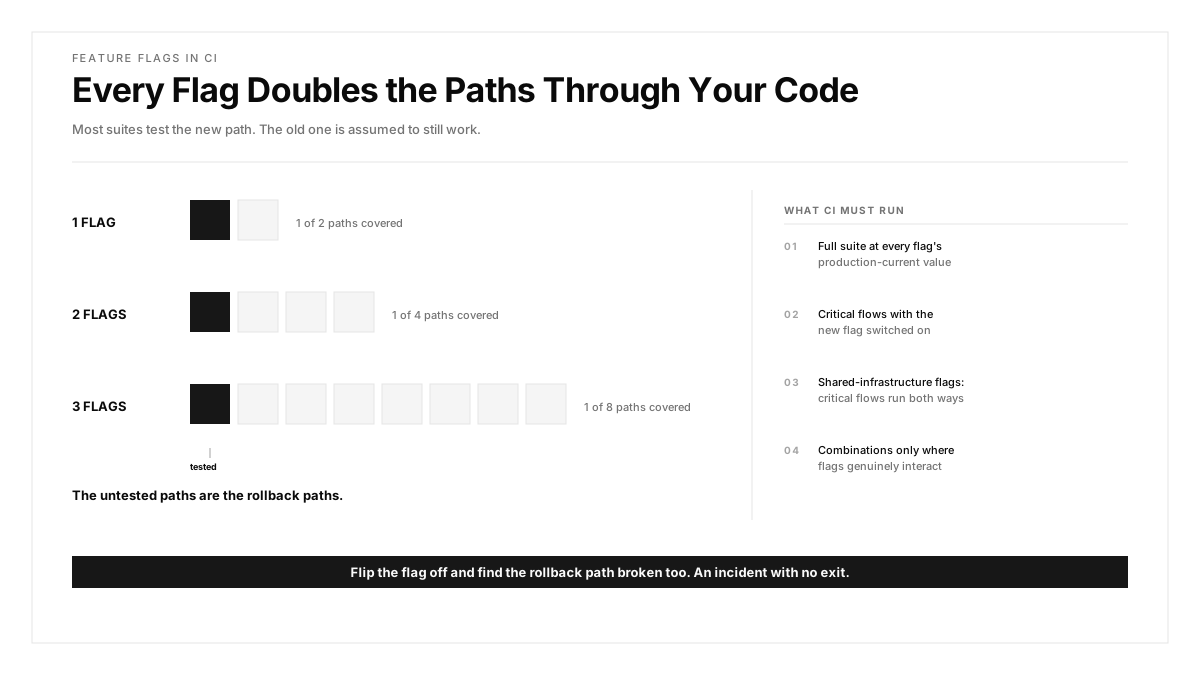
Every flagged change doubles the paths through the guarded code, so CI has to test both states.
Most suites test the new behaviour, because the new behaviour is what the ticket was about. The old path is assumed to still work, since it was working yesterday. That assumption fails whenever the change touched shared code: a refactor underneath both branches, a modified database write used by both, a shared helper whose signature changed.
The failure mode is specific and ugly. You roll out to 5 percent, something looks wrong, you flip the flag off, and the rollback path is broken too. Now you have an incident with no exit.
A workable approach:
- Run the full suite with every flag at its production-current value. This is the state users are actually in.
- Run critical-flow tests with the new flag on. This is the state you are rolling out to.
- For flags guarding shared infrastructure, run the critical flows both ways before the rollout begins.
- Test combinations only where flags genuinely interact. Exhaustive combinatorial coverage is not achievable and is rarely the real risk.
An engineer on r/Everything_QA framed this well, noting that teams add conditional complexity to production far faster than they add it to the test matrix, so the gap between what can happen and what gets verified widens quietly.
Where does synthetic monitoring fit?
Flags and canaries give you control. Synthetic monitoring gives you detection.
A synthetic monitor runs a real user journey against production on a schedule, typically every five to fifteen minutes, from outside your infrastructure. It is the difference between learning about a broken checkout from your own alerting and learning about it from Twitter.
Three rules keep it useful. Monitor journeys rather than endpoints, because a health check that returns 200 while checkout is broken is actively misleading. Run from multiple regions, since degradation is frequently regional. And alert on the business-critical path only, because a synthetic suite that pages on everything gets muted within a month, which is the same failure as not having one.
A QA lead on r/softwaretesting described the familiar end state of noisy alerting, where the signal is technically present and nobody is reading it any more.
What metrics should gate each rollout step?
A staged rollout without gates is a schedule, not a safety mechanism. The point of stopping at 1 percent is to look at something before continuing, and "looks fine" is not a gate.
Three tiers of signal, and all three are needed because each misses what the others catch.
Technical signals are the fastest to move and the easiest to automate: error rate, crash-free session rate, p95 latency, and failed request ratio for the affected endpoints. Compare the flagged cohort against the control cohort rather than against yesterday, because comparing against yesterday confounds your change with everything else happening that day.
Business signals are slower and more important. Conversion through the affected funnel, completion rate for the flow, and revenue per session. A change can be technically flawless and commercially negative, and only this tier will tell you. The classic version is a redesign that reduces errors because fewer people reach the error, since fewer people reach anything.
Qualitative signals are slowest and catch what neither of the others sees. Support ticket volume and topic, app store review sentiment, and in-product feedback. These lag by hours or days, which is why a rollout should not sprint from 1 to 100 percent in an afternoon even when the dashboards look clean.
Two practical rules. Define the abort threshold before the rollout starts and write it in the ticket, because a threshold decided while watching a graph is a threshold that will be rationalised. And hold each step long enough to cover a full usage cycle, which for most consumer products means at least one business day, so you are not drawing conclusions from a single timezone's traffic.
A QA lead on r/QualityAssurance made the broader point that teams instrument the things that are easy to instrument, which means the dashboard answers the questions it can answer rather than the ones that would have caught the incident.
One asymmetry worth internalising: rolling forward is reversible and rolling back after data has been written frequently is not. If a flagged path writes to the database in a new shape, flipping the flag off stops new writes and does nothing about the rows already written. Migration-adjacent flags need a rollback plan for the data, not just for the code path, and that plan should exist before the 1 percent step rather than after the incident.
How does Autosana support testing in production?
Autosana is an AI-native E2E testing agent for iOS, Android, and web. Flows are stated as intent and the agent resolves targets at run time from on-screen context.
For flagged rollouts that matters in one specific way. Because a flow describes a user goal rather than a fixed sequence of elements, the same stated flow can run against either flag state. If the new checkout layout moves the promo field and renames the button, the intent "apply the promo and verify the discounted total" holds in both branches. Verifying both states does not mean maintaining two parallel suites, which is the practical reason teams skip the rollback path.
Runs execute on hosted real devices, which matters for the mobile case, since the long tail of OEM and OS behaviour is precisely what staging cannot enumerate. Results arrive through the GitHub integration with session replay attached, so a rollout decision is made from a recording rather than from a metric and a guess, and flows can be triggered over MCP as part of a rollout step.
The limits, plainly. Autosana does not manage your flags, gate your canary, or replace production monitoring and alerting. Those are platform concerns. It verifies that user-facing flows work in a given state, which is one input into a rollout decision rather than the decision itself.
Where to start
Count your live feature flags and find the oldest one. If it predates anyone's memory of why it exists, you have a cleanup problem that is quietly expanding your untested surface every sprint.
Then pick your most important kill switch and actually flip it in production, deliberately, during a low-traffic window. Either it works and you have earned real confidence, or it does not and you have found that out on your terms rather than during an incident. Almost nobody runs this test, and it is the single highest-value thing in this article.
.png)
FAQ
What does testing in production actually mean?
Validating behaviour against real production conditions using controls that limit blast radius, such as feature flags, canary releases, and synthetic monitoring. It supplements pre-release testing rather than replacing it, because the two answer different questions.
Is testing in production safe?
With a control surface, yes. Dark launches expose nobody, staged rollouts limit exposure to a small cohort, and kill switches enable instant rollback. Without those controls it is not testing in production, it is shipping and hoping.
What is the difference between a canary release and a feature flag?
Canary shifts traffic to a new deployment at the infrastructure layer and catches anything the build changed. A feature flag toggles one behaviour at the application layer with precise targeting. Mature teams run both for different reasons.
Why do mobile teams need feature flags more than web teams?
A broken web release rolls back in minutes. A broken mobile build is already installed, and shipping a fix requires app review plus user updates, realistically days. Remote flags are the only fast remediation available on mobile.
Should CI test both feature flag states?
Yes, at least for critical flows. A flagged change doubles the paths through the guarded code. Testing only the new path means discovering during an incident that the rollback path broke too, which leaves no exit.
What is a kill switch in feature flagging?
A flag used defensively: one toggle that disables a feature instantly without a deploy. Its value is measured in minutes of incident duration, and it only counts if someone has verified it recently in production.
How often should synthetic monitors run?
Typically every five to fifteen minutes on business-critical journeys, from multiple regions, outside your own infrastructure. Monitor full journeys rather than endpoints, since a health check can return success while checkout is broken.
Can Autosana test both states of a feature flag?
Yes. Flows are stated as intent rather than as fixed element sequences, so the same flow runs against either branch even when the layout differs. It does not manage flags or gate rollouts, which remain platform concerns.