
What Is XCUITest? How Apple's UI Testing Framework Works
XCUITest is Apple's native UI testing framework for iOS apps. How it works, how to write your first test, best practices for stable tests, and how XCUITest compares to Appium and Espresso.
Gautam · 13 min read
autosana.ai
XCUITest is Apple's native UI testing framework for iOS, iPadOS, macOS, watchOS and tvOS applications, built into Xcode as part of the broader XCTest library. Tests written with XCUITest automate real user interactions (tapping buttons, entering text, swiping through screens) against the compiled app binary running on a simulator or a physical device, and then assert on what appears on screen.
Apple shipped XCUITest with Xcode 7 in 2015. Before that, iOS teams either wrote no automated UI tests or relied on third-party tools like UIAutomation (deprecated), KIF or Appium. XCUITest gave every iOS developer a first-party option that lives inside the same Xcode project as the production code, runs through the same test infrastructure as unit tests, and requires no additional tooling to get started.
The framework targets the accessibility hierarchy rather than pixel coordinates, which makes tests more stable across screen sizes, orientations and iOS versions. If a button has an accessibility identifier of sign_in, a test finds it by that identifier regardless of whether the button moved 20 points to the right in a redesign.
Key Takeaways
- XCUITest is part of XCTest, which is Apple's umbrella testing framework. XCTest covers unit tests, integration tests and performance tests. XCUITest adds UI testing on top.
- Tests run against the actual compiled binary, not a mock or a stub. They launch the app, interact with it the way a user would, and verify outcomes by inspecting the accessibility hierarchy.
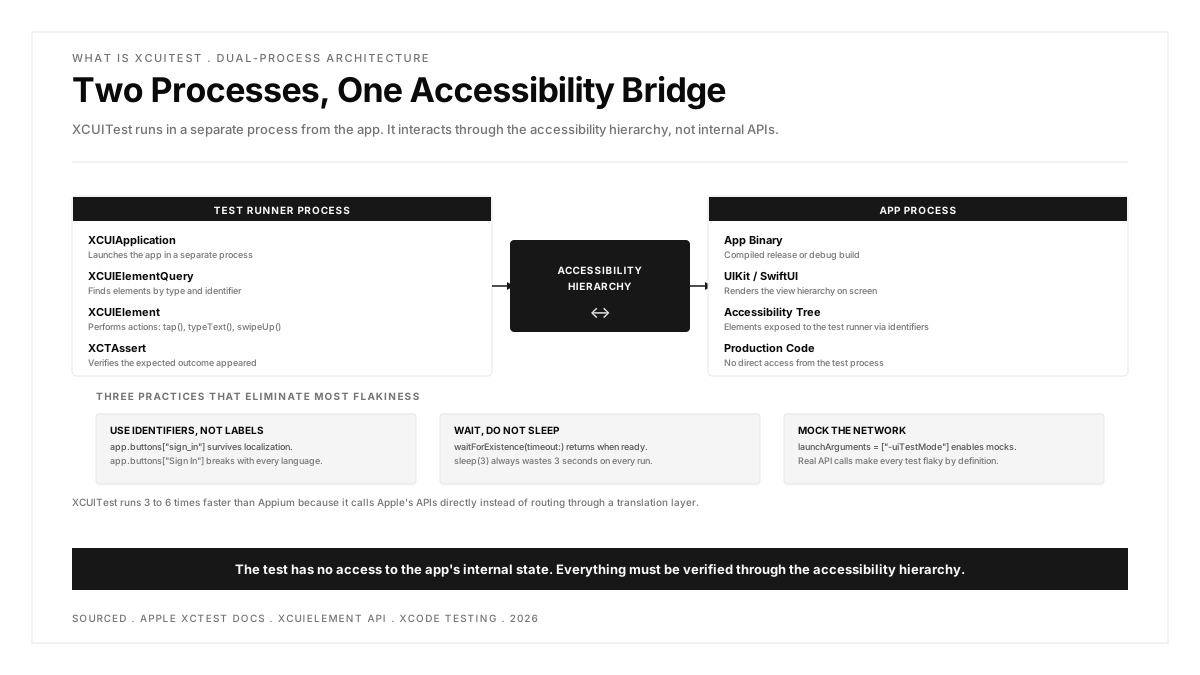
- The three core classes are XCUIApplication (launches and represents the app), XCUIElementQuery (finds elements by type, identifier or predicate) and XCUIElement (represents a single control and supports actions like tap(), typeText() and swipeUp()).
- The most common cause of flaky XCUITest tests is using sleep() instead of waitForExistence(timeout:). Time-based waits break because simulator and CI timing varies between runs.
- XCUITest only works for Apple platform apps. It cannot drive React Native, Flutter or other cross-platform frameworks directly.
How XCUITest works
Every XCUITest test follows the same three-step pattern: launch the app, find elements, perform actions and assert.
Step 1: Launch the app
The test creates an XCUIApplication instance and calls launch(). This starts a fresh copy of the app in a separate process from the test runner. The test interacts with the app through the accessibility hierarchy rather than through internal APIs, which means the test has no access to the app's internal state, variables or functions.
Launch arguments are the standard way to put the app into a test-friendly state: skip onboarding, use mock network responses, seed test data. The app reads these arguments at startup and configures itself accordingly.
Step 2: Find elements
XCUIElementQuery locates elements by type and identifier. The query evaluates against the accessibility hierarchy, which is the same tree that VoiceOver and other assistive technologies use.
The string in brackets is the accessibility identifier, set in the app's production code:
Elements can also be found by label, by predicate, or by traversing the hierarchy, but accessibility identifiers are the most stable approach because they do not change when the visible text is localized or redesigned.
Step 3: Perform actions and assert
waitForExistence(timeout:) pauses the test until the element appears or the timeout expires. This is the correct way to handle asynchronous UI changes. Using sleep() instead is the most common cause of flaky tests because the timing varies between simulator runs, CI environments and device hardware.
Writing your first XCUITest
A complete test that verifies a login flow:
Key details in this test:
- continueAfterFailure = false stops execution at the first assertion failure rather than running the rest of the test against a broken state.
- setUp() launches a fresh app instance before every test, which isolates tests from each other.
- tearDown() releases the app reference to prevent memory leaks across test runs.
- secureTextFields is the query for password fields, which are a different element type from regular text fields.
Setting up a UI test target in Xcode
- In Xcode, go to File > New > Target
- Select "UI Testing Bundle" under the Test section
- Xcode creates a new target with a default test file
- Write tests in this target using XCUIApplication and XCUIElement
- Run with Command+U or through the Test Navigator
The UI test target is separate from the unit test target. UI tests launch the app as a whole and interact through the accessibility hierarchy, while unit tests import the app module directly and call functions.
The page object pattern
As the test suite grows, raw element queries in every test become unmaintainable. The page object pattern encapsulates each screen in a class that exposes named actions and queries.
Tests become shorter and more readable:
When the login screen changes (a field moves, an identifier updates), the page object updates in one place rather than in every test.
XCUITest best practices
Use accessibility identifiers, not labels
app.buttons["Sign In"] breaks the moment the button text is localized to another language. app.buttons["sign_in"] works in every locale because the accessibility identifier is not user-facing. Set identifiers explicitly in the app code for every element that tests interact with.
Replace sleep() with waitForExistence()
sleep(3) wastes three seconds on every run when the UI is ready in 200 milliseconds, and still fails when the CI simulator takes four seconds. waitForExistence(timeout: 5) returns immediately when the element appears and only fails after the timeout, which is both faster and more reliable.
For more complex conditions, use XCTNSPredicateExpectation:
Control app state with launch arguments
Tests that depend on backend availability are flaky by definition. Pass launch arguments to put the app into a deterministic test mode with mocked network responses and seeded data.
The app reads these arguments at startup and configures itself accordingly: skip sign-in, load mock data, disable animations.
Run tests in parallel
A 30-minute test suite running serially becomes 8 to 10 minutes across four parallel simulators. Xcode supports parallel execution natively through xcodebuild:
Each simulator clone gets its own sandboxed environment, so tests do not interfere with each other as long as they do not share external state.
Quarantine flaky tests
A test that passes and fails on the same commit without code changes is flaky. Flaky tests erode trust in the suite faster than missing tests do, because the team learns to ignore failures. Detect flakes automatically (a test that fails and passes on retry is flaky), move them out of the main pipeline, and fix them as a priority.
For a deeper look at managing test reliability, the flaky tests guide covers detection, quarantine and resolution patterns.
XCUITest vs other iOS testing frameworks
| Framework | Type | Best For |
|---|---|---|
| XCTest | Unit and integration | The foundation. Ships with Xcode. Tests functions and classes directly. |
| XCUITest | UI and E2E | Apple's first-party UI testing. The default for iOS teams. |
| Swift Testing | Unit | Apple's modern unit testing framework (Xcode 16+). Cleaner syntax with macros and async support. |
| Appium | Cross-platform UI | Drives iOS and Android through the same WebDriver scripts. Wraps XCUITest via WebDriverAgent. |
| Espresso | Android UI | Google's native UI testing framework. The Android equivalent of XCUITest. |
| KIF | iOS UI | Older third-party framework. Largely superseded by XCUITest. |
| EarlGrey | iOS UI | Google's iOS UI framework. Useful for teams also using Espresso on Android. |
XCUITest vs Appium
Appium wraps XCUITest through a component called WebDriverAgent. Every Appium command travels from the test script, through the Appium server, through WebDriverAgent, and finally to the same XCUITest API that a native test calls directly. This translation adds 50 to 200 milliseconds per command.
Use XCUITest when: The team ships iOS only, the engineers write Swift, and Xcode integration matters. Tests run 3 to 6 times faster than Appium, and the setup is zero (Xcode includes everything).
Use Appium when: The team ships both iOS and Android and wants one test framework for both platforms. The tradeoff is speed and setup complexity in exchange for cross-platform consistency.
For a detailed comparison including maintenance cost analysis, see the Appium vs XCTest vs Visual AI comparison.
XCUITest vs Espresso
XCUITest and Espresso solve the same problem on different platforms. XCUITest is Apple's iOS framework (Swift and Objective-C). Espresso is Google's Android framework (Kotlin and Java). Both are native, fast and tightly integrated with their respective IDEs. A team shipping both platforms needs both frameworks, which means two test codebases in two languages. This is the dual-codebase cost that cross-platform tools like Appium attempt to solve.
XCUITest limitations
Apple platforms only. XCUITest cannot test Android, web, or cross-platform framework UIs directly. React Native apps can be tested against the rendered iOS UI, but the test has no visibility into the JavaScript layer. Flutter apps require Flutter's own integration_test framework.
No internal state access. Because the test runs in a separate process, it cannot read variables, call functions, or inspect the app's internal state. Everything must be verified through the accessibility hierarchy. If something is not visible on screen or exposed through accessibility, XCUITest cannot assert on it.
Simulator vs real device gaps. Simulators do not reproduce push notification handling, biometric authentication (Face ID, Touch ID), camera behavior, GPS location, or memory pressure from other running apps. Real device testing catches failures that simulator-only suites miss.
No built-in network mocking. XCUITest launches the real app binary. Mocking network calls requires the app itself to support a test mode (via launch arguments or a compile-time flag). Tools like OHHTTPStubs or custom URL protocols handle this inside the app code, not inside the test framework.
Maintenance scales with UI churn. Every test binds to specific accessibility identifiers. When identifiers change, tests break. The page object pattern reduces the repair surface, but the maintenance cost still grows linearly with the number of tests and the rate of UI change.
Running XCUITest in CI
The standard CI command for running XCUITest:
The .xcresult bundle contains test results, screenshots, logs and (if configured) video recordings. CI platforms parse this bundle to display results in the build dashboard.
Key CI considerations:
- macOS runners are required. XCUITest does not run on Linux or Windows.
- Simulator boot time adds 1.5 to 2.5 minutes per cold start. Caching the simulator state or using warm pools reduces this.
- macOS CI minutes are significantly more expensive than Linux minutes. On GitHub Actions, macOS runs at roughly 10 times the Linux rate.
- Code signing must be configured for real-device test runs but is not required for simulator runs.
For a broader view of how UI testing fits into the mobile CI pipeline, see the guide on CI/CD pipeline design.
.png)
FAQs
What is the difference between XCTest and XCUITest?
XCTest is the umbrella testing framework that ships with Xcode. It covers unit tests, integration tests and performance tests. XCUITest is the UI testing portion, accessed through XCUIApplication and XCUIElement. Both live in the same framework, but UI tests run in a separate test target because they launch the app as a whole rather than testing individual functions. Unit tests import the app module directly. UI tests interact through the accessibility hierarchy.
Is XCUITest better than Appium?
For iOS-only teams, yes. XCUITest runs 3 to 6 times faster because it calls Apple's APIs directly instead of routing through WebDriverAgent. Setup is zero (it ships with Xcode), and the Xcode integration is seamless. Appium is the better choice when the team needs one test framework across both iOS and Android, accepting slower execution and more complex setup in exchange for cross-platform consistency.
How do I make XCUITest tests less flaky?
Three changes eliminate the majority of flakiness. First, replace every sleep() call with waitForExistence(timeout:) or XCTNSPredicateExpectation. Second, use launch arguments to put the app into a deterministic test mode with mocked network responses. Third, set accessibility identifiers on every element that tests interact with, and query by identifier rather than by label.
Can XCUITest run on real devices?
Yes. XCUITest runs on any physical iOS device connected to the build machine and provisioned for development. CI platforms also support running XCUITest against hosted real-device farms. Real devices catch issues simulators miss: push notifications, biometric prompts, camera access, GPS behavior and memory pressure. Most teams use a tiered approach: simulators for speed on every commit, real devices for critical flows before release.
Does XCUITest work with SwiftUI?
Yes. XCUITest interacts with the rendered accessibility hierarchy, which SwiftUI generates the same way UIKit does. The key requirement is setting .accessibilityIdentifier() on SwiftUI views that tests need to find. SwiftUI's dynamic view hierarchy can cause identifiers to shift during recomposition, which makes stable identifiers even more important than in UIKit.
How long should XCUITest tests take?
A well-optimized suite of 100 UI tests should complete in 10 to 15 minutes using parallel execution across 4 simulators. Individual tests should take 5 to 30 seconds each. Tests that take longer than a minute usually indicate a waiting problem (using sleep() instead of conditions) or a state setup problem (the app performs real network calls instead of using mocked data). Parallel execution is the single most effective optimization for total suite duration.