
What Is a Virtual Machine? Definition, Types, Benefits, and Testing Use Cases
A virtual machine is a software-based computer that runs its own OS inside a host machine. Learn how VMs work, the three types, and how they are used in software testing.
Yuvan Sundrani · 13 min read
autosana.ai
.png)
TL;DR
- A virtual machine is a software-based computer that runs its own OS inside a physical host, managed by a hypervisor that divides hardware resources between multiple VMs.
- VMs are used for server consolidation, cross-platform development, security sandboxing, disaster recovery, and software testing across OS and browser combinations.
- For web and server-side testing, VMs provide isolated, repeatable, snapshot-capable environments that scale through cloud providers. Most CI/CD pipelines run inside VMs.
- For mobile app testing, VMs fall short entirely. You cannot run real iOS or Android inside a VM, and OEM-specific behavior, hardware sensors, touch input, and real-device performance are invisible to any virtual environment.
You have probably used a virtual machine without knowing it. Every time a CI pipeline runs your tests, every time you spin up a cloud server on AWS, every time a security researcher detonates malware in a sandbox, there is a virtual machine underneath doing the work.
A virtual machine is a software-based computer. It runs its own operating system, its own applications, and manages its own storage, all inside a physical host computer that shares its hardware resources. To the software running inside, the VM looks and behaves like a real, standalone machine. To the host, it is just another process consuming CPU and RAM.
The idea is older than most people realize. IBM built the first virtual machine systems in the 1960s for mainframe time-sharing. What changed is scale. Today, virtual machines are the backbone of cloud computing, and nearly every developer interacts with them daily, whether they know it or not.
How a virtual machine actually works
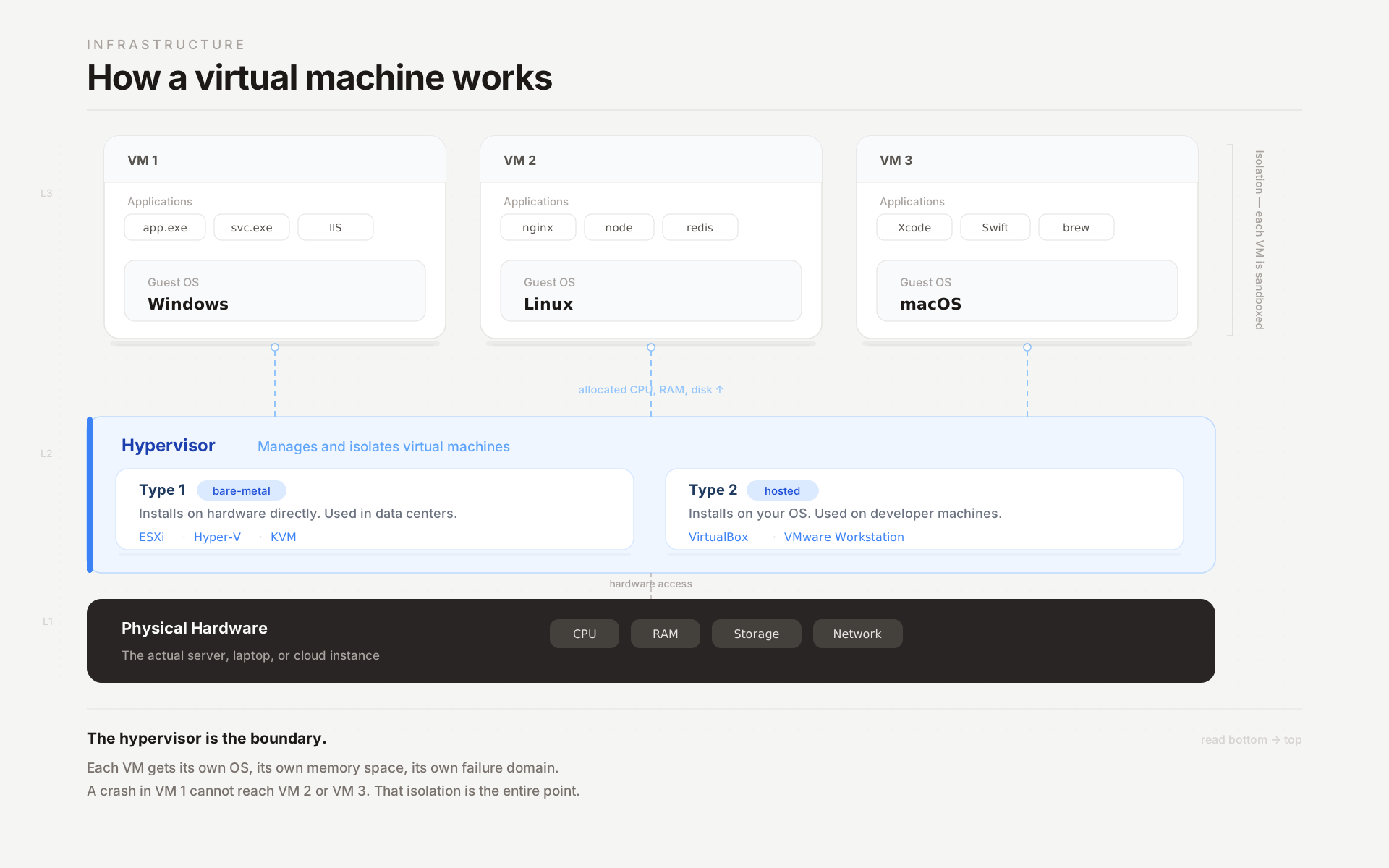
The key piece of technology is the hypervisor. It sits between the physical hardware and the virtual machines, and its job is resource brokering: dividing the host's CPU cores, RAM, disk, and network bandwidth among the VMs running on top of it.
There are two types, and the distinction matters.
Type 1 hypervisors install directly on bare metal. No host operating system underneath. VMware ESXi, Microsoft Hyper-V, and KVM are all Type 1. Data centers and cloud providers use these because they are fast and can pack dozens of VMs onto a single physical server with minimal overhead.
Type 2 hypervisors install on top of your regular operating system. VirtualBox on your MacBook, VMware Workstation on your Windows desktop. They are slower because every instruction passes through both the hypervisor and the host OS, but they are convenient for developers who need a quick Linux VM alongside their daily work.
When you boot a VM, the hypervisor carves out whatever you configured: four CPU cores, 8 GB of RAM, 100 GB of disk. The VM loads its own operating system from a virtual disk image, and from that point forward, it operates as if it were a standalone computer. Shut it down, and those resources return to the host pool.
The critical property is isolation. Each VM is sandboxed. A crash inside one VM does not touch the others. Malware inside a VM cannot escape to the host. This is not just a nice feature. It is the reason VMs became the default infrastructure for cloud computing and security research.
Types of virtual machines
Not all VMs do the same thing.
System VMs are what most people picture. A full operating system running on virtualized hardware: Windows on a Linux host, Ubuntu on a Mac, a cloud instance on AWS EC2. Each system VM gets its own virtual CPU, memory, storage, and network interface. It behaves like a complete computer.
Process VMs are narrower. Instead of virtualizing an entire machine, they virtualize a single application runtime. The Java Virtual Machine is the canonical example. It lets Java bytecode run on any hardware without recompilation. The .NET CLR does the same for C# and F#. You interact with process VMs constantly without thinking about them as "virtual machines."
Cloud VMs are system VMs hosted by someone else. AWS EC2, Google Compute Engine, Azure Virtual Machines. You configure the specs, the provider runs the VM on their hardware, and you pay by the hour. The infrastructure that powers most of the internet is, at its core, a very large collection of virtual machines managed by a very small number of companies.
What virtual machines are actually used for
The use cases are broader than most people expect.
Server consolidation is where the economics get compelling. Red Hat estimates that most physical servers run at 5% to 15% of capacity. VMs let you stack multiple workloads onto fewer physical machines, which means less hardware, less power, less cooling, less rack space. A company that ran 20 physical servers might consolidate down to 4.
Cross-platform development is the everyday use case for developers. A macOS user who needs to test on Windows and Linux spins up two VMs and has three operating systems on one laptop. No dual-boot, no extra hardware, no borrowing a colleague's PC.
Security sandboxing relies on VM isolation. A researcher investigating ransomware runs it inside a VM. If it encrypts the guest's disk, the host is untouched. Restore from a snapshot, run it again with different parameters. This controlled detonation workflow is only possible because VMs guarantee that nothing escapes the boundary.
Disaster recovery benefits from VM portability. A VM is ultimately a set of files: a disk image, a configuration, a snapshot. Back those files up, and if the host server dies, you can restart the VM on completely different physical hardware. Recovery measured in minutes instead of hours.
Software testing is the use case that connects VMs to everything else in this article. QA teams run VMs with different OS and browser combinations to verify cross-platform compatibility. CI/CD pipelines execute builds and tests inside fresh VMs on every commit. Every major CI system, GitHub Actions, GitLab CI, Jenkins, runs on virtualized infrastructure.
Virtual machines in software testing
This is worth expanding because VMs have been the default testing infrastructure for over a decade, and understanding what they handle well clarifies where they stop being useful.
Web application testing across browser and OS combinations was the original killer use case. Before cloud testing platforms existed, QA teams maintained VM farms: a Windows 10 VM with Chrome 90, a Windows 11 VM with Edge, an Ubuntu VM with Firefox. Each VM was a controlled, reproducible environment.
You could snapshot a clean state, run your tests, and restore the snapshot for the next round. That workflow still works and is still in use at many companies.
CI/CD pipeline execution is where most developers interact with VMs without realizing it. When your GitHub Actions workflow runs, it boots a fresh VM, checks out your code, installs dependencies, runs your test suite, and reports results.
The "clean state on every run" guarantee that makes CI reliable comes directly from VM isolation. Each run is a fresh machine. No leftover state from the previous build.
Parallel test execution is the scaling story. Need to run 2,000 tests? Distribute them across 20 VMs and finish in a fraction of the time. Cloud VMs make this practical because you do not own the hardware. Spin up 20 instances, run the suite, tear them down. Pay for 30 minutes of compute instead of maintaining 20 physical machines year-round.
Local testing with environment parity is the developer-side story. If production runs Ubuntu 22.04 with specific library versions, you create a VM with the identical configuration. For mobile, Autosana lets you run flows against your dev environment on a local simulator, emulator, or physical device.
Where VM-based testing stops working
Here is where most "what is a virtual machine" articles get vague. They say VMs have "limitations" without being specific. The specific limitations matter because they determine what other testing tools you need.
You cannot run real iOS or Android inside a standard VM. This is the biggest gap. iOS does not support virtualization outside Apple hardware, period. Android requires a dedicated emulator that simulates phone-specific hardware, not a VirtualBox instance. If you are testing mobile apps, VMs are not the tool. Emulators, simulators, or real devices are.
OEM behavior is invisible. Even Android emulators only run stock Android. Samsung One UI, Xiaomi MIUI, Huawei EMUI, OnePlus OxygenOS: these custom skins change how the phone handles notifications, background processes, battery optimization, and permissions. An app that works flawlessly on stock Android can crash on a Samsung Galaxy because One UI kills background services more aggressively. No VM, no emulator, and no simulator reproduces OEM behavior. Only real devices do.
Hardware sensors do not exist in a VM. Camera modules, fingerprint readers, NFC chips, GPS receivers, accelerometers. VMs virtualize generic compute hardware: CPU, RAM, disk, network. They do not virtualize the specific sensor stack of a Pixel 8 or an iPhone 15. Any feature that touches physical hardware needs testing on physical hardware.
Performance profiling is meaningless on VMs. A VM running on a host with 64 GB of RAM and an enterprise SSD does not tell you how your app performs on a budget Android phone with 4 GB of RAM and eMMC storage. Memory leaks, thermal throttling, GPU rendering hitches, and ANR (Application Not Responding) events only manifest under real resource constraints. Mobile app performance problems are hardware problems, and VMs do not have real hardware. Autosana's performance monitoring tracks memory, CPU, and rendering metrics during test runs on real devices, which is where these numbers actually mean something.
Touch and gesture fidelity does not translate. VMs convert mouse clicks to pointer events. They do not reproduce multi-touch pressure sensitivity, swipe velocity, or the latency characteristics of a real capacitive touchscreen. If your app is gesture-heavy, VM testing cannot validate the interaction layer.
Virtual machines vs emulators vs simulators
These three get confused constantly, so here is the cleanest way to think about it.
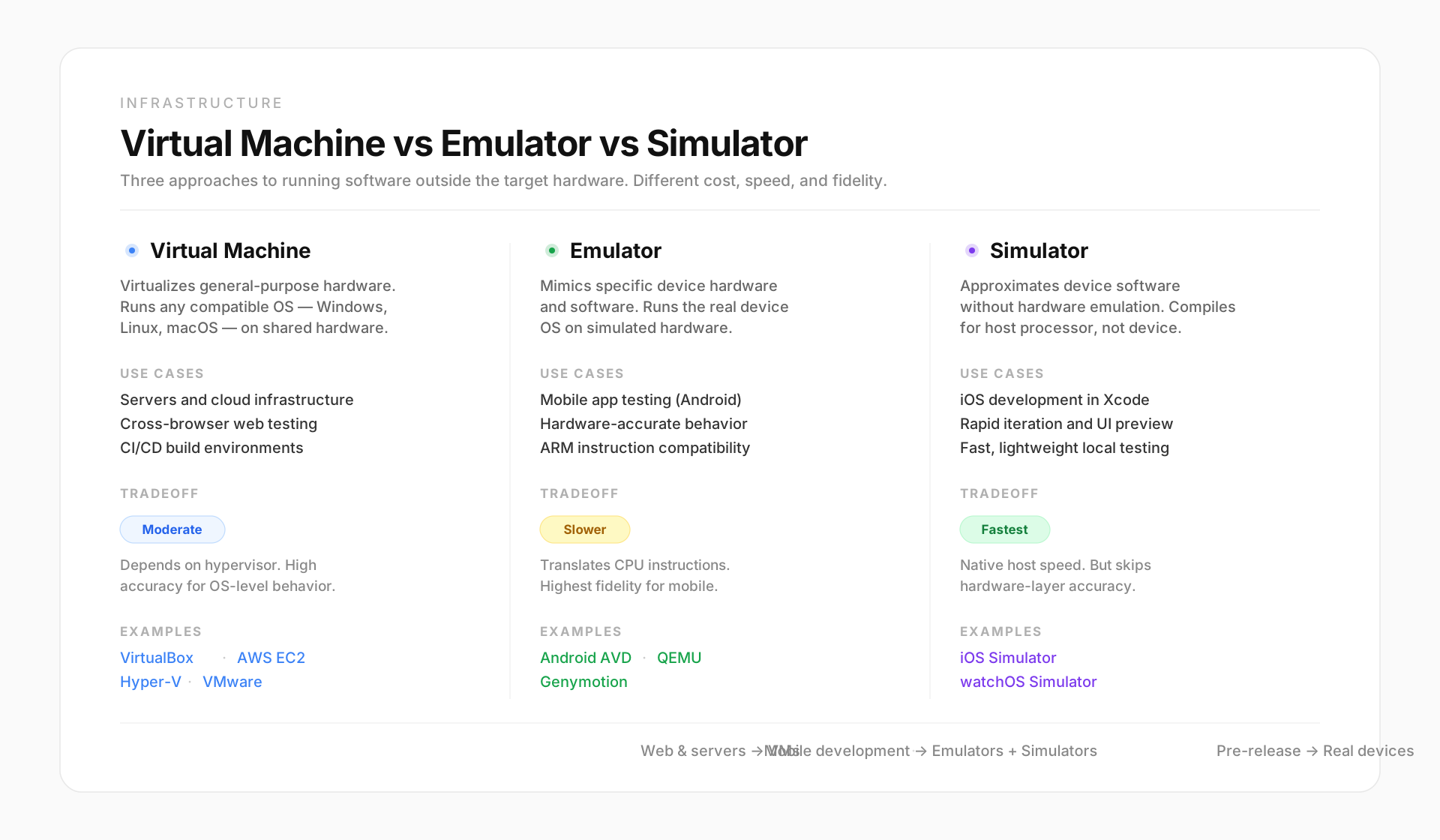
A virtual machine virtualizes general-purpose hardware and runs any compatible OS. It is not built for any specific device. You use VMs for servers, desktops, web testing, and CI/CD.
An emulator mimics a specific device's hardware and software. The Android emulator creates a virtual phone with a simulated ARM processor, screen, GPS, and sensors. It runs the actual Android OS on simulated hardware. It is purpose-built for one platform.
A simulator approximates a device's software without emulating hardware. The iOS Simulator in Xcode compiles apps for the Mac's native processor instead of emulating an iPhone's ARM chip. Faster than an emulator, but it cannot reproduce hardware-dependent behavior like push notification delivery or sensor input.
For Android test automation, the Android emulator is standard. For iOS, the Simulator covers most development workflows. For web and server testing, VMs remain the backbone. For pre-release validation on actual hardware, none of these are enough.
How Autosana covers what VMs cannot
Virtual machines handle web testing, CI/CD execution, and cross-platform validation. That is their strength, and nothing in this section argues otherwise.
Autosana covers the layer VMs cannot reach. We run end-to-end test flows on real iOS and Android devices in our cloud: actual Samsung, Pixel, and iPhone hardware. Tests are natural-language instructions that describe user journeys. The agent opens the app, navigates by intent, and verifies outcomes. When labels change or navigation restructures between builds, the test does not break.
The CI integration uploads your build after every commit and triggers test suites on real devices automatically. Results with session replay post back to the PR. Your VM pipeline handles the server side. We handle the device side. Together, nothing falls through the gap.
Conclusion
A virtual machine is one of the most important abstractions in computing. It lets you consolidate servers, isolate workloads, snapshot and rollback state, and run cross-platform tests from a single physical host. For web applications and server-side software, VMs are the standard testing environment and will be for a long time.
But mobile lives outside what VMs can reach. Real iOS and Android devices with OEM skins, physical sensors, and constrained memory produce bugs that no virtual environment will ever reproduce. The teams that ship reliable mobile apps do not choose between VMs and real devices. They use both, each where it is strongest.
.png)
FAQ
What is a virtual machine?
A virtual machine is a software-based computer that runs its own operating system and applications on a host computer's physical hardware. It behaves like a separate machine but exists entirely as software, managed by a hypervisor that allocates CPU, memory, and storage from the host.
What is a hypervisor?
A hypervisor is the software layer that creates and manages virtual machines. Type 1 hypervisors (VMware ESXi, Hyper-V, KVM) install directly on hardware for maximum performance. Type 2 hypervisors (VirtualBox, VMware Workstation) install on top of an existing operating system for convenience on developer workstations.
What is the difference between a virtual machine and a container?
A virtual machine runs a full operating system with its own kernel, which makes it heavier but more isolated. A container shares the host's operating system kernel and only packages the application and its dependencies, which makes it lighter and faster to start. VMs are better for running different operating systems. Containers are better for deploying applications efficiently.
Can you run iOS on a virtual machine?
Not practically. Apple restricts macOS and iOS virtualization to Apple hardware. You can run macOS VMs on Mac hardware using Apple's Virtualization framework, but running iOS in a VM is not supported. iOS app testing requires the Xcode Simulator or real iOS devices.
Can you run Android on a virtual machine?
You can run Android x86 builds in a VM using VirtualBox or VMware, but this is not how Android apps are tested in practice. The standard tool is the Android emulator built into Android Studio, which creates purpose-built Android Virtual Devices optimized for app development and testing.
Are virtual machines free?
Several hypervisors are free. Oracle VirtualBox is open source. VMware Workstation Player is free for personal use. KVM is built into the Linux kernel. Cloud VMs from AWS, Azure, and Google Cloud are pay-per-use, with free tiers that provide limited hours at no cost.
What is the difference between a virtual machine and an emulator?
A virtual machine runs a full operating system on virtualized general-purpose hardware. An emulator mimics a specific device's hardware and software. The Android emulator creates a virtual phone with simulated mobile hardware. A VM creates a virtual computer with simulated desktop or server hardware. Emulators are device-specific. VMs are general-purpose.
Why are virtual machines used in software testing?
VMs provide isolated, repeatable test environments. Each test run starts from a clean state via snapshots. Cross-platform testing is possible without separate physical machines. CI/CD pipelines use VMs to execute builds and tests automatically. For web and server testing, VMs remain the standard infrastructure. For mobile, they need to be supplemented with emulators or real devices.