
What Is a PWA? Capabilities, Limits, and How to Test One
A PWA is a website that behaves like an installed app through a service worker, manifest, and HTTPS. What it can do, where it stops, and the states testing usually misses.
Yuvan Sundrani · 10 min read
autosana.ai

TL;DR
- A PWA is a website built to behave like an installed app: it works offline, installs to the home screen, and can receive push notifications, using standard web technology.
- Three pieces make it work: a service worker for offline and caching, a web app manifest for installation, and HTTPS as a hard requirement.
- iOS support has improved while remaining narrower than Android, so PWA capability questions usually resolve to "what does Safari allow this quarter".
- Autosana runs intent-based flows against a PWA on real iOS and Android devices, which is where install prompts, offline behaviour, and service worker caching actually differ.
A user visits a site on their phone, taps Add to Home Screen, and the next launch opens without browser chrome, loads instantly from cache, and works on the train with no signal.
That is a PWA. The code behind it is a website. The distinction lives entirely in three additions the browser recognises and treats differently.
This guide covers what a PWA actually requires, what it can and cannot do on each platform, and which parts break under testing in ways a normal web suite misses.
What a PWA Is
A PWA, or progressive web app, is a web application built with capabilities that let it behave like a platform-installed app. MDN and web.dev both define it by capability rather than by framework, which matters: any site can become a PWA by adding the right pieces, regardless of how it was built.
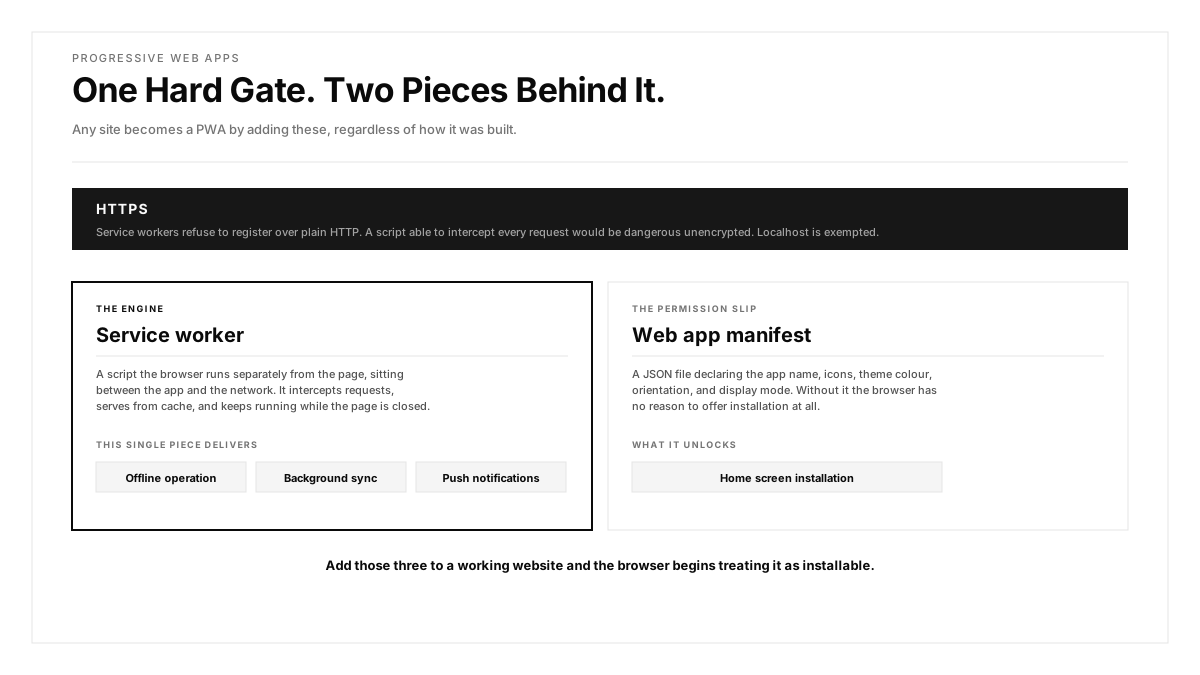
Three requirements are non-negotiable.
A service worker. A script the browser runs separately from the page, sitting between the app and the network. It intercepts requests, serves from cache, and keeps working while the page is closed. This single piece delivers offline support, background sync, and push.
A web app manifest. A JSON file declaring the app name, icons, theme colour, orientation, and display mode. Without it the browser has no reason to offer installation.
HTTPS. Service workers refuse to register over plain HTTP, since a script able to intercept every request would be dangerous over an unencrypted connection. Localhost is exempted for development.
Add those three to a working website and the browser begins treating it as installable.
What a PWA Can Do
Capability sits between a plain website and a native app, and the gap has narrowed considerably.
Offline operation. The service worker serves cached assets and queues actions taken while disconnected. Done well, a PWA works on a plane.
Home screen installation. The app launches from an icon without browser chrome, in its own task window.
Push notifications. Supported on Android for years and now on iOS for installed PWAs, with the caveat below.
Background sync. Actions taken offline get replayed when connectivity returns, handled by the service worker rather than the page.
Device access. Camera, geolocation, device orientation, clipboard, and file access are all available through web APIs, subject to permission prompts.
Payment. Payment Request API support means checkout flows can reach platform payment sheets.
Where a PWA Stops
Four limits still matter, and the first two are the ones that decide whether a PWA fits a given product.
iOS treats PWAs differently. Installation happens only through Safari's Share menu with no install prompt a site can trigger. Push requires the user to have installed the PWA first. Storage can be evicted after a period of disuse, which means cached data is less durable than on Android.
Background execution is heavily constrained. A PWA cannot run arbitrary work while closed. Background sync and periodic sync exist, and both are subject to browser heuristics rather than guarantees.
Deep hardware access is unavailable. Bluetooth and NFC have partial support with uneven availability. Anything needing a platform SDK stays out of reach.
App store presence requires wrapping. A PWA is reachable by URL. Appearing in the App Store or Play Store means packaging it, which reintroduces a build and review cycle.
The practical read: a PWA suits content, commerce, and productivity products well, and suits anything depending on sustained background work or specific hardware poorly.
How Do You Test a PWA?
A PWA fails in ways a conventional web suite misses, because the interesting behaviour lives in the service worker and in states a normal test rarely enters.
How Do You Test the Service Worker Update Path?
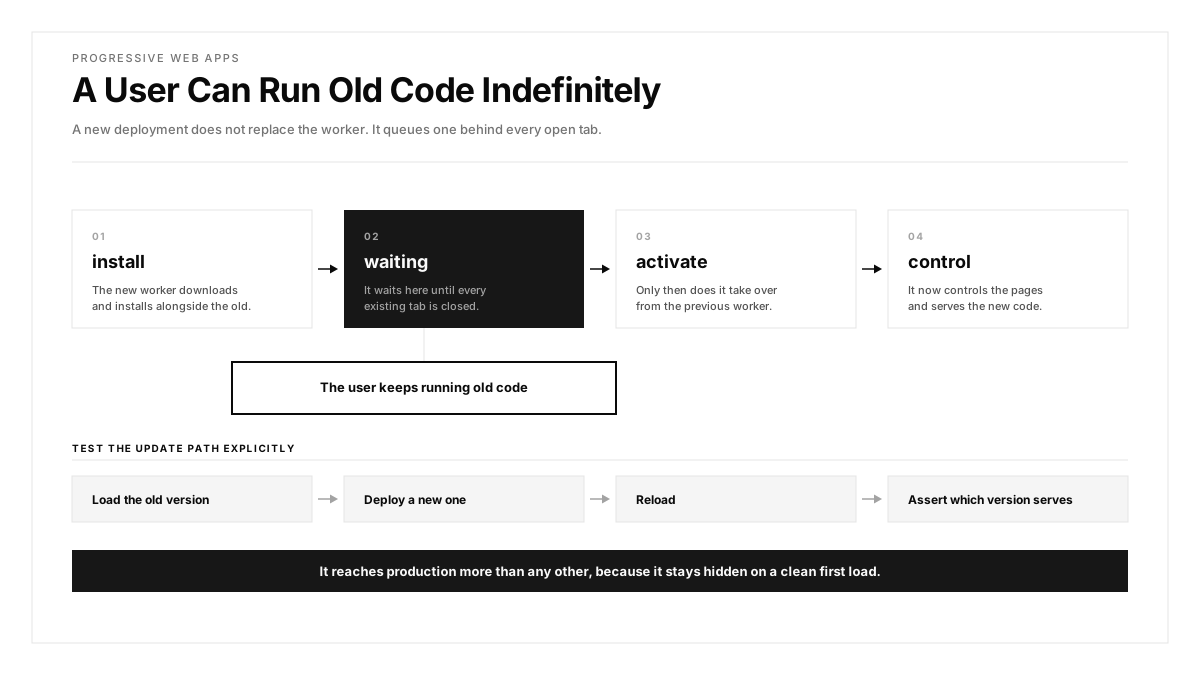
The worker installs, waits, activates, and controls pages. A new deployment produces a new worker that waits until existing tabs close before taking over, which means a user can run old code indefinitely.
Test the update path explicitly: load the old version, deploy a new one, reload, and assert which version serves. Regression testing across deployments is what keeps this honest once the suite grows. This is the defect class that reaches production most often, because it stays hidden on a clean first load.
Which Network States Should a PWA Be Tested Against?
Test three states rather than two. Fully offline, fully online, and the one in between where requests hang rather than fail. That third state produces the worst behaviour, since a cache strategy waiting on a network response that fails to arrive leaves the user staring at a blank screen.
Our network traffic inspection and environments network profiles cover these conditions during a run.
Why Test the Installed PWA Separately From the Browser Tab?
The install prompt differs per platform, and the launched experience differs from the browser one. Test both separately: the site in a browser tab and the same PWA launched from the home screen, since display mode changes layout and navigation. Mobile app testing treats these as two surfaces rather than one.
Mobile UI testing at this boundary catches safe-area and status-bar problems that only appear in standalone display mode.
What Happens When a PWA Loses Its Cached Storage?
On iOS especially, cached data can be cleared after disuse. A PWA assuming its cache persists indefinitely behaves badly when it returns to a cleared state, and this needs an explicit test rather than an assumption.
How Should PWA Performance Be Measured?
The web.dev performance guidance thresholds apply, measured on real hardware rather than a desktop browser throttled to look mobile. Mobile app performance testing covers the method, and the result on a mid-tier Android device differs sharply from a developer laptop.
How Does a PWA Compare With a Native App?
| Dimension | PWA | Native |
|---|---|---|
| Distribution | A URL | App store, with review |
| Update delivery | Immediate, next load | Store review, then user update |
| Offline | Service worker cache | Full control |
| Background work | Constrained, heuristic | Supported with limits |
| Hardware access | Web APIs, uneven | Full platform SDK |
| iOS capability | Narrower than Android | Equal to Android |
The update row is the strongest argument for a PWA. Shipping a fix reaches every user on their next load rather than days later through a store cycle, which changes the cost of a mistake substantially.
Testing a mobile app built either way follows the same shape, with a PWA adding the service worker states above and removing the store submission gate.
How Autosana Fits
We run against a PWA the same way a user does: on real hardware, through the browser or from the home screen.
Our web testing covers the browser-tab experience, and real device testing on physical iOS and Android devices covers the installed one, where display mode, safe areas, and launch behaviour differ.
Our flows describe user intent, so the same flow verifies a journey in a desktop browser, in mobile Safari, and in an installed PWA without three separate definitions.
Network conditions come from environments configuration, which is how the offline and degraded-network states above get exercised, and network traffic records what the service worker actually requested.
Performance monitoring captures load and rendering behaviour on real devices, where a PWA's caching strategy either pays off or fails to.
Conclusion
Take your PWA, load it, deploy a change, and reload without closing the tab.
Check which version you are running. Where it is still the old one, your service worker update path works as specified and your users will sit on stale code longer than you expect, which is the PWA surprise teams hit most often.
Then put it in airplane mode and try the three network states. The one that breaks is almost always the middle state, where requests hang rather than fail cleanly.
FAQ
What is a PWA?
A PWA, or progressive web app, is a website built with capabilities that let it behave like an installed app: offline operation, home screen installation, and push notifications, using standard web technology.
What does a site need to become a PWA?
Three things: a service worker script that intercepts requests and serves cache, a web app manifest declaring name and icons, and HTTPS, since service workers refuse to register over plain HTTP.
What does a service worker do?
It runs separately from the page, sitting between the app and the network. It intercepts requests, serves cached responses, enables background sync, and continues working while the page is closed.
Do PWAs work on iOS?
Yes, with narrower capability than Android. Installation happens only through Safari's Share menu, push requires prior installation, and cached storage can be evicted after a period of disuse.
What can a PWA do that a normal website cannot?
Operate offline from a service worker cache, install to the home screen and launch without browser chrome, receive push notifications, replay queued actions through background sync, and reach platform payment sheets.
Where do PWAs fall short of native apps?
Sustained background execution, deep hardware access such as Bluetooth and NFC, and app store presence without wrapping. iOS capability also trails Android across several of these.
What breaks most often in a PWA?
The service worker update path. A new deployment produces a worker that waits until existing tabs close, so users can run old code indefinitely. It stays invisible on a clean first load.
How should PWA offline behaviour be tested?
Test three states rather than two: fully offline, fully online, and the middle state where requests hang rather than fail. The third produces the worst behaviour and is the one usually skipped.