
Sanity Testing: How Much to Check After a Bug Fix
Sanity testing verifies one change before a full regression cycle. Types, mobile and web examples, when to skip it, and the three traps that create false confidence.
Yuvan Sundrani · 11 min read
autosana.ai
.png)
TL;DR
- Sanity testing is a narrow check confirming that one specific fix or small change behaves correctly, run before committing time to a full regression cycle.
- Smoke testing asks whether a build is stable enough to test at all. Sanity testing asks whether one change did what it claimed.
- On mobile the common failure is verifying a fix on the device from the bug report and stopping there, while the same fix breaks on a different vendor's OS fork.
- Autosana runs sanity flows on real iOS and Android hardware from your CI, so the second and third device get checked automatically on every fix.
A crash fires when a user taps Apply Coupon on a Galaxy A14 running Android 12. A developer finds the cause in nine minutes and pushes a fix.
Now someone decides how much to verify before it ships. Re-running the full regression suite costs 45 minutes of pipeline time. Checking the one button costs two. Sanity testing is the discipline of choosing correctly between those numbers.
This guide covers where that line sits, the cases where a narrow check is enough, the three situations where it produces false confidence, and how to run sanity testing across devices automatically.
What Sanity Testing Is
Sanity testing is a focused verification that a specific change works as intended. The ISTQB Foundation Level syllabus treats it as a form of confirmation testing, concerned with one change rather than the whole system.
Four properties define it. Scope stays on the changed module and its immediate dependencies. Execution finishes in minutes. Scripting is light, since testers lean on product knowledge. The outcome gates whether deeper testing is worth starting.
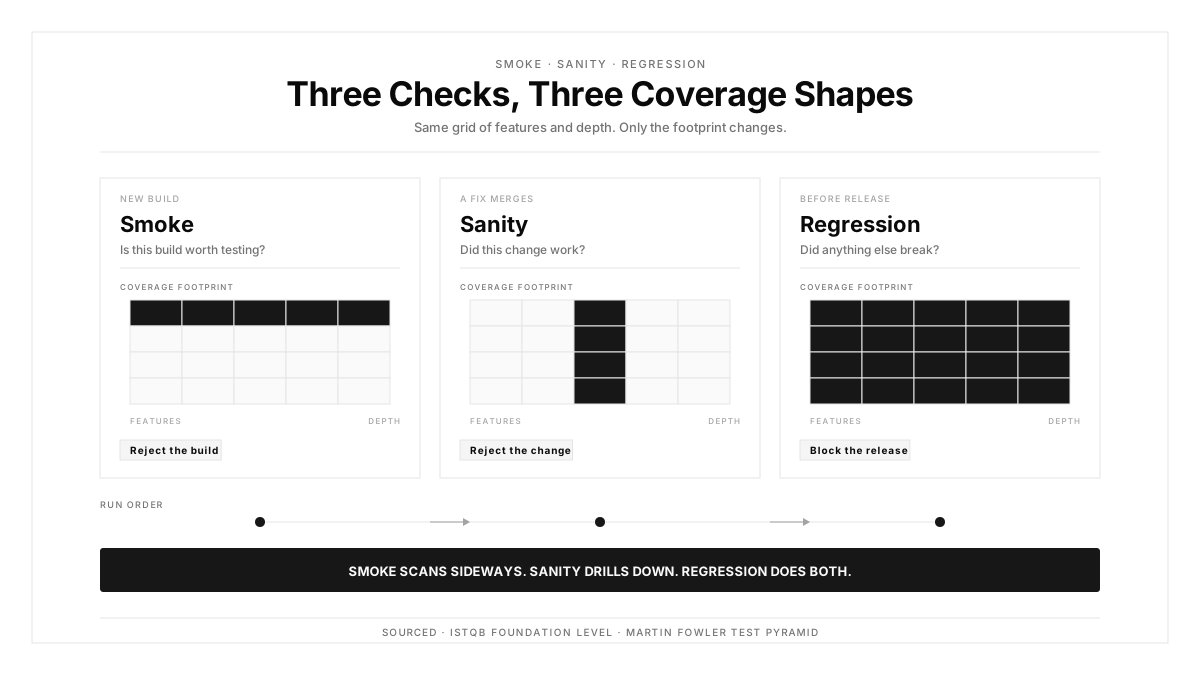
Sanity testing sits between two neighbors in the cycle. Smoke testing runs first and confirms the build launches and core paths respond. Regression testing runs last and confirms the wider system survived the change.
Sanity Testing vs Smoke Testing
| Dimension | Smoke Testing | Sanity Testing |
|---|---|---|
| Question answered | Is this build worth testing? | Did this change work? |
| Scope | Broad across major features | Narrow on the changed area |
| Depth | Shallow | Deeper on one path |
| Trigger | Every new build | A specific fix or small change |
| Scripting | Usually scripted | Often unscripted |
| Failure means | Reject the build | Reject the change |
The clearest way to hold the distinction: smoke testing scans sideways across many features at shallow depth, and sanity testing drills down into one.
A release build arrives. Smoke testing confirms login, search, checkout, and profile all open. Later a developer merges the coupon fix from the opening. Sanity testing then exercises the coupon path on Galaxy hardware specifically.
Martin Fowler's test pyramid puts both near the top, where feedback is fast and coverage is deliberately partial.
Types of Sanity Testing
Independent sanity testing
The changed component gets validated alone, isolated from the rest of the application. A developer fixes a date picker returning wrong timezone offsets, and the check exercises the picker across several input dates.
Integrated sanity testing
The changed component gets validated together with whatever depends on it. That same date picker now runs inside the booking flow, confirming the confirmation screen displays the date the user selected.
Component-level sanity testing
A shared UI element gets checked after modification. A padding change to a button component affects every screen using it, so the check covers a representative set of screens across mobile and web viewports.
API sanity testing
A backend endpoint gets checked after a contract change. Adding a field to a profile response calls for confirming the new field carries correct data while existing fields keep their previous shape.
Sanity Test Examples
Mobile: a fix scoped to one device
The coupon crash from the opening. A useful sanity check covers three runs: the Galaxy A14 on Android 12 where the crash was reported, a Pixel 8 on Android 14 to confirm the fix holds on stock Android, and an iPhone to confirm the shared code path stayed intact.
Three devices, roughly four minutes. This example carries the main lesson of the whole discipline, which appears again below.
Web: a navigation redesign
A hamburger menu becomes a persistent sidebar at desktop widths. The check covers rendering in Chrome, Safari, and Firefox, responsive behavior at tablet and phone widths, every link resolving to the right route, and keyboard navigation still reaching each item.
Mobile: permission handling after an OS update
iOS changes how location permission dialogs present. After updating the handling code, confirm the dialog appears correctly on the new OS, that each of the three user responses is handled, and that the previous OS version still behaves as before.
Each example stays tight on the change and one layer around it.
When to Use Sanity Testing
A narrow check fits when the change is isolated:
- A bug fix needs verification before a full regression cycle
- A small feature change touches one module
- A hotfix lands mid-release
- A third-party SDK update affects one integration point
- An OS update changes behavior in a single area
Go straight to regression when the change is broad:
- Several modules changed at once
- A database migration altered the data layer under many features
- A framework upgrade touched the rendering engine
- The change affects a shared component used across ten or more screens
The rule underneath: a narrow check gives fast confirmation when effects are contained, and gives false comfort when effects ripple.
When Sanity Testing Creates False Confidence
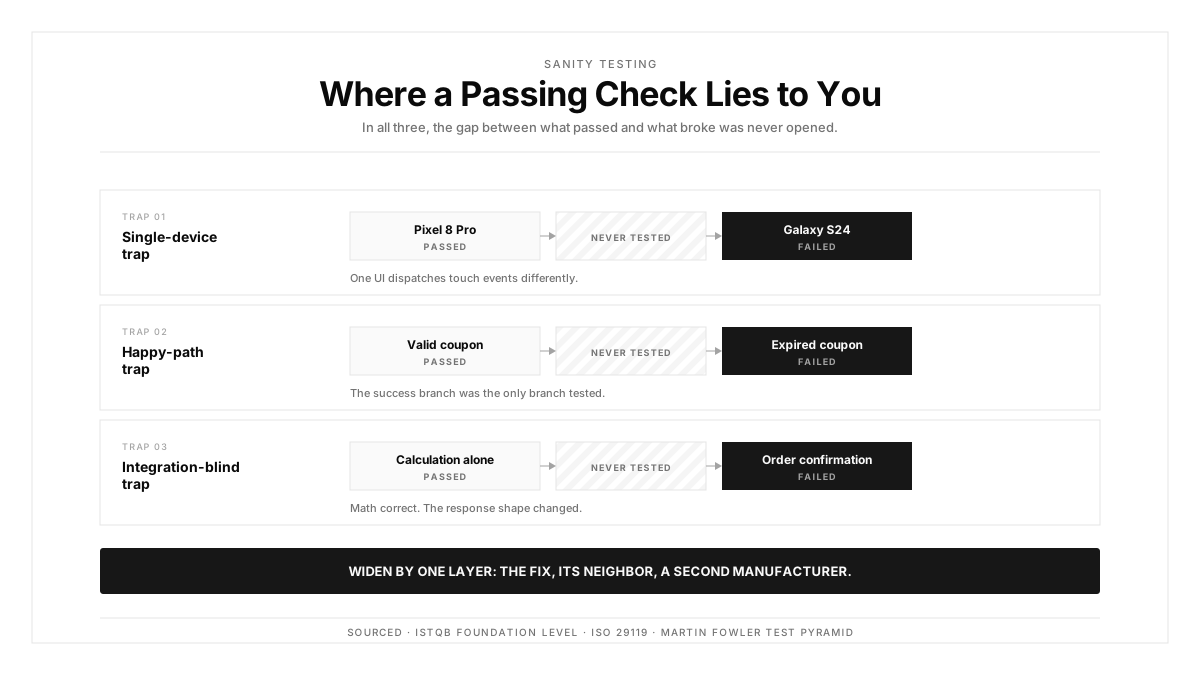
Three traps account for most escapes.
The single-device trap. A gesture fix passes on a Pixel 8 Pro and gets marked verified. Two days later the same gesture fails on a Galaxy S24, because One UI handles touch dispatch differently. One device confirmed one reality.
The happy-path trap. A check confirms a valid coupon applies a 20 percent discount. The tester enters a working code and sees the right total. The same fix broke the expired-code branch, which the check skipped.
The integration-blind trap. A payment calculation gets fixed and verified in isolation. The math is right. That same change altered the API response shape, and the order confirmation screen now renders a blank total.
All three share a remedy. Widen scope by exactly one layer: the fix, its nearest neighbor, and a second device. Four extra minutes closes most of this gap.
Automated Sanity Testing in CI/CD
Manual checks hold up for teams shipping weekly. Daily or continuous deployment calls for sanity testing inside the CI/CD pipeline.
The mechanism is straightforward. A commit modifies a module. The pipeline triggers the suite of flows mapped to that module. Results post back before the merge completes, with a session replay attached to any failure.
Four things improve once this runs automatically. Checks execute in parallel across devices and finish in minutes. Every fix receives identical coverage, which removes tester-to-tester variance. Three to five devices get covered instead of whichever phone was on the desk. Each run leaves recordings and screenshots tied to the commit.
The same pattern turns sanity testing from a checkpoint someone remembers into a gate that always runs.
Sanity Testing on Real Devices
Emulator runs catch logic and layout problems. Real hardware catches the rest: vendor rendering differences, touch latency, hardware back button behavior, and permission dialogs redrawn by a manufacturer skin.
That matters more here than in most test types, because the purpose is confirming a fix on the surface where it was reported. An emulator approximates that surface. A phone is that surface.
The ISO 29119 standard asks for environments representing actual usage conditions, which for mobile means the hardware your users hold.
A workable minimum is three real devices: the model from the bug report, one from a different manufacturer, and one on a different OS version. Mobile test automation makes that minimum cheap enough to apply to every fix.
How Autosana Fits
We built Autosana because verifying a fix on one phone kept letting defects through on the second and third.
Our flows describe intent, so one definition covers apply a coupon, complete checkout, or open the login screen across every device. When a vendor skin shifts the layout, the flow still completes because it targets the user goal.
We run those flows on real devices in parallel, which makes the three-device minimum the default rather than an aspiration.
We trigger from your CI/CD pipeline and through automations, so pushing a fix starts the check automatically.
Every run records video and step-level results. A failure arrives with the replay showing the exact step and device, which is what keeps triage to seconds. Testing a mobile app this way removes the reason teams stop at one device.
Conclusion
Take your last ten bug fixes and count how many were verified on exactly one device.
The number is usually close to ten, because the device from the bug report is the obvious place to look while a second device requires someone to decide it is worth the time. That second device is where the single-device trap lives, and it costs about ninety seconds to close.
Run the fix, run its nearest neighbor, run a second manufacturer. Then start regression.
.png)
FAQ
What is sanity testing in software testing?
Sanity testing is a focused check confirming that one specific fix or small change behaves as intended. It covers the changed area and its immediate dependencies, running before a team commits to a full regression cycle.
How does sanity testing differ from smoke testing?
Smoke testing verifies a build is stable enough to test, scanning shallowly across major features. Sanity testing verifies one change worked, drilling deeper into a single area after a fix lands.
What are common sanity test examples?
Verifying a crash fix on the device that reported it plus a second manufacturer. Checking a UI change across three browsers. Confirming an endpoint returns correct data after a contract change.
When should a team skip sanity testing and run regression?
When several modules changed together, a migration altered the data layer, a framework upgrade touched rendering, or the change affects a component shared across ten or more screens.
How many devices should a sanity check cover?
Three as a working minimum: the model from the bug report, one from a different manufacturer, and one on a different OS version. That combination catches the most common fix-one-break-another failure.
How do teams automate sanity testing in CI/CD?
Map each module to a small suite of flows. A commit touching that module triggers the suite, which runs in parallel across devices and posts pass or fail to the pull request with session replays attached.
What separates independent from integrated sanity testing?
Independent checks validate the changed component alone. Integrated checks validate it alongside whatever depends on it, which catches failures appearing only when data crosses a boundary.
Where does sanity testing sit in the testing lifecycle?
After smoke testing and before regression testing. Smoke confirms the build is testable, sanity confirms the specific change is correct, and regression confirms the wider system survived it.