
Sandboxing coding agents that drive mobile devices
Containers, microVMs, CI runners and long-lived Macs: how each agent sandbox handles iOS Simulators and Android emulators, and what crosses the boundary.
- Written by
- Gautam Agarwal
- Read time
- 9 min read
- Published

Key Takeaways
- The isolation models that work best for coding agents (containers, microVMs, one pod per session) are all Linux, and none of them can host an iOS Simulator.
- Android's own docs say a VM-accelerated emulator can't run inside another VM such as Docker, so a well-isolated agent can't host an Android emulator either.
- The machine that can host both, a long-lived Mac, is the weakest isolation model for agents.
- The workable pattern keeps the agent in its sandbox and puts the device somewhere else, reached through a narrow CLI or API.
- That pattern adds three channels to secure: builds going up, actions going down, and screenshots and logs coming back.
A coding agent sandbox is an isolated environment where an agent can run commands without approval prompts, because the sandbox boundary limits what it can damage. Mobile apps complicate this. The agent needs a device, and the device has to run somewhere.
Why coding agents need a sandbox
The case for sandboxing agents is simple. An agent running locally with permission prompts turned off can reach everything you can: your files, the secrets in your environment, your home directory, and whatever production database or cluster your shell is logged into. Robert Brennan, CEO of OpenHands, made exactly this point in a recent talk on isolating coding agents, framing it as least privilege: limit the blast radius of a prompt injection or a confused agent.
Docker's documentation for its Sandboxes product states the trade directly: the sandbox itself is the safety boundary, which is why agents inside it run without approval prompts. Inside, the agent has full control, including sudo. Outside, it can reach only what you mounted and what the network policy allows.
For a web app, that is close to enough. The agent writes code, runs the test suite, starts a dev server and opens a headless browser, all inside the box. For a mobile app, the last step breaks. To check its change, the agent needs an iOS Simulator or an Android emulator, and the question becomes which sandbox models can host one.
Five isolation models for coding agents
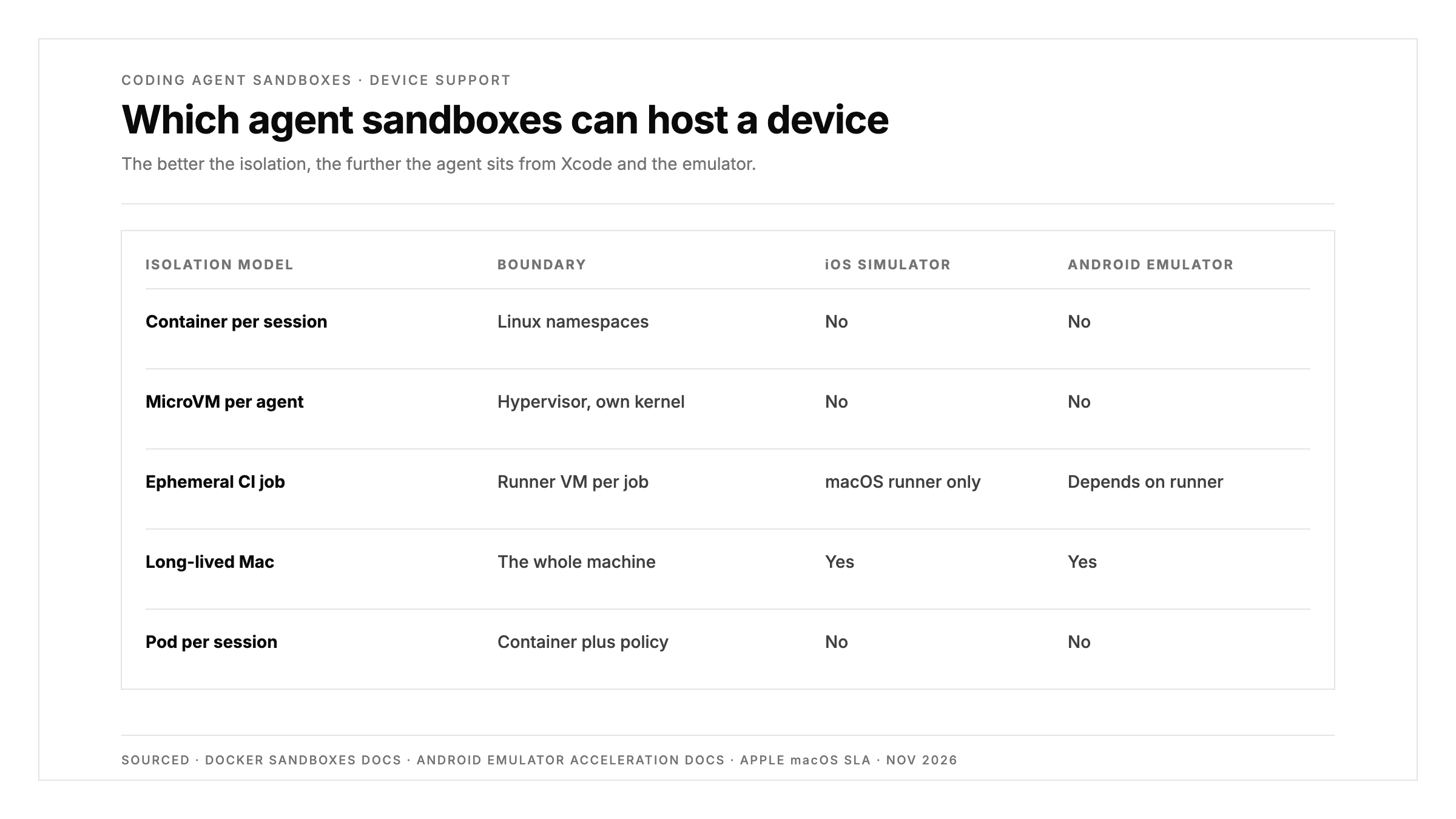
Brennan's talk walked through four ways teams run agents. Docker's Sandboxes product adds a fifth, a microVM per agent. Here is each one against the two device runtimes a mobile agent needs.
| Isolation model | Boundary | iOS Simulator inside | Android emulator inside |
|---|---|---|---|
| Container per session on a laptop | Linux namespaces | No, needs macOS | No, the emulator docs rule out Docker |
| MicroVM per agent (Docker Sandboxes) | Hypervisor, own Linux kernel | No, needs macOS | No, it is another VM |
| Ephemeral CI job | Runner VM per job | Only on a macOS runner | Depends on the runner |
| Long-lived VM or Mac mini | Whatever the machine provides | Yes, on a Mac | Yes |
| One Kubernetes pod per session | Container, plus cluster policy | No, needs macOS | No, same as containers |
The iOS column is short because the iOS Simulator ships with Xcode and runs on macOS, and macOS runs on Apple hardware. Apple's license permits up to two additional macOS instances in virtual machines on each Apple computer, for software development and testing, and leases of Apple hardware run for a minimum of 24 hours. This breakdown of Apple silicon runners for iOS CI covers the licensing in detail. None of it fits a Linux container or a Linux microVM.
The Android column is short for a different reason. The emulator acceleration documentation says you can't run a VM-accelerated emulator inside another VM, naming VirtualBox, VMware and Docker, and that it must run directly on the host. A microVM is a VM, so the same rule applies to it; this explainer on virtual machines covers why nesting costs so much. An unaccelerated emulator technically boots, slowly enough that an agent waiting on every screen is no longer useful.
The one row that hosts both is the long-lived Mac. It is also the model Brennan was most critical of for agents. State persists between sessions, the machine can drift into a bad state, and agents with different jobs end up sharing one machine, so a code-review agent can reach credentials that were set up for something else entirely.
So the better isolated the agent, the further it sits from Xcode and the Android emulator. That is the core tension, and it doesn't go away with a better container image.
Agent in the sandbox, device outside it
The pattern that resolves the tension is to stop trying to fit the device into the sandbox. The agent stays in its container or microVM. The device runs on infrastructure built for it: Macs for iOS Simulators, KVM hosts for Android emulators, racks for real phones. The agent reaches it over the network through a narrow interface.
With Autosana's sandboxes, that interface is a CLI:
autosana sandbox start --platform android --upload build/app-debug.apk
autosana sandbox tap 540,1720 --description "Open cart"
autosana sandbox look
autosana sandbox logs --since 1 --grep "error"
autosana sandbox end
From the sandbox's point of view, every one of those commands is an outbound HTTPS request. No USB passthrough, no /dev/kvm, no macOS guest. That matters because Docker's sandbox capability list marks USB device access as unsupported, and its docs are silent on exposing KVM. The device being remote is what lets the agent's sandbox stay strict.
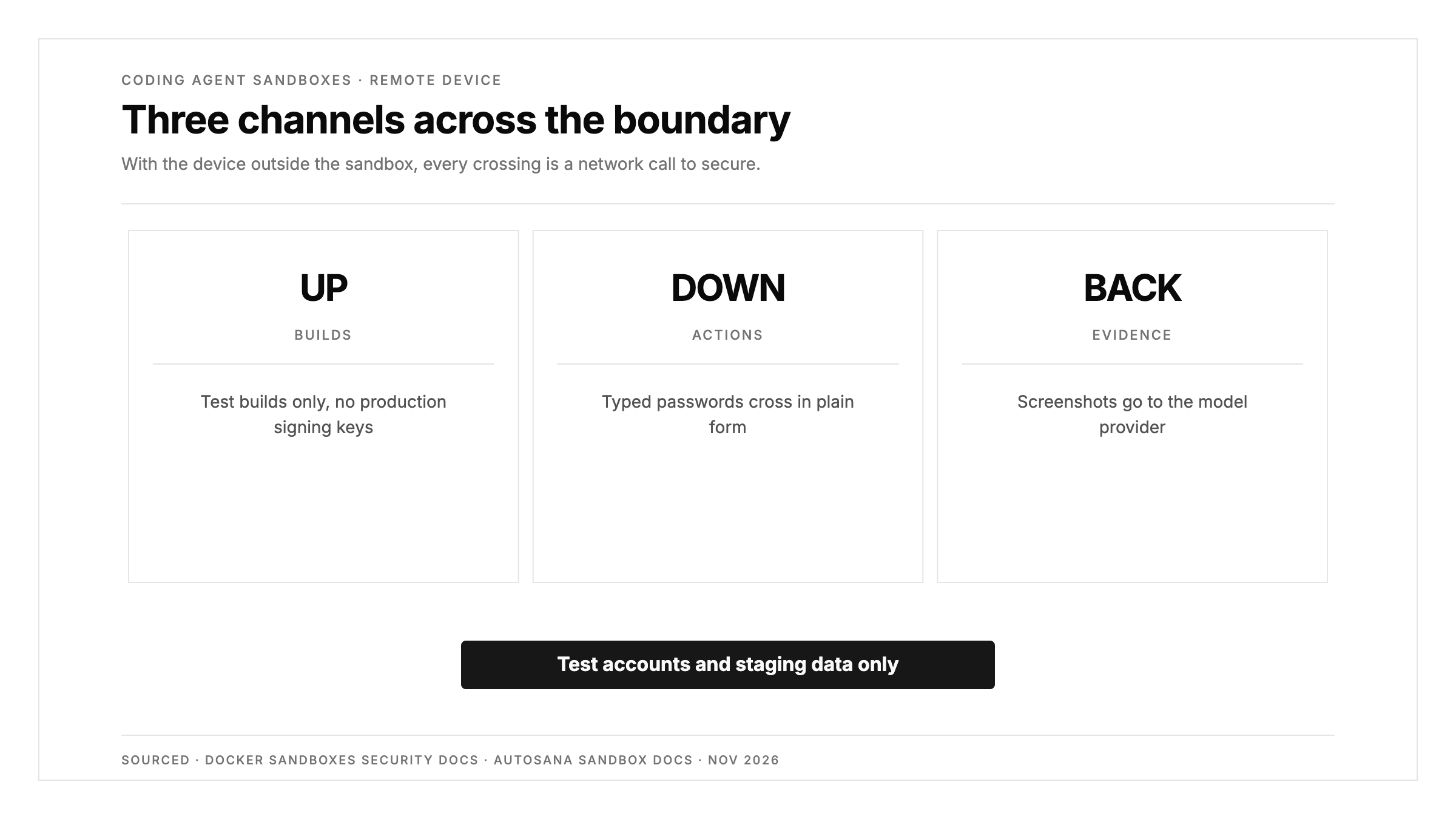
It also changes what you need to think about. A device inside the sandbox would share the sandbox's boundary. A remote device creates three channels across it, and each needs a decision. The container-specific setup for Claude Code is covered in iOS simulator access for Claude Code in remote containers.
Three channels across the sandbox boundary
Builds going up. The agent uploads an .app, .apk or .ipa it just built. That artifact is whatever the agent's branch contains, which is the point, and it also means a prompt-injected agent can upload anything it can compile. Use test builds pointed at staging, and keep production signing keys out of the sandbox entirely.
Actions going down. Taps, typed text, deep links, location changes, push notifications. Typed text is the sensitive part. If the agent logs in, the password crosses this channel in plain form, because the device needs it in plain form.
Evidence coming back. Screenshots after every step, recordings, app logs, failed requests. This is the most useful channel and the leakiest. Every screenshot the agent reasons about is sent to its model provider. Anything on screen, an email address, an order history, a one-time code, leaves with it.
The rules that follow are short. Test accounts only, never real customer data on an agent's device. Staging backends with seeded data. And a decision about where screenshots and recordings are stored and for how long, made before the first agent run rather than after the first audit. Secrets handling across all three channels is a topic of its own: credential proxies only cover part of it.
Network egress for a device loop
A sandbox that can reach anything isn't much of a sandbox. Docker's isolation documentation describes the default: outbound TCP is allowed only when a policy rule matches the destination. There are three presets. Open allows everything. Balanced denies by default with a baseline allowlist of AI provider APIs, package managers, code hosts, registries and common cloud services. Locked Down blocks everything, including model APIs.
For a mobile agent loop, the minimum list is short and specific:
- The model provider, or the agent can't think.
- Package registries your build uses: npm, Maven, CocoaPods, Swift packages.
- Your code host, to push a branch.
- The device provider's API host, for the device commands.
What it should not include is your production backend. The device talks to your staging backend, not the sandbox, and in the remote pattern the device is on the provider's network. So the allowlist that matters for your backend is inbound: Autosana publishes the source IPs of its device runners through a network allowlist endpoint, and states that the endpoint is the source of truth and that IP changes aren't announced. Pull it on a schedule.
Two details from Docker's policy model catch people out. example.com and *.example.com don't cover each other, so allowing a provider's apex domain doesn't allow its API subdomain. And the defaults are broader than they look: Docker notes that a default like *.googleapis.com covers many services beyond AI APIs. Start from Locked Down and add hosts until the loop works, then stop.
Throwaway sandboxes, throwaway devices
Brennan's preferred model was one pod per agent session: thrown away at the end, so a bad state can't carry over. The same reasoning applies to the device. A simulator that one agent session logged into, granted permissions on and filled with cached data is a long-lived machine with all the drift problems of the long-lived Mac.
Make both halves disposable and give them matching lifetimes. The agent's sandbox ends with the task. The device ends with it too, or shortly after: Autosana sandboxes end 30 minutes after their last command and last at most 12 hours, and a plan-level limit caps how many can be live at once, which also caps what a runaway agent can spend. For a refresher on why disposable environments are worth the setup cost, see what a sandbox environment is.
Brennan's own caveat belongs here too: sandboxing is not a panacea. A remote device is one more boundary with its own failure modes. It narrows what an agent can touch. It doesn't make the agent trustworthy.
Conclusion
The isolation models that make coding agents safe are Linux, and mobile device runtimes need macOS or bare-metal KVM. Trying to put the device inside the sandbox pushes teams toward the long-lived Mac, the model with the weakest isolation.
Keep the agent in a container or microVM, put the device on infrastructure built for it, and connect them with a narrow CLI. Then secure the three channels that creates: builds going up, typed input going down, and screenshots coming back.
FAQs
Can an iOS Simulator run inside a Docker container?
No. The iOS Simulator needs macOS, which runs on Apple hardware, not Linux containers.
Can an Android emulator run inside Docker?
Android's docs say a VM-accelerated emulator can't run inside another VM, including Docker.
What is the safest way to give a coding agent a mobile device?
Keep the agent sandboxed and lease a remote device through a narrow CLI or API.
What does a sandboxed mobile agent need network access to?
The model provider, package registries, your code host and the device provider's API.
Do screenshots from an agent's device leave the sandbox?
Yes. Each screenshot the agent reasons about goes to its model provider.
How does Autosana fit an agent sandbox?
Its CLI drives a cloud device over HTTPS, so the agent needs no local simulator.
Sources
- Docker: Sandboxes isolation layers
- Android Developers: Configure hardware acceleration for the Android Emulator