
Self-hosted versus managed Apple silicon runners for iOS CI
Self-host Mac minis with ephemeral VMs or rent managed Apple silicon runners? Licensing limits, capacity math, build-time levers and when to switch.
- Written by
- Gautam Agarwal
- Read time
- 9 min read
- Published

Key Takeaways
- GitHub's standard arm64 macOS runner has 3 M1 cores and 7 GB of RAM, and costs $0.062 a minute against $0.006 for Linux.
- Apple's macOS license allows two extra virtual machines per Mac, so each Mac mini serves at most two isolated CI jobs at once.
- Apple requires macOS leases for CI to run at least 24 consecutive hours with exclusive use, which is why cloud Macs bill by the day.
- Tart runs ephemeral macOS VMs on Apple silicon from images stored in an OCI registry, which gives self-hosted Macs a fresh machine per job.
- The cheapest macOS minute is the one you move to Linux: build on the Mac, then test from an Ubuntu job.
An iOS pull request sits in a macOS queue while the Linux jobs finished minutes ago. Apple silicon runners are the fix, and the real choice is whether you rent them or run them. Both work; the licensing and capacity math decides which one fits.
Why macOS CI costs more than Linux CI
Linux CI is cheap because Linux runs anywhere. A provider slices large servers into small VMs and bills by the minute.
macOS has two constraints that break that model. First, it runs on Apple hardware only. Second, the macOS software license agreement caps virtualization at two additional macOS instances per Apple-branded computer, and its leasing section for continuous integration requires each lease to last at least 24 consecutive hours, with the lessee holding exclusive use of the machine. That is why EC2 Mac hosts and most rented Macs bill per day or per month, and why nobody can slice a Mac Studio into twenty CI runners.
The result shows up on every invoice. GitHub's Actions runner pricing lists $0.062 a minute for a standard macOS runner, $0.102 for the 5-core M2 Pro runner, and $0.006 for a 2-core Linux runner. The standard arm64 macOS runner itself is modest: 3 M1 cores, 7 GB of RAM and 14 GB of SSD, according to GitHub's runner reference. A large Xcode project with a few hundred Swift packages feels that RAM figure on every build.
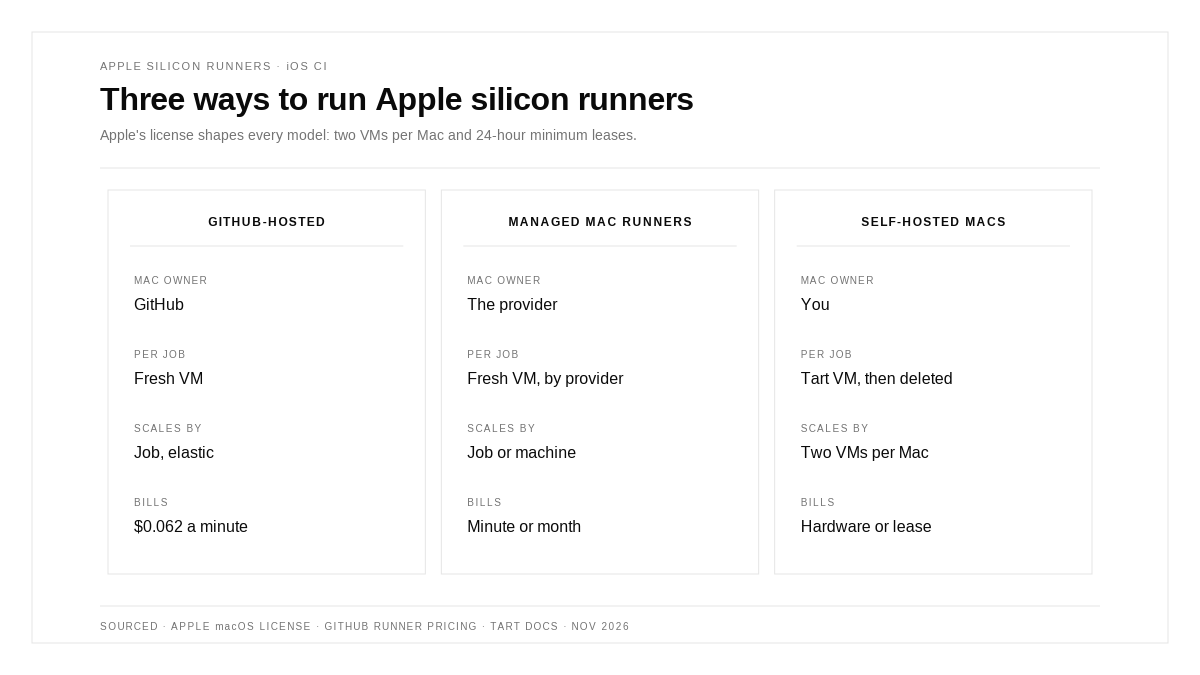
Three ways to run Apple silicon runners
| Model | Who owns the Mac | Isolation per job | Scaling unit | Cost shape |
|---|---|---|---|---|
| GitHub-hosted macOS runners | GitHub | Fresh VM per job | Per job, elastic | Per minute |
| Third-party managed Mac runners | The provider | Fresh VM per job, varies by provider | Per job or per reserved machine | Per minute or per machine-month |
| Self-hosted Macs with ephemeral VMs | You | A Tart VM per job, deleted after | Two VMs per Mac | Hardware or a 24-hour-minimum lease |
Managed runners are the default for good reason: zero hardware, zero Xcode upgrades, and elastic capacity for release-day spikes. Self-hosting starts to win when macOS minutes become a large, steady line item, or when the build needs things hosted runners lack. GitHub's documentation lists two of those directly: static IPs and private networking are unavailable on macOS larger runners, and arm64 macOS runners lack a static device UDID.
For the iOS development side of the same hardware question, this guide to choosing a cloud Mac compares hosting models for interactive work.
What a self-hosted Mac fleet needs
Ephemeral VMs per job
A bare-metal Mac that runs job after job accumulates state: stale DerivedData, leftover keychains, simulators from last week. Builds pass on Tuesday and fail on Wednesday for reasons unrelated to the diff. The fix is same one hosted runners use, a fresh VM per job.
Tart is the common tool for this on Apple silicon. It runs macOS and Linux VMs through Apple's Virtualization.framework and stores VM images in OCI registries, so a VM image moves around like a container image. Expo's infrastructure team says on Tart's site that it was the practical way for them to use the Virtualization framework, and Expo's own iOS builders run a fresh macOS VM per build on Mac mini hosts.
A golden image per Xcode version
Each image bakes in macOS, one Xcode version, the iOS runtimes you test against, and your toolchain, such as fastlane for signing and uploads. Pin the Xcode version in the image tag, push it to your registry, and roll forward by publishing a new tag. Rolling back becomes a one-line change in workflow file.
Capacity math that starts at two
Apple's license sets the ceiling: two VMs per Mac. Ten Mac minis give twenty concurrent jobs, and peak hour of PR traffic decides how many Macs you need. Count build jobs and macOS test jobs separately, because test jobs are the ones that grow with the device matrix.
Secrets hygiene per job
Runner registration tokens, signing certificates and App Store Connect keys live on these machines. Inject them per job from your secret store, keep them out of the base image, and delete the VM when the job ends.
One ephemeral Tart runner, step by step
Here is lifecycle of a single job on a self-hosted Mac, using commands from Tart's quick start.
1. Pull the golden image once per host.
brew install openai/tools/tart
tart pull ghcr.io/cirruslabs/macos-tahoe-xcode:latest
The first pull downloads a large image; every later job on that host reuses local copy.
2. Clone a fresh VM for the job.
tart clone ghcr.io/cirruslabs/macos-tahoe-xcode:latest job-4821
tart set job-4821 --cpu 4 --memory 8192
A Tart VM defaults to 2 CPUs and 4 GB of memory, so size it for Xcode before first build. On macOS 27 hosts, tart clone --stacked keeps the remote image as an immutable base and stores only the job's writes.
3. Boot it with the workspace mounted.
tart run --no-graphics --dir=src:"$PWD" job-4821 &
ssh admin@$(tart ip job-4821) 'cd "/Volumes/My Shared Files/src" && xcodebuild -scheme App build-for-testing'
Shared directories appear under /Volumes/My Shared Files inside the guest, so checkout stays on the host and the VM stays disposable.
4. Collect artifacts, then delete.
tart stop job-4821
tart delete job-4821
The next job starts from same clean image. In production, an orchestrator such as Tart's Orchard, or a CI integration for GitHub Actions, GitLab or Buildkite, runs this loop for you.
Cutting iOS build times beyond GitHub-hosted runners
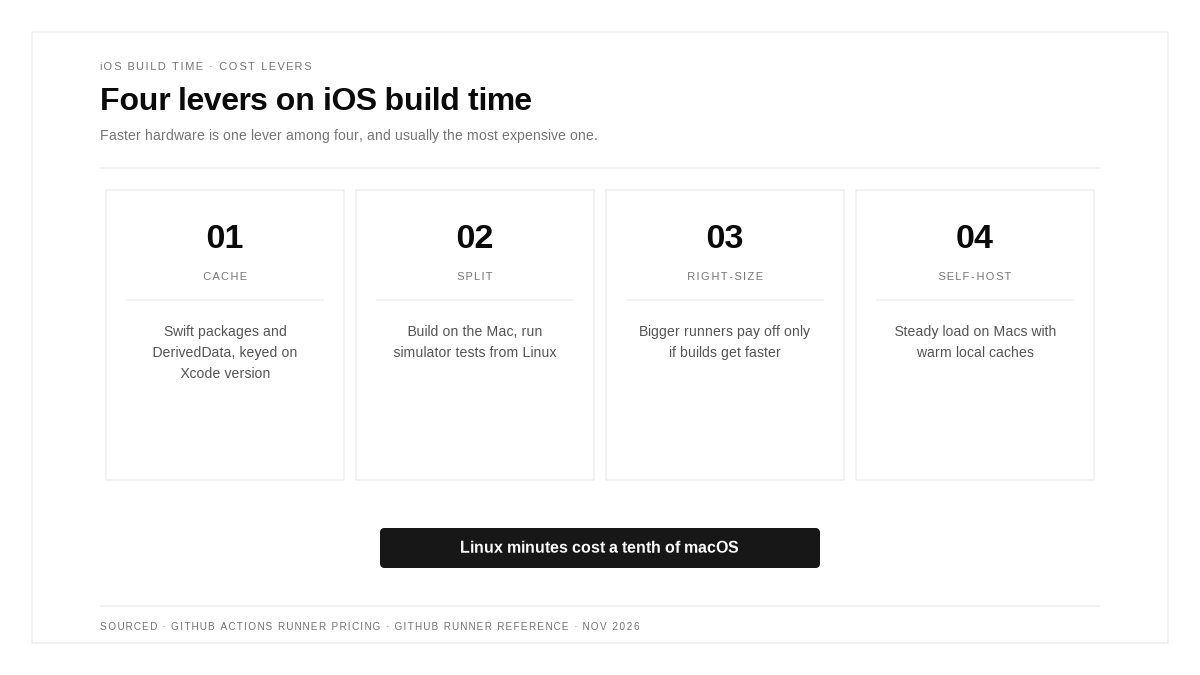
Faster hardware is one lever among four, and usually most expensive one.
- Cache dependencies across runs. Pass -clonedSourcePackagesDirPath and -derivedDataPath to xcodebuild, then cache those directories keyed on Package.resolved and the Xcode version. Cold Swift package resolution is a common hidden cost on fresh VMs.
- Build once, test from Linux. The macOS job compiles simulator .app and uploads it. Test jobs then run on ubuntu-latest against hosted simulators, so the long, parallel part of the pipeline bills at Linux rates. This guide to walks through split.
- Right-size the runner. The 5-core M2 Pro runner costs about 1.6 times the standard runner per minute. It pays off only when the build gets at least that much faster, so time one build on each before switching.
- Self-host the steady load. Warm local caches on your own Macs remove the dependency download entirely, at the price of tfleet work above.
A worked example at GitHub's list prices: a team runs 400 PR builds a month at 15 minutes each on the standard macOS runner, which is $372 a month. Adding a 25-minute simulator test job per PR on macOS adds $620. Running that same test job from a Linux runner costs $60 in runner minutes, plus the hosted simulator provider's charge.
Signals that it is time to self-host macOS runners
Roughly in order of how strongly they point toward owning Macs:
- Steady, high macOS minutes. When monthly bill for macOS minutes passes the cost of the Macs plus a slice of an engineer's time, owning wins.
- Network requirements. Builds that need a static IP or a private network fit self-hosted runners, given GitHub's macOS larger-runner limits.
- Device requirements. A static UDID for signing, or a physical device attached to the build host, rules out hosted arm64 runners.
- Queue time on the PR. Long waits for a macOS runner during working hours point to reserved capacity, owned or managed.
Spiky traffic, a small team, or zero appetite for Xcode upgrades on a fleet all point the other way.
Where Autosana fits in Mac CI
Autosana takes the test half of the pipeline off the Mac. Your macOS job, hosted or self-hosted, builds the simulator .app; the uploads it from an ubuntu-latest job and runs natural-language flows on Autosana's iOS simulators, with results and video on pull request.
Ziina runs this shape every night. Its full regression, including build, completes in 1 hour 20 minutes before the team starts work, and four critical smoke tests run on every pull request. The Ziina case study covers how that cut active manual regression from about 12 hours to about 1.
Conclusion
Managed Apple silicon runners areright start for most teams, and self-hosting becomes worth it when macOS minutes are large and steady, or when the build needs a static IP, a private network or a fixed UDID. Apple's license shapes both paths: two VMs per Mac and 24-hour minimum leases.
Whichever you pick, run every job in a fresh VM, cache Swift packages and DerivedData, and keep the Mac for the build. Tests that only need a simulator run fine from Linux.
FAQs
How many CI jobs can one Mac run at once?
Apple's license allows two additional macOS VMs per Mac, so two isolated jobs.
Why do cloud Macs bill by the day?
Apple requires CI leases of macOS to last at least 24 consecutive hours.
What is Tart used for?
Tart runs ephemeral macOS and Linux VMs on Apple silicon for CI and development.
How much RAM does GitHub's macOS runner have?
The standard arm64 macOS runner has 7 GB of RAM and 3 M1 cores.
How do I speed up iOS builds on GitHub Actions?
Cache Swift packages and DerivedData, right-size the runner, and move simulator tests to Linux.
Can Autosana run iOS tests from a Linux runner?
Yes. A Linux job uploads the simulator build and Autosana runs flows on hosted simulators.