
What Is Fastlane? The Open Source Tool That Automates iOS and Android Builds
Fastlane is an open source automation tool for iOS and Android that handles code signing, builds, testing, screenshots and App Store deployment. How it works, core tools, and how to set it up.
Gautam · 10 min read
autosana.ai
Fastlane is an open source command line tool that automates the repetitive tasks in iOS and Android development: code signing, building, running tests, capturing screenshots, managing provisioning profiles, and submitting apps to the App Store and Google Play. It runs as a Ruby gem on macOS (and partially on Linux for Android workflows) and integrates with every major CI/CD platform.
Google maintains Fastlane as part of the Fastlane open source project. The project started in 2014 when Felix Krause built it to eliminate the manual steps that consumed hours every release cycle. It became the most widely adopted mobile build automation tool in the iOS ecosystem, and Google acquired it in 2017 to maintain it alongside Firebase and the broader Android toolchain.
The core insight behind Fastlane is that most mobile release tasks are identical across teams: every iOS team manages certificates, every Android team signs APKs, every team uploads builds to a distribution service. Fastlane codifies these steps into reusable actions that run from a single configuration file.
Key Takeaways
- Fastlane is not a CI/CD platform. It is a task runner that automates mobile-specific build steps. It runs inside any CI system (GitHub Actions, GitLab CI, Bitrise, CircleCI, Jenkins) or locally on a developer's machine.
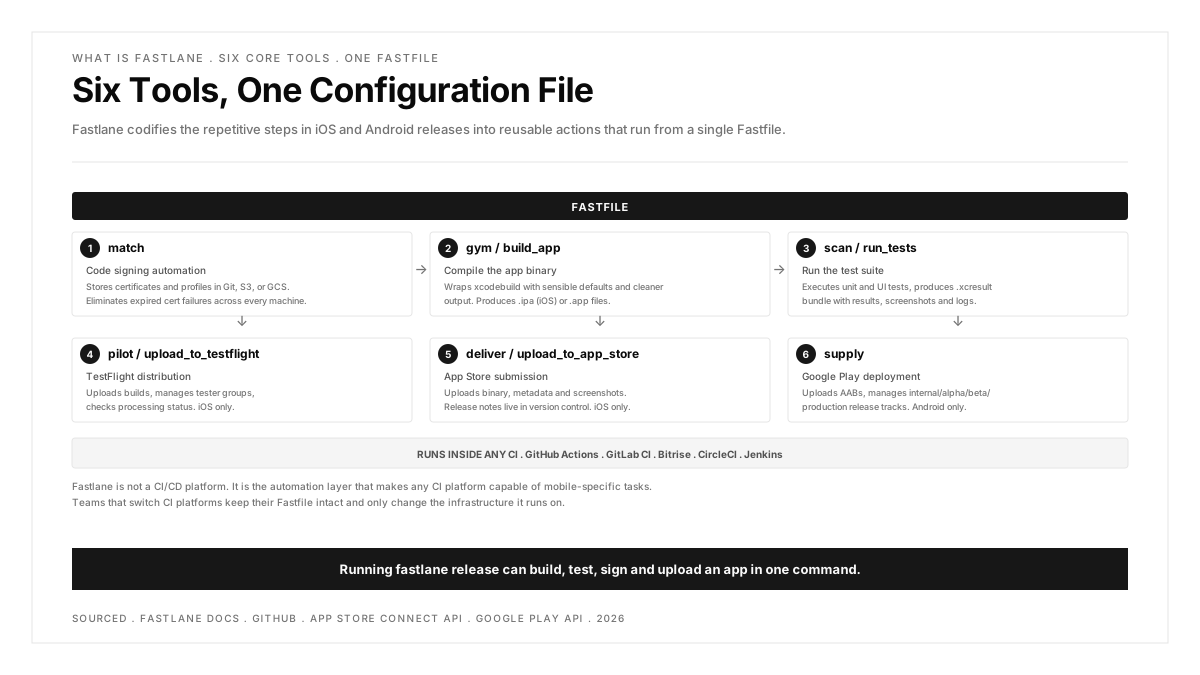
- The configuration lives in a Fastfile, which defines lanes (named sequences of actions). Running fastlane release can build, test, screenshot, sign and upload an app in one command.
- Fastlane's biggest value on iOS is code signing automation through match, which stores certificates and provisioning profiles in a shared repository and eliminates the most common source of iOS build failures.
- Over 400 built-in and community actions cover everything from Slack notifications to TestFlight uploads to Play Store submissions.
- Fastlane is free and open source. The cost is the engineering time to configure and maintain the Fastfile, which pays back on the first release cycle it automates.
How Fastlane works
Fastlane organizes automation into three concepts: actions, lanes and the Fastfile.
Actions are individual tasks: build_app compiles the binary, upload_to_testflight pushes it to TestFlight, capture_screenshots runs the app on multiple simulators and saves screenshots. Each action accepts parameters and returns results that subsequent actions can use.
Lanes chain actions into a sequence. A lane named beta might build the app, run tests, increment the build number, and upload to TestFlight. A lane named release might do everything beta does plus submit to App Store review.
The Fastfile is the configuration file that defines all lanes. It lives in the project's fastlane/ directory alongside other configuration files.
Running fastlane beta from the terminal (or from a CI script) executes every action in the beta lane in order. If any action fails, the lane stops and reports the error.
Core Fastlane tools
Fastlane ships with several standalone tools that handle specific parts of the mobile release process. Each can run independently or as an action inside a lane.
match: code signing
match is the tool that solves iOS code signing. It stores certificates and provisioning profiles in a Git repository, Google Cloud Storage, or Amazon S3, and automatically installs them on every machine that runs the build. This eliminates the most common source of iOS CI failures: expired certificates, mismatched profiles, and the "works on my machine" problem.
When a new developer joins the team, running match once downloads and installs the correct certificates. When a certificate expires, regenerating it with match nuke and match updates every machine on the next build.
gym (build_app): building
gym compiles the app and produces an .ipa file (iOS) or .app file. It wraps xcodebuild with sensible defaults and cleaner output.
pilot (upload_to_testflight): TestFlight distribution
pilot uploads builds to TestFlight and manages testers. It can add and remove testers, check processing status, and distribute builds to specific tester groups.
deliver (upload_to_app_store): App Store submission
deliver uploads metadata, screenshots and the binary to App Store Connect. It reads metadata from text files in the fastlane/metadata/ directory, which means release notes, descriptions and keywords live in version control alongside the code.
snapshot (capture_screenshots): automated screenshots
snapshot launches the app on multiple simulators and captures screenshots for every device size and language combination. For an app supporting 5 languages and 4 device sizes, this produces 20 screenshot sets automatically instead of manually.
supply: Google Play Store
supply is the Android equivalent of deliver. It uploads APKs or AABs to the Google Play Console, manages release tracks (internal, alpha, beta, production), and updates store listing metadata.
Setting up Fastlane
Prerequisites
- macOS for iOS workflows (Linux works for Android-only workflows)
- Ruby 2.5 or higher (macOS ships with Ruby)
- Xcode and the Xcode command line tools (for iOS)
- A valid Apple Developer Program membership (for code signing and distribution)
Installation and initialization
fastlane init creates the fastlane/ directory with a Fastfile and an Appfile (which stores the app identifier and Apple ID). The setup wizard asks which automation pattern to start with: automated screenshots, beta distribution, App Store deployment, or a manual configuration.
Running a lane
This executes every action in the beta lane. Output appears in the terminal with color-coded status for each step. A summary at the end reports success or failure for the entire lane.
Fastlane in CI/CD
Fastlane runs inside any CI system that supports Ruby. The CI configuration calls fastlane <lane_name> as a build step, and Fastlane handles the mobile-specific automation.
GitHub Actions example:
The pattern is the same across CI platforms: install Ruby, install dependencies with Bundler, run the lane. Secrets (certificates, API keys, passwords) are stored in the CI platform's secret manager and passed as environment variables.
For a broader view of how Fastlane fits into the mobile CI pipeline, see the guide on CI/CD pipeline design.
Fastlane vs other mobile build tools
| Tool | Type | What It Does |
|---|---|---|
| Fastlane | Build automation | Automates code signing, builds, tests, screenshots and store deployment. Runs inside any CI. |
| Bitrise | CI/CD platform | Provides managed infrastructure (macOS runners) and preconfigured mobile workflow steps. Can run Fastlane as a step. |
| Codemagic | CI/CD platform | Mobile-first CI/CD with Flutter emphasis. Includes its own code signing and build automation alongside Fastlane support. |
| GitHub Actions | General CI/CD | General-purpose CI. Runs Fastlane as a build step on macOS runners. |
| Xcode Cloud | Apple CI/CD | Apple's first-party CI/CD for Apple platforms. Built into Xcode and App Store Connect. Does not support Fastlane. |
| Gradle | Android build system | Compiles and packages Android apps. Fastlane's gradle action wraps it for integration into lanes. |
The key distinction: Fastlane is not a CI/CD platform. It does not provide build machines, triggers, or dashboards. It is the automation layer that makes any CI platform capable of mobile-specific tasks. Teams that switch CI platforms (from Bitrise to GitHub Actions, for example) often keep their Fastlane configuration intact and only change the infrastructure it runs on.
Common Fastlane workflows
Nightly beta builds
Screenshot automation for multiple locales
This captures screenshots on 3 devices in 5 languages (15 combinations) and uploads them directly to App Store Connect. Doing this manually takes hours. Fastlane completes it in the time it takes the simulators to run.
.png)
FAQs
Is Fastlane free?
Yes. Fastlane is open source and maintained by Google. There is no paid tier, no premium features, and no license fee. The cost is the engineering time to set up and maintain the Fastfile, which is typically a few hours for the initial configuration and occasional maintenance as the project evolves.
Does Fastlane work with Android?
Yes. Fastlane supports Android through the gradle action (for building), supply (for Google Play Store deployment), and screengrab (for automated screenshots on Android). Android workflows run on both macOS and Linux. The Android toolset is less extensive than the iOS toolset because Android's build and signing process is simpler, but the core workflows (build, test, deploy) are fully supported.
What is Fastlane match?
Match is Fastlane's code signing management tool. It stores iOS certificates and provisioning profiles in a shared location (Git repository, Google Cloud Storage, or S3) and automatically downloads and installs them on every machine that runs the build. This solves the most common iOS CI problem: builds failing because a certificate expired, a profile was revoked, or a developer's machine has different signing credentials than the CI server.
Can I use Fastlane without a CI system?
Yes. Fastlane runs locally on a developer's machine from the terminal. Many teams start by running lanes locally before adding CI. The workflow is the same: cd to the project directory and run fastlane <lane_name>. Local runs are useful for one-off tasks like capturing screenshots or uploading a hotfix build to TestFlight.
How does Fastlane compare to Xcode Cloud?
Xcode Cloud is Apple's first-party CI/CD service, integrated into Xcode and App Store Connect. It handles builds, tests and distribution for Apple platforms. Fastlane is a build automation tool that runs inside any CI system. The key differences: Xcode Cloud provides infrastructure and is Apple-only. Fastlane provides automation and is platform-agnostic. Xcode Cloud does not support Fastlane. Teams using Xcode Cloud use Apple's built-in workflow editor instead of a Fastfile.
What happens when Fastlane breaks after an Xcode update?
Xcode updates occasionally change build tool behavior, which can break Fastlane actions. The Fastlane team typically releases patches within days of major Xcode releases. Running bundle update fastlane pulls the latest version. Pinning Fastlane versions in the Gemfile prevents unexpected breakage from automatic updates, and updating deliberately after verifying compatibility is the safest approach.