
How to Choose a Cloud Mac for iOS Development
Explore cloud Mac features, benefits, and use cases for running Xcode, testing iOS apps, and accessing macOS without owning Apple hardware
- Written by
- Gautam Agarwal
- Read time
- 7 min read
- Published

A cloud Mac is a Mac mini, Mac Studio or macOS virtual machine hosted in a data center that you reach over the internet through SSH, remote desktop or a CI pipeline. Teams rent one to build, sign and test apps for iPhone, iPad and Mac from a Windows PC, a Linux server or a CI system.
Key facts
- Every cloud Mac runs on Apple hardware, because Apple's macOS license covers Apple-branded computers only.
- Apple's license sets a minimum lease of 24 consecutive hours for Macs rented out for developer services.
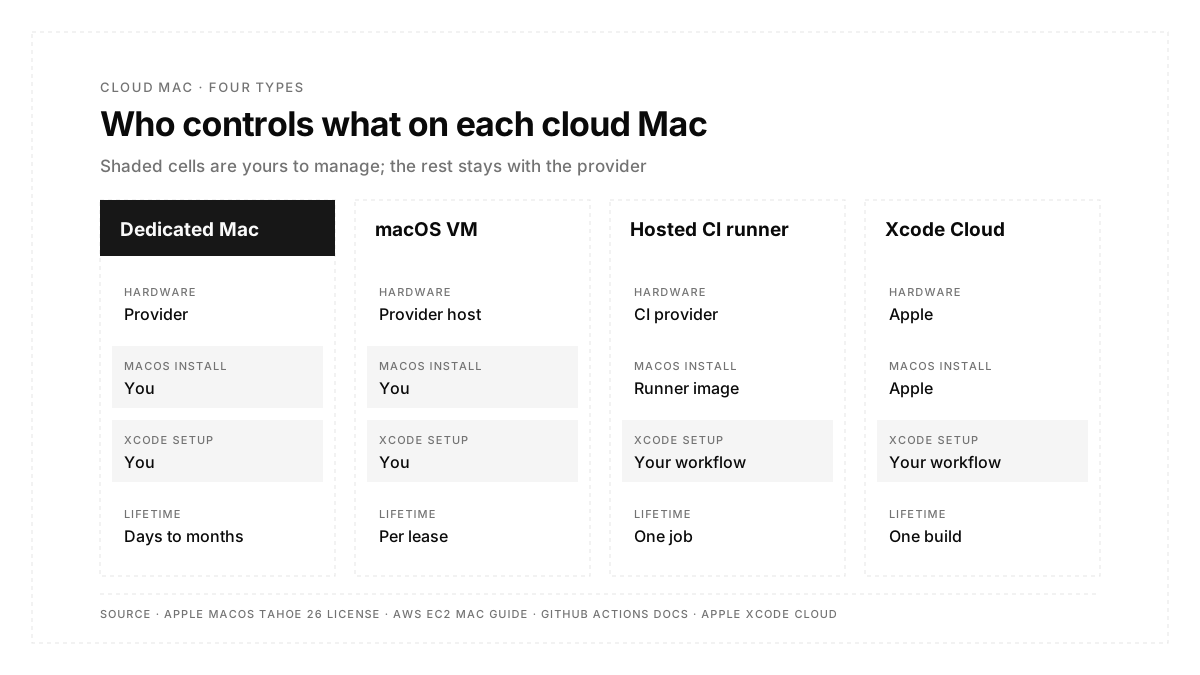
- Four types cover most needs: a dedicated Mac, a macOS virtual machine, a hosted CI runner and Apple's Xcode Cloud.
- Billing runs from per-minute (CI runners) to per-day minimums (dedicated hosts) to monthly hour bundles (Xcode Cloud).
Why do cloud Macs run on real Apple hardware?
The rule comes from the license. Apple's software license agreement for macOS Tahoe 26 is written "for use on Apple-branded Systems", and its virtualization clause allows up to two extra macOS copies in virtual machines on each Apple branded computer you own or control.
Section 3 of the same license covers leasing. A company may lease a Mac to a customer for continuous integration, building from source and automated testing, provided each lease lasts at least 24 consecutive hours and the customer has sole use of the machine during that period. This is why data centers rack physical Mac minis and Mac Studios, and why most dedicated plans carry a one-day minimum.
What types of cloud Mac exist?
| Type | What you get | Access | Billing pattern |
|---|---|---|---|
| Dedicated Mac | A whole physical Mac mini or Mac Studio | SSH, VNC, Apple Remote Desktop | Daily or monthly, 24-hour minimum |
| macOS virtual machine | A macOS instance running on a host Mac | SSH, VNC | Per lease, on Apple hardware only |
| Hosted CI runner | A fresh macOS machine per pipeline job | CI config file | Per minute of job time |
| Apple Xcode Cloud | Managed builds and tests inside Xcode | Xcode, App Store Connect | Monthly compute-hour bundles |
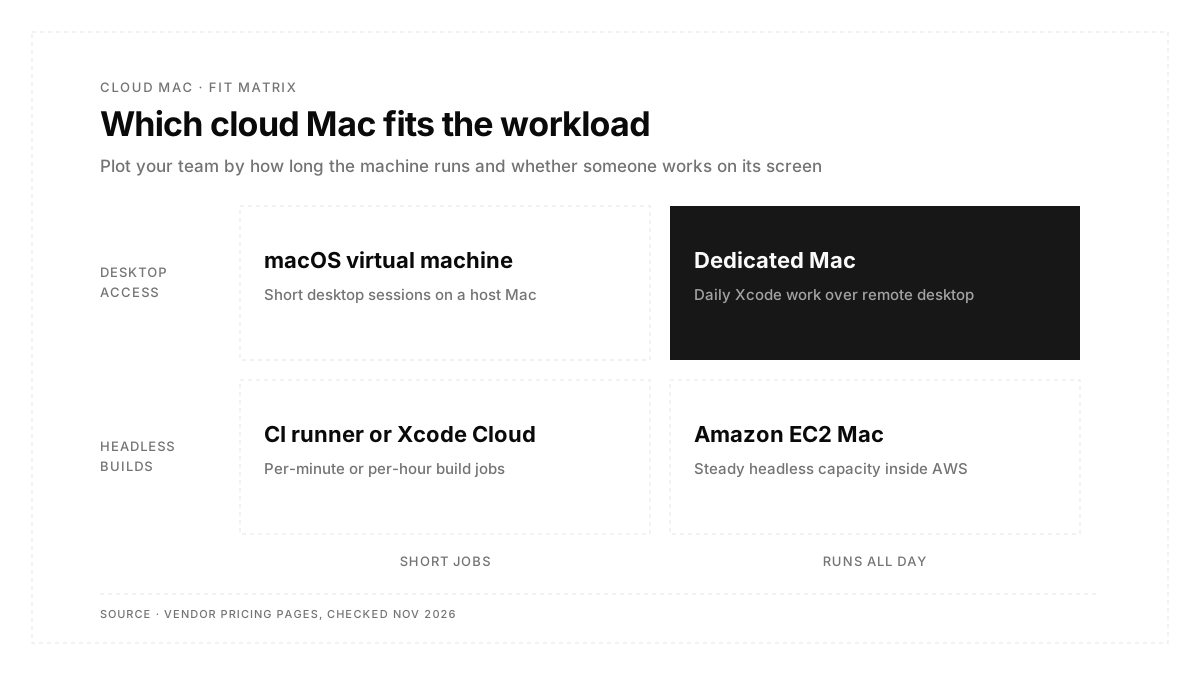
The first two give you a desktop to work in. The last two give you a build machine that appears for a job and disappears afterward.
What is a macOS virtual machine?
A macOS virtual machine is a full copy of macOS running inside a hypervisor on a host Mac. The concept matches any other virtual machine, with one Apple-specific limit: the host must be Apple hardware already running macOS.
Providers use VMs to give each customer a clean, resettable machine, and teams use them locally to test against older macOS releases. On a leased Mac, Apple's license lets either the provider or the customer run the extra virtual copies, and it limits the provider to a single virtual instance used as a provisioning tool.
What is an Amazon EC2 Mac instance?
Amazon EC2 Mac instances are bare-metal Macs that AWS runs as Dedicated Hosts. The EC2 Mac instance guide lists hardware from a 2018 Intel Mac mini through M4 and M4 Pro Mac minis, plus an M1 Ultra Mac Studio.
Four details shape how teams use them:
- Billing unit: the Dedicated Host, with a minimum allocation of 24 hours before release.
- Capacity: one Mac instance per host.
- Purchase options: On-Demand pricing or a Savings Plan.
- Startup time: about 6 to 20 minutes before a new instance accepts connections.
Access runs over SSH or Apple Remote Desktop, and Mac instances support EC2 Auto Scaling.
How do GitHub Actions macOS runners work?
A GitHub-hosted macOS runner is a cloud Mac that exists for the length of one workflow job. A job that sets runs-on: macos-latest gets a fresh macOS machine from GitHub's runner image, runs its steps, then hands the machine back.
```yaml
jobs:
build:
runs-on: macos-latest
steps:
- uses: actions/checkout@v4
- run: xcodebuild -scheme MyApp -sdk iphonesimulator build
```
GitHub rounds each job up to the nearest whole minute and bills macOS at a higher per-minute rate than Linux. Teams that need a long-lived machine with saved state can register their own rented Mac as a self-hosted runner, which the overview of CI/CD tools for mobile testing covers in more depth.
How much does a cloud Mac cost?
Published rates from the vendors' own pages, checked November 2026:
| Option | Published price | Notes |
|---|---|---|
| GitHub-hosted macOS runner, 3 or 4 core | $0.062 per minute | From GitHub's runner pricing reference |
| GitHub-hosted macOS, 12 core | $0.077 per minute | Larger runner, Team or Enterprise plans |
| GitHub-hosted macOS, M2 Pro 5 core | $0.102 per minute | Larger runner, Team or Enterprise plans |
| Xcode Cloud, included | 25 compute hours per month | With Apple Developer Program membership |
| Xcode Cloud, 100 hours | US$49.99 per month | Add-on subscription |
| Xcode Cloud, 250 hours | US$99.99 per month | Add-on subscription |
| Amazon EC2 Mac | Per Dedicated Host | 24-hour minimum; rate varies by instance type and region |
| Dedicated Mac rental | Per day or per month | Set by each hosting provider |
As a worked example, a 20-minute build and test job on the standard macOS runner costs $1.24 per run. Apple's Xcode Cloud page defines one compute hour as, for example, five 12-minute test runs.
What do teams use a cloud Mac for?
| Option | Published price |
|---|---|
| GitHub-hosted macOS runner, 3 or 4 core | $0.062 per minute |
| GitHub-hosted macOS, 12 core | $0.077 per minute |
| GitHub-hosted macOS, M2 Pro 5 core | $0.102 per minute |
| Xcode Cloud, included | 25 compute hours per month |
| Xcode Cloud, 100 hours | US$49.99 per month |
| Xcode Cloud, 250 hours | US$99.99 per month |
Does iOS testing need its own cloud Mac?
The build needs a Mac, because Xcode runs only on macOS. A simulator build or a signed device build comes from Xcode on a Mac, on a cloud Mac, or through a cloud build service.
Test runs can live elsewhere. Autosana runs flows on its own iPhone and iPad simulators from iOS 17 to iOS 26 and on real devices in the cloud. A team uploads a zipped .app built for the simulator SDK on arm64, or an .ipa for real devices, as the guide to building your app for the Autosana cloud describes. The cloud Mac then handles the build, and the test matrix runs on Autosana's hosted devices with results and videos on the PR.
Teams setting up the simulator side first can start with this .
What should you check before you rent a cloud Mac?
- Chip: Apple silicon or Intel, matching the architecture your builds and simulators need.
- Memory: enough for Xcode plus the simulators you run at the same time.
- macOS and Xcode versions: the releases your project requires, plus a path to future ones.
- Admin rights: full administrator access on dedicated plans for installing Xcode, runtimes and certificates.
- Billing minimum: a 24-hour minimum on dedicated hosts, against per-minute billing on CI runners.
- Access method: SSH, VNC or Apple Remote Desktop, plus a stable connection for remote screens.
- Region: a data center close to your team or your CI system.
- Storage: room for Xcode, simulator runtimes and derived data, which grow with each release.
Conclusion
A cloud Mac gives a team rented Apple hardware, and the right type depends on the job: a dedicated Mac for daily desktop work, a CI runner or Xcode Cloud for builds on every commit, and EC2 Mac for steady capacity inside AWS. Apple's license keeps every option on real Apple hardware with a one-day minimum for leases, so per-minute CI billing suits short jobs best. Testing can sit on hosted devices, leaving the cloud Mac to build and sign.
FAQs
Does a cloud Mac need Apple hardware?
Yes. Apple's macOS license covers Apple-branded computers only, so every compliant cloud Mac runs on Apple hardware.
Why do cloud Mac providers charge a 24-hour minimum?
Apple's macOS license sets a minimum lease of 24 consecutive hours for Macs rented for developer services.
How much does a GitHub Actions macOS runner cost?
The standard GitHub-hosted macOS runner bills $0.062 per minute, rounded up to the whole minute.
Is Xcode Cloud free?
Apple Developer Program membership includes 25 Xcode Cloud compute hours per month, with paid bundles above that.
Does Autosana need a Mac to run iOS tests?
Autosana runs iOS flows on its hosted simulators and real devices. The app build itself comes from Xcode.