
CI/CD Tools: Choosing One When You Ship Mobile
CI/CD tools differ on macOS runner cost, concurrency limits, and cache behaviour. How the categories compare for mobile teams and how to evaluate before migrating.
Yuvan Sundrani · 14 min read
autosana.ai
TL;DR
- CI/CD tools differ less in features than in three constraints that decide mobile cost: macOS runner pricing, concurrency limits, and cache behaviour.
- A macOS runner costs roughly ten times a Linux runner per minute on most managed providers, and iOS builds require one.
- Self-hosted Mac hardware becomes favorable once monthly macOS minutes exceed the amortized cost of a machine, though it transfers maintenance and security to you.
- Autosana connects to whichever CI/CD tool you choose, running real-device tests triggered by commit, API, or webhook.
A Linux runner costs a fraction of a cent per minute on most managed CI/CD tools. A macOS runner on the same platform typically costs around ten times that, and iOS builds require one.
Multiply by every pull request, and the choice of CI/CD tools stops being about feature checklists. Three constraints do most of the deciding for mobile teams, and all three sit well below the fold on a comparison page.
This guide covers those three constraints, what each category actually costs to run, how to evaluate without migrating, and what migration itself takes.
Which Three Constraints Actually Decide the Cost of CI/CD Tools?
How Much Do macOS Runners Cost Against Linux?
iOS builds need macOS, and Apple's licensing restricts where macOS may legally run. That makes macOS minutes scarce and expensive across every managed provider.
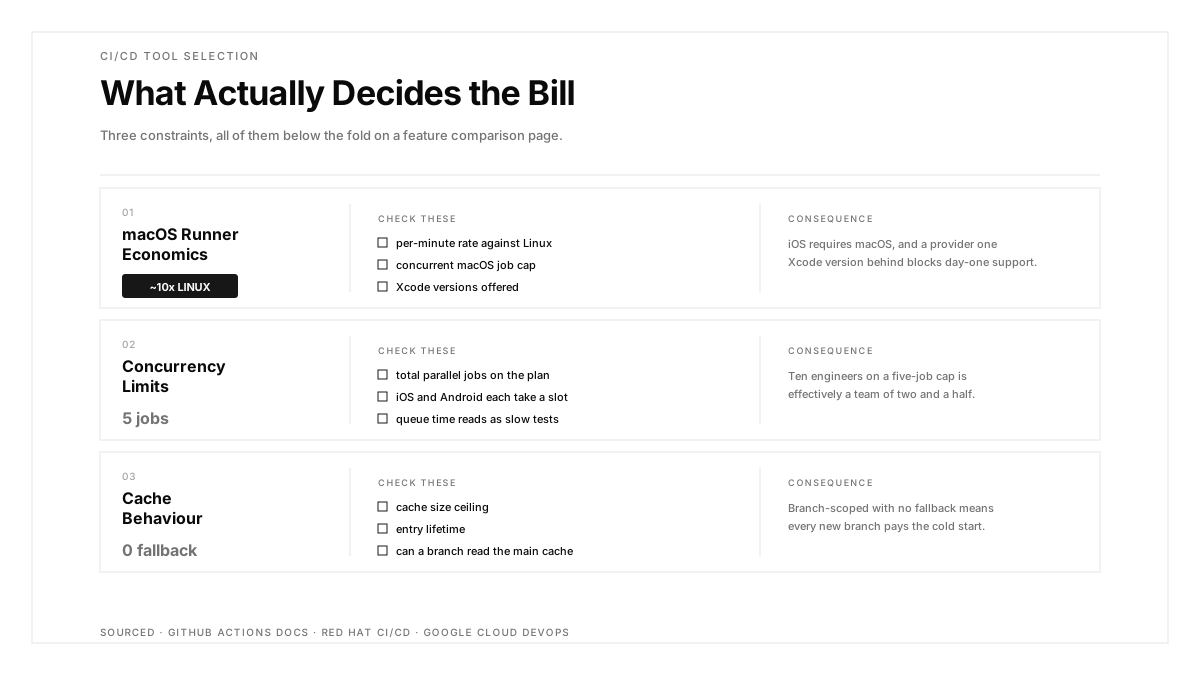
Check three numbers before anything else: the per-minute macOS rate, how many macOS jobs may run concurrently on your plan, and which Xcode versions are offered. A provider one Xcode version behind blocks you from shipping against a new iOS release on day one.
Work the arithmetic with your own figures. A team merging 40 pull requests a week, each triggering a 12-minute iOS build, consumes roughly 2,000 macOS minutes a month before any test execution. That single number decides more than any feature comparison.
Why Do Concurrency Limits Matter More for Mobile?
Total parallel jobs determine whether your pipeline scales with team size. A plan capping concurrency at five means the sixth engineer's pull request queues, and queue time is indistinguishable from slow tests to the person waiting.
Mobile doubles the demand, since iOS and Android builds should run in parallel rather than sequentially. A team of ten on a five-job cap is effectively a team of two and a half.
How Should You Evaluate Cache Behaviour?
Gradle cold starts are expensive and Xcode derived data is large. Ask three questions: what is the cache size ceiling, how long does an entry survive, and can a cache written on main be read by a feature branch.
That last one matters more than it sounds. Where caches are branch-scoped with no fallback, every new branch pays the cold-start cost, and most builds run on new branches.
How Do the Categories Compare?
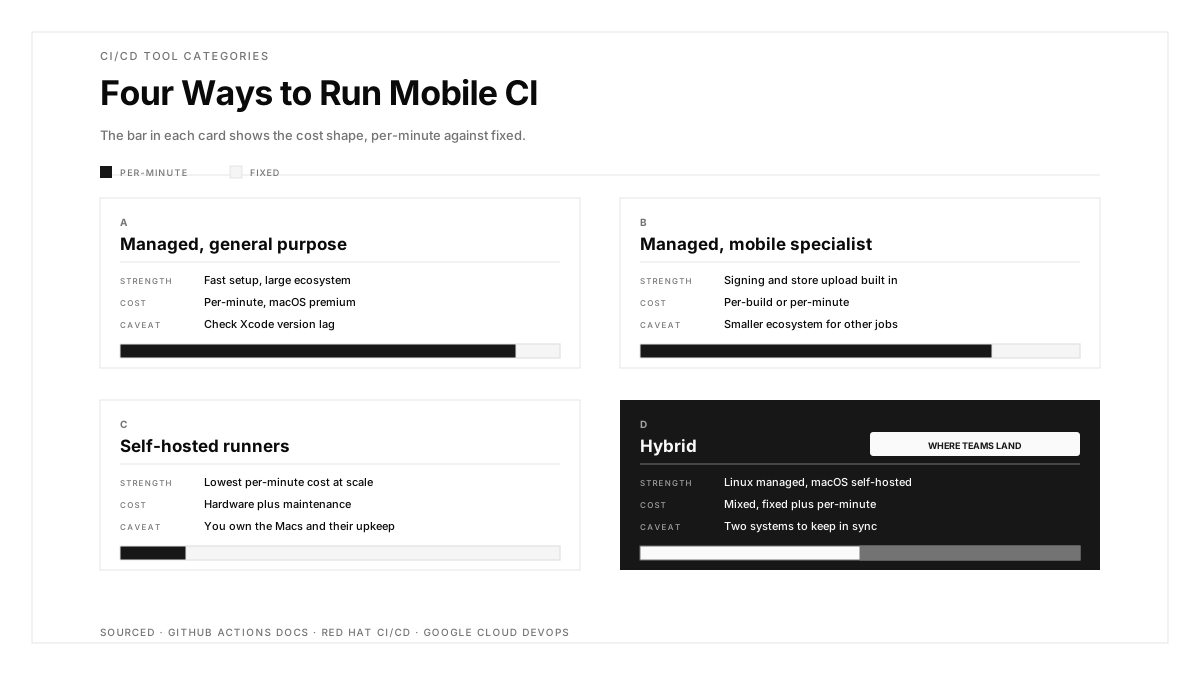
| Category | Strength | Cost shape | Mobile caveat |
|---|---|---|---|
| Managed cloud, general purpose | Fast setup, large ecosystem | Per-minute, macOS at a premium | Check Xcode version lag |
| Managed cloud, mobile specialist | Signing and store upload built in | Per-build or per-minute | Smaller ecosystem for other jobs |
| Self-hosted runners | Lowest per-minute cost at scale | Hardware plus maintenance | You own Mac hardware and its upkeep |
| Hybrid | Linux managed, macOS self-hosted | Mixed | Two systems to keep in sync |
The hybrid pattern is where many mobile teams land. Linux jobs stay on a managed service where they are cheap and elastic, while a small fleet of Mac hardware handles iOS builds at fixed cost rather than per-minute.
That trade becomes favourable somewhere around the point where monthly macOS minutes exceed the amortised cost of a Mac mini. Run the arithmetic with your own numbers rather than accepting a general recommendation.
What Does Running Self-Hosted Mac Hardware Actually Involve?
The per-minute saving is real. The operational cost arrives in four forms, and teams underestimate all four.
Maintenance. macOS updates, Xcode versions, and certificate renewals become your schedule. A Mac left on an old Xcode blocks the same day-one iOS support a lagging provider would.
Security. A self-hosted runner executing pull request code from forks is a remote code execution path into your network. Isolate runners, deny them access to production credentials, and consider refusing fork-based pull requests entirely on self-hosted machines.
State leakage. Managed runners start clean every time. A self-hosted Mac accumulates state across runs, so a build passing because of a file left by a previous job is a genuine failure mode. Reset between runs or accept the debugging.
Capacity planning. Four Macs serve a team until the team grows or a release crunch arrives, at which point the queue appears and hardware takes weeks to procure. Elasticity is what you traded away.
None of these argue against self-hosting. They argue for counting them in the comparison, since the per-minute rate is the visible cost and these are the invisible ones.
How Do You Evaluate CI/CD Tools Without Migrating?
Migration is expensive, so evaluate against your real workload before committing.
Start by measuring what you have. Time a cold build and a warm build on each platform. Count queued minutes across a week. Record your cache hit rate. Those three numbers are the baseline any candidate has to beat.
Then run one representative pipeline on the candidate, including the slowest stage rather than a toy example. A provider that builds a sample app quickly tells you little about your dependency graph.
Check the integration surface you depend on. Most CI/CD tools expose these differently, and GitHub Actions is worth reading as a reference implementation even where you use something else. GitHub integration covers status checks and pull request comments, webhooks cover custom orchestration, and an API for CI triggers runs from outside the provider.
Finally, price the real pattern rather than the headline rate. Multiply macOS minutes by actual pull request volume, add concurrency overage, and compare against the current invoice.
What Does Migrating Between CI/CD Tools Actually Cost?
Pipeline definitions are the visible work and the smallest part. Four other items carry the real cost.
Secrets have to be recreated and rescoped, including signing certificates, keystores, and store API credentials. This is manual, security-sensitive, and difficult to roll back partially.
Cache warm-up means the first weeks run cold while the new provider populates. Budget for slower builds during transition rather than treating day one as representative.
Custom scripts accumulate provider-specific assumptions: environment variable names, working directory conventions, artefact paths. These surface one at a time during migration rather than in an audit beforehand.
Institutional knowledge resets. The person who knew why a particular step existed has to reconstruct it, and undocumented steps frequently get dropped and then missed.
Run both pipelines in parallel for a period rather than cutting over. The duplicate cost is cheaper than discovering a gap during a release.
How Should Flaky Tests Be Handled at the Tool Level?
Most CI/CD tools offer automatic retry. Used carelessly it converts a quality problem into an invisible one.
Retry at the job level rather than the suite level, and cap it at one attempt. A job passing on retry should still report that it retried, since a silent pass loses the signal entirely.
Record retry rate as a metric. A suite needing retries on 15 percent of runs has a defect in the tests, and the retry is masking it rather than solving it.
Quarantine rather than retry where possible. Move intermittent tests to a non-blocking suite that still runs and still reports, so the signal survives while the gate stays usable.
Intent-based flows reduce one whole category of flakiness, since anchoring to user goals survives the element changes that break selector-bound end-to-end suites.
What Belongs in the Pipeline Whatever Tool You Choose?
Tool choice changes the economics. It changes very little about what should run.
The Red Hat CI/CD overview and Google's DevOps research both land on the same tiering, and it holds whichever CI/CD tools you pick.
| Tier | Runtime | Trigger | Contents |
|---|---|---|---|
| Fast | Under 5 min | Every commit | Lint, type checks, unit tests |
| Pull request | Under 15 min | Every PR | Integration, API checks, smoke tests |
| Deep | Under 45 min | Pre-merge or nightly | Regression, cross-device mobile test automation |
| Scheduled | Unbounded | Nightly | Full matrix, performance checks |
Across all four tiers, the property mattering most is where results appear. A failure attached to the pull request with a replay triages in seconds. The same failure as a console log line gets deferred.
How Should Signing Secrets Be Handled?
Signing material is the highest-value secret in a mobile pipeline, and CI/CD tools differ sharply in how they handle it. Weight this heavily, since the blast radius of a mistake here exceeds anything else on the evaluation list.
A leaked Android keystore lets anyone publish an update users accept as genuine. iOS provisioning profiles and certificates expire on a schedule, and an expired certificate fails the release stage of an otherwise healthy pipeline.
Four properties to require.
Encrypted storage native to the provider rather than files in the repository.
Scoping that denies fork-based pull requests access to secrets, which closes the most common exfiltration path.
Rotation possible without editing every pipeline definition, since a rotation requiring twelve file edits gets deferred.
Audit logging showing which job accessed which secret and when, which is what makes an incident investigable.
Use hooks or webhooks to alert on certificate expiry ahead of time rather than discovering it during a release.
How Autosana Fits
We stay deliberately tool-agnostic, because the right CI/CD tools depend on constraints we cannot see from here: your platform mix, your pull request volume, and what your team already runs.
Our CI/CD integration and GitHub integration cover the common managed path, posting results as pull request comments with session video attached.
For anything else, our API for CI triggers runs from any system able to make an HTTP request, and webhooks fire on run events so you can gate a deployment programmatically.
We execute on real iOS and Android devices in parallel, which keeps the test stage roughly flat as your matrix widens. That matters when pricing a provider, since it removes the pressure to buy concurrency purely to run devices sequentially.
Hooks handle event-driven cases, including routing a failure into whichever system your team already watches.
Conclusion
Before comparing CI/CD tools, measure three numbers on your current setup: cold build time per platform, queued minutes per week, and cache hit rate. Those are the baseline any candidate has to beat, and collecting them takes an afternoon.
Then price macOS minutes against your actual pull request volume rather than the headline rate. That single line usually dominates the invoice, and it is the number a feature comparison leaves out.
If macOS minutes already exceed the amortised cost of a Mac mini, model the hybrid pattern before migrating anywhere, and count maintenance, security isolation, state leakage, and capacity planning in the comparison.
.png)
FAQ
What are CI/CD tools?
CI/CD tools automate the path from commit to deployable artefact, running builds, tests, and releases. For mobile teams they also handle code signing, provisioning, and app store upload.
What should mobile teams check first when comparing CI/CD tools?
macOS runner pricing and concurrency, since iOS builds require macOS at roughly ten times a Linux runner. Then check which Xcode versions are offered, because version lag blocks day-one OS support.
Why does concurrency matter more for mobile?
iOS and Android builds should run in parallel rather than sequentially, so each pull request consumes at least two slots. A ten-person team on a five-job cap queues constantly.
What is the hybrid CI/CD pattern?
Linux jobs run on a managed service where they are cheap and elastic, while self-hosted Mac hardware handles iOS builds at fixed cost. It becomes favourable once macOS minutes exceed the amortised cost of a machine.
What does self-hosting actually cost beyond hardware?
Maintenance of macOS and Xcode versions, security isolation for fork-based pull requests, state leakage between runs on machines that stay dirty, and capacity planning without elasticity.
How do you evaluate a CI/CD tool without migrating?
Measure cold and warm build time per platform, queued minutes per week, and cache hit rate on your current setup. Then run one representative pipeline including its slowest stage on the candidate.
How should signing secrets be handled?
Use the provider's encrypted store rather than repository files, scope secrets so fork-based pull requests are denied access, rotate without editing every pipeline definition, and keep audit logs of secret access.
Should CI/CD tools retry flaky tests automatically?
Retry at job level, capped at one attempt, and report that a retry occurred. Track retry rate as a metric, since a suite needing retries on 15 percent of runs has a defect the retry is masking.