
One device per worktree: running parallel coding agents on a mobile app
Git worktrees isolate files, but parallel coding agents sharing one simulator still collide. How to give each agent its own iOS or Android device.
- Written by
- Gautam Agarwal
- Read time
- 10 min read
- Published

Key Takeaways
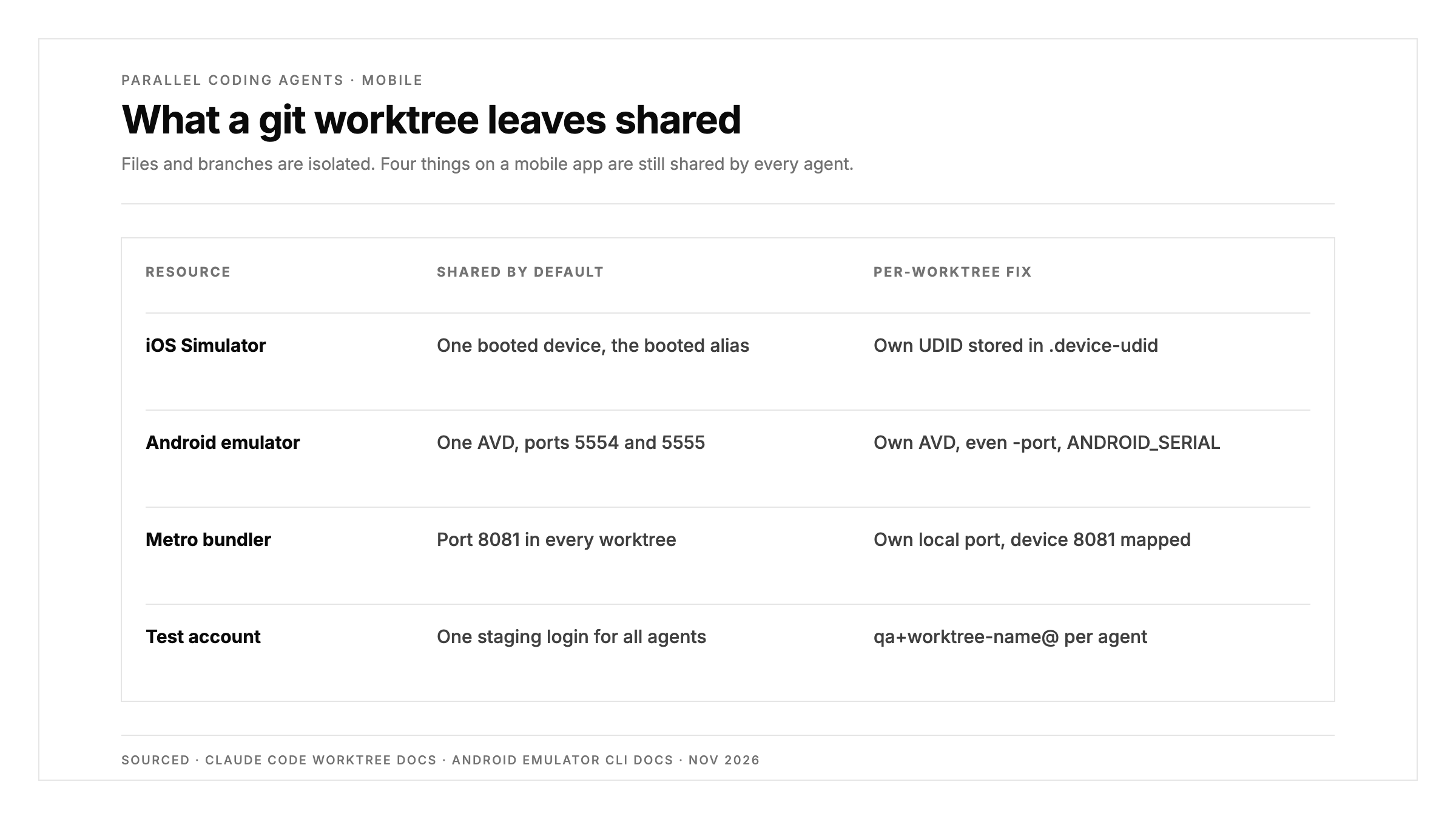
- Git worktrees give each coding agent its own files and branch. They do nothing for the simulator, the emulator, the Metro port or the test account the agents share.
- Two worktrees of one app usually build the same bundle ID, so installing agent B's build on a shared simulator silently replaces agent A's.
- On iOS, give each worktree its own simulator UDID and stop using the
bootedalias. On Android, give each worktree its own AVD and pinANDROID_SERIAL. - Metro defaults to port 8081 in every worktree; run each on its own local port and map the device side back to 8081.
- Cloud sandboxes bind one device to one git worktree by default, which removes most of this bookkeeping from the agent's instructions.
Running parallel coding agents on a mobile app means each agent edits, builds and verifies its own branch at the same time. Worktrees handle the editing. This post covers the part they leave out: giving every agent a device nobody else touches.
Worktrees isolate files, not devices
The setup is common now. You start three Claude Code sessions with claude --worktree onboarding, claude --worktree checkout-fix and claude --worktree settings-redesign. Each gets a separate checkout under .claude/worktrees/ on its own branch. Claude Code's worktree documentation is precise about the scope: worktrees isolate file edits, and the session is blocked from editing the main checkout.
Then each agent finishes its change and does the responsible thing. It builds the app and checks the screen on a simulator. There is one simulator booted on the Mac, so all three use it.
For a web app this mostly works, because each agent can start its dev server on a different port and open its own browser tab. A mobile app has more shared state than that, and none of it lives in the worktree. Robert Brennan of OpenHands made the general point in a recent talk on agent sandboxes: agents that share one long-lived machine end up stepping on each other. Mobile is where that shows up first, because the device is a long-lived machine with a lot of state.
What two agents share on one iOS Simulator
Here is the failure that costs the most time, because nothing reports an error.
Agent A, in checkout-fix, builds com.example.shop and installs it:
xcrun simctl install booted build/Debug-iphonesimulator/Shop.app
xcrun simctl launch booted com.example.shop
While A is walking through the checkout screens, agent B, in settings-redesign, finishes its build. Same app, same bundle ID, so simctl install replaces the installed app with B's build. A's next screenshot shows B's code. If B's branch happens to render the checkout screen correctly, A reports its own fix as verified.
Everything else on the simulator is shared in the same way:
| Shared state | Where it lives | What goes wrong |
|---|---|---|
| Installed app | One install per bundle ID per simulator | The last agent to install wins |
| App container | ~/Library/Developer/CoreSimulator/Devices/<UDID>/data | Agent A's cached session or feature flags leak into B's run |
| Keychain | Per simulator | One agent's logout clears another agent's token |
| Permission prompts | Per simulator | B never sees the notification prompt A already accepted |
The booted alias | Resolves to one booted device | With several booted, you don't choose which one it picks |
The fix on a single Mac is to stop sharing. Give each worktree its own simulator and refer to it by UDID:
# once per worktree
UDID=$(xcrun simctl create "agent-checkout-fix" "iPhone 16 Pro" com.apple.CoreSimulator.SimRuntime.iOS-18-4)
echo "$UDID" > .device-udid

# every build the agent verifies
UDID=$(cat .device-udid)
xcrun simctl boot "$UDID" 2>/dev/null || true
xcrun simctl install "$UDID" build/Debug-iphonesimulator/Shop.app
xcrun simctl launch "$UDID" com.example.shop
Two details make this hold up. Add .device-udid to .gitignore, since it belongs to the worktree and should never be committed. And put the rule in the agent's instructions file: "use the UDID in .device-udid, never booted". Agents copy commands from docs and Stack Overflow, and almost every example uses booted.
When a worktree is removed, delete its simulator with xcrun simctl delete "$UDID". Leftover simulators accumulate quickly when agents create one per branch. For a refresher on what a simulator does and doesn't reproduce, see this explainer on the iOS Simulator.
One AVD per agent on Android
The Android emulator has the same shape with different names. Each AVD keeps its user data in its own userdata-qemu.img, so two agents need two AVDs, not two boots of the same one.
Ports are the next thing that collides. The emulator command-line documentation explains the scheme: each running emulator takes a pair of adjacent ports, a console port and an adb port, starting at 5554 and 5555 and counting up by two, with room for 64 concurrent devices in the 5554 to 5682 range. It also recommends even console port numbers, because an odd one below 5584 can start without appearing in adb devices.
Pin the port per worktree so the serial number is predictable:
# worktree checkout-fix
emulator @agent_checkout_fix -port 5556 -no-snapshot-save &
export ANDROID_SERIAL=emulator-5556

# worktree settings-redesign
emulator @agent_settings_redesign -port 5558 -no-snapshot-save &
export ANDROID_SERIAL=emulator-5558
adb reads ANDROID_SERIAL, so adb install, adb shell and adb logcat hit the right device without every command carrying -s. Without it, an adb install with two emulators attached fails with "more than one device/emulator", which is the better outcome, since an agent will at least notice. -no-snapshot-save keeps one agent's half-finished state from becoming the next cold start. The ADB commands cheat sheet covers the rest of the device commands an agent ends up using.
Metro port collisions across worktrees
React Native and Expo add a third shared resource. Metro listens on 8081 by default, and every worktree tries to start it there. The second one fails or, depending on the tooling, offers another port. Either way, the debug build on the device still asks for 8081, so it may load JavaScript from the other agent's bundler.
Run each worktree's Metro on its own local port, and keep the device side on 8081:
# worktree checkout-fix
npx expo start --port 8082

# worktree settings-redesign
npx expo start --port 8083
On a local simulator that means also telling the app where Metro is, which usually means a rebuild or a dev-menu change per worktree. On a remote device it is a port mapping. With Autosana's forward command, 8081:8082 sends the device's port 8081 to your machine's 8082, so the debug build keeps asking for 8081 and gets its own worktree's bundle:
autosana sandbox forward 8081:8082 3000Backend state: one test account per agent
The last shared resource isn't on your machine. If three agents log into staging as qa@example.com, they share a cart, a profile, notification settings and, depending on your backend, a session limit. Agent A adds an item to the cart; agent B's checkout test sees two items and reports a bug.
The pattern that works is one test account per worktree, named after it, such as qa+checkout-fix@example.com. Keep the credentials in a gitignored .env.local, and list the file in .worktreeinclude so Claude Code copies it into new worktrees. Each worktree then overrides the account name. It is boring and it removes a whole class of false failures.
Cloud sandboxes: a device per worktree by default
Everything above works on one Mac, with three limits. The Mac runs out of memory long before 64 emulators. The agent has to follow a page of device bookkeeping rules every time. And an agent running in a Linux container or a remote workspace can't start an iOS Simulator at all, a problem covered in iOS simulator access for Claude Code in remote containers.
Autosana's sandboxes move the device off the machine and make the worktree the unit of ownership. autosana sandbox start leases a cloud iOS Simulator, Android Emulator or, on request, a real device, then installs and launches the app. Commands after that act on the current sandbox, one per git worktree. If a worktree has more than one sandbox, every command needs --sandbox <id>, so agents sharing a worktree can't drive each other's device by accident.
The per-worktree flow for an agent looks like this:
autosana sandbox start --platform ios --upload build/Shop.app --device "iPhone 17 Pro"
autosana sandbox forward 8081:8082
autosana sandbox open shop://checkout --description "Open checkout"
autosana sandbox tap 603,1311 --description "Pay"
autosana sandbox logs --since 2 --grep "error"
autosana sandbox end
Each action waits for the screen to settle and saves a screenshot under .autosana/.sandboxes/<sandbox-id>/ inside that worktree, so the evidence for a branch stays with the branch. A forgotten sandbox ends 30 minutes after its last command, and your plan caps how many can be live at once, which also caps what a runaway agent fleet can spend. The evidence side of this, attaching screenshots and logs to the pull request, is covered in mobile UI verification for coding agents.
One line in AGENTS.md or CLAUDE.md makes it the default for every session:
After a user-facing change to the mobile app, check it in an Autosana sandbox:
start one with your latest build, forward Metro if it is running, walk through
the change with a --description on each step, then run autosana sandbox end.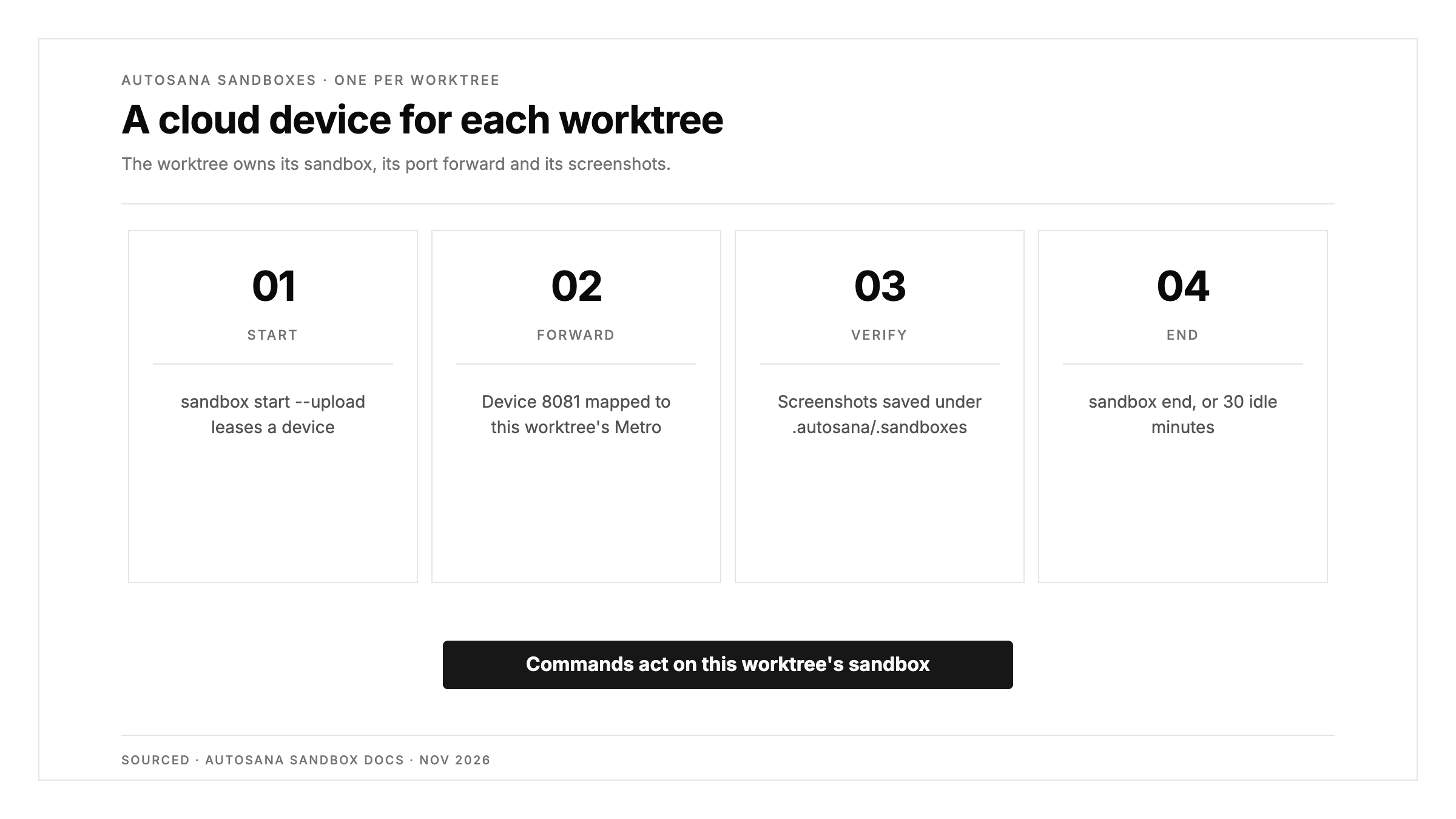
Where one device per worktree costs more
This isn't free, and a few cases call for something else.
Native rebuilds per worktree. Each worktree needs its own build. Two agents on JavaScript-only changes can share a native build and differ only in Metro, which is cheap. Agents changing native code each pay for an Xcode or Gradle build, and on a cloud device each also uploads it.
Read-only agents. A review agent that only takes screenshots of a build someone else installed doesn't need its own device. Sharing is safe when exactly one agent installs and the others only look.
Real devices. Physical phones are scarce, and on a real device there is no port forwarding, so the app has to point at public URLs. Give real devices to the release checks and keep the parallel agents on simulators and emulators.
Conclusion
Worktrees solved the file problem for parallel agents. On a mobile app, four more things are shared: the installed app, the device's state, the Metro port and the test account. Each one produces a false pass or a false failure that looks like a real result.
Give each worktree its own simulator UDID or AVD, its own Metro port and its own test account, and write those rules into the agent's instructions. Or move the device off the machine and let the worktree own a sandbox. Either way, the rule is the same one worktrees applied to files: one agent, one copy of everything it writes to.
FAQs
Can two coding agents share one iOS Simulator?
Only if one installs and the others just look. Two installers overwrite each other's build.
Why does my agent verify the wrong build?
Another worktree installed the same bundle ID on the shared simulator after your agent did.
How do I run several Android emulators for parallel agents?
Use one AVD per agent, an even -port per emulator, and ANDROID_SERIAL per worktree.
How do I fix Metro port 8081 conflicts across worktrees?
Start each worktree's Metro on its own port and map the device's 8081 to it.
Do git worktrees isolate simulators?
No. Worktrees isolate files and branches; devices, ports and test accounts stay shared.
How does Autosana handle parallel coding agents?
Each git worktree gets its own sandbox device, and commands act only on that sandbox.
Sources