
iOS Simulator Guide for Testing iPhone Apps
Learn how the iOS Simulator helps developers test iPhone and iPad apps, simulate device settings, identify bugs, and validate app behavior on a Mac.
- Written by
- Gautam Agarwal
- Read time
- 9 min read
- Published

The iOS simulator is Apple's tool inside Xcode that runs iPhone, iPad, Apple Watch, Apple TV and Vision Pro apps directly on a Mac. It ships free with Xcode, boots any device model and iOS version you install, and answers to the simctl command line. In Xcode 27 the simulated devices open in an app called Device Hub, which replaced the standalone Simulator app.
Key takeaways
- The iOS simulator runs only on macOS, because it ships inside Xcode.
- It compiles your app for the Mac's own processor (arm64 or x86_64), which makes it fast and also different from real iPhone hardware.
- Xcode 27 renamed the Simulator app to Device Hub. Xcode 26 and earlier still use Simulator.
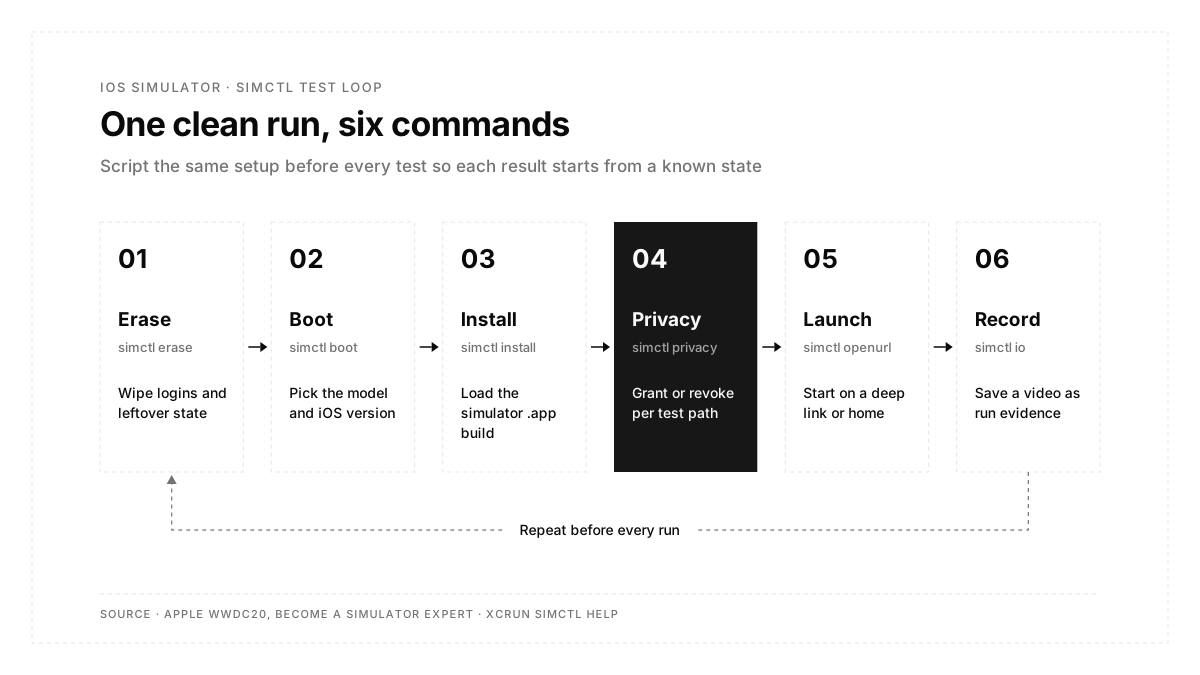
- xcrun simctl scripts the jobs testers repeat: boot, install, deep links, permissions, push payloads, status bar and video.
- Autosana runs flows on cloud iPhone and iPad simulators from iOS 17 to iOS 26, with the model and OS chosen per run.
Is the iOS simulator an emulator?
The iOS simulator is a simulator. An emulator recreates a phone's processor in software. Apple's simulator compiles your app for the Mac's CPU, arm64 on Apple silicon or x86_64 on Intel, and runs it natively alongside iOS frameworks built for the Mac.
That design brings speed, plus three gaps. Apple's guide to running your app on simulated or physical devices states that simulators run within Device Hub on your Mac and differ from a physical device in performance and features:
- Performance: the Mac's CPU, memory and network outpace a phone, so speed, memory use and thermal throttling look different.
- Hardware: camera, microphone, barometer and motion sensors are absent, according to Expo's iOS Simulator guide.
- Build type: the simulator runs simulator builds only, so App Store downloads stay out of reach.
| iOS simulator | Android emulator | |
|---|---|---|
| How it works | App compiled for the Mac's CPU | Full Android system image on virtual hardware |
| Host computer | macOS with Xcode | Windows, macOS or Linux |
| Build it accepts | .app built for the iphonesimulator SDK | Standard .apk |
| Strongest at | Functional flows, layout, localization, dark mode | Functional flows plus closer hardware behavior |
The Android side has its own walkthrough in the Android emulator setup guide.
What is Device Hub in Xcode 27?
Device Hub is the Xcode 27 app that holds every simulated and physical device in one window. It replaced the Simulator app. When you run an app on a simulator, Device Hub opens a compact window showing the device screen, and you can expand it to see the full device sidebar.
Apple's page on managing simulated and physical devices in Device Hub covers the two jobs testers use most: adding simulators for specific models or OS versions, and pairing real iPhones over Wi-Fi or a cable. On Xcode 26 and earlier, the same jobs live in the Simulator app and the Devices and Simulators window.
How do you install the iOS simulator on a Mac?
Installing Xcode installs the simulator. The full setup takes four steps:
- Install Xcode from the Mac App Store.
- Open Xcode, then choose Xcode > Settings > Components.
- Under Platform Support, click Get next to iOS to download the current simulator runtime.
- Add older iOS versions under Other Installed Platforms with the Add Platforms button.
Teams that provision CI machines can script the same downloads with xcodebuild, as Apple's page on downloading and installing additional Xcode components shows:
# latest iOS simulator runtime
xcodebuild -downloadPlatform iOS
# a specific iOS version
xcodebuild -downloadPlatform iOS -buildVersion 18.0
Runtimes are large downloads, so keep the versions your analytics show users run and delete the rest from Components settings.
How do you open the iOS simulator?
The path depends on your Xcode version:
| Task | Xcode 27 (Device Hub) | Xcode 26 and earlier (Simulator) |
|---|---|---|
| Open the app from Xcode | Xcode > Open Developer Tool > Device Hub | Xcode > Open Developer Tool > Simulator |
| Open it from Terminal | open -a DeviceHub | open -a Simulator |
| Pick a device model | Add Device (+) at the top of the sidebar | File > Open Simulator |
| Run your app on it | Choose the simulator as run destination, press Run | Same |
| Reset a device | Device > Reset Content and Settings | Device > Erase All Content and Settings |
Spotlight also finds either app by name.
How do you launch the iOS simulator from a cross-platform framework?
Each framework's CLI boots a simulator and installs the app in one step:
| Framework | Command |
|---|---|
| Expo | npx expo start, then press i (or Shift + i to pick a simulator) |
| React Native | npx react-native run-ios |
| Flutter | flutter run with a simulator already booted |
| Native Swift | Choose a simulator as run destination in Xcode and press Run |
The CLIs target the most recently opened simulator, so boot the device you want first when several are running.
Which simctl commands matter most for testing?
simctl (simulator control) drives every simulator from Terminal, and xcrun simctl with zero arguments prints the full help. Apple's WWDC20 session Become a Simulator expert demonstrates the permission, push, video and status bar commands below.
| Testing job | Command |
|---|---|
| List available devices | xcrun simctl list devices available |
| Boot a device | xcrun simctl boot "iPhone 17 Pro" |
| Install a simulator build | xcrun simctl install booted MyApp.app |
| Launch by bundle ID | xcrun simctl launch booted com.example.MyApp |
| Open a deep link | xcrun simctl openurl booted myapp\://orders/4021 |
| Grant a permission | xcrun simctl privacy booted grant photos com.example.MyApp |
| Reset every permission | xcrun simctl privacy booted reset all |
| Send a push payload | xcrun simctl push booted com.example.MyApp payload.json |
| Record the screen | xcrun simctl io booted recordVideo run.mp4 |
| Freeze the status bar | xcrun simctl status_bar booted override --time 9:41 |
| Trust a test CA certificate | xcrun simctl keychain booted add-root-cert myCA.pem |
| Wipe a device | xcrun simctl erase "iPhone 17 Pro" |
The privacy commands carry the most value for QA. Permission prompts decide whether a user ever reaches a feature, and revoke plus reset let a test walk the declined path on demand. Use booted with a single running device, and pass the device name or UDID when several are running.
Can you run the iOS simulator on Windows?
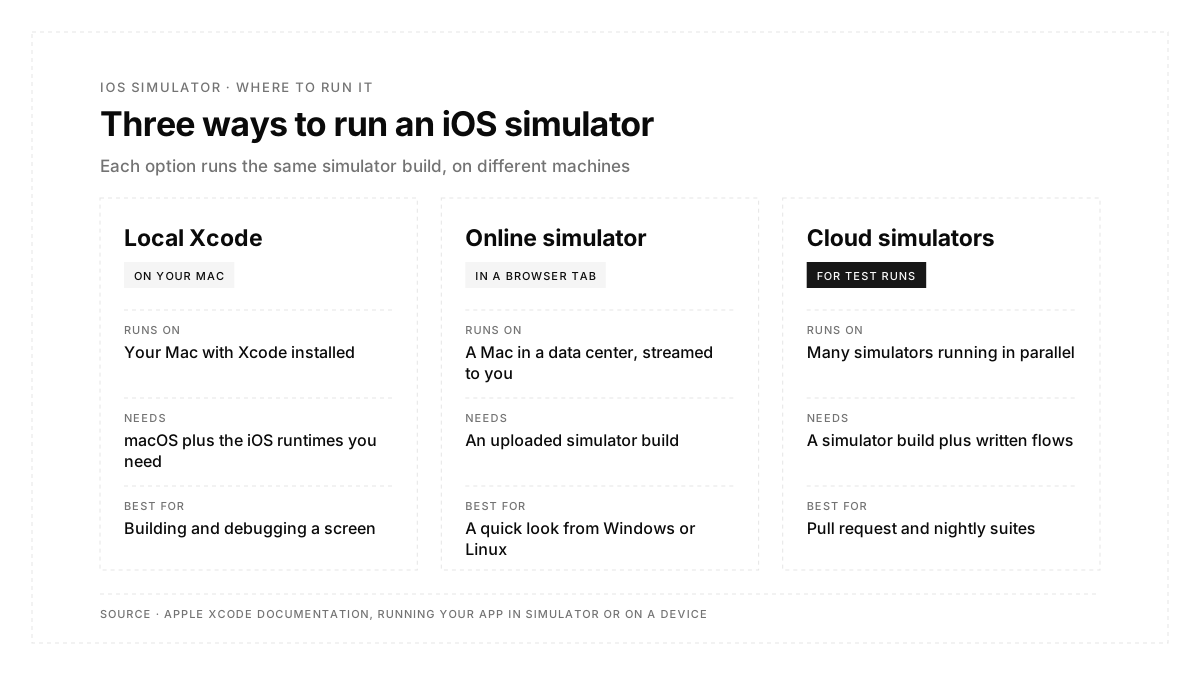
Apple's simulator runs on macOS only, so Windows and Linux users reach iOS through one of four routes:
- A cloud Mac: rent a Mac in a data center, install Xcode, and view its screen over remote desktop. This is the one route where you build and simulate in the same place.
- A browser-streamed simulator: services run simulators on Mac hardware and stream them to a browser tab. They run a simulator build (.app) that someone produced with Xcode or a cloud build service. Expo, for example, offers remote iOS simulators for Expo projects.
- A real device cloud: physical iPhones in a data center, shown in the browser. These take a signed device build (.ipa).
- Your own iPhone: Expo projects can run on a real iPhone through Expo Go or a development build.
Two shortcuts come up often and both miss the mark. Browser extensions that mimic a phone screen resize a website, so they test mobile web layouts and leave native iOS apps untouched. Downloads branded "iOS emulator for Windows" come from third parties, since Apple publishes its simulator only inside Xcode.
Which simulator setup fits each testing job?
Each setup suits a different stage of the release:
| Testing job | Where it runs best |
|---|---|
| Building a screen and checking each change | Local simulator |
| Several screen sizes, iOS versions, dark mode, right-to-left layouts | Local simulator |
Scripting setup with simctl before an XCUITest or agent run | Local simulator |
| A suite that needs parallel runs on every pull request | Cloud simulators |
| Teammates on Windows or Linux reviewing a build | Cloud simulators |
| Each run pinned to an exact device model and iOS version | Cloud simulators |
| Camera, motion sensors, biometrics, Bluetooth | Real iPhone |
| Scroll smoothness, launch time, memory, battery | Real iPhone |
The hardware side gets a full treatment in when a simulator is enough and when real devices are required.
How do you run iOS simulator tests in CI?
xcodebuild runs XCTest and XCUITest suites against any installed simulator, so the same command works on a laptop and a CI runner:
xcodebuild test \
-scheme MyApp \
-destination 'platform=iOS Simulator,name=iPhone 17 Pro,OS=latest'
Add one -destination flag per device to fan a run across several simulators, and run simctl erase before each job so leftover logins and granted permissions stay out of the results. Teams new to the framework layer can start with this overview of XCUITest.
Cloud simulators remove the one-Mac ceiling. Autosana's platform runs flows on iPhone and iPad simulators from iOS 17 to iOS 26, with the model and OS picked per run. It takes a zipped .app built for the simulator SDK on arm64, while an .ipa routes the same flow to real devices, as the guide to building your app for the Autosana cloud explains. A flow describes the user's journey and what should happen along the way, so the same flow runs on every device model and iOS version in the matrix.
Conclusion
The iOS simulator is the fastest place to test an iPhone app: install it with Xcode, open it through Device Hub on Xcode 27, add the runtimes your users run, and script setup with simctl so every run starts clean. Windows users reach it through a cloud Mac or a browser stream, and real iPhones remain the final check for sensors and performance.
FAQs
Is the iOS simulator free?
Yes. The simulator ships with Xcode, a free download from the Mac App Store.
Is there an iOS emulator for Windows?
Apple publishes its simulator only inside Xcode for macOS. Windows users reach it through a cloud Mac or browser stream.
What replaced the Simulator app in Xcode 27?
Device Hub. It holds simulated and physical devices in one window, and open -a DeviceHub launches it.
How does a simulator build differ from a device build?
A simulator build is an .app for the iphonesimulator SDK. A device build is a signed .ipa for iphoneos.
Can the iOS simulator receive push notifications?
Yes. xcrun simctl push delivers a local payload, and since Xcode 14, simulators on Apple silicon or T2 Macs also receive remote pushes.
Which iOS versions does Autosana's cloud simulator support?
Autosana's platform page lists iPhone and iPad simulators running iOS 17 through iOS 26.