
Mobile UI verification for coding agents before the pull request
Let coding agents check mobile UI changes on a real simulator, emulator or device before the PR. Compare computer-use options, evidence and guardrails.
- Written by
- Gautam Agarwal
- Read time
- 8 min read
- Published

Key Takeaways
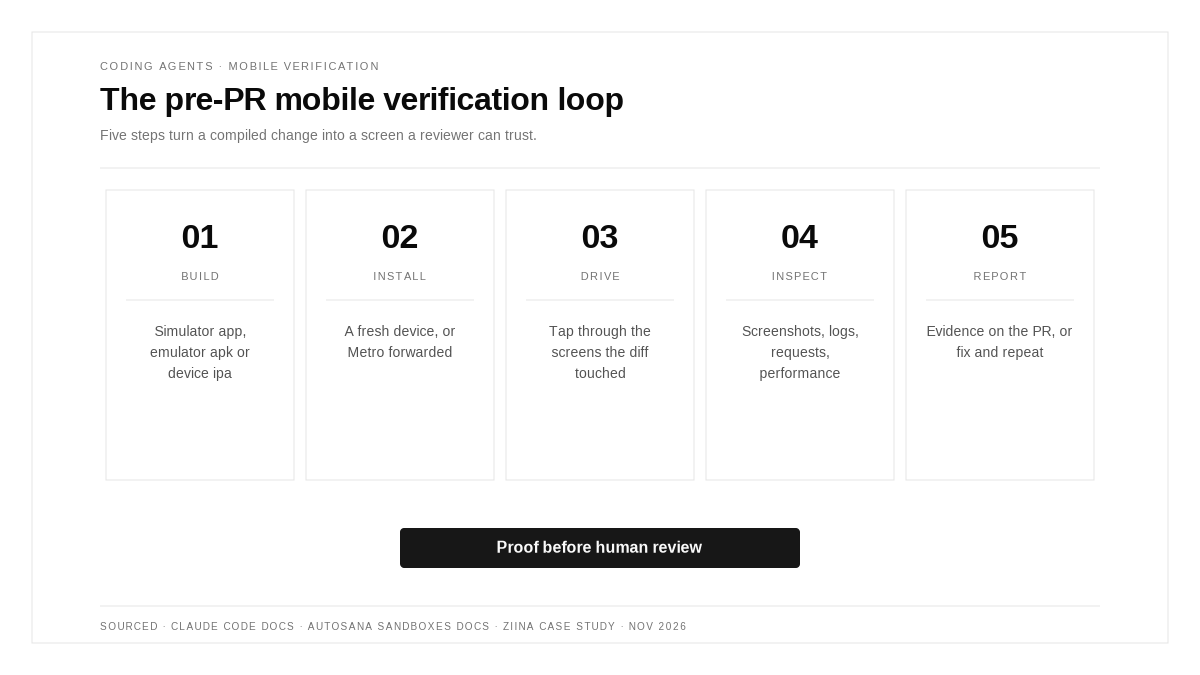
- A coding agent verifies a mobile change by installing its build on a simulator, emulator or device, driving the changed screens, and attaching evidence to the PR.
- Claude Code's CLI computer use runs on macOS only, holds a one-session lock, and hides other apps while it works.
- Mobile agents read the screen from screenshots after every action, while browser agents can also read a DOM.
- Useful evidence is per-step screenshots, a short recording, filtered app logs and performance data.
- A passing check can become a regression flow committed to the PR branch, so the next change gets tested automatically.
Mobile UI verification for coding agents is the step where an agent runs its own change on a mobile device, checks the screens it touched, and attaches proof before human review. It turns "the build compiles" into "the screen works," with evidence a reviewer can open.
What a coding agent can check inside a mobile app
The mechanics are simpler than the phrase "computer use" suggests. An agent checking a mobile change runs a tight loop: look at screen, act, look again.
The looking step is where most of the quality comes from. After every tap, the agent needs a fresh picture of the device, or it is guessing what happened. Autosana's sandbox commands wait for the screen to settle and save a screenshot after each action, and coordinates refer to pixels in the latest screenshot, so agent always acts on the screen it just saw.
From there, the agent can reach most of what a person checks by hand. It can open a deep link straight to the screen it changed in place of navigating six screens to reach it. It can set location, locale and network conditions, send a push notification on the iOS Simulator, relaunch cold, or reinstall clean. And it can look underneath UI: app logs, failed network requests and memory per step catch the failures where a screen renders correctly over a broken call.
That is enough for the changes coding agents make most: a new screen, a fixed layout, a form with validation, a navigation path, a deep link.
Mobile computer use versus browser agents
Browser agents have an easier job. A web page exposes a DOM, selectors and network logs inside one process the agent already controls. A mobile agent starts from pixels and a device runtime that lives somewhere else: a simulator on a Mac, an emulator on a KVM host, or a phone.
Claude Code's documentation shows the difference from the inside. Its controls apps on a Mac's screen, including the iOS Simulator, as a research preview on macOS for Pro and Max plans. One session holds the computer-use lock at a time, other apps are hidden while Claude works, and screenshots are downscaled before they reach the model. Claude Code reaches for an MCP server, Bash or a browser tool first, and saves screen control for apps beyond the reach of other tools. That ordering is the right instinct for any agent: use most structured interface available, and drive pixels only where structure runs out. For the concept itself, this explainer on how computer use agents test mobile apps coversvision side.
Getting a person to look at the agent's work
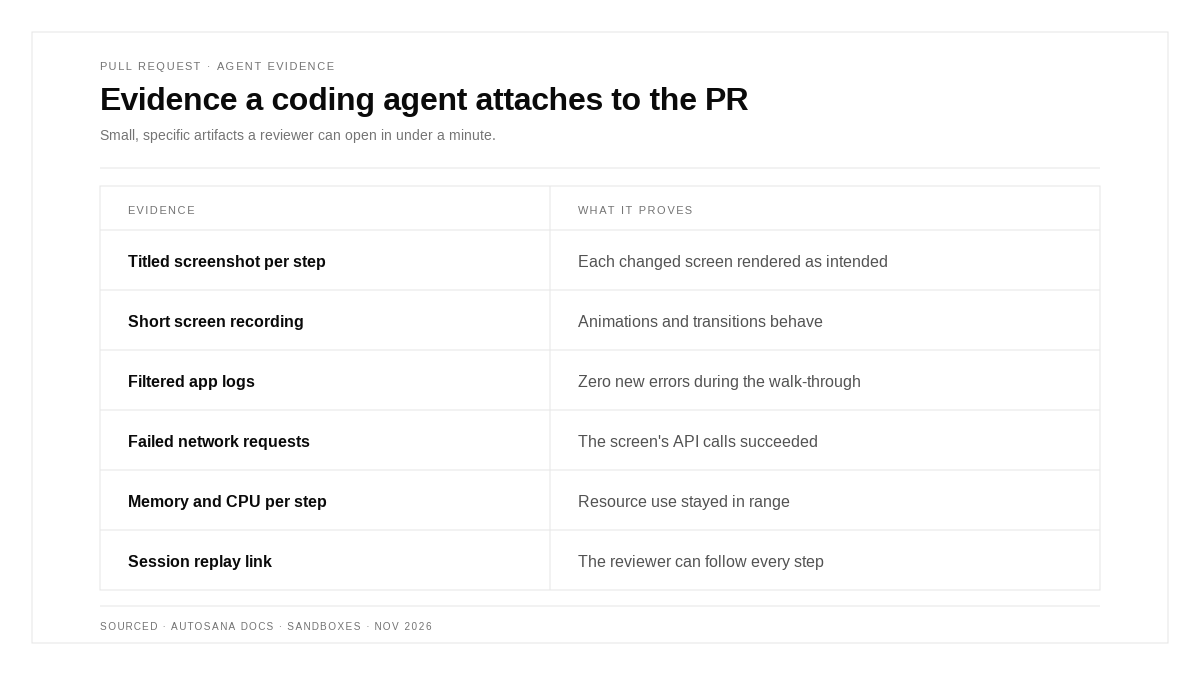
An agent that finishes and reports "the screen works" is asking for trust it has yet to earn. A reviewer should be able to check in a minute, with zero rebuilds on their side.
| Evidence | How the agent produces it on an Autosana sandbox | What it proves |
|---|---|---|
| Screenshot per step | Saved automatically after every action | Each changed screen rendered as intended |
| Step titles | --description "Open settings" on each command | The reviewer can follow the path |
| Short recording | autosana sandbox video --last 30s | Animations and transitions behave |
| Filtered logs | autosana sandbox logs --since 4 --grep "error" | Zero new errors during the walk-through |
| Failed requests | autosana sandbox network --failed (iOS Simulator) | The screen's API calls succeeded |
| Memory and CPU | autosana sandbox perf --since 4 | Resource use stayed in range |
Each sandbox also has a replay page with every step, screenshot, recording and log, which is the link to paste into the PR.
The same pattern works on the CI side. At Ziina, after a run finishes in GitHub Actions, Georgii Troshin has Codex extract annotated screenshots, compare them with previous successful runs and summarize each failure. The Ziina case study describes it as delegating the analysis and checking to the agent, then coming back to the results.
What pre-PR mobile verification replaces
Most teams already verify mobile changes before merge. They just do it by hand, with predictable failure points.
The screenshot in Slack. A developer posts one screenshot from their simulator. It shows happy path on one device and leaves out the keyboard covering the submit button.
"Works on my simulator." The change passed on the author's machine with author's cached login. A fresh device with a fresh account tells a different story.
The reviewer who checks out the branch. Someone pulls branch, builds it and taps through, which costs twenty minutes and happens for the risky PRs only.
The manual pass before release. An afternoon of tapping through screens, skipped when the release is urgent. Agent checks on every PR shrink what that pass has to cover.
Selector scripts that rot. UI automation tied to element IDs breaks with every redesign, which is why so much of it gets abandoned. A check written as a description of the journey survives layout changes far better.
Mobile computer-use infrastructure options
Each row reflects what the vendor documents on its own site.
| Option | Devices | How the agent drives it | Where it runs |
|---|---|---|---|
| Claude Code Desktop simulator pane | iOS simulators, up to 4 per session | Built into the desktop app | Your Mac, local sessions |
| Claude Code CLI computer use | Any app on screen, including the iOS Simulator | Screen control with a one-session lock | Your Mac |
| Expo Simulators | Remote iOS Simulator and Android Emulator | EAS CLI, REST API, agent-device, Argent or Appium | Expo infrastructure |
| Appetize | Cloud iOS simulators and Android emulators | CLI and REST API | Appetize infrastructure |
| Autosana sandboxes | Cloud iOS Simulator, Android Emulator, real devices on request | autosana CLI, one sandbox per git worktree | Autosana cloud |
The split follows where the agent runs. An agent on a developer's Mac does well with the local pane. An agent in a container or a cloud workspace needs a device it leases over the network, because the device runtimes live outside the container. The Expo Simulators documentation makes the same point: it gives Linux and Windows users an iOS Simulator, with sessions that consume usage until they stop or hit a configured limit. For the container-specific setup, read iOS simulator access for Claude Code in remote containers.
From an agent check to a regression flow
A one-off check protects one pull request. The same check, saved as a test, protects every pull request after it. Autosana's closes that gap from inside the agent's session: flows_create saves the check as a natural-language flow, such as "open settings, switch to dark mode, and confirm profile header stays readable"; pr_attach_flow runs existing flows on the current pull request; and pr_commit_flow_as_code commits a passing flow to the PR's branch as a file, next to the code it tests.
The format matters. Gobi's CTO, Tyler Becks, described writing instructions way he would brief someone in a usability test, with zero code. The covers how his team moved from 13 brittle scripted tests to more than 30 flows in that style, and it is also format a coding agent produces naturally.
This walkthrough of end-to-end results on the pull request shows what reviewers see once those flows run on every PR.
Guardrails for agent-driven mobile devices
- Test accounts only. Device screenshots go to model provider, so keep real credentials off agent devices.
- One device per session. A shared device returns results shaped by another agent's taps.
- Idle timeouts. A sandbox that ends 30 minutes after its last command keeps a forgotten session from running up usage.
- Approval before changes. MCP tools labeled read-only or data-changing let the agent ask before it edits flows or starts runs.
- Concurrency caps. Plan limits on live sandboxes double as a budget control for agent fleets.
Conclusion
Mobile UI verification gives coding agents the step they were missing: running change on a device and showing the result. The loop is look, act, look again, with logs underneath and evidence on top.
Give the agent a device it can lease, ask for screenshots, a short recording and filtered logs on every PR it opens, and save the passing checks as flows so next change gets the same test automatically.
FAQs
Can a coding agent test a mobile app before opening a PR?
Yes, by installing its build on a simulator, emulator or device and driving the changed screens.
How does mobile computer use differ from browser automation?
Mobile agents work from screenshots and taps on a device, while browser agents can read the DOM.
Does Claude Code computer use work on Linux?
The CLI's computer use is available on macOS only, per Claude Code's documentation.
What evidence should an agent attach to a mobile PR?
Per-step screenshots, a short recording, filtered app logs and performance data.
Can agents test mobile apps on cloud devices?
Yes. Hosted services lease cloud iOS simulators and Android emulators to agents through a CLI or API.
How does Autosana help coding agents verify mobile changes?
Its sandboxes give agents a cloud device; its MCP server saves passing checks as flows.