
How Computer Use Agents Test Mobile Apps
Learn how computer use agents use AI to see, understand, and interact with screens, helping automate tasks across browsers and desktop applications.
- Written by
- Gautam Agarwal
- Read time
- 7 min read
- Published

A computer use agent is an AI system that operates software the way a person does: it looks at the screen, moves a pointer, clicks, scrolls and types. It works through the graphical interface, so it reaches apps that offer zero APIs to call.
The agent runs a loop of screenshot, decision and action until the task is done. Anthropic, OpenAI, Google and Microsoft each ship a computer use tool for developers. In app testing, the same loop lets an agent walk through a user journey the way a customer would, which changes how teams write and maintain end-to-end tests.
How does a computer use agent work?
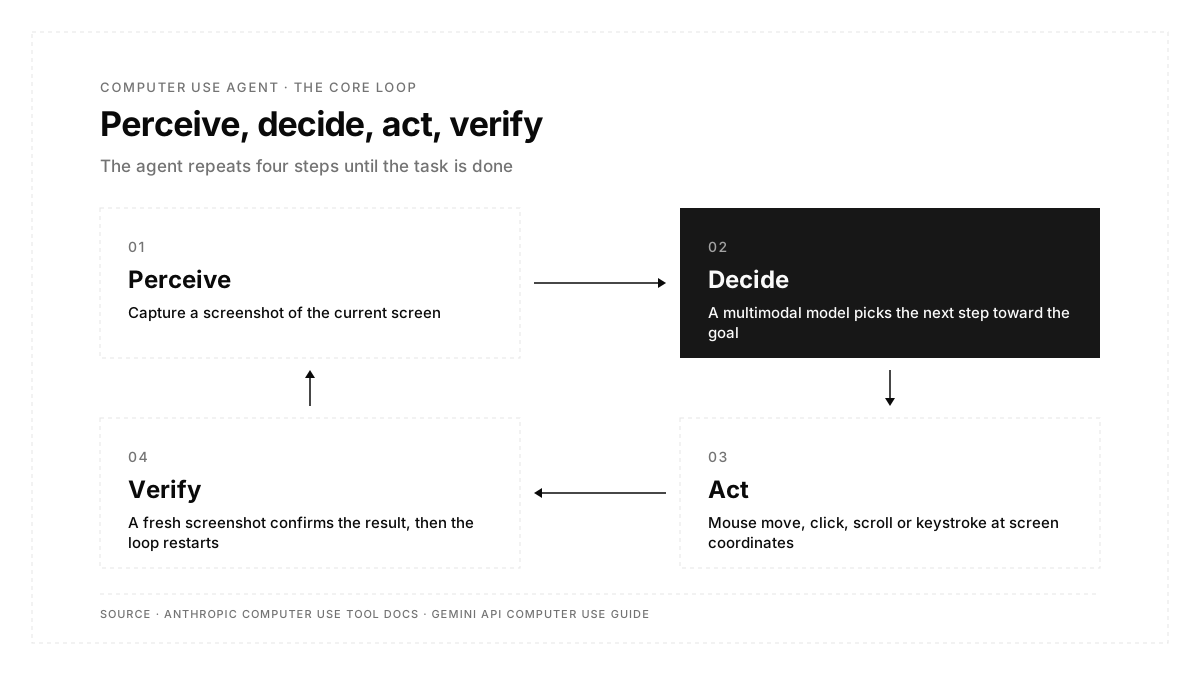
Every computer use agent repeats four steps:
- Perceive: the surrounding system captures a screenshot of the current screen and sends it to a multimodal model.
- Decide: the model compares the screenshot with the goal and picks the next step, such as finding a form field or a menu button.
- Act: an execution environment carries out the step as a mouse move, click, scroll or keystroke at specific screen coordinates.
- Verify: a fresh screenshot shows whether the action worked, and the loop starts again.
Anthropic's computer use tool documentation describes the same split of responsibilities. The model returns actions such as screenshot, left_click or type, and your application performs them inside a sandboxed environment with a virtual display, then returns the result. The model can also batch a short sequence of actions and usually ends the batch with a screenshot to check the outcome.
Why do teams use computer use agents?
Three properties set computer use agents apart from API integrations and recorded scripts:
| Property | What it means in practice |
|---|---|
| Works through the interface | Legacy desktop software, internal admin tools and third-party portals become automatable with zero custom integration |
| Reads the screen visually | A moved button or renamed label stays recognizable, so a layout change leaves the task intact |
| Crosses applications | One run can read a spreadsheet, sign in to a web portal, fill a multi-step form and send a summary |
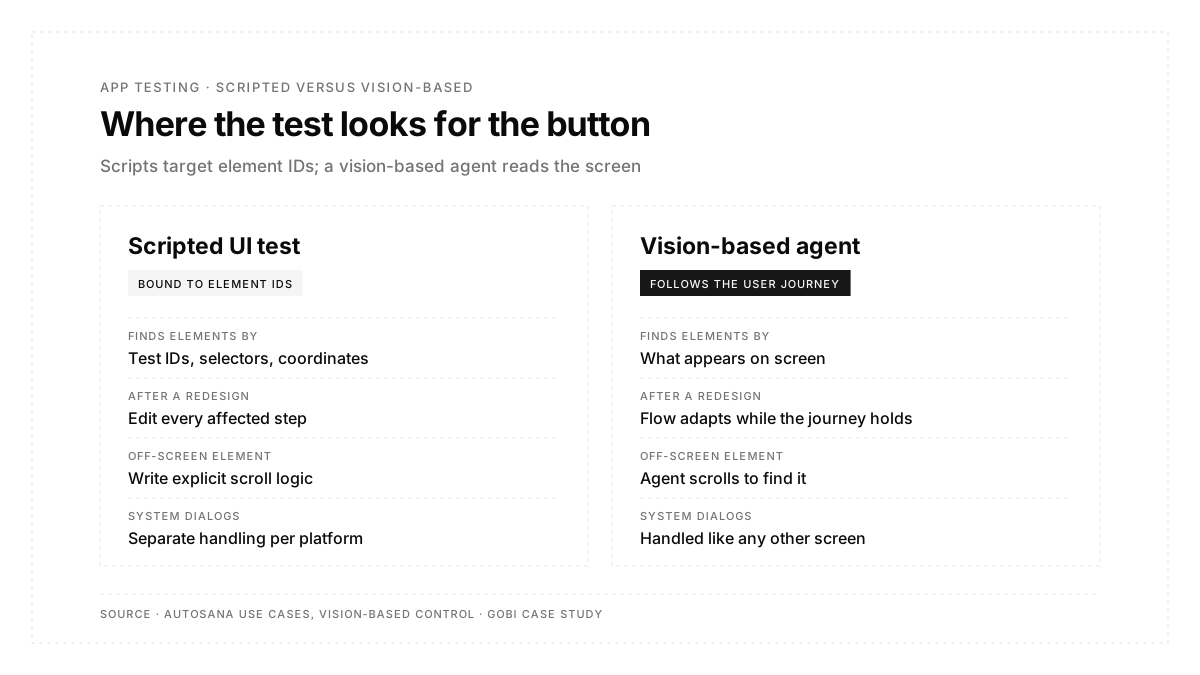
The second property matters most for testing. Robotic process automation and scripted UI tests bind each step to a position or an element ID, so every redesign means maintenance. A vision model finds the element the way a person does.
Which computer use tools are available today?
The four large AI platforms each document a computer use capability. All four rely on screenshots plus mouse and keyboard actions, and they differ in where the actions run:
| Tool | How it acts | Where it runs | Source |
|---|---|---|---|
| Anthropic computer use tool | Screenshot, mouse and keyboard control through a client toolset | A desktop in your own VM or container | Anthropic docs (linked above) |
| OpenAI computer use | Operates browser and desktop interfaces through the Responses API | Your runtime through an SDK driver, or OpenAI-hosted sandboxes | OpenAI API docs |
| Gemini API Computer Use | UI actions with an intent field that explains each step | Browser, Android-optimized mobile and desktop environments | Gemini API computer use guide |
| Microsoft Copilot Studio computer use | Selects buttons, menus and fields from natural language instructions | A Windows machine you configure, with OpenAI and Anthropic models | Copilot Studio computer use article |
Microsoft states that Copilot Studio's computer use is powered by OpenAI's Computer-Using Agent model and also offers Claude models, which shows how quickly these tools now combine.
How are computer use agents used in app testing?
End-to-end testing is a natural fit for the perceive, decide, act loop. A test is a user journey with an expected outcome, and a computer use agent can follow that journey on screen and check what it sees at each step.
Gobi, a social maps app, offers a concrete example. Its team had spent almost a full day trying to script a check for an element hidden below the fold inside a bottom sheet. In the Gobi case study, CTO and co-founder Tyler Becks describes watching an agent reach the same element: it saw the element was off screen, scrolled down on its own and completed the interaction. His summary: "It's like a human is using your app." Gobi's suite then grew from 13 scripted tests to more than 30 agentic flows, and nightly runs found six real bugs in five days.
Autosana applies this approach to mobile and web apps. Its vision-based control sees the screen the way users do, so the agent can step outside the app to accept a permission prompt, change a setting or open another app, across any framework including embedded webviews. A flow describes the user's journey and what should happen along the way, and the same flow runs on iOS, Android and the web.
The broader shift is covered in this guide to agentic QA testing.
Can a computer use agent test a mobile app?
Yes. Google's Gemini API documents a mobile environment with Android-optimized actions such as opening an app by name and tapping at screen coordinates. Testing platforms extend the idea to both mobile platforms with managed devices, so the agent runs on iOS simulators, Android emulators or real phones.
Coding agents add a second path. A developer working in Claude Code or Cursor can connect a testing service through MCP, so the coding agent runs a user journey on a device after each change. Autosana's MCP server gives coding agents tools to upload a build, choose a device and run flows, and its homepage describes the result: your coding agent runs the flow on your machine through the CLI or MCP and fixes what fails before it opens the PR. This roundup of testing tools for Claude Code and Cursor compares the options for mobile teams.
What are the limits of computer use agents?
Computer use trades speed and cost for flexibility, and safe setups follow a few rules:
- Cost per step: every screenshot is image input. OpenAI notes that screenshots count toward input tokens, and Microsoft bills Copilot Studio computer use at 5 Copilot Credits per step on standard models.
- Speed: each action waits for a screenshot and a model decision, so a computer use run takes longer than a direct API call or a pinned selector.
- Isolation: Anthropic recommends a dedicated virtual machine or container with minimal privileges, and Microsoft recommends dedicated machines with allow lists for websites and apps.
- Human approval: Anthropic advises a human confirmation step for actions with real-world consequences, such as financial transactions or accepting terms, and Copilot Studio routes flagged instructions to a human supervisor.
- Prompt injection: instructions shown on a webpage or inside an image can steer the model, so Anthropic scans screenshots for injection attempts by default.
For testing, these limits shape the setup more than the choice. Runs happen on disposable simulators, emulators and staging builds, which keeps the agent isolated by design.
Conclusion
A computer use agent turns a screenshot into a decision and a decision into a click, then checks the result and repeats. That loop powers general automation tools from Anthropic, OpenAI, Google and Microsoft, and in app testing it lets an agent follow a user journey on screen the way a customer would. For teams tired of maintaining brittle tests, the useful question is where that loop runs: on which devices, on which builds, and on every pull request.
FAQs
What does a computer use agent do?
It operates software through the screen, taking screenshots and sending mouse and keyboard actions to complete a task.
How does a computer use agent differ from RPA?
RPA replays fixed steps tied to screen positions. A computer use agent reads each screenshot and adapts to layout changes.
Which companies offer computer use tools?
Anthropic, OpenAI, Google and Microsoft each document a computer use tool for developers.
Is computer use safe to run on a work laptop?
Vendors recommend an isolated virtual machine or container with minimal privileges and human approval for sensitive actions.
Can a computer use agent test iOS apps?
Yes. Testing platforms run vision-based agents on iOS simulators and real iPhones, alongside Android devices.
How does Autosana use computer vision in testing?
Autosana's agent sees the screen the way users do, so it handles system dialogs, permission prompts and other apps.