
How to Stress Test Your PC: Free Tools for CPU, GPU and RAM
A repeatable method for stress testing a PC with free tools, which numbers to watch, how long to run each test, and when to stop immediately.
Gautam · 11 min read
autosana.ai

A stress test loads one part of your computer to its limit and holds it there, so a fault that only appears under pressure shows up while you are watching rather than halfway through something that matters.
Test one component at a time, watch the temperature and the clock speed together, and stop the moment either misbehaves. Everything else on this page is detail.
Three reasons people do this: a new build needs proving before it is trusted, a stable machine has started crashing and the cause is unclear, or an overclock needs validating.
Before you start
Install a monitoring tool first. A stress test with no monitoring tells you only whether the machine survived, which is the least useful thing you could learn. HWiNFO and HWMonitor are both free, and both show temperature, clock speed, voltage and fan speed in real time.
What to watch, and why both numbers matter together:
| Reading | What It Tells You |
|---|---|
| Temperature | Whether cooling is adequate |
| Clock speed | Whether the chip is throttling to protect itself |
| Voltage under load | Whether the power supply is sagging |
| Fan speed | Whether cooling is responding at all |
Temperature on its own misleads. A processor that stays cool by quietly dropping its clock speed has failed the test, because you have discovered cooling is inadequate and the chip is compensating. Watching both together is what separates a useful test from a passed one.
Practical preparation: close everything else, plug a laptop into mains power, make sure the case has airflow, and save any open work. A stress test is designed to find instability, and finding it means a crash.
CPU stress test tools
Prime95
Free, from the GIMPS project, which uses spare computing power to search for Mersenne primes. Its torture test is the long-standing standard for CPU stability, and it runs on Windows, macOS, Linux and FreeBSD. You agree to the GIMPS free software licence on download.
How to run it: launch it, choose Just Stress Testing when prompted, pick the Blend test to exercise processor and memory together, and let it run for 30 minutes with your monitoring tool visible.
Recent versions improved the torture test dialog and added better handling of the L1, L2 and L3 cache hierarchy, which matters because the three preset tests load the chip in genuinely different ways.
Fair warning: Prime95 pushes a processor harder than any real workload ever will. Some people consider that unrealistic. It is precisely why it finds faults nothing else does.
OCCT
Free for personal use, from OCBASE, and described on its own site as an all-in-one stability, stress test, benchmark and monitoring tool.
The advantage over Prime95 is that monitoring is built in, so you see temperatures and voltages in the same window as the test, and it can test processor, graphics card, memory and power supply from one place. For a first stress test, this is the easier starting point.
How to run it: open the CPU test, choose a medium data set for a balanced load, set 30 minutes, start, and watch the graphs.
Cinebench
Cinebench from Maxon is a rendering benchmark rather than a torture test, which makes it the most realistic of the three. It loads every core with work resembling an actual demanding application and gives a score you can compare against other machines with the same processor.
Use it to answer a different question: not "is this stable" but "is this as fast as it should be". A score well below others with the same chip usually means thermal throttling.
GPU stress test tools
FurMark
Free, from Geeks3D, and the most intense graphics load available.
Check which version you are getting. FurMark 2 is the current release, covering Windows 32 and 64-bit and Linux, and working as an OpenGL and Vulkan benchmark with online scores. FurMark 1 still exists and is maintained, and is Windows 32-bit only. Most guides written in the last few years describe FurMark 1 and never mention that Vulkan and Linux support arrived.
How to run it: set resolution to your monitor's native resolution, switch on the temperature alarm, and run 15 minutes.
Fifteen minutes is enough. FurMark generates a load no game produces, which is the point for finding faults and the reason not to leave it running for an hour.
Unigine Heaven and Superposition
Free versions of both are published on the UNIGINE benchmarks page. These run a demanding 3D scene rather than an artificial load, so they sit closer to what a game actually does. Better for confirming a graphics card performs correctly, less aggressive for finding a hidden fault.
RAM test tools
MemTest86
Free, from the official site, and described there as the original stand-alone memory testing software for x86 and ARM computers. It boots from a USB flash drive, which is what makes it thorough: with no operating system loaded, it can test memory the OS would otherwise be occupying.
How to run it: create a bootable USB with the included tool, restart and boot from it, and let it complete at least one full pass. Expect 30 to 60 minutes depending on how much memory you have. Any error at all means faulty memory, a bad slot, or settings pushed too far.
A paid Pro edition exists. The free one is sufficient for diagnosing a home machine.
Windows Memory Diagnostic
Built into Windows and good enough for a first look. Press the Windows key, type mdsched, and choose to restart and check. Far less thorough than MemTest86, and it takes minutes rather than an hour.
A method you can repeat
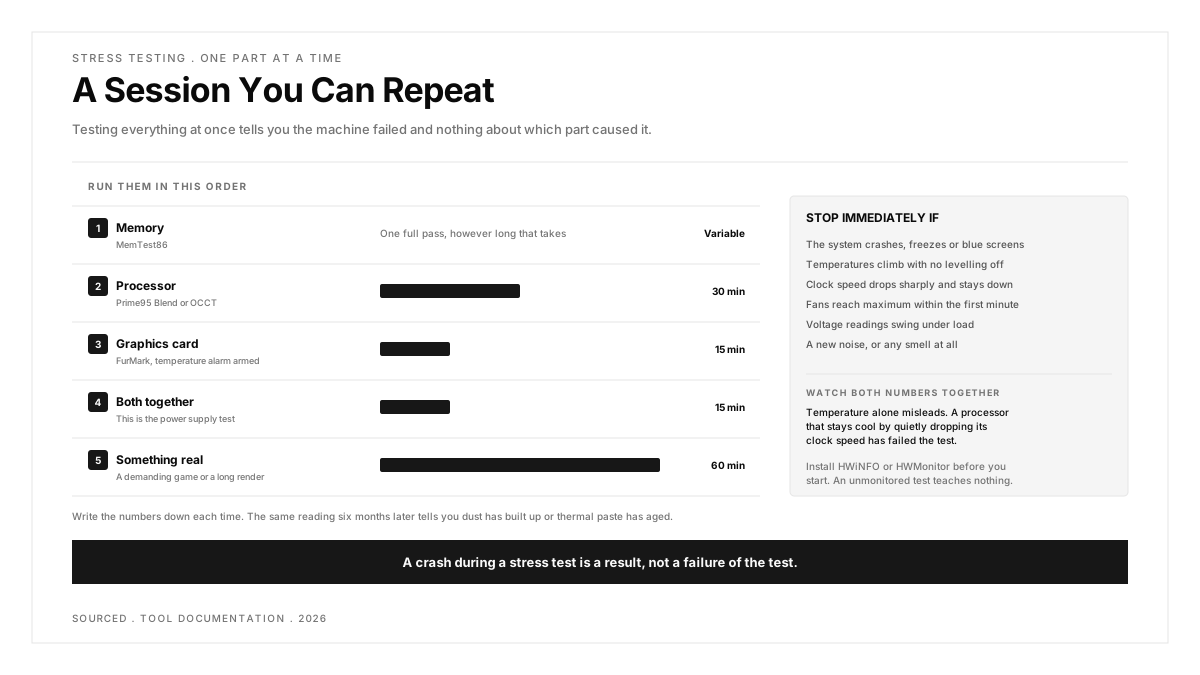
Testing everything at once tells you the machine failed and nothing about which part caused it. Go in order.
- Memory first, 1 full pass of MemTest86. Faulty memory produces symptoms that look like every other fault, so eliminate it before you measure anything else.
- Processor next, 30 minutes. Prime95 Blend or OCCT. Watch temperature and clock speed together.
- Graphics card, 15 minutes. FurMark with the temperature alarm armed.
- Both together, 15 minutes. This is the power supply test. A machine that passes each separately and fails when both run is usually telling you the supply cannot deliver both loads at once.
- Something real, one hour. A demanding game or a long render. Artificial tests find faults, and only a real workload confirms the machine is pleasant to use.
Write the numbers down each time. Peak temperature, sustained clock speed, and whether anything dropped. A single reading means very little. The same reading six months later tells you dust has built up or thermal paste has aged, which is the whole reason to keep records.
When to stop immediately
Stop the test and investigate if any of these happen:
- The system crashes, freezes or shows a blue screen
- Temperatures keep climbing with no sign of levelling off
- Clock speed drops sharply and stays down
- Fans reach maximum within the first minute
- Voltage readings swing under load
- You hear a new noise, or smell anything at all
A crash during a stress test is a result, not a failure of the test. You have found the fault while watching, with nothing of yours open, which is the best possible place to find it.
Reading what happened
Crashed under processor load, memory passed. Cooling or an unstable overclock. Reset any overclock to default and test again before changing hardware.
Crashed only with processor and graphics together. Power supply. The clearest signal in the whole process.
Any MemTest86 error. Faulty memory or a faulty slot. Test one stick at a time to identify which.
No crash, but temperatures very high and clock speed dropping. Stable and thermally limited. The machine is protecting itself and you are not getting the performance you paid for. Clean the dust, improve airflow, consider replacing thermal paste.
Everything passed and it still crashes in normal use. The fault is probably not hardware. Drivers, particularly graphics drivers, and storage faults both produce this pattern.
The same idea applies to phones
Nothing above is specific to desktops. A phone throttles under sustained load exactly as a processor does, and the consequence shows up as a frame rate that collapses three minutes into a session rather than a crash.
That is why serious mobile app performance testing measures memory, processor use and frame rate over time rather than at a single moment, and why it has to happen on real devices rather than emulators, which have no thermal behaviour to measure. The same principle also explains why results differ so widely across handsets, which is the subject of device fragmentation.
The discipline transfers exactly: load one thing, watch two numbers, and record them so the next reading means something.
.png)
Frequently asked questions
How long should a stress test run?
30 minutes for the processor and 15 for the graphics card is enough to expose most faults. Memory needs at least one full MemTest86 pass, usually 30 to 60 minutes. Multi-hour runs add little beyond confirming what the first 30 minutes showed.
What are the best free stress test tools?
Prime95 and OCCT for the processor, FurMark and Unigine for the graphics card, MemTest86 for memory, and HWiNFO or HWMonitor for monitoring throughout. All are free for personal use.
Can a stress test damage my PC?
Modern processors and graphics cards throttle and then shut down before damage occurs, so on healthy hardware with working cooling it is safe. The real risk is running one on a machine with failed cooling and ignoring the readings, which is why monitoring is not optional.
What temperature is too high during a stress test?
Watch the trend rather than a fixed number, because the safe range differs by chip and every manufacturer publishes its own limit. A reading that climbs without levelling off, or a clock speed that drops and stays down, means cooling is inadequate regardless of the figure on screen. Check your specific processor or graphics card on the manufacturer's own specification page.
Should I stress test a new PC?
Yes, before you rely on it. Components fail early or not at all, and a new build is the one time you can return a faulty part easily. An afternoon of testing is cheaper than discovering the fault after the return window closes.
My PC passed every stress test but still crashes. What now?
Look at software. Graphics drivers are the most common cause, followed by storage faults, which stress tests do not touch. Check the Windows reliability history for what was running at the moment of each crash.