
Emulator Testing: When to Use Emulators vs Real Devices
An emulator reproduces device hardware in software. Learn how emulators differ from simulators, what Android emulator testing covers, and which bugs need real devices.
Yuvan Sundrani · 13 min read
autosana.ai
.png)
TL;DR
- An emulator translates the target device's instruction set in software, so an Android emulator can boot a full ARM Android OS on your x86 laptop.
- The iOS Simulator skips translation and runs your app as a native macOS process, which makes it fast and much less faithful to real iPhone behavior.
- An emulator handles layout, navigation, and business logic well. Thermal throttling, cellular handoff, camera pipelines, and manufacturer OS skins need real hardware.
- Autosana runs the same intent-based flow on real iOS and Android devices, so the checks an emulator misses still happen on every commit.
The Android emulator translates ARM instructions to x86 when your host machine runs Intel silicon. The iOS Simulator performs no translation at all, compiling your app for the Mac and running it as a native process.
Those two facts explain most of the confusion in this area. One is an emulator. The other is a simulator. They fail in different ways, so they belong at different points in your test plan.
This guide covers what each one reproduces faithfully, where the gap against real hardware opens up, and how to split coverage between them.
What Is an Emulator?
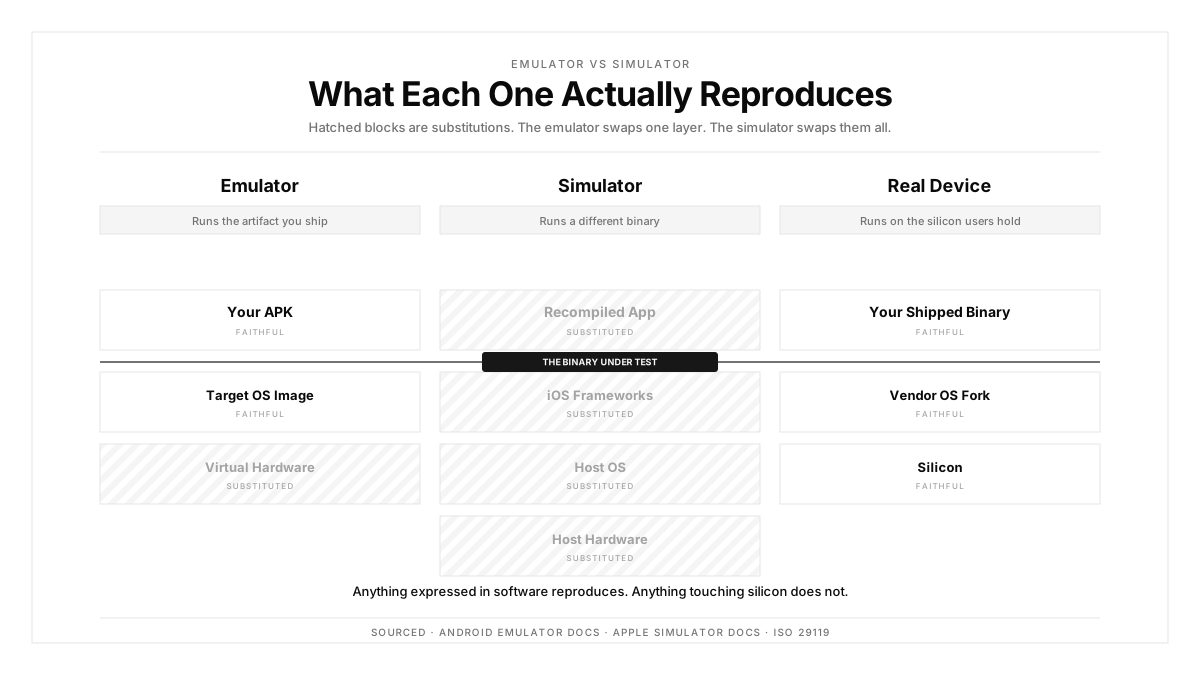
An emulator is software that reproduces the hardware behavior of one system on another. It implements the target CPU instruction set, memory model, and peripherals, then boots the target operating system on top of that virtual hardware.
Because an Android emulator boots the real Android OS image, system services behave as they do on a phone. Intents resolve. Permissions dialogs render through the actual framework. The binder IPC layer runs.
The cost is speed. Every guest instruction passes through translation unless the guest and host architectures match. On Apple Silicon running ARM64 Android images, that penalty largely disappears, which is why emulator performance improved sharply after 2021.
Emulator vs Simulator: What Actually Differs
| Dimension | Emulator (Android) | Simulator (iOS) |
|---|---|---|
| Layer reproduced | Hardware plus full OS | API surface only |
| Instruction set | Translated or matched | Host native, compiled for macOS |
| OS image | Real Android system image | macOS frameworks standing in for iOS |
| Binary tested | The APK you ship | A macOS build of your source |
| Speed | Moderate | Fast |
| Fidelity | Higher | Lower |
The line that matters for QA: an emulator runs the artifact you ship, and the iOS Simulator runs a different binary compiled for a different platform. Bugs that depend on ARM64 code generation, on-device compilation, or iOS-specific memory pressure stay invisible in the Simulator.
Android Emulator: Capabilities and Constraints
Google's Android Emulator ships with hardware profiles covering screen size, density, RAM, and API level. You can script most of the environment.
What it reproduces well:
- Any API level from 21 upward, including preview builds
- Screen geometry, density buckets, and display cutouts
- Locale, timezone, and font scale
- Simulated GPS coordinates and route playback
- Network throttling presets down to GSM speeds
- Battery level and charging state as reported by the framework
What stays out of reach:
- Real thermal behavior, so sustained-load throttling goes untested
- Manufacturer skins, so Samsung One UI and Xiaomi MIUI differences stay hidden
- Genuine camera sensor output and HDR pipelines
- Bluetooth and NFC hardware stacks
- Real cellular radio handoff between towers and network types
Android test automation on emulators covers a wide API matrix cheaply. The uncovered list above is where field bugs come from.
iOS Simulator: A Different Architecture Entirely
Apple's Simulator is a macOS application hosting a macOS build of your app against iOS-shaped frameworks. There is no virtual iPhone underneath.
That design buys speed. Builds install in seconds and the UI responds instantly, which is why it fits tight inner loops during development.
It also means the Simulator uses your Mac's CPU, GPU, disk, and memory. A view hierarchy that stutters on an iPhone SE will glide on an M-series Mac. Memory pressure that triggers a jetsam kill on device stays comfortable in the Simulator.
Areas the Simulator leaves untested: Face ID and Touch ID hardware paths, push notification delivery through APNs, background execution limits, StoreKit purchase flows, Core Motion sensors, and real GPU thermal behavior.
Emulator vs Real Device: Where the Gap Lives
| Failure Class | Emulator or Simulator | Real Device |
|---|---|---|
| Layout on a 6.1 inch screen | Reliable | Reliable |
| Navigation and deep links | Reliable | Reliable |
| Form validation and business logic | Reliable | Reliable |
| Sustained-load frame drops | Hidden | Surfaces |
| Manufacturer skin rendering | Hidden | Surfaces |
| Camera and sensor pipelines | Hidden | Surfaces |
| Cellular handoff and flaky networks | Approximated | Surfaces |
| Memory pressure kills | Hidden | Surfaces |
| Biometric auth | Stubbed | Surfaces |
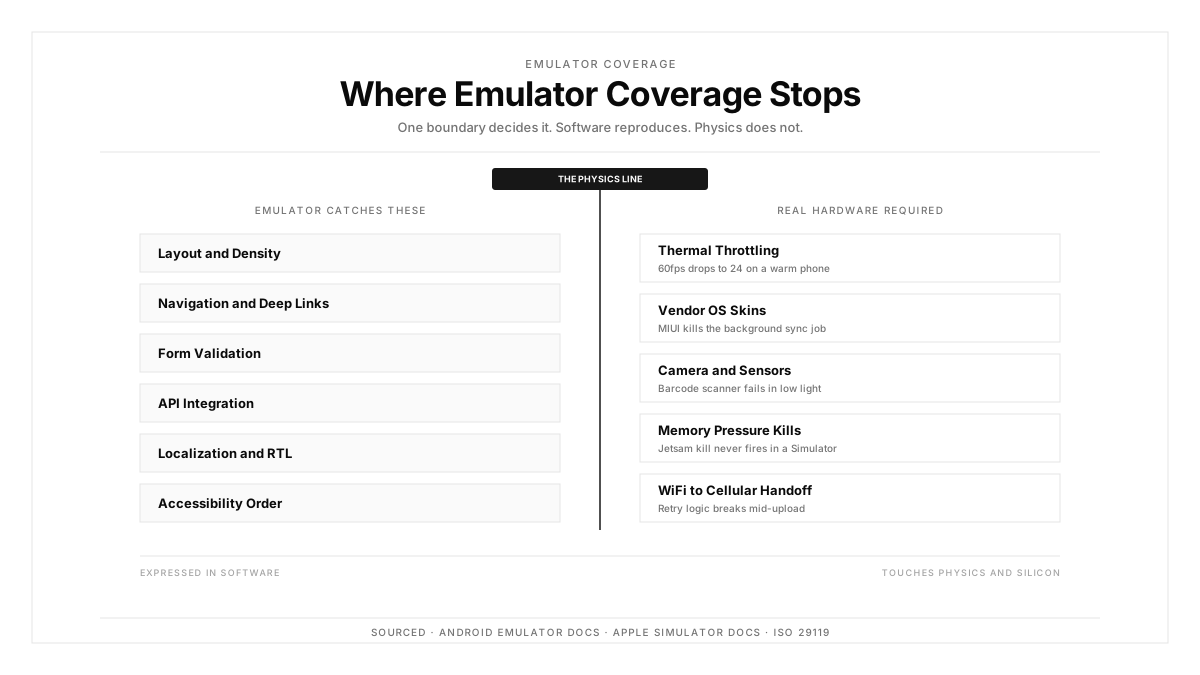
The pattern is consistent. Anything expressed in software alone reproduces faithfully on an emulator. Anything touching physics, silicon, or a vendor's OS fork requires real device testing.
What Emulator Testing Covers Well
Run these on an emulator with confidence:
- Screen layout across density buckets and text scale settings
- Navigation graphs, deep links, and back stack behavior
- Form validation, input masking, and keyboard types
- API integration against staging, including error and timeout paths
- Localization across languages, including right-to-left layouts
- Accessibility labels and focus order
- API-level branching, such as a permission flow that changed in Android 13
This list covers a large share of your suite. Emulators are cheap and spin up on demand, which makes them the right host for breadth. Pair them with a thin mobile app testing pass on hardware for the rest.
Where Emulator Testing Misses Real-World Bugs
Four failure classes reach production through emulator-only pipelines.
Thermal throttling arrives after several minutes of sustained work. A video export or a map render that holds 60fps in an emulator drops to 24fps on a warm phone. Performance testing needs hardware that actually heats up.
Manufacturer OS forks change behavior. Samsung One UI adjusts padding and gesture regions. Xiaomi MIUI applies aggressive background process limits that kill sync jobs. Stock emulator images ship with AOSP behavior, so both vendor forks stay untested.
Camera and sensor pipelines differ per device. A barcode scanner tuned against the emulator's synthetic camera feed often fails on a real sensor under low light.
Network transitions break state machines. Moving from WiFi to LTE mid-upload, or crossing a dead zone, exposes retry logic that throttling presets approximate poorly.
How to Combine Emulators, Simulators, and Real Devices
Split by feedback loop rather than by preference.
During local development, use the Simulator on iOS and an emulator on Android. Speed matters more than fidelity when you are iterating on a layout.
On every pull request, run the broad functional suite across emulator images spanning your supported API levels. Add a small real-device set covering your top two Android manufacturers and two iPhone generations.
Nightly, run the full matrix on real hardware, including performance and sensor paths. Multi-device testing at this cadence catches the throttling and vendor-skin defects before they reach a release branch.
Before release, run the complete suite on real devices only. The ISO 29119 standard calls for test environments that represent production conditions, and for mobile that means the hardware your users hold.
A practical split lands near 70 percent emulator coverage for breadth and 30 percent real device coverage for the failure classes above.
How Autosana Fits
We built Autosana so one flow definition runs everywhere, which removes the usual reason teams skip real hardware.
Our flows describe user intent, so the same test executes on an Android emulator during a pull request and on a real Galaxy overnight with zero rewriting. We manage apps and build artifacts per platform.
We run on real devices for iOS and Android, which covers thermal throttling, vendor skins, and sensor paths. We also support local testing against your development machine when you want a fast loop.
Our environments configuration handles staging versus production targets, locale, and network conditions across both emulator and hardware runs.
Because we anchor by intent, a Samsung layout shift keeps the flow valid. That is the property that makes running the same suite on emulators and real devices practical.
Conclusion
Decide per failure class, then assign hardware.
Layout, navigation, and validation belong on an emulator, where they run fast and wide. Thermal behavior, vendor skins, camera pipelines, biometrics, and network transitions belong on real phones. Those categories exist outside software.
Audit your last ten production bugs against that split. The ones an emulator would have caught tell you about coverage gaps. The rest tell you how much real hardware you actually need.
.png)
FAQ
What is an emulator in software testing?
An emulator is software that reproduces a target device's hardware in software, including its CPU instruction set, then boots the real operating system on top. An Android emulator runs an actual Android system image on your development machine.
How does an emulator differ from a simulator?
An emulator reproduces hardware and boots the target OS. A simulator models only the API surface and runs your app compiled for the host platform. The iOS Simulator is the common example of the second approach.
Is the Android Emulator accurate enough for QA?
For layout, navigation, business logic, and API integration, yes. For thermal throttling, manufacturer skins, camera sensors, and cellular handoff, the Android emulator leaves those paths untested.
Why is the iOS Simulator faster than an Android emulator?
The Simulator compiles your app for macOS and runs it natively, skipping instruction translation entirely. An Android emulator boots a full guest OS, which costs more even when host and guest architectures match.
What bugs slip past emulator testing?
Sustained-load frame drops from thermal throttling, layout shifts from Samsung One UI or Xiaomi MIUI, camera pipeline failures in low light, memory pressure kills, and retry logic that breaks during WiFi to cellular transitions.
What ratio of emulator to real device testing works?
Around 70 percent emulator for broad functional coverage and 30 percent real hardware for performance, sensors, and vendor-specific behavior. Run release candidates entirely on real devices.
Can an emulator test push notifications?
An Android emulator with Google Play services can receive FCM messages. The iOS Simulator has limited support and skips the full APNs delivery path, so real hardware remains the reliable option for iOS.
Does emulator testing work in CI pipelines?
Yes, and it parallelizes well because instances spin up on demand. Watch for timing flakiness inside throttled containers, which causes passing tests to time out and erodes trust in the pipeline.