
Android Regression Testing Across 100+ Device Configurations
Android fragmentation is four independent variables that multiply. OEM skin matters most because it changes runtime behaviour rather than appearance, and a targetSdkVersion bump regresses with zero code change.
Yuvan Sundrani · 19 min read
autosana.ai
TL;DR
- Four independent variables compose the matrix: OS version, OEM skin, screen geometry and hardware capability, so coverage multiplies rather than accumulates.
- OEM skin is the variable that matters most, since Samsung, Xiaomi and others alter background execution, notification delivery and permission flows rather than only styling.
- A targetSdkVersion bump is a regression event producing behavior changes with zero application code changed, which makes it invisible to a diff-driven testing strategy.
- Device selection beats device count, so choosing three devices that span skin families beats choosing eight that share one.
- Autosana runs intent-based flows across the matrix without a scripted variant per device, which is what makes broad coverage affordable to maintain.
What actually varies across Android devices?
Four variables, and treating them as one number is the mistake that produces unbalanced matrices.
| Variable | What Changes | Testing Consequence |
|---|---|---|
| OS version | Platform APIs, permission model, runtime defaults | Behaviour shifts at version boundaries |
| OEM skin | Background execution, notifications, permission dialogs | Runtime behaviour differs from stock |
| Screen geometry | Aspect ratio, density, foldable states | Layout clips, overlaps, becomes unreachable |
| Hardware capability | Memory, chipset, camera, sensors | Performance and feature availability vary |
These compose. A Samsung on Android 14 with a foldable display and 6GB of memory is a different runtime environment from a Xiaomi on Android 13 with a 21:9 display and 12GB, and passing on one establishes little about the other.
The count of device models in circulation runs into the tens of thousands, which is the figure usually quoted and the least actionable. The useful question concerns how many distinct combinations of these four variables your users actually occupy, and that number is considerably smaller and genuinely addressable.
Why does OEM skin matter more than OS version?
Because the skin changes behavior while the version changes capability, and behavior changes break flows that were working.
Stock Android defines how background work, notifications and permissions should operate. Manufacturers then layer their own power management on top, and that layer intervenes in ways the platform documentation does not describe.
Background execution. OEM battery managers terminate background services and halt background activity, frequently without a signal the application can observe. Samsung, Xiaomi and Huawei implementations are the most aggressive. A sync that completes reliably on a Pixel silently fails to run on a device whose manufacturer decided the application was idle.
Notification delivery. The same battery management intercepts the notification pipeline, so push notifications arriving consistently in testing reach a fraction of users on certain skins. A push test passing on stock Android establishes very little about delivery elsewhere.
Permission flows. Several manufacturers insert additional dialogs beyond what stock Android presents, including autostart permission on Xiaomi and battery optimization exclusions on Samsung. An onboarding flow scripted against stock encounters a prompt nobody anticipated and stalls.
These three share a property worth naming. The application code is identical and the behavior differs, which means no amount of code review catches them and only execution on the affected skin reveals them.
A practitioner on r/developersIndia noted that device-specific behavior dominates support volume in markets where particular manufacturers hold large shares, which is the commercial version of the same observation.
Why is a targetSdkVersion bump a regression event?
Because platform behaviour is gated on the version an application targets, so raising that value changes how the system treats the application with zero lines of application code modified.
Permission semantics tighten. Background execution limits apply more strictly. Default behaviours that were permissive become restrictive. The application compiled yesterday and the application compiled today differ in how the platform runs them.
This is invisible to a diff-driven testing strategy, since the diff shows one line in a build file. Teams selecting tests by changed area run almost nothing, and the change affected everything.
The practical response is to treat a targetSdkVersion bump as a full-matrix event rather than as a configuration change. Run the complete regression suite across the device tiers described below, and treat the result as establishing a new baseline rather than as confirming the previous one.
A tester on r/QualityAssurance made the general point that coverage decisions follow what was built recently rather than what carries risk, and a build-file change is the clearest case of that mismatch, since it looks trivial and behaves comprehensively.
Where do device regressions actually cluster?
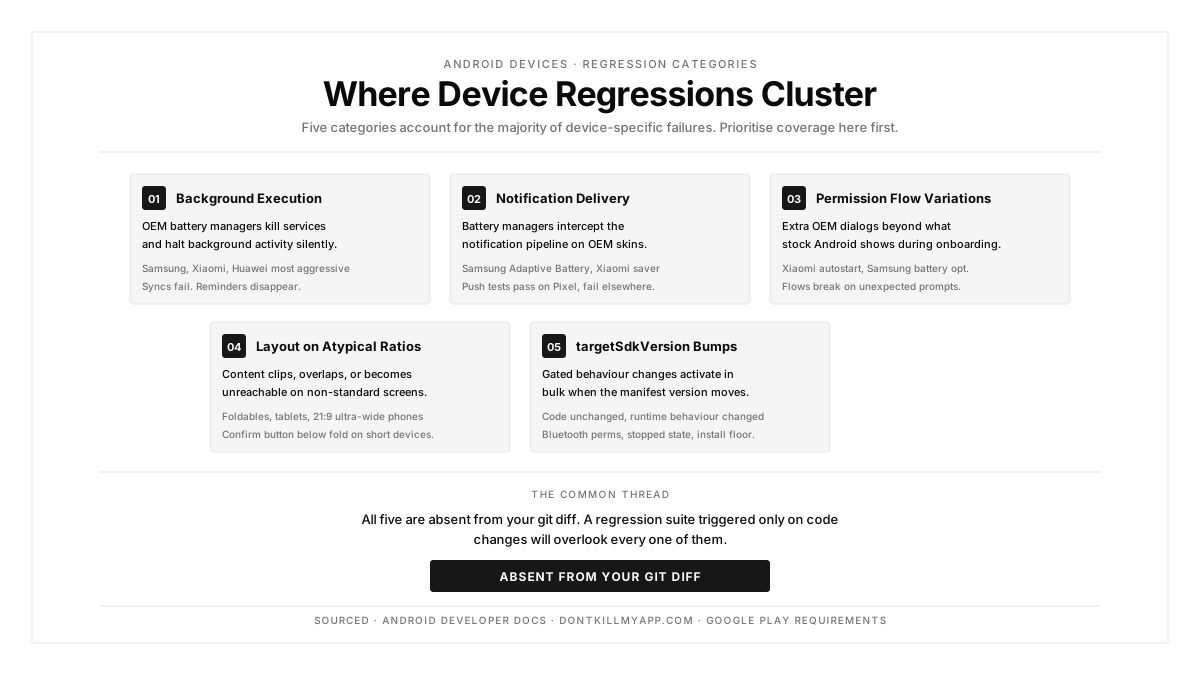
Five categories account for the majority of device-specific failures, which makes them the correct place to concentrate coverage first.
| Hotspot | Mechanism | Symptom |
|---|---|---|
| Background execution | OEM battery managers kill services | Syncs fail, reminders disappear |
| Notification delivery | Battery managers intercept the pipeline | Push passes on Pixel, fails elsewhere |
| Permission flow variations | Extra OEM dialogs beyond stock | Onboarding stalls on an unexpected prompt |
| Layout on atypical ratios | Non-standard geometry | Content clips, overlaps, becomes unreachable |
| targetSdkVersion bumps | Platform gating on target version | Behaviour changes with no code change |
Three of those five trace to OEM power management, which concentrates the risk usefully, since testing background execution, notifications and permissions on two aggressive skins covers a disproportionate share of what reaches production.
Layout deserves separate attention because its failures are visible yet frequently unreported. A button clipped beyond the viewport on a 21:9 display, a modal that cannot scroll on a compact screen, a keyboard overlapping the field it was summoned for, or a foldable transition that loses form state. Users encountering these abandon rather than file reports, so the defect persists while the metrics merely soften.
A developer on r/reactnative described the real-device gap directly, observing that infrastructure behaving correctly in an emulator diverges once actual hardware participates, which is precisely where these five live.
How do you select devices rather than merely count them?
This is where most matrices go wrong, since teams add devices without asking what each one newly covers.
The principle: a device earns its place by covering a combination nothing else covers. Eight devices sharing one skin family and one geometry class provide roughly the coverage of one, while three devices spanning three skin families provide considerably more.
Four selection criteria, applied in order:
Skin family first. Stock or near-stock, Samsung One UI, and one aggressive power-management skin such as Xiaomi. These three cover the behaviour variance that produces most production incidents.
OS version spread second. Newest supported and oldest supported, since behaviour changes concentrate at the boundaries rather than distributing evenly across the middle.
Geometry class third. A standard aspect ratio, plus whichever atypical class your install base actually contains, which might be foldables, tablets or ultra-wide depending on your market.
Install base weighting last. Your analytics tell you which combinations your users genuinely occupy, and that data should adjust the above rather than drive it, since a combination held by two percent of users can still generate most of your support volume where the failure is severe.
Shaping the tiers
Running every combination on every trigger is unaffordable, so coverage narrows as frequency rises.
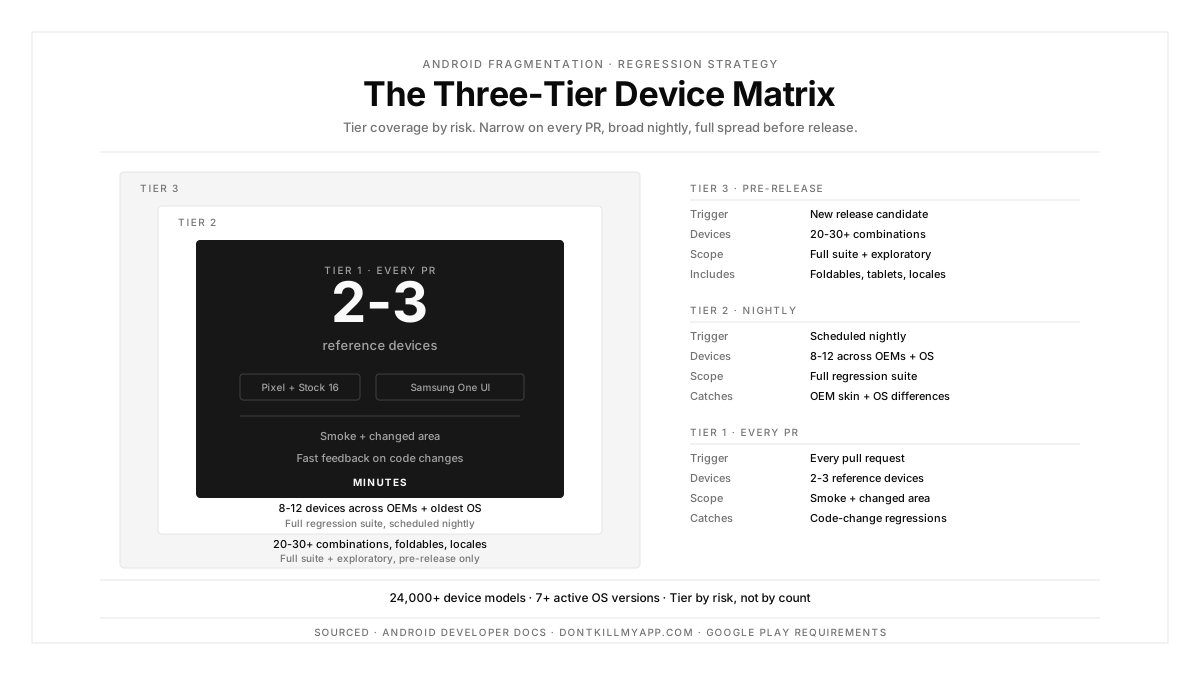
| Tier | Trigger | Devices | Scope |
|---|---|---|---|
| 1 | Every pull request | 2 to 3 reference devices | Smoke plus the changed area |
| 2 | Nightly | 8 to 12 across OEMs plus oldest OS | Full regression suite |
| 3 | Pre-release | 20 to 30+ combinations | Full suite plus exploratory |
Tier 1 should contain a stock device and one Samsung, since that pairing catches skin-behaviour divergence at the earliest point where fixing it is cheapest. Tier 2 adds the aggressive power-management skins and the oldest supported OS. Tier 3 adds foldables, tablets, locales and the long tail.
The scheduling logic behind tiering, covering time budgets and what belongs on a blocking gate, is a separate question from device selection. This section concerns which devices populate each tier rather than when each tier runs, and the two decisions are made independently.
One flow, three skins, three outcomes
Concrete tracing makes the variance legible. Take a flow that signs a user in, enables push notifications, backgrounds the application, and verifies that a reminder arrives twenty minutes later.
On stock Android. Sign-in completes, the runtime permission dialog appears once and gets granted, the application backgrounds, the scheduled work executes, and the notification arrives. The flow passes, and the team concludes the feature works.
On Samsung One UI. Sign-in completes identically. After the runtime permission dialog, a second prompt concerning battery optimisation appears, which the scripted flow failed to anticipate and therefore stalls against. Where the flow handles it, the application backgrounds and Adaptive Battery subsequently classifies the application as infrequently used, so the scheduled work runs later than requested or fails to run. The notification arrives late or never.
On Xiaomi. Sign-in completes. An autostart permission prompt appears, distinct from both previous dialogs and absent from stock entirely. Where that permission stays ungranted, background work is prevented outright rather than merely delayed, so the notification never arrives and the application observes no error it could report.
Three outcomes, one codebase, zero defects in the application logic. The flow is correct and the environments differ.
Two lessons follow. The failure modes are ordered by severity rather than by similarity, since late delivery and prevented delivery are different problems requiring different fixes. And only the third case is silent, because the application receives no signal that its work was blocked, which makes it the one most likely to reach production undetected.
Diagnosing a device-specific failure
Four questions resolve most cases quickly, and running them in order saves considerable time.
Does it reproduce on the same model consistently? Consistent reproduction points at skin behaviour, while intermittent reproduction points at timing or at a battery state that varies between runs.
Does it reproduce on a second device of the same skin family? Confirmation here establishes a skin issue rather than a single faulty handset, which is the distinction that determines whether anyone should care.
Does it reproduce with battery optimisation disabled? This single toggle isolates power management from everything else, and it resolves a surprising share of background and notification failures immediately.
Does the same flow pass on stock at the same OS version? Passing on stock while failing on the skin confirms the variable, and failing on both points at an OS version change rather than at the manufacturer.
Record the answers alongside the failure, because device-specific defects recur across releases and the diagnosis is the expensive part rather than the fix.
Why does fragmentation multiply maintenance rather than runtime?
Runtime cost scales predictably, since twelve devices take roughly twelve times one device, and parallelism addresses most of it.
Maintenance scales worse, and the mechanism is the binding.
A selector-bound test frequently needs device-specific handling, because an OEM dialog appears on one skin, a layout difference shifts an element on another, and a permission prompt arrives in a different order on a third. Each accommodation becomes a conditional, and conditionals multiply across the matrix until the single suite is several suites sharing filenames.
That multiplication is the real cost of a broad matrix, and it is why teams quietly shrink their device coverage over time. The suite becomes expensive to maintain, so devices get dropped, and the dropped devices are where incidents subsequently originate.
An engineer on r/PerformanceTesting made the adjacent observation that measurement across heterogeneous environments costs more in interpretation than in execution, and device matrices behave identically, since running the tests is straightforward while keeping them meaningful across twelve environments is the work.
How does Autosana handle a device matrix?
Autosana is an AI-native E2E testing agent for iOS, Android and web, and its relevance here concerns the maintenance multiplication rather than the execution.
Flows state intent, and the agent resolves targets at run time from what each device actually renders. An OEM dialog appearing on one skin and absent on another needs no conditional, since the agent responds to the screen in front of it rather than following a fixed step list authored against one device. The variant explosion that makes broad matrices expensive stops occurring.
Runs execute on hosted real devices rather than emulators, which matters disproportionately for this topic, since the five hotspots above are precisely the behaviours an emulator fails to reproduce. OEM battery management, manufacturer permission dialogs and foldable transitions exist on hardware and stay absent from a generic image.
Results arrive through the GitHub integration with session replay per device, which matters when a flow passes on eleven devices and fails on one, since the question is always what that device did differently. Flows are invocable over MCP.
The limits stated plainly. Device supply bounds breadth, so a sufficiently obscure combination may stay uncovered regardless of approach. Deciding which combinations your users occupy is analytics work that stays with your team. And performance profiling across hardware classes is a separate discipline from functional regression, better served by tooling built for it.
Conclusion
Pull your analytics and list the top ten combinations of OS version, manufacturer and screen class your users actually occupy. Most teams discover their matrix was assembled from devices the team owned rather than devices the users hold, and the two lists overlap less than expected.
Then take one flow involving a background operation, a notification or a permission prompt, and run it on one Samsung and one Xiaomi alongside your usual reference device. Those three results frequently disagree, and the disagreement is the clearest possible argument for widening the matrix along skin families rather than along device count.
.png)
FAQ
How many devices do you need for Android regression testing?
Selection matters more than count. Three devices spanning stock, Samsung One UI and an aggressive power-management skin cover more behaviour variance than eight sharing one skin family and one geometry class.
Why do tests pass on Pixel and fail on Samsung?
Because manufacturers layer their own power management over stock Android, altering background execution, notification delivery and permission flows. The application code is identical while the runtime behaviour differs, so only execution on that skin reveals it.
Is a targetSdkVersion bump a code change for testing purposes?
Treat it as a full-matrix regression event. Platform behaviour is gated on the targeted version, so permission semantics and background limits change with zero application code modified, which makes diff-driven test selection run almost nothing.
Which Android device regressions are most common?
Background execution killed by OEM battery managers, notification delivery intercepted by the same managers, permission flows interrupted by manufacturer-specific dialogs, layout failures on atypical aspect ratios, and behaviour changes following a targetSdkVersion bump.
Can emulators cover Android fragmentation?
Partially, for OS version and geometry. Emulators run generic images, so OEM skin behaviour, manufacturer battery management and manufacturer permission dialogs stay absent, and those account for most device-specific production incidents.
How do you choose which devices go in each tier?
Prioritise skin family, then OS version boundaries, then geometry class, then adjust by install base. Tier 1 should pair a stock device with a Samsung, since that catches skin divergence where fixing it costs least.
Why does a wide device matrix get expensive to maintain?
Selector-bound tests accumulate device-specific conditionals for OEM dialogs, layout differences and permission ordering. Those conditionals multiply across the matrix, which is why teams quietly shrink coverage and then see incidents from the dropped devices.
Does Autosana need a separate test per device?
No. Flows state intent and the agent responds to what each device renders, so an OEM dialog present on one skin and absent on another requires no conditional, which is what keeps broad matrices affordable to maintain.