
Acceptance Testing: The Final Quality Gate Before Your Users See the Product
Acceptance testing validates a feature against business criteria agreed in advance. Types, how to write testable criteria, the sign-off process, and mobile specifics.
Yuvan Sundrani · 11 min read
autosana.ai
TL;DR
- Acceptance testing checks a finished feature against criteria the business agreed to in advance, using the language of the people who requested it.
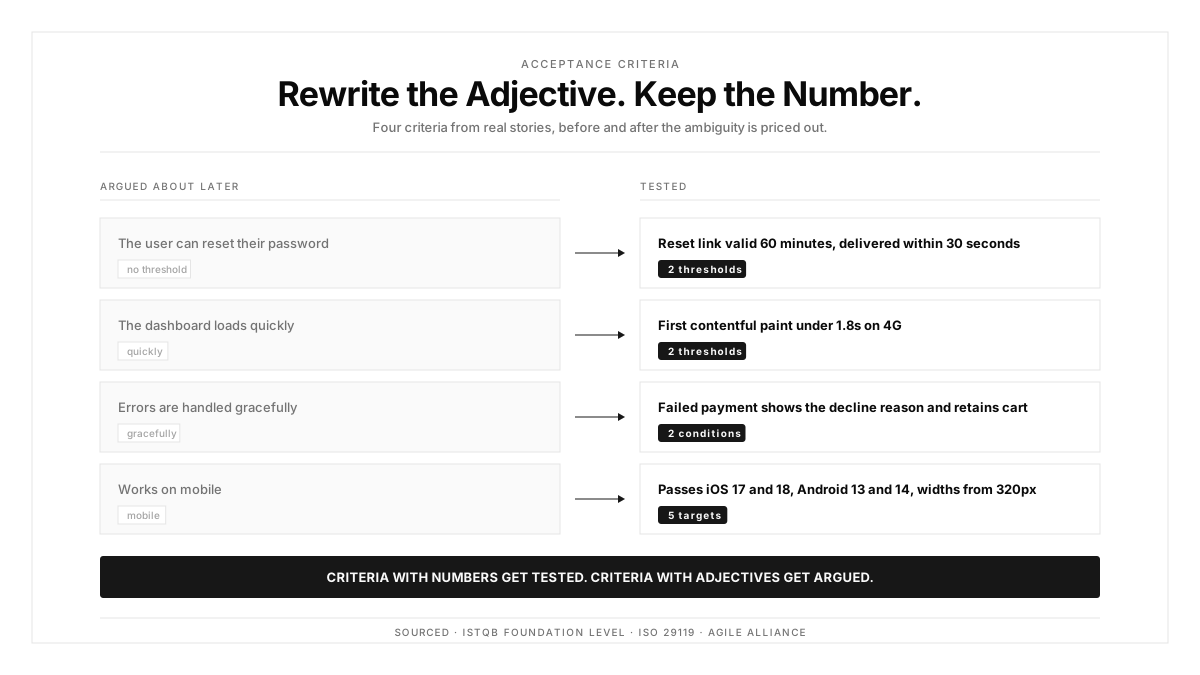
- Written acceptance criteria settle ambiguity before development starts. A story saying "the user can reset their password" leaves expiry windows, retry limits, and error copy open to argument.
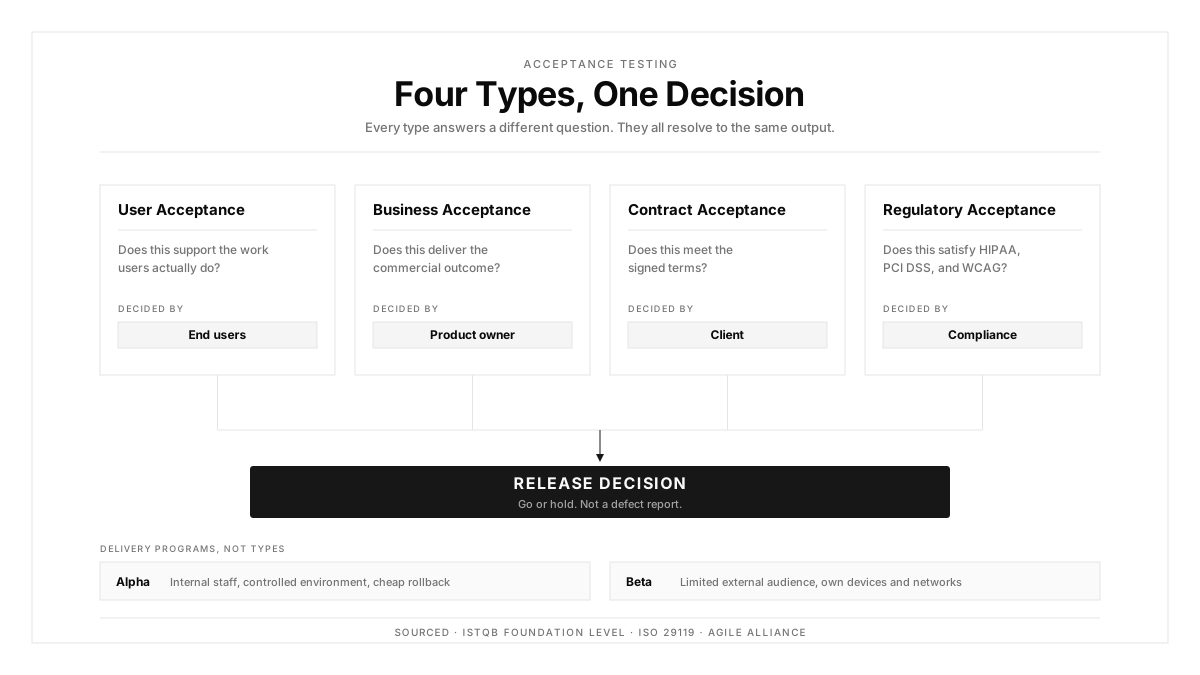
- The main types are user acceptance testing, business acceptance testing, contract and regulatory acceptance testing, plus alpha and beta programs.
- Autosana runs acceptance flows written in plain language across real iOS, Android, and web devices, so sign-off happens on the hardware your users hold.
A story reads: the user can reset their password. Everyone approves it. Three weeks later the team argues about whether the reset link expires after one hour or twenty-four, because the story left both numbers open.
Acceptance testing exists to settle that argument before anyone writes code. It validates a feature against criteria the business agreed to, phrased the way the business phrased them.
This guide covers the types of acceptance testing, how to write criteria that hold up under pressure, the process from entry to sign-off, and what changes when the product ships to an app store.
What Is Acceptance Testing?
Acceptance testing is formal validation that a system meets business requirements and is ready for release. The ISTQB Foundation Level syllabus places it at the final level of the test hierarchy, after unit, integration, and system testing.
Two properties separate it from everything upstream. First, the criteria come from the business rather than from engineering. Second, the outcome is a release decision rather than a defect report.
The Agile Alliance frames acceptance in terms of a conversation: the customer states what "done" means, the team builds toward it, and the test confirms the two matched.
Acceptance Testing vs Other Test Types
| Test Level | Question It Answers | Who Writes It | Outcome |
|---|---|---|---|
| Unit | Does this function behave correctly? | Developer | Defect or pass |
| Integration | Do these modules work together? | Developer | Defect or pass |
| System | Does the assembled product meet the spec? | QA | Defect or pass |
| Acceptance | Does this meet what the business asked for? | Business plus QA | Release decision |
Regression testing and smoke testing run alongside all four levels, checking that existing behavior survives change. Acceptance testing answers a different question entirely, which is why it sits last.
Types of Acceptance Testing
User acceptance testing
UAT puts real users or their proxies in front of the build to confirm it supports their actual work. UAT surfaces workflow mismatches that a spec-driven test misses, because users bring context the spec omitted.
Business acceptance testing
This checks that the feature delivers the commercial outcome behind it. A checkout redesign passes functionally while still lowering conversion, and business acceptance testing is where that gets caught.
Contract acceptance testing
This validates the build against terms in a signed agreement. Common in agency and enterprise delivery, where payment milestones depend on specified criteria being demonstrably met.
Regulatory acceptance testing
This confirms compliance with law and standards. Healthcare products face HIPAA requirements, payment features face PCI DSS, and accessibility obligations apply across many jurisdictions.
Alpha testing
Alpha runs internally with staff acting as users, in a controlled environment where instrumentation is heavy and rollback is cheap.
Beta testing
Beta ships to a limited external audience on their own devices and networks. TestFlight and Google Play internal tracks exist for this, and beta feedback covers the device and network diversity a lab cannot reproduce.
How to Write Effective Acceptance Criteria
Criteria fail when they describe intent instead of observable outcomes. Three formats hold up well.
The Given-When-Then format states preconditions, action, and expected result:
Given a registered account with a verified email, when the user requests a password reset, then a reset link valid for 60 minutes arrives within 30 seconds.
That version answers the expiry question from the opening. The delivery window is specified. A tester can run it without asking follow-up questions.
A checklist format suits criteria with many independent conditions:
- Reset link expires 60 minutes after issue
- A second request invalidates the first link
- Five failed attempts within an hour lock the flow for 15 minutes
- Error copy names the specific problem rather than a generic failure message
- The flow works on screen widths from 320px upward
Rule-oriented criteria fit business logic with thresholds. Orders over 5000 dollars route to manual review. Refunds inside 30 days process automatically, and older ones require approval.
Four properties make criteria testable: each one is observable from outside the system, each has a single clear pass condition, numbers appear as numbers, and the wording avoids terms like fast, intuitive, or user-friendly.
The Acceptance Testing Process
Entry criteria come first. System testing has completed, known blockers are resolved, the build is deployed to a stable environment, and test data exists.
Preparation follows. Criteria convert into executable test cases, participants get scheduled, and the device matrix gets agreed. For anything customer-facing, confirm the environment mirrors production configuration rather than a developer default.
Execution runs the cases and records evidence. Screenshots, session recordings, and environment details make results reviewable later by people who were absent.
Defect triage classifies each finding by whether it blocks acceptance. A wrong tax calculation blocks. A slightly misaligned icon stays below that bar and belongs in the backlog.
Sign-off closes the cycle. A named business stakeholder accepts the feature against the stated criteria. The ISO 29119 standard treats this record as a required artifact, and it matters most when a dispute surfaces months later.
Acceptance Testing for Mobile Apps
Mobile adds four constraints that reshape the process.
Store review sits between sign-off and availability. Apple and Google review windows usually run 24 to 48 hours, so acceptance has to finish early enough for a rejection to be survivable within the release plan.
Device diversity widens the matrix. Criteria that pass on a Pixel can fail on a Galaxy because One UI adjusts padding and gesture regions. Run acceptance on real devices spanning at least two Android manufacturers and two iPhone generations.
Permission flows became acceptance-relevant. iOS App Tracking Transparency and Android runtime permissions each create branches where a user denies access, and the criteria need to state what the app does in the denial branch.
Offline behavior deserves explicit criteria. Mobile users lose connectivity mid-task, so state whether a draft persists, whether a queued action retries, and what the user sees while offline. Mobile app testing that skips this ships apps that lose work.
Automated Acceptance Testing
Automation suits acceptance criteria that are stable, repeatedly executed, and objectively verifiable. Regulatory checks and contract criteria fit well because their wording rarely shifts.
Keep manual the criteria that require human judgment: whether a workflow feels workable, whether error copy reads clearly, whether the visual design matches brand direction.
A practical arrangement runs automated acceptance flows in suites on every release candidate, with results routed through notifications to the stakeholders who own sign-off. Manual sessions then focus on judgment calls, which is where human attention pays off.
The failure mode to avoid is automating criteria written in vague language. A test asserting "the dashboard loads quickly" encodes an arbitrary threshold that later breaks for reasons unrelated to the product.
How Autosana Fits
We built Autosana so acceptance criteria and executable tests stay the same artifact.
Our flows are written in plain language describing what the user does. A product manager reads the flow and recognizes the acceptance criterion, which removes the translation step where meaning usually leaks.
We execute those flows on real devices across iOS, Android, and web. Sign-off happens against the hardware and OS versions your users actually run.
We record every run with video and step-level results, so the evidence trail a stakeholder needs for sign-off generates itself rather than getting assembled by hand.
Our environments support lets acceptance run against a staging configuration that mirrors production, and notifications deliver results to the people holding the release decision.
Because we anchor to intent, a UI refresh between release candidates keeps the acceptance flow valid. Testing a mobile app this way keeps acceptance cycles short enough to fit inside a store review window.
Conclusion
Go back to your last three stories and read the acceptance criteria. Count how many contain a number, and how many contain a word like fast, simple, or intuitive.
The ratio tells you how much of your acceptance testing is actually negotiation happening late. Criteria with numbers get tested. Criteria with adjectives get argued about in the release meeting.
Fix the wording upstream, run the checks on real hardware, and acceptance stops being the phase where release dates slip.
.png)
FAQ
What is acceptance testing?
Acceptance testing is the final validation level, checking that a completed feature meets business requirements agreed in advance. Its output is a release decision made by a business stakeholder rather than a defect list.
What are the main types of acceptance testing?
User acceptance testing, business acceptance testing, contract acceptance testing, and regulatory acceptance testing. Alpha testing runs internally with staff, and beta testing ships to a limited external audience on their own devices.
How does acceptance testing differ from system testing?
System testing verifies the assembled product against the technical specification and is owned by QA. Acceptance testing validates against business requirements, is owned by the business, and results in a go or hold decision.
What makes an acceptance criterion testable?
It describes something observable from outside the system, has one clear pass condition, states thresholds as numbers, and avoids subjective words such as fast, intuitive, or user-friendly.
Who signs off on acceptance testing?
A named business stakeholder, usually a product owner or the sponsor who requested the feature. Record the sign-off with the criteria version and build identifier, since disputes surface long after release.
Should acceptance testing be automated?
Automate criteria that are stable, run repeatedly, and verify objectively, such as regulatory and contract checks. Keep human judgment for workflow suitability, error copy clarity, and visual design review.
How does acceptance testing work for mobile apps?
Run it on real devices covering at least two Android manufacturers and two iPhone generations. Finish early enough to absorb an app store rejection, and write explicit criteria for permission denial and offline states.
When does acceptance testing happen in the release cycle?
After system testing completes and known blockers are resolved, against a build deployed to a production-like environment. For mobile, it finishes before submission so a rejection still leaves room in the schedule.