
How to Connect Coding Agents to Xcode With MCP
Explore Xcode MCP, its key features, benefits, and use cases. Understand how the Model Context Protocol helps AI agents work with Xcode more efficiently.
- Written by
- Gautam Agarwal
- Read time
- 7 min read
- Published

Xcode MCP is the Model Context Protocol server built into Xcode 26.3 and later, reached through the xcrun mcpbridge command. It lets coding agents running outside Xcode, such as Claude Code, Codex and Cursor, read project files, build the app, run tests and render SwiftUI previews inside your open Xcode project.
TL;DR
- Turn it on in Xcode > Settings > Intelligence, then register xcrun mcpbridge as a stdio server in your agent.
- Xcode 26.3 exposes 20 tools across files, builds, tests, diagnostics and previews.
- Xcode stays the engine: it must be open with a project loaded, and it alerts you whenever an agent connects.
How does Xcode MCP work?
Three layers pass each request along:
- The agent client (Claude Code, Codex, Cursor or any MCP client) decides it needs to build, read a file or run a test, and calls a tool.
- xcrun mcpbridge, a binary Apple ships inside Xcode, receives the MCP message over stdio and translates it into Xcode's internal XPC calls.
- Xcode itself performs the work in the open project: compiling with the active scheme, running XCTest, reading the Issue Navigator or rendering a preview.
Results travel back the same way, so the agent sees build logs, test results and preview screenshots as tool output. Apple's guide to giving external agents access to Xcode describes the same three-step flow: allow access, configure the agent, then open the project and start prompting.
This differs from Xcode's own coding assistant. Agents launched inside Xcode use Xcode's built-in agent panel, while Xcode MCP serves agents you launch from Terminal or another editor.
How do you turn on Xcode MCP?
Two settings make the bridge reachable:
- Choose Xcode > Settings, then select Intelligence in the sidebar.
- Under Model Context Protocol, set "Allow External Agents to Use Xcode Tools" to Always or While Xcode is Open. Choosing Never turns the bridge off again.
If Terminal reports that mcpbridge is missing, the Mac is pointed at the standalone Command Line Tools package. Point it at the full Xcode app and confirm the binary exists:
sudo xcode-select -s /Applications/Xcode.app/Contents/Developer
sudo xcodebuild -runFirstLaunch
xcrun --find mcpbridge
The last command prints a file path once the bridge is in place.
How do you connect an agent to Xcode MCP?
Each client registers the same command, xcrun mcpbridge, as a local stdio server:
| Client | Setup command | Verify |
|---|---|---|
| Claude Code | claude mcp add --transport stdio xcode -- xcrun mcpbridge | claude mcp list |
| Codex | codex mcp add xcode -- xcrun mcpbridge | codex mcp list |
| Cursor (editor) | Customize > MCPs > Add New MCP Server, transport stdio, command xcrun mcpbridge | Server shows green in MCP settings |
| Cursor (CLI) | agent mcp add xcode-tools -- xcrun mcpbridge | Shared with the editor config |
The Claude Code and Codex commands come from Apple's guide. The Cursor steps come from Cursor's Xcode integration docs, which also show the equivalent mcp.json entry.
Before the first prompt, open the project in Xcode. Apple also suggests adding project hints to an AGENTS.md or CLAUDE.md file, so the agent knows your schemes, test targets and conventions from the start.
A short hints file saves the agent several discovery calls per session:
```markdown
# AGENTS.md
- Open MyApp.xcworkspace in Xcode before starting.
- Build with the MyApp scheme.
- Run unit tests in MyAppTests and UI tests in MyAppUITests.
- Use RunSomeTests for the tests touched by a change.
- Read GetBuildLog for warnings after every build.
```
Keep the file in the repository root so every teammate's agent starts from the same instructions. Codex reads AGENTS.md, while Claude Code reads CLAUDE.md, so mirror the hints in both files.
Which tools does Xcode MCP expose?
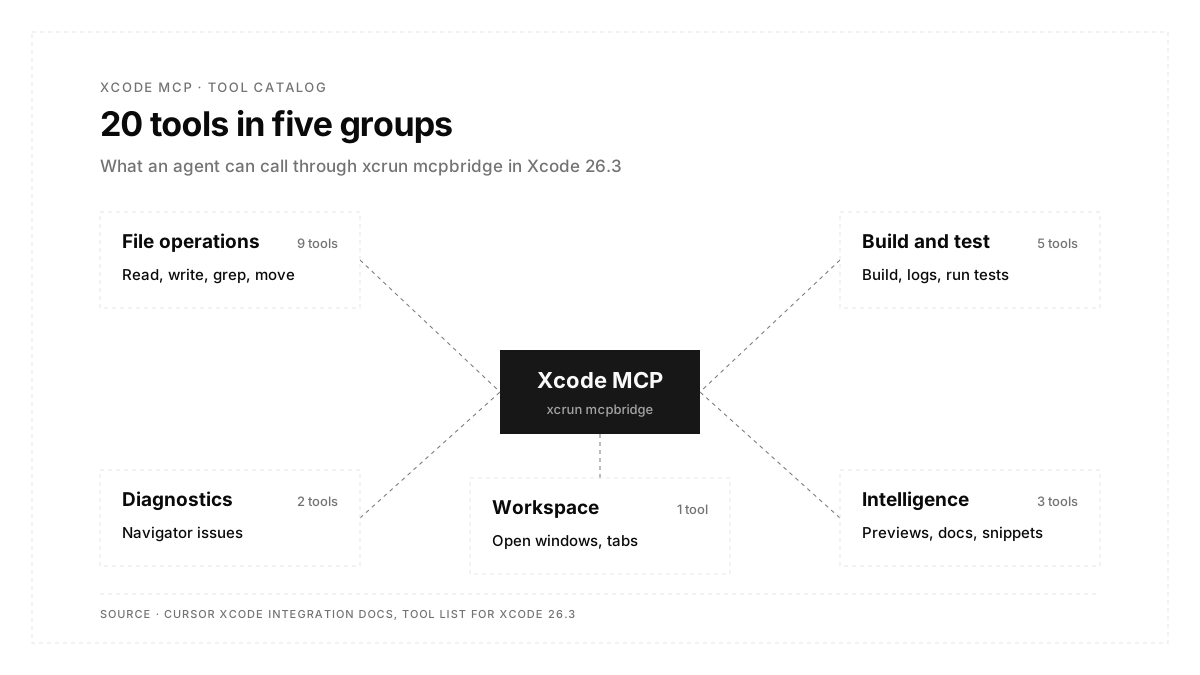
Xcode 26.3 exposes 20 tools in five groups, as listed in Cursor's integration docs:
| Group | Tools | What the agent gains |
|---|---|---|
| File operations | XcodeRead, XcodeWrite, XcodeUpdate, XcodeGrep, XcodeGlob, XcodeLS, XcodeMakeDir, XcodeRM, XcodeMV | Reads and edits files through Xcode's view of the project |
| Build and test | BuildProject, GetBuildLog, RunAllTests, RunSomeTests, GetTestList | Compiles the active scheme and runs XCTest suites |
| Diagnostics | XcodeListNavigatorIssues, XcodeRefreshCodeIssuesInFile | Sees the same warnings and errors a developer sees |
| Intelligence | RenderPreview, DocumentationSearch, ExecuteSnippet | Captures SwiftUI previews, searches Apple docs, runs Swift snippets |
| Workspace | XcodeListWindows | Finds the open windows and tabs to act on |
A typical loop chains them: XcodeGrep to find the code, XcodeUpdate to change it, BuildProject plus GetBuildLog to confirm it compiles, RunSomeTests to check behavior, and RenderPreview to confirm the UI.
Xcode 27 grows the catalog with tools for running the app, sending debugger commands, reading console output and interacting with simulated devices.
Can Xcode MCP drive the iOS simulator?
On Xcode 26.3, the bridge reaches the simulator indirectly. RunAllTests and RunSomeTests execute your XCTest and XCUITest targets on the active run destination, which is usually a simulator, and RenderPreview captures SwiftUI previews. Tapping through the running app is outside that tool set.
Teams that want an agent to tap through the running app pair the bridge with simctl commands or a separate simulator MCP server, covered in the next section.
For scripted UI checks, the bridge runs whatever XCUITest suite already exists. This overview of XCUITest covers how those tests are structured.
What is MobileBuildMCP?
MobileBuildMCP, formerly XcodeBuildMCP, is an open-source MCP server and CLI maintained by Sentry. Its GitHub repository describes tools for agents working on iOS and macOS projects: simulator builds, test runs, log capture and debugging. It works through the xcodebuild command line, so it runs from a terminal session with the Xcode app closed.
| Apple's Xcode MCP | MobileBuildMCP | |
|---|---|---|
| Maintainer | Apple, inside Xcode 26.3 and later | Sentry, open source under MIT |
| Install | Built in, turned on in Intelligence settings | Homebrew or npm (Node.js 18 and later) |
| Requirement | Xcode open with the project loaded | macOS 14.5 and Xcode 16 or later |
| Strongest at | Previews, diagnostics, Apple documentation search | Headless simulator builds, test runs, logs |
Both servers can sit in the same agent config: Apple's bridge for work inside the open project, and MobileBuildMCP for headless builds and simulator runs.
What does Xcode MCP leave to other tools?
Xcode MCP is scoped to one developer's Mac and one open project. Four jobs sit outside it:
- Machine scope: the bridge talks to the Xcode instance on the same Mac, so it serves local development sessions.
- Session requirement: Xcode must be running with the project open for tools to respond.
- Platform scope: it covers Apple platforms, so Android builds need their own tooling.
- Test authoring: it runs the tests in your targets, so coverage depends on the suites your team writes and maintains.
Large projects also take longer per call, since the bridge waits for Xcode to finish each build or test run.
How does Xcode MCP fit into mobile testing?
Most teams combine one MCP server per job, a pattern covered in this roundup of MCP servers for test automation. Xcode MCP covers the inner loop: edit, build, unit test, preview. End-to-end checks across many devices form a second loop.
Autosana's MCP server covers that second loop from the same agent session. Its documented tools include builds_upload to send a build, devices_list to choose a cloud device model and OS, flows_run and suites_run to run test flows written as user journeys, and read_flow_run to inspect results. It connects to Claude Code, Codex and Cursor through browser sign-in, and its flows run on iOS, Android and web. A single prompt can therefore build with Xcode MCP and then run user journeys on cloud simulators through Autosana.
Teams planning the wider iOS strategy can read this guide to iOS test automation.
Conclusion
Xcode MCP turns Xcode into a set of tools any MCP client can call: allow external agents in Intelligence settings, register xcrun mcpbridge in Claude Code, Codex or Cursor, and keep the project open in Xcode. It handles the build, unit test and preview loop well, and pairing it with a device-level testing server extends the same agent session to full user journeys.
FAQs
Which Xcode version includes the MCP server?
Xcode 26.3 and later include it, reached through the xcrun mcpbridge command.
Does Xcode need to stay open for Xcode MCP?
Yes. The bridge calls the running Xcode instance, so keep the project open while the agent works.
How many tools does Xcode MCP provide?
Xcode 26.3 provides 20 tools across files, builds, tests, diagnostics and previews. Xcode 27 adds more.
Can Autosana's MCP server run alongside Xcode MCP?
Yes. Both register in the same agent, with Autosana running test flows on cloud iOS and Android devices.