
7 Best MCP Servers for Test Automation in 2026
Which testing platforms ship a real MCP server, what each one lets an agent actually do, and where the pull request loop is handled instead.
Yuvan Sundrani · 15 min read
autosana.ai
TL;DR
- Autosana MCP is the one that reaches native iOS and Android rather than stopping at a browser.
- Playwright MCP is the free default and the server most teams install first.
- Chrome DevTools MCP gives an agent the profiler, console and network panel.
- k6 MCP lets an agent write and run load tests from the same conversation.
- GitHub MCP supplies the context an agent needs about the change it is testing.
- Jira MCP closes the loop by filing what the run found.
- ContextQA MCP exposes an entire test platform as callable tools.
Model Context Protocol is an open standard that lets an AI assistant call external tools through one interface. For testing, that means your agent can drive a browser, read a diff, run a suite or file a bug without leaving the editor.
The category moved quickly. A year ago this was a proposal; now most testing vendors ship a server and the question is which ones are worth connecting.
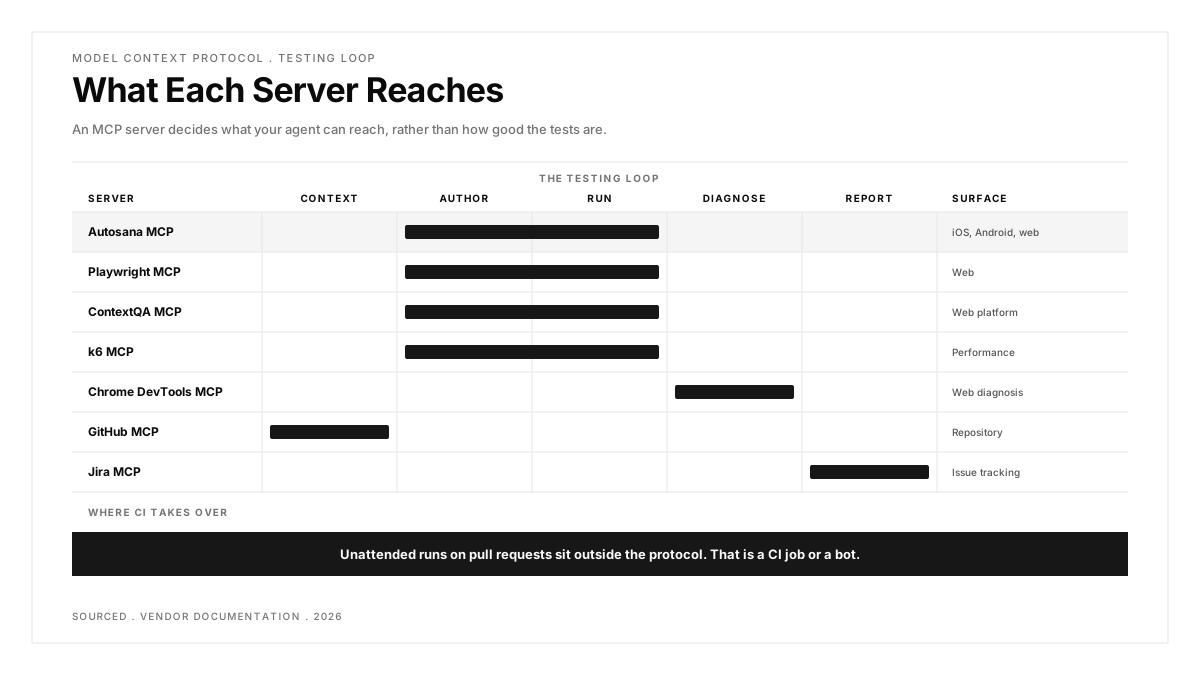
A useful thing to notice early: the best setups are stacks rather than single servers. A web end-to-end setup commonly pairs Playwright MCP with GitHub MCP, and a performance setup pairs k6 MCP with Chrome DevTools MCP.
What should an MCP server actually do for testing?
The honest answer is narrower than the marketing suggests, and practitioners have already worked it out.
In a r/QualityAssurance thread on Playwright MCP, at 46 votes and 45 comments, a tester who ran it across both Cursor and Copilot reported that generated scripts were "around 75-80% usable (Cursor) and 60-70% usable (GitHub Copilot + VS Code)", with accuracy dropping on longer flows and the output ignoring existing page objects.
So an MCP server is an authoring accelerator and a runner. It is not a maintenance strategy. A separate r/QualityAssurance thread on getting started with Playwright MCP, at 25 votes and 23 comments, reads as setup advice rather than transformation, which is the right register.
Scepticism is worth bringing along. A r/QualityAssurance thread asking who is genuinely using AI in test automation drew 40 votes and 72 comments, and a r/softwaretesting thread titled "AI is a nightmare for QA" adds 174 more.
Worth holding onto: an MCP server decides what your agent can reach, not how good the tests are.
| Server | What the Agent Can Do | Surface | Cost |
|---|---|---|---|
| Autosana MCP | Manage and run flows on iOS, Android and web | Native mobile and web | Per agent-run |
| Playwright MCP | Drive a browser, read the DOM, generate tests | Web | Free |
| Chrome DevTools MCP | Inspect console, network and performance traces | Web | Free |
| k6 MCP | Write and execute load tests | Performance | Free, OSS |
| GitHub MCP | Read diffs, issues and pull request context | Repository | Free |
| Jira MCP | Create and update tickets from a run | Issue tracking | With a Jira plan |
| ContextQA MCP | Call a full test platform as tools | Web platform | Vendor pricing |
The seven servers, and what each one unlocks
Three categories sit in this list and they are worth separating before comparing them. Two entries are testing platforms with a protocol attached. Three are capabilities an agent needs while testing, covering browser control, diagnosis and load. Two supply surrounding context, meaning what changed and where the finding goes. A working setup usually draws one from each rather than picking a winner.
1. Autosana MCP: The One That Reaches Native Mobile
Autosana is first here for a plain reason: almost every other testing MCP server drives a browser, and a browser is not where mobile teams ship.
The MCP server connects AI assistants for documentation access and flow management, with setup documented for Claude Code, Claude Desktop, Cursor, Gemini CLI, Codex, Devin, Hermes Agent and ChatGPT through Dots. From the IDE an agent can list flows and run them, across apps on virtual and physical iOS and Android devices and web.
The division of labour is worth stating because it is the most common misreading of this category. MCP is the IDE-side surface. The pull request loop belongs to the GitHub Bot, which analyses a PR, runs the relevant flows and returns results with video. An agent in your editor and an automated check on your branch are two different things, and conflating them leads teams to expect unattended runs from a protocol that was never doing that.
Worth being concrete about what the agent does and does not control. Listing and running existing flows from the editor is well suited to an assistant. Deciding what the suite should cover is not, and treating an MCP connection as a substitute for that judgement produces coverage that looks busy and tests little.
Where it shines: native iOS and Android rather than browser only, the widest documented client list here, and code-managed flows for teams who want definitions in git.
What it costs: per agent-run, with a self-serve trial.
Reach for it when: your agents write code that ends up in a mobile app.
2. Playwright MCP: The Free Default Everyone Installs First
Microsoft's server is where this category became real for most teams. It exposes browser handling, DOM parsing for locators and snapshots, so an agent can open a page, find elements and write a test against what it sees rather than guessing selectors from source.
Install it and the quality question becomes yours. The usability numbers above are the honest picture: strong first drafts, weaker long flows, and a tendency to bypass the page objects your team already maintains.
The setup is less fiddly than the category suggests. A practitioner thread on getting started points to the official microsoft/playwright-mcp repository plus an npm package that pairs auto-execute with auto-generate, and that combination is most of what a first install needs.
A quiet benefit worth naming: because the agent inspects a live page rather than reading source, the locators it produces reflect what actually renders. That is a better starting point than a selector inferred from a component file, even when the surrounding code needs work.
Where it shines: free, official, well documented, and the agent works against a live page rather than from imagination.
Trade-offs: web only, and generated code needs review before it joins a suite.
What it costs: free.
Reach for it when: you test web and want the agent authoring against a real browser.
3. Chrome DevTools MCP: The Debugging Panel as Tools
This one changes what an agent can see when something fails. Rather than reading a stack trace, it can inspect the console, examine network requests and read performance traces directly.
For diagnosis that is a meaningful shift. An agent that can see a failed request with its status and timing explains a flaky test far better than one working from an assertion error alone.
The pairing is the point rather than the server alone. Playwright MCP tells the agent what the page contains, and DevTools MCP tells it what the page did, which together cover authoring and diagnosis in one session.
Where it shines: free, turns failure analysis from guesswork into inspection, and pairs naturally with Playwright MCP.
Trade-offs: Chromium only, and it diagnoses rather than tests, so it adds nothing on its own.
What it costs: free.
Reach for it when: your agent writes tests well and explains failures badly.
4. k6 MCP: Load Testing From the Same Conversation
k6 is Grafana's load testing tool, and its MCP server lets an agent author and execute load scripts without switching context. Describe the scenario and the agent produces a script, runs it and reads the result.
Performance work benefits unusually well from this, because the cost is usually in writing boilerplate scenarios rather than in deciding what to measure.
Load scripts are unusually well suited to generation because they are formulaic. Ramp to a concurrency, hold, assert a threshold: the structure barely varies between scenarios, which is exactly where an agent is reliable.
Treat thresholds as the human part. An agent will happily assert that a request finished under two seconds because you said so, and choosing two rather than five is a product decision nobody should delegate.
Where it shines: free and open source, removes the scripting overhead from load testing, and fits a stack beside Chrome DevTools MCP.
Trade-offs: load testing only, and interpreting the results still needs someone who knows what a bad number looks like.
What it costs: free, open source.
Reach for it when: performance checks keep getting skipped because nobody writes the script.
5. GitHub MCP: Context About What Changed
This is not a testing server, and leaving it out would misrepresent how these stacks work. It lets an agent read diffs, issues and pull request context, which is what turns "write a test" into "write a test for this change".
An agent that knows which files moved writes far more relevant coverage than one working from a prompt alone.
It also changes what a reviewer sees. An agent that cites the diff when proposing coverage gives the reviewer something to agree or disagree with, rather than a test that appeared with no stated reason.
Pull request descriptions turn out to matter more than expected here. An agent reading a well-written description produces coverage aimed at intent, while a one-line commit message leaves it guessing from the diff alone.
Where it shines: free, official, and it supplies the single most useful piece of context an agent can have when writing tests.
Trade-offs: no testing capability of its own, so it is always a component rather than a solution.
What it costs: free.
Reach for it when: your agent writes tests that are technically fine and miss the point of the change.
6. Jira MCP: Closing the Loop After a Failure
The step after a failed run is usually a ticket, and this is the server that lets the agent write it. Create an issue, attach the context, update status, all from the same session that found the problem.
Small, and it removes the gap where a finding is noticed and never recorded.
Constrain it before connecting it. Giving an agent create and update permissions on a live board without agreeing what warrants a ticket is how a backlog fills with duplicates of the same flaky test.
Where it shines: turns a finding into a tracked item without a context switch, and fits whatever workflow your team already runs.
Trade-offs: needs a Jira plan, and an agent filing tickets unsupervised produces noise unless you constrain it.
What it costs: included with Jira.
Reach for it when: findings get lost between the run and the backlog.
7. ContextQA MCP: An Entire Platform as Callable Tools
ContextQA takes the maximalist approach, exposing its test automation platform as a large set of MCP tools so an agent can create tests, trigger executions, analyse failures and manage the lifecycle.
Breadth is the pitch and the caution. A very large tool surface gives an agent more ways to act and more ways to pick the wrong one, so expect to constrain which tools you expose.
A large tool surface has a practical cost beyond confusion: every exposed tool consumes context in the agent's window, so curating down to the handful your workflow uses tends to improve results rather than limiting them.
Where it shines: the broadest action surface here, covering the full lifecycle rather than one step.
Trade-offs: you are adopting a platform rather than a server, it is web focused, and a large tool list needs curating.
What it costs: vendor pricing.
Reach for it when: you want the agent running an existing platform rather than writing code.
Which MCP servers should you actually connect?
You ship a mobile app. Autosana MCP, because the rest of this list stops at the browser and your users do not live there.
You test web and want free. Playwright MCP, then add Chrome DevTools MCP once your agent starts producing failures it cannot explain.
Your tests miss the point of the change. GitHub MCP. Context is usually the gap rather than capability.
Performance keeps getting skipped. k6 MCP, which removes the scripting excuse.
Findings vanish after a run. Jira MCP, with constraints on what the agent is allowed to file.
You already run a test platform. Check whether it ships a server before adding anything else. Driving the platform you already pay for beats introducing a second one that duplicates half of it.
You expect unattended runs on pull requests. Look past MCP. That is a CI integration or a bot, and treating the protocol as if it does that is the most common mistake in this category.
Conclusion
MCP changed where testing happens rather than how good it is. An agent that can drive a browser, read a diff and file a ticket removes a great deal of switching, and it still produces first drafts that need review.
Choose on reach rather than on feature lists. The server that matters is the one that touches the thing you actually ship, and for a mobile team most of this category stops one layer short of that. Decide what your agent needs to reach before comparing anything else, because that single answer removes most of the list.
.png)
Frequently asked questions
What is an MCP server in testing?
Model Context Protocol is an open standard that lets an AI assistant call external tools through one interface. A testing MCP server exposes actions such as driving a browser, listing flows or running a suite, so the agent can test from inside your editor.
Does an MCP server run tests on pull requests?
Usually not. MCP is IDE-side, driven by an agent you are talking to. Pull request automation is a separate integration, such as a GitHub bot or a CI job, and expecting one to do the other is the most common misunderstanding here.
Is Playwright MCP good enough on its own?
For authoring web tests, largely yes. Practitioner reports put generated scripts at roughly 75 to 80 percent usable on Cursor, lower on longer flows, so plan for review rather than unattended acceptance.
Can MCP servers test mobile apps?
Most cannot, because they drive browsers. Autosana's server reaches native iOS and Android, which is the distinction worth checking before assuming a server covers your stack.
Should you connect several MCP servers at once?
Yes, and the common stacks pair a driver with a context source. Playwright MCP with GitHub MCP for web end-to-end work, or k6 MCP with Chrome DevTools MCP for performance, both work better than either half alone.
Do AI-generated tests from MCP need review?
Yes. Reported usability sits between 60 and 80 percent depending on the client and the flow, and generated code tends to ignore the reusable helpers a team already has, so review is part of the workflow rather than an optional step.