
How AWS Device Farm Runs Tests on Real Devices
Learn what AWS Device Farm is, how it works, and how developers use real devices to test app compatibility, performance, and functionality
- Written by
- Gautam Agarwal
- Read time
- 9 min read
- Published

AWS Device Farm is an Amazon Web Services testing service that runs Android, iOS and web apps on real phones and tablets hosted in an AWS data center. Teams use it two ways: remote access, where a person or a local Appium script drives one device live, and automated runs, where uploaded tests execute in parallel across a device pool and return logs, video and screenshots.
At a glance
| Question | Answer |
|---|---|
| What it tests | Native and hybrid Android and iOS apps, web apps, desktop browsers |
| Devices | Real, physical phones and tablets hosted by AWS |
| Ways to use it | Remote access sessions and automated test runs |
| Frameworks | Appium, Android Instrumentation, XCTest, XCTest UI, built-in fuzz |
| Region | us-west-2 (Oregon) only |
| Pricing | Per device minute, or a flat monthly fee per device slot |
| Run length cap | 150 minutes per automated run or remote session |
How does AWS Device Farm work?
Device Farm organizes work into a small set of objects, and knowing them makes the console easy to read. Each term below comes from the AWS Device Farm developer guide:
- Project: a workspace that holds every run for one app or platform.
- Device pool: a saved group of devices that share traits such as platform, maker or model.
- Run: one build of your app, one set of tests, one device pool.
- Job: one app tested on one device. A run contains one job per device.
- Suite and test: the structure inside your test package.
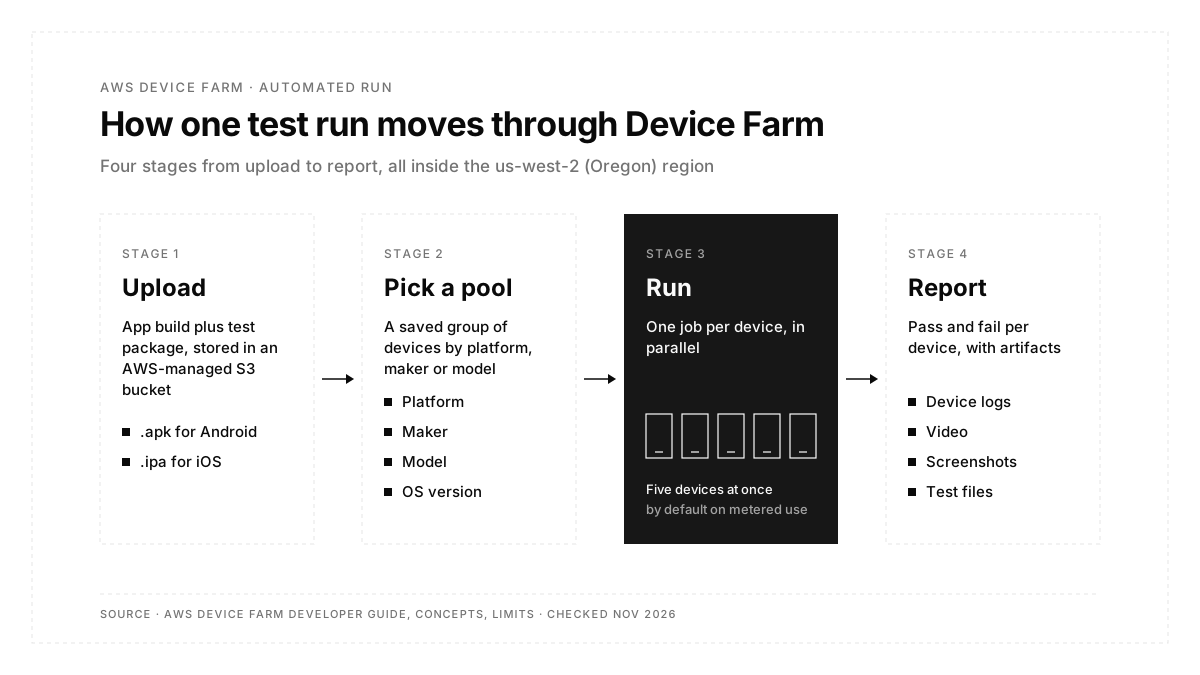
An automated run follows four steps. You upload the app and test package to an AWS-managed S3 bucket. You pick a device pool. Device Farm starts its own test hosts, installs the app and runs the tests on every device in parallel. When the jobs finish, the report holds pass and fail results, device logs, screenshots, video and any files your tests save.
The test hosts sit physically close to the devices, and they can connect to your VPC, so tests reach private staging endpoints.
Which test frameworks does AWS Device Farm support?
Device Farm runs four framework families plus one built-in test:
| Platform | Supported options |
|---|---|
| Android | Appium, Instrumentation (Espresso and other runners) |
| iOS | Appium, XCTest, XCTest UI |
| Web apps | Appium |
| Both platforms | Built-in fuzz test, which sends random input to find crashes |
The fuzz test needs zero scripts, so it suits a first smoke pass on a new build. For Android, upload an .apk, since Device Farm currently rejects .aab bundles. Teams weighing frameworks before they pick a device cloud can compare options in this guide to Appium.
What is remote access in AWS Device Farm?
Remote access opens a single real device in your browser. You tap, swipe and type in real time, which helps with manual checks, bug reproduction on one specific model, and install or upgrade sequences. At the end of the session Device Farm saves a log of your actions plus a video.
The same session also exposes a managed Appium endpoint. That lets you run Appium tests from a local IDE against the remote device, with breakpoints and live logs, as many times as you like within the session.
Each remote session stops at 150 minutes, and each Appium command times out after 4 minutes.
Which device settings can a test run control?
The run setup in the guide to creating a test run exposes these options:
- Radio states: Wi-Fi, Bluetooth, GPS and NFC on or off for the run.
- Device location: preset latitude and longitude.
- Device locale: preset language and region.
- Extra data: a .zip of files the tests read during the run.
- Other apps: extra .apk or .ipa files installed in a set order.
- Video recording: on or off per run.
Radio states and locale apply to Android native tests today. Each report then holds pass and fail results, crash reports, device logs (logcat on Android, the device console on iOS) and screenshots, and Device Farm keeps reports for 400 days.
How does AWS Device Farm connect to CI/CD?
Runs start from the console, the AWS CLI, the Device Farm API or the Jenkins and Gradle plugins. In a pipeline, the CLI sequence is short: create-upload for the app and test package, schedule-run against a device pool, then get-run to poll for the result.
Does AWS Device Farm test desktop browsers?
Yes. Alongside mobile devices, Device Farm offers a managed desktop browser grid that runs web tests in parallel. Billing runs per instance minute, so three browsers running 100 minutes each count as 300 instance minutes.
How much does AWS Device Farm cost?
AWS publishes four price points on its Device Farm pricing page, checked November 2026:
| Plan | Price | Best fit |
|---|---|---|
| Pay as you go | $0.17 per device minute | Occasional runs, small device pools |
| Free trial | One-time 1,000 device minutes (standard trial is 250) | First evaluation |
| Unmetered | $250 per device slot per month | Steady daily runs |
| Private devices | From $200 per month | Exact hardware kept for your account |
| Desktop browsers | $0.005 per instance minute | Web test grids |
Device minutes count every device in a run. A 10-minute suite on 6 phones uses 60 device minutes, which costs $10.20 on pay as you go.
Unmetered slots work as concurrency. Ten Android automation slots run a 100-device job ten devices at a time until every device finishes. Slots are bought per platform and per usage type, so automated testing and remote access each need their own.
What limits should teams plan for?
The Device Farm limits page lists the numbers that shape a test plan:
- One region: every project lives in us-west-2 (Oregon).
- Five devices at once by default: metered accounts run up to five devices in parallel, with higher limits granted on request.
- 150 minutes per run: long suites need splitting across runs.
- 24 hours in the queue: a scheduled run waits up to a day for devices.
- 250 test cases per standard run: larger suites move to a custom test environment.
- 4 GB per app upload: with video and device logs each capped at 1 GB.
The five-device default matters most. A 50-device pool on a metered account runs in ten waves, so a suite that takes 10 minutes per device needs close to 100 minutes of wall-clock time.
How does Firebase Test Lab compare?
Firebase Test Lab is Google's device cloud for Android and iOS, and it carries one fact every buyer needs first: Google has deprecated Firebase Test Lab and will shut it down on September 30, 2027, with existing users pointed to Google Cloud's Developer Device Platform.
Until then, the main differences from Device Farm are:
| AWS Device Farm | Firebase Test Lab | |
|---|---|---|
| Devices | Real devices | Real devices plus virtual Android devices |
| Script-free test | Built-in fuzz | Robo test, which crawls the app UI |
| Free usage | One-time trial minutes | Spark plan: 10 virtual and 5 physical runs per day |
| Paid rate | Per device minute (see pricing above) | $5 per physical device hour, $1 per virtual device hour |
| Status | Active | Deprecated, shutting down September 30, 2027 |
For a new project, the shutdown date settles the comparison. For a team already on Test Lab, the date sets a migration deadline.
Which device cloud fits your team?
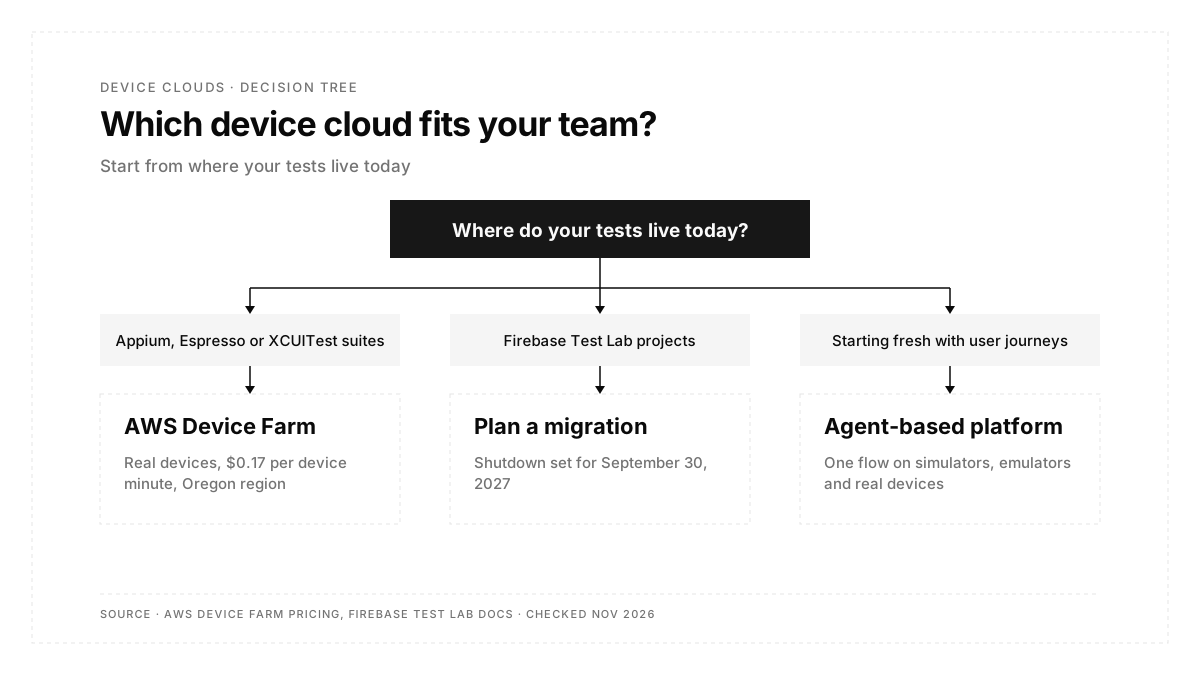
The starting point decides the fit more than the price does:
| Your situation | Where it points |
|---|---|
| Appium, Espresso or XCUITest suites that need real hardware | AWS Device Farm |
| Cloud spend billed through AWS on one invoice | AWS Device Farm |
| Tests that reach private endpoints inside a VPC | AWS Device Farm |
| An existing Test Lab setup | A migration plan before September 2027 |
| Tests written as user journeys, with zero selectors or scripts to maintain | Agent-based platform such as Autosana |
| One flow across iOS simulators, Android emulators and real devices | Agent-based platform such as Autosana |
| Sign-in codes, push notifications, system permission dialogs | Agent-based platform such as Autosana |
Autosana runs flows on virtual devices and real hardware in the cloud, with Pixel 6 through Pixel 10 emulators on Android 14 to 17 and iPhone and iPad simulators on iOS 17 to 26. A real-device run targets a chosen model and OS, and every run records full video plus screenshots for each agent action. For the hardware side of that choice, see when a simulator is enough and when real devices are required.
What should you check before choosing a device farm?
Run through this list with your own numbers:
- Count device minutes per week: suite length times devices times runs.
- Compare that figure with the cost of flat-rate slots.
- Confirm the build formats each service accepts (.apk, .ipa, .aab).
- Check parallel device limits against your release window.
- Confirm the region fits your data rules.
- List flows that need real hardware: camera, biometrics, Bluetooth, carrier SMS.
- Estimate the hours spent each month fixing broken selectors.
Teams that need two phones inside one test, such as chat or ride sharing, face a separate question covered in this comparison of multi-device testing platforms.
Conclusion
AWS Device Farm gives teams with existing Appium, Espresso or XCUITest suites a pay-per-minute route onto real phones, with a 150-minute run cap, five parallel devices by default and a single Oregon region to plan around. Firebase Test Lab users now face a September 2027 shutdown. Teams starting fresh can weigh a script-based device farm against an agent that runs the user's journey across virtual and real devices.
FAQs
Is AWS Device Farm free?
AWS Device Farm offers a one-time free trial of 1,000 device minutes, then charges $0.17 per device minute.
Does AWS Device Farm use real devices?
Yes. Every mobile test runs on real, physical phones and tablets hosted by AWS in its Oregon region.
Which regions support AWS Device Farm?
AWS Device Farm runs only in the us-west-2 (Oregon) region.
How long can an AWS Device Farm run last?
An automated run or remote access session ends at a hard limit of 150 minutes.
How many devices run in parallel on AWS Device Farm?
Metered accounts run five devices at once by default. Unmetered accounts run one device per purchased slot.
Is Firebase Test Lab shutting down?
Yes. Google deprecated Firebase Test Lab and will shut it down on September 30, 2027.
Does Autosana run tests on real devices?
Yes. Autosana runs the same flow on real iOS and Android devices, plus simulators and emulators.