
Best Multi-Device Testing Platforms for Mobile Teams in 2026
Comparing platforms that run one app across many devices against the smaller set that drives two devices inside a single flow, and when each is the right spend.
Yuvan Sundrani · 15 min read
autosana.ai
TL;DR
- Autosana drives two devices inside one flow, which is the only way to test an interaction between them.
- BrowserStack offers interactive app testing on 2,000 or more iOS and Android devices.
- TestMu AI runs a 10,000 device cloud, including SIM-enabled devices for SMS and OTP.
- Sauce Labs lets you mix public devices with private dedicated pools.
- TestingBot is the cheapest published entry point at 20 euros a month.
- Kobiton starts at 83 dollars a month and offers fully on-premises devices at the top end.
- Self-hosted Appium removes the per-minute meter and hands you the hardware problem.
Multi-device means two completely different things, and buying the wrong one is an expensive mistake that takes a quarter to notice.
Breadth is one app checked across many handsets: does the layout hold on a Pixel 6a, does the keyboard behave on an older iPhone SE. Interaction is one user journey spanning two devices at once: one phone sends, the other receives, and the test has to watch both.
Almost every platform below sells breadth. One sells interaction. They are not substitutes, and a team that needs the second will not get it by buying more of the first.
Do you need breadth or interaction?
Answer one question: does your test need two devices on screen at the same time, or one device at a time across many models?
If an action on device A must produce a visible result on device B, that is interaction. Messaging, calling, sharing, collaborative editing, pairing, transfers, multiplayer. No amount of device-cloud breadth helps, because a cloud gives you many sequential sessions rather than two concurrent ones in a single test.
If you are hunting fragmentation bugs, that is breadth, and the right answer is a device cloud with the widest catalogue you can afford. Our guide to cross-platform testing tools covers that decision in full, and most teams here should read it instead of this page.
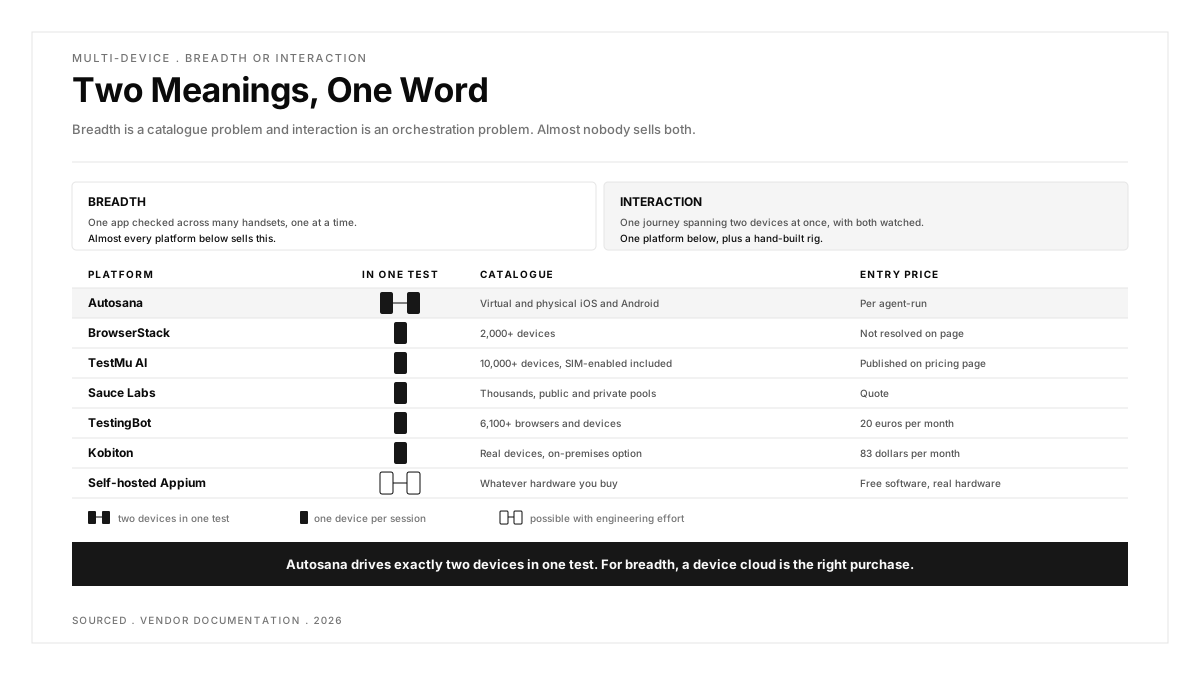
Worth holding onto: breadth is a catalogue problem and interaction is an orchestration problem, and almost nobody sells both.
| Platform | Breadth | Two Devices in One Test | Published Entry Price |
|---|---|---|---|
| Autosana | Virtual and physical iOS and Android | Yes, exactly two | Per agent-run |
| BrowserStack | 2,000+ devices | No | Not resolved on page |
| TestMu AI | 10,000+ devices | No | Published on pricing page |
| Sauce Labs | Thousands, public and private | No | Quote |
| TestingBot | 6,100+ browsers and devices | No | 20 euros per month |
| Kobiton | Real devices, on-prem option | No | 83 dollars per month |
| Self-hosted Appium | Whatever you buy | With effort | Free software, real hardware |
Which multi-device platform matches which job?
The table splits cleanly on one column. Everything except Autosana and a hand-built Appium rig gives you one device per session, and the question becomes catalogue size against price. Autosana sits alone on the interaction column, and the honest framing is that it is not competing with the clouds below on breadth and should not be chosen for it.
1. Autosana: Best for Testing a Flow That Spans Two Devices
Autosana goes first because it is the only platform here that treats two devices as one test. The multi-device docs describe one agent controlling two phones in the same flow, seeing both screens and taking one action at a time on Device 1 or Device 2.
The setup is deliberately plain. In the flow editor you expand Advanced options and set Number of devices to 2, then refer to Device 1 and Device 2 in ordinary instructions. The docs give the pattern directly: switch the app to light mode on Device 1 and dark mode on Device 2, then verify each device keeps its theme.
Three constraints are stated in the docs and should be read before anything else. It currently supports up to two cloud mobile devices, both devices must run the same app build and platform though they may differ in model and OS version, and both must be virtual or both must be physical. The feature is marked advanced.
What you get in exchange for that ceiling is that the orchestration disappears. There is no second session to start, no synchronisation code, no polling loop asking whether the message has landed yet. The agent watches both screens and knows when the receiving device has changed, which is the part teams building this by hand spend most of their time on.
Say the number out loud, because it decides everything. Two. If your requirement is a thirty-device compatibility matrix, this is the wrong product and one of the clouds below is the right one. If your requirement is proving that a message sent on one phone arrives on another, every cloud below is the wrong product and this is the only one that does it.
Built for: messaging, sharing, collaboration and any journey where an action on one device must appear on another, written as ordinary sentences naming Device 1 and Device 2.
Not built for: fragmentation sweeps. Two devices is the ceiling, both must be the same platform and build, and you cannot mix a virtual device with a physical one.
Pricing: per agent-run, published on the Autosana pricing page.
Go here when: the defect you keep shipping only appears when two devices interact.
2. BrowserStack: Best Known Catalogue for Interactive Testing
BrowserStack App Live offers interactive mobile app testing on 2,000 or more iOS and Android devices, and for most teams it is the default because it is the one everybody has already used somewhere.
Breadth is the product, and the catalogue is deep on older hardware that other clouds quietly retire. When a support ticket arrives naming a four-year-old handset, this is usually where you go.
Price is the recurring complaint rather than capability. A r/QualityAssurance thread asking for BrowserStack alternatives drew 17 votes and 37 comments, which is a good proxy for how often teams go looking. The pricing figures on the plan page render client-side and did not resolve when we visited, so budget from a quote rather than a published number.
Built for: broad fragmentation coverage, legacy device access and interactive manual sessions with no setup.
Not built for: two devices inside a single test, and the pricing is not readable without a session.
Pricing: figures render client-side and did not resolve on visit. Treat as quote-based.
Go here when: catalogue depth matters more than cost and you need an older handset today.
3. TestMu AI: Best Catalogue Size, With SIM-Enabled Devices
TestMu AI, the platform rebranded from LambdaTest in January 2026, publishes the largest figure on this list: 10,000 or more real devices with automation support.
One capability sets it apart from the rest of the breadth group. Its own comparison table lists SIM-enabled devices for SMS and OTP flows, alongside network throttling across 3G, 4G, 5G and offline. Most clouds give you a device without a working carrier connection, which makes anything involving a real text message untestable.
The rebrand is worth knowing about before you search for documentation. lambdatest.com now redirects to testmuai.com, and older guides, Stack Overflow answers and internal runbooks still use the previous name.
Built for: the widest published device catalogue, SIM-enabled handsets for real SMS and OTP, and network condition simulation on real hardware.
Not built for: two devices in one test, and documentation continuity while the rebrand settles.
Pricing: published on the TestMu AI pricing page.
Go here when: you need catalogue breadth and a real carrier connection in the same place.
4. Sauce Labs: Best for Mixing Public and Private Device Pools
Sauce Labs Real Device Cloud offers instant access to thousands of real iOS and Android devices, and its own page makes the structural argument clearly: public devices give broad on-demand coverage, private dedicated pools give exclusive access and enhanced device management, and you can use both together.
That combination is the reason regulated teams keep choosing it. A private pool satisfies a security review while the public pool absorbs the long tail of compatibility checks, without running two vendors.
Device procurement, OS updates and hardware refreshes are handled by Sauce Labs on the managed infrastructure, which is the cost most in-house device labs underestimate. A r/QualityAssurance comparison of AWS, BrowserStack, Sauce Labs and Kobiton, at 9 votes and 8 comments, is the shape of that decision in practice.
Built for: mixed public and private device pools under one contract, managed procurement and OS updates, and enterprise security review.
Not built for: two devices in a single test, and the entry point is higher than the budget options below.
Pricing: quote-based, no figures published on the product page.
Go here when: compliance requires dedicated devices and you still want on-demand breadth alongside them.
5. TestingBot: Best Published Entry Price
TestingBot is the only platform here with a price you can read without talking to anybody, and it is low. Plans start at 20 euros a month on annual billing, or 30 euros month to month, with a further tier at 50 euros, against a catalogue of 6,100 or more real browsers and devices.
Parallelism is priced in visible steps too: one parallel test with 1,000 minutes, two with 2,000, four with 4,000, eight with 6,000 and sixteen with 10,000. For a small team that wants to know the annual cost before a meeting, that transparency is worth more than catalogue size.
The trade is scale. The device pool is smaller than the three above, and the support structure is sized for the price. For a team running a few hundred sessions a month that is rarely the binding constraint, and the published parallel tiers make it easy to work out when it would become one.
Built for: small teams needing a predictable, published bill and a usable real device catalogue.
Not built for: two-device interaction, or the catalogue depth of a 10,000-device cloud.
Pricing: from 20 euros a month billed annually, 30 euros month to month, with a 50 euro tier above and parallel tiers up to 16 tests and 10,000 minutes.
Go here when: budget certainty matters more than having every handset ever shipped.
6. Kobiton: Best Route to Fully On-Premises Devices
Kobiton publishes figures too, starting at 83 dollars a month for small teams needing quick access to devices, with a 399 dollar a month tier above it and a free trial on both.
The Enterprise tier is the real differentiator: dedicated devices and fully on-premises devices, aimed at teams who need highly secure deployment or more control over the hardware than a shared cloud allows.
That makes Kobiton the natural answer when a security policy forbids testing on shared infrastructure but nobody wants to build a device lab from nothing. It is the middle option between a public cloud and the self-hosted route at the end of this list, and it is the one most often reached for after an in-house lab proposal fails its first cost review. A r/softwaretesting thread on whether anyone has set up their own in-house device farm is short, which tells you how few teams complete that project.
Built for: mobile-first teams, published entry pricing, and a supported path to dedicated or fully on-premises devices.
Not built for: two devices in one test, and the catalogue is narrower than the large clouds.
Pricing: from 83 dollars a month, with a 399 dollar a month tier and a free trial.
Go here when: policy pushes you toward on-premises hardware but you want it managed.
7. Self-Hosted Appium: Best When the Meter Is the Problem
The option with no vendor. Buy handsets, run an Appium grid, connect it to CI, and the per-minute meter disappears. For two-device interaction it is technically possible by driving two Appium sessions from one test, which is how teams solved this before anything sold it.
The cost moves rather than vanishing. Devices need charging, re-flashing, OS pinning and physical replacement, and somebody owns that as a real part of their week. A r/androiddev thread asking how people realistically test across Android devices, at 22 comments, and a r/androiddev thread on how many devices teams actually own, at 6 votes and 16 comments, are both mostly descriptions of that overhead.
Built for: removing per-minute cost, full control over hardware and OS versions, and two concurrent sessions if you are willing to orchestrate them.
Not built for: teams without someone to own the hardware, and the two-session approach is yours to build and debug.
Pricing: free software, real capital expenditure and ongoing maintenance time.
Go here when: your run volume makes cloud minutes the largest line item and you have an owner for the lab.
Which approach fits your situation?
An action on one device must appear on another. Autosana, because it is the only platform here that puts two devices in one test, and the ceiling is two.
You need an old handset this afternoon. BrowserStack, for catalogue depth.
Real SMS or OTP has to arrive on a real device. TestMu AI, for the SIM-enabled handsets.
Security review requires dedicated devices. Sauce Labs for a managed private pool alongside public, or Kobiton for fully on-premises.
You need the annual number before the meeting. TestingBot, the only published entry price on this list.
Cloud minutes are your biggest line item. Self-hosted Appium, with the lab ownership budgeted honestly.
You are chasing fragmentation, not interaction. Read best cross-platform testing tools instead. It is the right page for that decision and this one is not.
Conclusion
The word multi-device hides a fork that most buying processes never reach. One branch is a catalogue question answered by price per device-minute. The other is an orchestration question that catalogue size cannot answer at any budget.
Work out which branch you are on before you compare vendors. If two devices never need to be live in the same test, buy on breadth and cost. If they do, the field narrows to one option and a hand-built Appium rig, and the number that matters is two.
.png)
Frequently asked questions
What does multi-device testing actually mean?
Two different things. Breadth is running one app across many handsets to find fragmentation bugs, which every device cloud sells. Interaction is one journey spanning two devices at once, where an action on the first must produce a result on the second, which almost nothing sells.
Can a device cloud test two phones in the same test?
Not in a single test. Clouds allocate one device per session, so you can run many sessions in parallel but they do not share a test context. Driving two devices inside one flow needs either a platform built for it or two Appium sessions orchestrated by hand.
How many devices can Autosana drive in one flow?
Two. The docs state it currently supports up to two cloud mobile devices, both on the same app build and platform, and both either virtual or both physical, though they may differ in model and OS version.
Which multi-device platform is cheapest?
TestingBot publishes the lowest entry price at 20 euros a month billed annually, with Kobiton next at 83 dollars a month. Sauce Labs is quote-based, and BrowserStack's plan figures render client-side and did not resolve on visit.