
What Is Appium, and Is It Still the Right Choice?
Appium 3 is current and Appium 1 is end of life. The architecture explains most of what teams like and dislike about it. A practical map.
Yuvan Sundrani · 15 min read
autosana.ai

TL;DR
If you are choosing a framework: Appium is the right answer when one team automates both platforms and the tests live outside the app repository. It is the wrong answer when mobile engineers own the tests and speed matters more than sharing code.
If you already run Appium: check your version. Appium 1 is end of life and receives no security updates. Appium 2 restructured the architecture and made W3C the only protocol. Appium 3, generally available since August 2025, mostly changes requirements rather than syntax, and the change that breaks pipelines is the Node.js floor.
If you are debugging flakiness: the cause is almost always the round trip described below, not your test.
Most complaints about Appium are really complaints about one design decision, and it is a decision made before Appium existed.
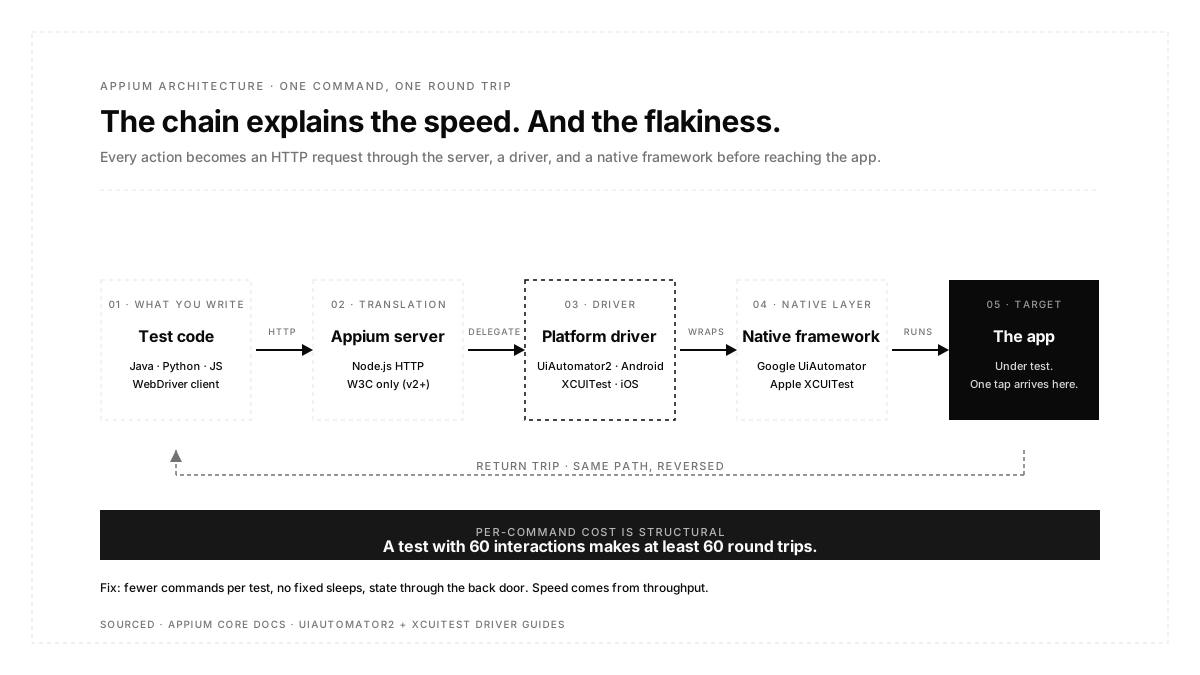
Appium speaks the W3C WebDriver protocol, which was designed for browsers. Every action your test takes becomes an HTTP request to the Appium server, which translates it into a call to a platform driver, which translates that into a call to Google's or Apple's native automation framework, which finally touches the app. Tap a button, and that is one round trip. Check whether an element exists and that it is another.
Understand that chain and the rest of Appium follow from it: the speed, the flakiness profile, the reason it works on both platforms at all, and the reason two newer frameworks exist mostly to avoid it.
What is Appium?
Appium is an open-source framework for automating native, hybrid, and mobile web applications on Android and iOS from a single test suite. It does not require you to modify or recompile the app, and it lets you write tests in Java, Python, JavaScript, Ruby, C#, or anything else with a WebDriver client.
Its long-standing advantage is reach. One suite covers both platforms; the API resembles Selenium closely enough that web automation engineers are productive quickly, and every major device cloud supports it.
How Appium actually works
Underneath, Appium is a Node.js HTTP server that receives WebDriver commands and delegates them to a driver.
The driver is the part that matters. On Android, the UiAutomator2 driver wraps Google's UiAutomator framework. On iOS, the XCUITest driver wraps Apple's XCUITest and runs through a helper app called WebDriverAgent that has to be built and signed onto the device. Appium itself automates nothing. It is a translation layer over the frameworks Apple and Google already ship.
That explains the trade cleanly. You get one API across two platforms because Appium normalizes two very different native frameworks behind a common protocol. You pay for it in latency and in a longer failure chain, since a broken test can be broken in your code, in the client library, in the server, in the driver, in WebDriverAgent, or in the native framework underneath.
What Appium 2 changed
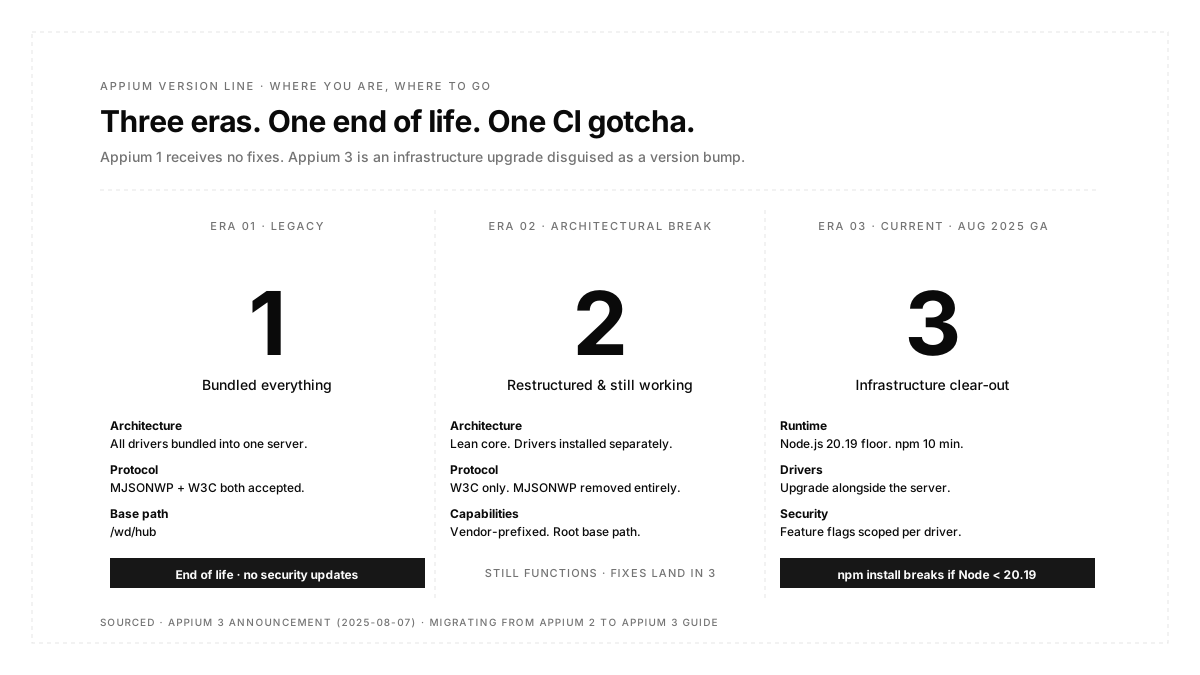
Appium 2 was the architectural break, and its changes are the ones most likely to bite when following an older tutorial.
Drivers were decoupled from the server. Appium 1 shipped every driver bundled into one package. Appium 2 ships a lean core, and you install what you need with commands like "appium driver install uiautomator2" or "appium driver install xcuitest." Installs got much smaller, and drivers now release on their own cadence rather than waiting for a server release.
W3C became the only protocol. Support for JSONWP and MJSONWP, the pre-standard protocols inherited from early Selenium, was removed entirely. Appium 1 accepted both, which let old clients keep working; Appium 2 does not, so an outdated client library fails outright rather than degrading.
Capabilities need a vendor prefix. Under W3C, anything that is not a standard capability must be namespaced. In practice only browserName and platform Name go unprefixed, and everything else takes appium:, as in appium:platformVersion or appium:automationName. Omit the prefix and the server rejects the session.
The server base path moved. Appium 1 served at /wd/hub. Appium 2 serves at the root, which quietly breaks any hardcoded endpoint. You can restore the old behavior by starting the server with a base-path argument if a migration needs it.
Driver-specific flags became capabilities. The chromedriver-executable command line flag, for instance, is now the appium:chromedriverExecutable capability. Appium Desktop was deprecated, and image comparison and execute-driver moved out of core into plugins.
What Appium 3 changed
Appium 3 has been generally available since August 2025, with 3.5.2 the current stable release as of mid-2026. The project describes it as clearing out old cruft rather than reworking anything, and the official position is that the breaking changes are minimal. That is true for test code and less true for infrastructure.
Node.js is the change that breaks pipelines. The minimum moved to Node.js 20.19 and npm 10, with the supported range being 20.19, 22.12, or 24 and above. Appium 2 accepted Node 14.17, which was already past end of life at the time, so plenty of build agents and Docker images are sitting well below the new floor. The failure appears at npm install, not in your tests.
Drivers must be upgraded alongside the server. Archive extraction was removed from the core, so unpacking an APK or an app bundle during session setup is now the driver's job. Upgrade the server without upgrading drivers and app installation breaks.
Security feature flags are now scoped to a driver. A flag such as adb_shell becomes uiautomator2:adb_shell, which stops an insecure feature being enabled across drivers by accident. Session discovery also moved behind an explicit flag rather than being on by default.
Legacy request shapes were removed. The desiredCapabilities and requiredCapabilities objects are gone from session creation, leaving only the standard W3C capabilities object. Timeout requests no longer accept the old type and ms parameters and require script, pageLoad, or implicit. The element value endpoint no longer takes a value array and expects a text string. A client that still sends the old shapes gets a hard validation error.
Two conveniences worth knowing. Inspector can now be hosted by the server as a plugin rather than installed as a separate desktop app. And a client can set an X-Appium-Is-Sensitive header so the server masks that request in the logs, which stops passwords appearing in plaintext in CI output.
The server version and the client library version are independent, incidentally, which is a recurring source of confusion. A 3.5.2 server does not require a 3.5.2 client.
Appium compared to the native frameworks
| Appium | Espresso | XCUITest | |
|---|---|---|---|
| Platforms | Android and iOS | Android only | iOS only |
| Runs | Out of process, over HTTP | In process with the app | Out of process |
| Speed | Slowest | Fastest | Middle |
| Synchronisation | Manual waits | Automatic for the main thread and AsyncTask | Existence polling |
| Languages | Most | Kotlin and Java | Swift and Objective-C |
| App Changes Needed | None | Test code in the app project | Test target in the project |
Espresso's advantage is not just proximity; it is knowledge. Because it runs in a process,process it can wait for the app's main thread message queue and the default AsyncTask pool to go idle before acting. Appium cannot see any of that, so an Appium test waits by polling or by a number you chose.
Why are Appium tests slow, and what to do
Latency comes from the chain, and the chain is per command. A test with sixty interactions makes at least sixty round trips before any assertion overhead.
Reduce commands, not just wait times. Reaching into the page source to find one element and then acting on it is cheaper than three separate find calls. The cost is per request, so the lever is request count.
Never use fixed sleeps. A hardcoded pause is a guess that is either wasteful or wrong, and on a loaded CI machine it becomes wrong. Explicit conditional waits at least fail for a legible reason.
Set app state through the back door. Clicking through six screens to reach the state you want to test costs six screens of round trips and adds six ways to fail before the assertion. Use an API call or a script to arrive at the state directly. This is a general principle rather than an Appium one, and it is what hooks exist for in any framework that has them: the setup should not be part of what the test can fail on.
Parallelise, since you cannot make a single test fast. Appium's per-command cost is structural, so throughput comes from running many sessions at once rather than from optimizing one. That turns the bottleneck into device supply, which is why Appium suites and device clouds are usually bought together. It is also worth checking what the emulator is hiding before you scale: latency, thermal behavior, and modem timing differ enough on real hardware that a suite tuned entirely against emulators will find new timing failures the first time it meets a physical device.
Choosing locators that survive
The single most useful locator decision in Appium is to prefer accessibility ID. It maps to content-desc on Android and to the accessibility identifier on iOS, so one locator works on both platforms, and developers can set it deliberately for testability rather than leaving tests to scrape whatever the UI happens to expose.
The alternative most teams fall into is XPath, which works everywhere and is the slowest and most brittle option available. An XPath expression walks the entire element tree, and on Appium that tree has to be serialized across the HTTP boundary first. It also encodes layout structure, so it breaks when someone nests a view differently, and that breakage arrives looking exactly like a real defect.
This is the same underlying problem regardless of framework. A test bound to interface structure breaks on a rename; a test written against user-visible outcomes does not. Autosana takes the approach of writing tests as natural-language flows that an agent interprets against the running app, so there is no locator to maintain, and the instruction-writing guidance argues for journey-level phrasing for the same reason a good Appium suite prefers accessibility ids over XPath.
When Appium is the right choice
Appium fits when one team automates both platforms and duplicating a suite in Kotlin and Swift is not realistic, when the people writing tests come from a Selenium background, when tests must live outside the app repository, or when you need broad device cloud support with a portable suite.
It fits less well when mobile engineers own the tests and would rather stay in the app's language, when suite runtime is the binding constraint, or when the app is React Native and Detox can hook the runtime more directly.
If you inherit an Appium 1 suite, migrating is not optional in any meaningful sense. That line receives no fixes and no security updates.
Conclusion
Appium's architecture is both the reason it works across platforms and the reason it feels slow, and most advice about it makes more sense once that trade is explicit. Check which version you are on before anything else, because Appium 1 is unsupported and the Appium 3 upgrade is an infrastructure change disguised as a version bump. Then spend your effort where the cost actually is: fewer commands per test, no fixed sleeps, state set through the back door, and accessibility IDs instead of XPath.
FAQ
Is Appium still relevant?
Yes. It remains the most widely used open-source option for automating both platforms from one suite, and every major device cloud supports it. Newer frameworks are faster, but most are single-platform or tied to a specific stack.
What is the difference between Appium 1, 2, and 3?
Appium 1 bundled all drivers into one server and is now end of life. Appium 2 decoupled drivers and plugins, moved to W3C only, and required vendor-prefixed capabilities. Appium 3 modernises requirements, notably Node.js 20.19 and npm 10, and removes endpoints deprecated in Appium 2.
Do I need to upgrade from Appium 2 to Appium 3?
Not urgently, since Appium 2 still functions. But Appium 3 is where fixes land, and the migration guide is short. Budget for the Node.js upgrade in CI rather than for test rewrites.
Why are my Appium tests so slow?
Because every command is an HTTP round trip through the server and a driver before reaching the app. The fix is fewer commands per test and parallel sessions, not faster individual commands.
Does Appium need the app source code?
No. It automates a compiled build without modification, which is one of its genuine advantages over the native frameworks and why it suits teams outside the app repository.
What is the best locator strategy in Appium?
Accessibility id first, because it works on both platforms, and developers can set it intentionally. Then platform-specific ids. XPath last, since it is the slowest and breaks on layout changes.