
Validation vs Verification: The Difference, With Examples
Validation vs verification explained: what each checks, when it runs, who owns it, the methods behind both, plus a worked example and test code.
- Written by
- Gautam Agarwal
- Read time
- 7 min read
- Published
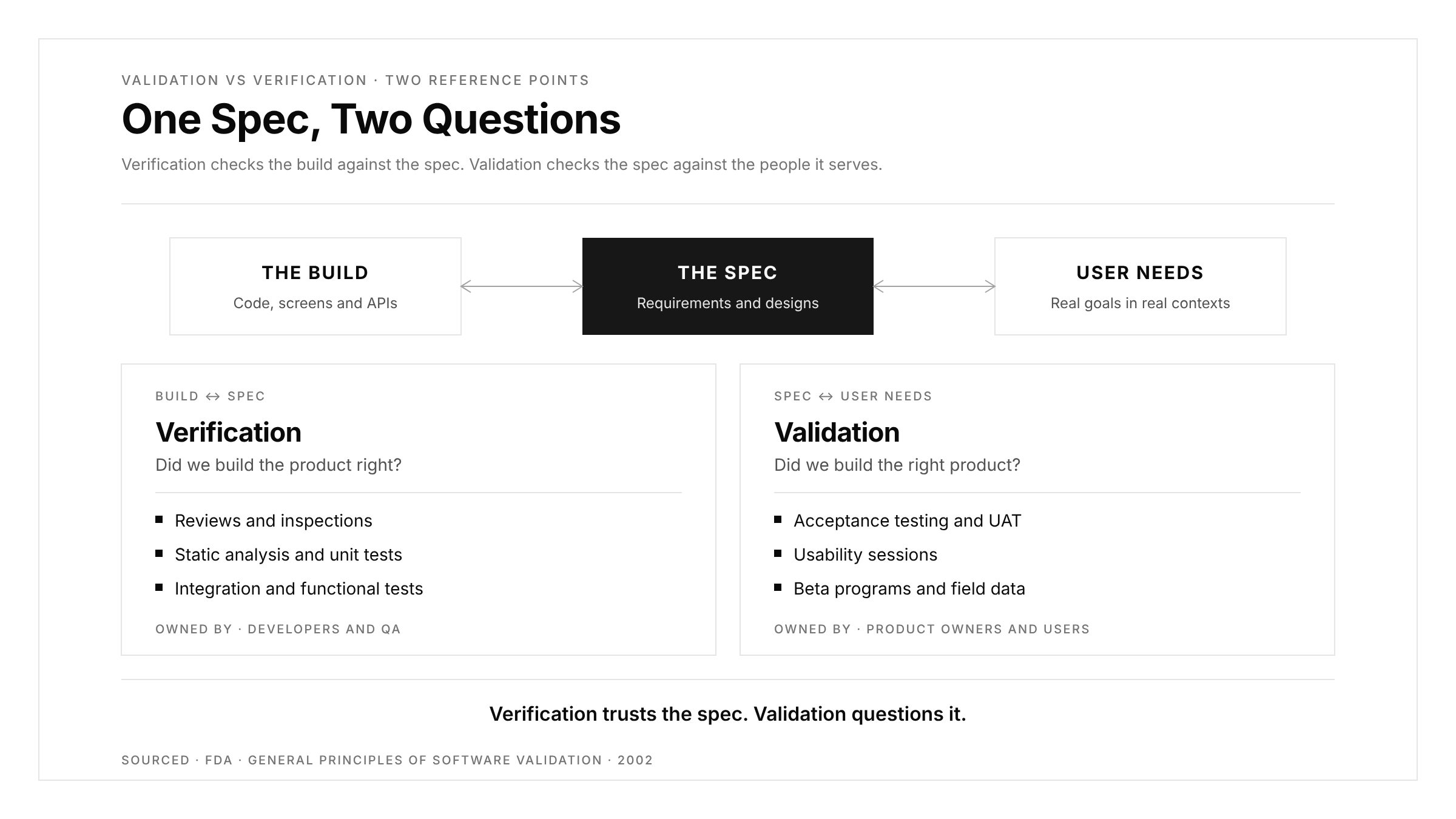
Verification checks that software is built correctly against its specification, while validation checks that the right software was built for the people who will use it. Verification compares the product with documents; validation compares it with real needs.
The two words sound interchangeable, and many teams treat them that way. The cost of that blur shows up late: a release passes every specified check, ships on time, and then users abandon the feature because the specification itself missed what they wanted. Separating the two questions early gives each one an owner, a method and a moment in the lifecycle.
This guide covers what each term means, how the methods differ, where both sit in the V-model, a worked example on a single feature, and what each looks like in test code.
Key Takeaways
- Verification asks "did we build the product right?" and validation asks "did we build the right product?"
- The US FDA's software validation guidance defines verification as objective evidence that each phase's outputs meet that phase's specified requirements.
- Verification relies on reviews, static analysis tools such as ESLint, and unit and integration tests run by developers.
- Validation relies on acceptance testing, usability sessions and beta feedback, and its reference point is user needs.
- In the V-model, each specification on the left side pairs with a test level on the right, from unit tests up to acceptance testing.
Verification vs Validation at a Glance
| Dimension | Verification | Validation |
|---|---|---|
| Core question | Did we build the product right? | Did we build the right product? |
| Reference point | Requirements, designs, specifications | User needs and intended use |
| When it runs | Throughout development, phase by phase | Mostly on working builds, near and after release |
| Code execution | Optional: reviews and static analysis run on code at rest | Required: users interact with running software |
| Typical methods | Reviews, inspections, static analysis, unit and integration tests | Acceptance testing, usability tests, beta programs, field data |
| Typical owners | Developers, QA engineers | Product owners, customers, end users |
| Defect it catches | Code that departs from the specification | A specification that misses the real need |
The last row carries the most weight. Verification finds mistakes in the build. Validation finds mistakes in the plan.
What Verification Means
The US Food and Drug Administration's General Principles of Software Validation guidance, which FDA states still reflects its current thinking outside one superseded section, describes verification as objective evidence that the outputs of a given lifecycle phase meet all of the requirements specified for that phase. Put simply, every phase hands over a work product, and verification confirms that product matches what the phase promised.
Verification spans both static and dynamic techniques:
- Reviews and inspections. Peers read requirements, designs and code against a checklist before anything runs. A contradictory business rule caught here costs one conversation.
- Static analysis. Tools such as ESLint inspect code at rest and check it against defined rules.
- Unit and integration tests. Automated checks confirm that functions and their connections behave as specified.
- Functional system tests. Scripted journeys confirm each feature against its acceptance criteria, as described in our guide to functional testing.
Verification is cheap because it starts early. A 2002 NIST report estimated that gaps in testing infrastructure cost the US economy $59.5 billion per year, and noted that over half of bugs surfaced downstream in development.
What Validation Means
The same FDA guidance describes validation as confirmation, through examination and objective evidence, that software specifications conform to user needs and intended uses. The reference point shifts from the document to the person.
Validation methods put working software in front of the people it serves:
- Acceptance testing. Business stakeholders confirm the product supports their real workflows. Our guide to acceptance testing explains the main variants.
- User acceptance testing (UAT). Real users run realistic scenarios on a release candidate. On mobile, build distribution shapes what UAT you can run, as our guide to UAT testing shows.
- Usability sessions. Observers watch users attempt goals and record where they hesitate or fail.
- Beta programs and field data. Analytics, crash reports and support tickets reveal whether the shipped product meets needs at scale.
Validation also covers quality expectations that live outside feature lists, such as speed, accessibility and reliability.
Where Both Sit in the V-Model
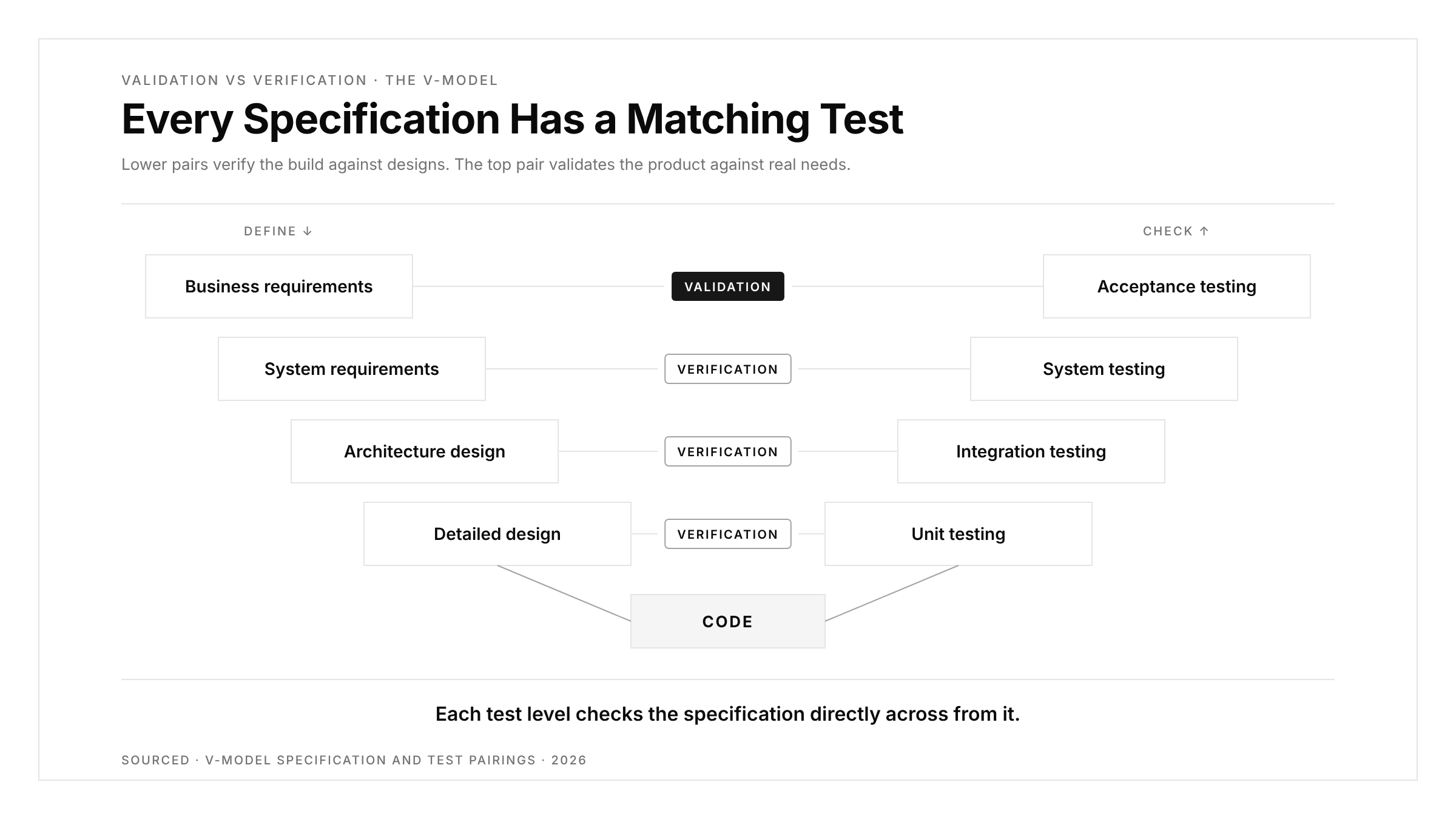
The V-model draws development as a descent on the left side and testing as an ascent on the right. Each specification on the left pairs with a test activity on the right that checks it.
| Left side: specification | Right side: matching test | Mainly verification or validation? |
|---|---|---|
| Business and user requirements | Acceptance testing | Validation |
| System requirements | System testing | Verification, with validation elements |
| Architecture and high-level design | Integration testing | Verification |
| Detailed design and code | Unit testing | Verification |
The pairing explains why verification dominates the lower levels and validation dominates the top. Code is checked against designs, while the finished product is checked against the people who asked for it. A test plan is the natural place to record which activity covers which pair.
A Worked Example: Password Reset
Take one feature with a written specification: a user requests a reset link by email, the link expires after 30 minutes, and the new password needs at least 12 characters.
| Check | Type | What it confirms |
|---|---|---|
| Code review of the token logic | Verification | The expiry uses 30 minutes, matching the spec |
| Unit test on the expiry function | Verification | A 31-minute-old token is rejected |
| Unit test on password rules | Verification | An 11-character password is rejected |
| End-to-end test of the full flow | Verification | Request, email, link and reset work together |
| Usability session with five users | Validation | Users find the reset option and finish in under 2 minutes |
| Support ticket review after launch | Validation | Reset-related tickets fall, showing the feature meets the need |
Imagine the usability session reveals that most users check email on a phone and open the link after the 30-minute window. Every verification check passed, yet the feature fails its purpose. Validation surfaces a requirement problem that verification, by design, is blind to, since verification trusts the specification.
Verification in Code
Verification lends itself to automation because the expected result is written down. Here is the expiry rule as a pytest unit test:
And the full journey as a Playwright end-to-end test:
Both tests verify. They prove the build matches the specification, and they will keep proving it on every commit as part of a regression suite. Neither test can tell you whether 30 minutes was the right window. That judgement belongs to validation.
One subtle trap applies to automated verification itself: a test can pass while the underlying outcome is wrong, for example when a success message renders from cached state. The fix is to assert on stored state, such as the saved record, as well as on the screen.
Pitfalls to Watch
- Treating a green suite as proof of fitness. Passing tests confirm conformance to the spec, and only validation confirms the spec was right.
- Saving validation for launch day. Prototype reviews and early usability sessions validate cheaply before code exists.
- Letting the same person write the spec and validate it. Validation works best when the people who carry the need judge the result.
- Verifying one platform only. A flow that passes on web can still fail on iOS or Android. Our platform page shows how one flow can run across iOS, Android, the web, Chrome extensions and App Clips.
Conclusion
Verification and validation answer two different questions, and a release needs both answers. Verification proves the build matches the specification, phase by phase, with reviews, static analysis and automated tests. Validation proves the specification matches real needs, with acceptance testing, usability sessions and field data.
A practical split: automate verification so it runs on every commit, and schedule validation at fixed points such as prototype review, release candidate and four weeks after launch. For the broader context of how both fit into a test strategy.
FAQs
What is the main difference between verification and validation?
Verification checks the product against its specification, while validation checks it against real user needs.
Which comes first, verification or validation?
Verification usually starts first and runs throughout development, while validation concentrates on working builds near release.
Is unit testing verification or validation?
Unit testing is verification, because it confirms code behaves exactly as the design specifies.
Is user acceptance testing verification or validation?
User acceptance testing is validation, because real users confirm the product meets their needs.
Can verification happen before code runs?
Yes, reviews, inspections and static analysis verify requirements, designs and code before anything executes.
What does V&V stand for?
V&V stands for verification and validation, the paired quality activities common in regulated software development.