
Selenium Grid: Setup, Architecture and When It Pays Off
Selenium Grid explained: the three deployment modes, Grid 4 components, setup with Java or Docker, connecting tests with RemoteWebDriver, sizing and security.
- Written by
- Gautam Agarwal
- Read time
- 7 min read
- Published
Selenium Grid is the part of the Selenium project that runs WebDriver tests on remote machines by routing commands from your test code to browser instances on one or more Nodes, so a suite can run in parallel across browsers, versions and operating systems. It is free and ships in the same server jar as the rest of Selenium.
Grid solves one problem well: time. A suite that takes eleven minutes on one machine can finish in about two on five. The cost is infrastructure that someone has to run, size and secure, so the useful question is when a Grid pays for itself.
This guide covers what Grid does, its three deployment modes, the Grid 4 components, setup with Java and Docker, connecting tests, sizing, security and the alternatives.
Key Takeaways
- Selenium's docs estimate total run time as tests × average test time ÷ Nodes: 15 tests of 45 seconds drop from 11m 15s to 2m 15s on five Nodes.
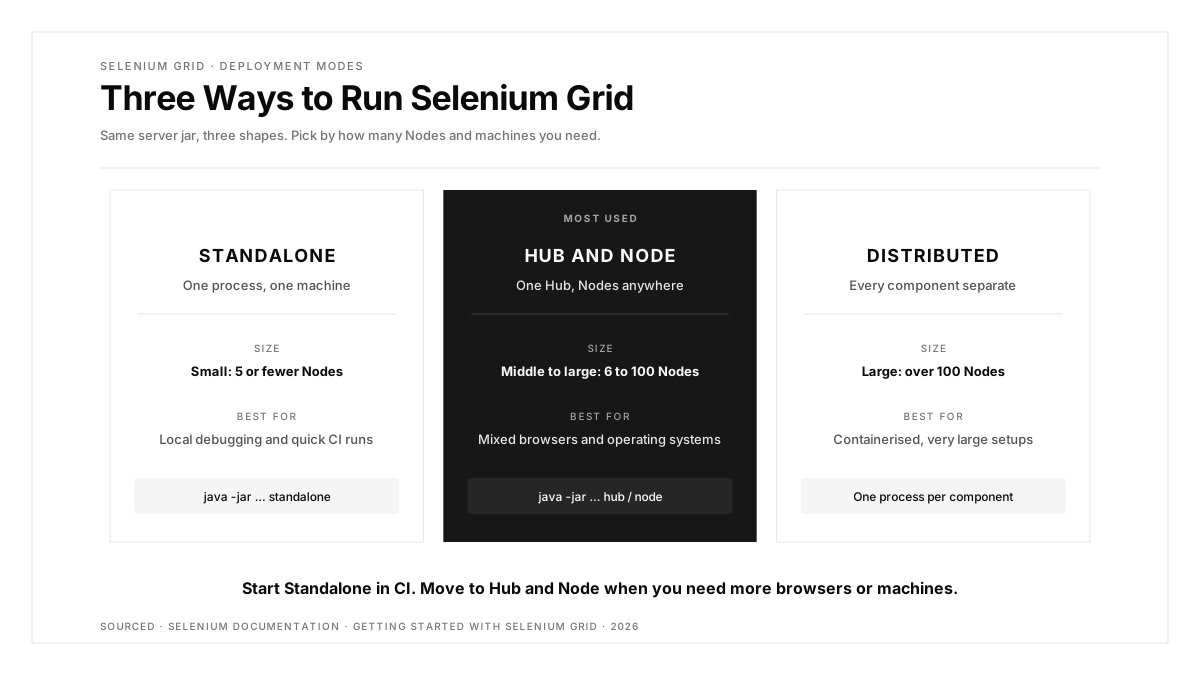
- Grid runs in three modes: Standalone in a single process, Hub and Node across machines, or fully Distributed.
- Grid 4 splits the server into a Router, Distributor, Session Map, New Session Queue, Event Bus and Nodes.
- Tests connect through RemoteWebDriver, pointed at the Grid URL, which defaults to
http://localhost:4444. - The Selenium docs warn that a Grid must be protected from external access with appropriate firewall permissions.
When Selenium Grid Pays Off
The Selenium docs frame the benefit with a simple formula: number of tests × average test time ÷ number of Nodes = total execution time.
| Tests | Average time | Nodes | Total run time |
|---|---|---|---|
| 15 | 45s | 1 | 11m 15s |
| 15 | 45s | 5 | 2m 15s |
| 15 | 45s | 15 | 45s |
| 100 | 120s | 15 | 13m 20s, compared with over 3 hours on one Node |
Grid earns its keep when one or more of these holds: the suite takes long enough to slow down merges, you need several browsers or browser versions at once, or you need tests on operating systems your CI runners lack. If your suite finishes in a few minutes on one machine and targets one browser, a Grid adds operational work with little return.
The Three Deployment Modes
| Mode | How it runs | Typical size in the docs | Best for |
|---|---|---|---|
| Standalone | All components in one process on one machine | Small: 5 or fewer Nodes | Local debugging, quick CI runs |
| Hub and Node | One Hub, Nodes on one or many machines | Roughly 6 to 100 Nodes | Mixed browsers and operating systems |
| Distributed | Each component started and scaled separately | Over 100 Nodes | Very large, containerised setups |
The Selenium Grid getting started guide calls Hub and Node the most used role, because it combines different machines into one Grid with a single entry point and lets capacity scale up or down while the Grid keeps running. The docs also stress that these sizes are rough estimates that vary by environment.
Grid 4 Architecture
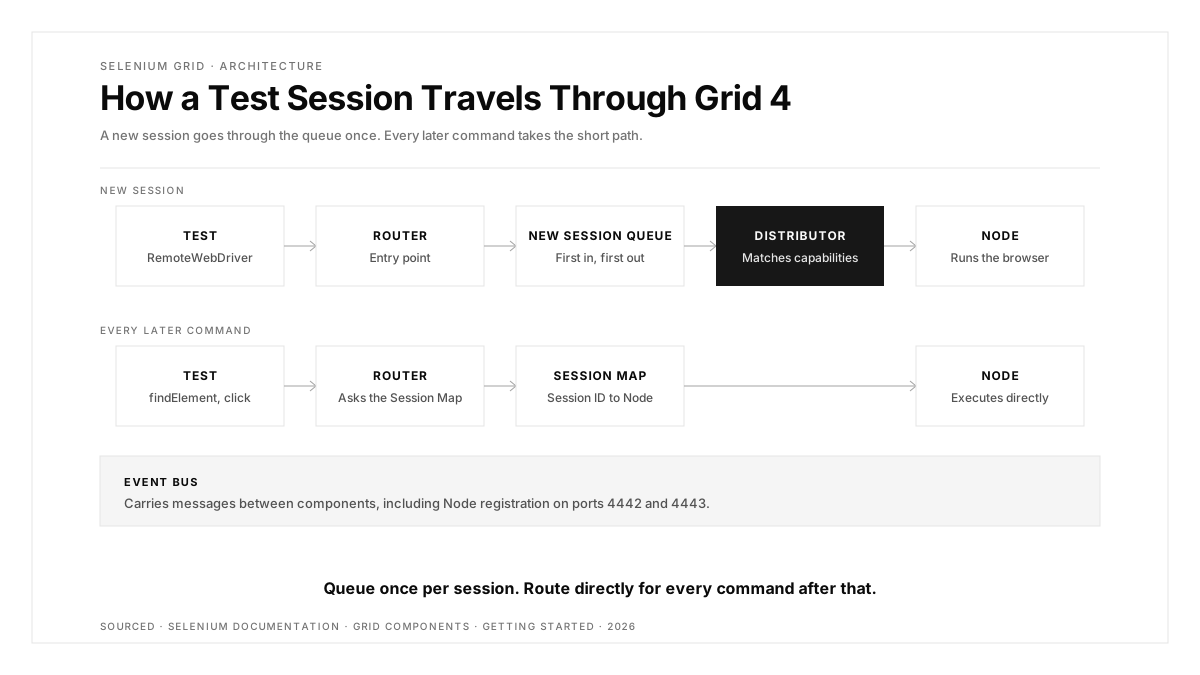
Grid 4 was rebuilt from earlier versions and breaks the server into components designed for containers and cloud scaling:
| Component | Role |
|---|---|
| Router | Entry point for every request; forwards new sessions to the queue and existing sessions to their Node |
| New Session Queue | Holds new session requests in first-in, first-out order |
| Distributor | Tracks Nodes and their capabilities, and assigns each queued session to a suitable Node |
| Session Map | Stores which Node runs which session, so the Router can forward commands |
| Event Bus | Carries messages between components, including Node registration |
| Node | Runs the actual browser sessions |
A new test session travels Router → New Session Queue → Distributor → Node. Every later command in that session goes Router → Session Map lookup → Node directly.
Setting Up Grid With Java
Grid needs Java 11 or higher, the browsers you want to test, and the Selenium Server jar. The quickest start is Standalone:
java -jar selenium-server-<version>.jar standalone
For Hub and Node, start the Hub, then one or more Nodes:
java -jar selenium-server-<version>.jar hub
java -jar selenium-server-<version>.jar node --port 5555
When the Hub and Nodes run on different machines, the Event Bus ports, 4442 and 4443 by default, must be reachable from the Nodes, and each Node's own port must be reachable from the Hub. Open http://localhost:4444 in a browser to see registered Nodes and running sessions.
Setting Up Grid With Docker
The official docker-selenium project publishes ready-made images. One command starts a Standalone Grid with Firefox:
docker run -d -p 4444:4444 -p 7900:7900 --shm-size="2g" \
  selenium/standalone-firefox:4.52.0-20261101
The --shm-size="2g" flag gives the browser enough shared memory to run stably inside a container, and port 7900 lets you watch the session live in a browser through the image's built-in viewer. Pin an exact image tag, as above, so every CI run uses the same browser and Grid version.
Connecting Your Tests
Tests switch from a local driver to a remote one. In Python:
from selenium import webdriver

options = webdriver.ChromeOptions()
driver = webdriver.Remote(command_executor="http://localhost:4444", options=options)

driver.get("https://shop.example.com")
assert "Shop" in driver.title
driver.quit()
The options object describes the browser you want, and the Distributor matches it to a Node that offers those capabilities. Parallelism then comes from your test runner, for example pytest -n 5 with the pytest-xdist plugin, with each worker opening its own remote session. Always call quit(), ideally in a fixture, so sessions release their slot even when a test fails.
Securing Your Grid
The Selenium docs carry a direct warning: a Grid must be protected from external access with appropriate firewall permissions. An open Grid gives outsiders access to your infrastructure, lets them reach internal web applications and files, and lets them run custom binaries. Keep Grid on a private network, open only the ports your Nodes need, and put any remote access behind your VPN or CI network.
Troubleshooting Common Grid Problems
| Symptom | Likely cause | Fix |
|---|---|---|
| New sessions wait in the queue | No Node offers the requested browser or version | Match the options to a registered Node, or add one |
| Node stays missing from the Grid UI | Event Bus ports 4442 and 4443 are blocked | Open those ports between Node and Hub |
| Browser crashes inside a container | Too little shared memory | Start the container with --shm-size="2g" |
| Slots stay busy after failures | Tests skip quit() when they fail | Release sessions in a fixture teardown |
| Results differ between runs | Floating image tags or browser versions | Pin exact image tags and Selenium versions |
Running Grid in CI
A common pattern is a Standalone container started as a service next to the test job, which the docs list as a typical Standalone use case for tools such as GitHub Actions and Jenkins. Larger teams run a shared Hub and Node Grid that many pipelines target. Either way, the Grid becomes part of your delivery pipeline, and our guide to designing a CI/CD pipeline that survives mobile testing covers how to keep that stage fast. A Grid is also the natural home for a nightly regression suite across every browser you support.
Grid and Its Alternatives
Grid covers desktop browsers. Running it well means maintaining machines, images, browser versions and network rules. Teams weigh that against hosted grids and different frameworks; our roundup of Selenium alternatives compares the options. If your coverage gap is real devices and operating systems rather than browsers, our guide to compatibility testing explains where that layer fits.
Conclusion
Selenium Grid turns a slow serial suite into a fast parallel one by spreading sessions across Nodes. Start with a Standalone container in CI, move to Hub and Node when you need several browsers or operating systems, and reserve the fully Distributed mode for very large setups. Whatever the size, pin versions, release every session with quit(), and keep the Grid behind a firewall.
Grid scales browsers; native apps need a different layer. Our platform page shows how one flow can run across iOS, Android, the web, Chrome extensions and App Clips.
FAQs
What is Selenium Grid used for?
Selenium Grid runs WebDriver tests in parallel on remote machines across different browsers, versions and operating systems.
Is Selenium Grid free?
Yes, Selenium Grid is part of the free, open source Selenium project and ships in the Selenium Server jar.
What is the difference between a Hub and a Node?
The Hub receives and routes test requests, while Nodes run the actual browser sessions.
What port does Selenium Grid use?
Grid listens for RemoteWebDriver requests on port 4444 by default, with Event Bus ports 4442 and 4443.
Can I run Selenium Grid in Docker?
Yes, the official docker-selenium images start a Grid with one docker run command.
How many Nodes do I need?
Divide total test time by your target run time; the Selenium docs call 5 or fewer Nodes small.