Selenium Alternatives in 2026: 7 Tools Compared by What They Fix
Selenium alternatives compared: Playwright, Cypress, Autosana, WebdriverIO, Appium, Selenide and BrowserStack. Flakiness, maintenance, and the free options.
YS
Yuvan Sundrani · 15 min read
autosana.ai
TL;DR
Playwright is the destination most Selenium teams pick, free and across five languages.
Cypress suits JavaScript front-end teams who want time-travel debugging.
Autosana is the one to look at when maintenance rather than flakiness is the cost.
WebdriverIO keeps the WebDriver protocol while modernising the experience around it.
Appium is the mobile branch of the same protocol, so the skills transfer directly.
Selenide wraps Selenium rather than replacing it, which makes it the cheapest move.
BrowserStack replaces the Grid you are maintaining yourself.
Start with a correction, because the premise of most Selenium alternatives pages is wrong. Selenium is not abandoned. Its own site shows 4.51 released on 9 October 2026 and 4.50 three weeks before it, which is roughly a monthly cadence.
The project also remains honest about its scope. The homepage says "Selenium automates browsers. That's it!", and the three components are WebDriver for language bindings, IDE for record and playback, and Grid for distributing runs.
So the question is never whether Selenium works. It is which of its costs you are still paying by choice.
Why move off Selenium?
Flakiness is the headline complaint, and the useful version of it is specific. In a r/QualityAssurance thread on CI stability, a reply at 8 votes listed what a Selenium team has to build for itself: screenshots, recordings and browser logs for debuggability, retry logic so a missing element does not fail outright, and resource measurement to decide how far tests can shard. Its conclusion is the honest one:
All the examples above are supported out-of-the-box by modern frameworks, so it might be worth to think how much you want to invest by implementing yourself vs. migrating.
The sentiment behind that is not subtle. A r/softwaretesting thread titled "WOW. Playwright is significantly better than Selenium" carries 147 votes and 48 comments, a second thread with almost the same title adds 86 votes and 58 comments, and a longer Selenium VS Playwright discussion runs to 56 votes and 78 comments.
The second cost is the Grid. Running your own means owning browser versions, container orchestration and capacity, which is a platform engineering job rather than a QA one.
Here is the reframe worth holding onto: Selenium gives you a protocol and leaves the engineering to you, and modern frameworks ship that engineering in the box.
Tool
What it tests
Pricing
Best for
Playwright
Web (Chromium, Firefox, WebKit)
Free, Apache 2.0
The most common exit, with auto-waiting built in
Cypress
Web (Chromium-based, Firefox)
Free runner, Cloud paid
Front-end debugging experience
Autosana
iOS, Android and web
Per agent-run, self-serve trial
Teams whose cost is maintenance
WebdriverIO
Web and mobile via WebDriver
Free, MIT
Keeping the protocol, modernising the tooling
Appium
Native iOS and Android
Free, Apache 2.0
Extending WebDriver skills to mobile
Selenide
Web, wraps Selenium
Free, MIT
The smallest possible migration
BrowserStack
Web and mobile, 3,500+ real devices
From $29/mo
Replacing a self-hosted Grid
1. Is Playwright a good Selenium alternative?
Playwright is where most Selenium teams land, and auto-waiting is the reason. It waits for an element to be actionable rather than merely present, which removes the explicit waits and retry wrappers that accumulate in older suites and takes a large share of flakiness with them.
Beyond that, one API covers Chromium, Firefox and WebKit, with network interception and native parallelism, across JavaScript, TypeScript, Python, Java and C#, so a Java Selenium team keeps its language. Trace viewer records each step of a failed run with a DOM snapshot, which is the debuggability the Reddit comment above said you otherwise build yourself.
Migration is less daunting than it was. A r/Playwright post on using AI to move a thousand tests off Selenium in about an hour shows how much of the mechanical conversion is now automatable.
Network interception is the other practical gain over raw WebDriver, letting a suite stub a slow backend and test the interface deterministically rather than waiting on it.
Pros: free, auto-waiting removes a class of flake, five language bindings, cross-browser including WebKit, trace viewer for CI debugging, native parallelism. Cons: web only, with viewport emulation rather than handsets, and you still own the CI infrastructure. Pricing: free, Apache 2.0. Best for: teams whose main cost is flaky waits.
2. Can Cypress replace Selenium for front-end testing?
Cypress runs inside the browser event loop, producing a DOM snapshot at every step and time-travel debugging that turns a failing assertion into a quick diagnosis rather than a reproduction exercise.
The trade against Selenium is breadth for depth. You give up language choice and full cross-browser parity, and you gain the most comfortable debugging loop in the category for a JavaScript team.
The scope boundary is worth stating plainly: a polyglot Selenium team gives up its language choice here, which is usually the deciding factor rather than any feature gap.
Pros: the best debugging experience available, automatic waiting for DOM stability, first-class TypeScript support, strong plugin ecosystem. Cons: JavaScript and TypeScript alone, no native mobile, cross-origin and multi-tab flows stay awkward, and parallel runs need the paid Cloud tier. Pricing: free runner under MIT, with Cypress Cloud paid. Best for: JavaScript teams testing single-page applications.
3. Is Autosana a Selenium alternative that removes maintenance?
Here is the honest pivot. If your problem is flaky waits on a web suite, Playwright fixes that directly, costs nothing and keeps your language. Take it. A different group has stable enough tests and still loses a day each sprint to selectors that moved, and a better waiting strategy does nothing for that.
Autosana writes flows in natural language and runs them against the current interface rather than resolving a stored locator, so a renamed element needs no patch. For teams who want definitions in git, the docs cover code-managed flows, where flow, suite and hook files live in your own repository and sync from there.
Coverage spans apps on virtual and physical iOS and Android devices and web across Chrome, Firefox, Edge and Chromium. The MCP server connects Claude Code, Cursor, Codex, Gemini CLI, Devin and Hermes Agent for flow management and running flows from the IDE, and the GitHub Bot analyses a pull request, runs the relevant flows and returns results with video. The docs also cover performance monitoring and network traffic inspection during a run.
One thing worth separating before you trial anything: flakiness and maintenance are different problems with different fixes. A suite that fails intermittently on the same unchanged test needs better waiting. A suite that fails cleanly every time a developer renames something needs a different locator strategy altogether.
Pros: no locator to maintain, mobile and web from one surface, flow definitions can live in your repository, per-run pricing, and a self-serve trial. Cons: this is a paid product against a free framework, and it covers neither desktop applications nor Selenium's full browser matrix. Pricing: per agent-run, self-serve. Best for: teams whose sprint cost is selector upkeep rather than flake.
4. Is WebdriverIO a good Selenium alternative?
WebdriverIO keeps the W3C WebDriver protocol and rebuilds the developer experience on top of it, with its own test runner, a service and reporter ecosystem, and a configuration model far friendlier than raw bindings. Because it speaks WebDriver, it also drives mobile through Appium from the same codebase.
For a team that likes the standard and dislikes the ergonomics, this is the smallest conceptual jump on the list.
The ecosystem is the real argument. Services handle the parts a Selenium team usually scripts by hand, from starting drivers to wiring reporters, which removes a large slice of the boilerplate without changing the protocol underneath.
Pros: free, keeps the WebDriver standard, web and mobile from one framework, large plugin ecosystem, modern runner and reporting. Cons: JavaScript and TypeScript focused, and WebDriver's architecture means it inherits some of the latency Playwright avoids. Pricing: free, MIT. Best for: teams keeping the protocol while modernising around it.
5. Is Appium the Selenium alternative for mobile?
Appium is the mobile branch of the same family, implementing the W3C WebDriver specification for native iOS and Android. For a Selenium team that is the point: the vocabulary, the language bindings and the mental model all transfer, so adding mobile coverage is an extension rather than a new discipline.
Our Appium guide covers the setup path, including the parts that surprise web testers.
The honest overhead is the device layer rather than the code. Build signing, simulator management and OS upgrades have no web equivalent, so budget that learning curve even for a strong Selenium team.
Pros: free, standards-based, skills transfer directly from Selenium, portable across every device cloud, five languages. Cons: verbose capability configuration, iOS driver rebuilds after OS releases, and no web coverage of its own. Pricing: free, Apache 2.0. Best for: Selenium teams adding native mobile.
6. Is Selenide a lighter alternative to raw Selenium?
Selenide is the option most alternatives pages miss, and it came up in that CI stability thread as a middle ground. It wraps Selenium rather than replacing it, adding concise syntax, built-in waiting and automatic screenshots on failure, while the engine underneath stays exactly what you already run.
That makes it the cheapest possible move. There is no protocol change, no new device strategy and no retraining, and much of the boilerplate that made Selenium unpleasant disappears.
Because nothing underneath changes, this is also the only option here you can trial on a single test class without a migration plan or a procurement conversation.
Pros: free, keeps your existing Selenium engine and grid, concise syntax with built-in waiting, automatic failure screenshots, minimal migration cost. Cons: Java focused, and it improves Selenium rather than changing its architecture, so the ceiling stays where it was. Pricing: free, MIT. Best for: Java teams who want relief without a migration.
7. Is BrowserStack a Selenium alternative for the Grid?
Nothing here replaces Selenium Grid conceptually, because Grid is infrastructure rather than a framework. BrowserStack replaces it commercially: 3,500 real devices, 3,000 browser and operating system combinations, and Automate running your existing Selenium scripts unchanged.
That last point matters. You keep every test you have written and stop maintaining browser versions, containers and capacity. Our BrowserStack alternatives guide compares the clouds for teams weighing them.
The arithmetic is worth running honestly. A self-hosted grid costs hardware, browser upkeep and a person to keep it alive, while a cloud charges per parallel session, and the comparison turns on how much of that person's time you are currently spending.
Pros: runs existing Selenium scripts with a hub URL change, the broadest matrix, published pricing, removes grid maintenance entirely. Cons: it is a subscription against free self-hosting, and parallel pricing climbs at scale. Pricing: from $29 a month, scaling with concurrency. Best for: teams whose real burden is running the Grid.
Which Selenium cost are you actually paying?
Flaky waits. Playwright, where auto-waiting is built in rather than implemented by you. Cypress for a JavaScript team. Both remove the explicit-wait scaffolding that accumulates around WebDriver.
Boilerplate and verbosity. Selenide if you are on Java, WebdriverIO if you are on JavaScript. Both keep the protocol and cost nothing.
Selector maintenance each sprint. Autosana, since no waiting strategy fixes an element that moved.
Running your own Grid. BrowserStack, keeping every script you already have, since Automate accepts an existing Selenium suite with a hub URL change rather than a rewrite.
No mobile coverage. Appium, because the skills transfer directly, or Autosana if you want both surfaces in one place.
Nothing in particular. Stay. Selenium shipped 4.51 in October 2026 and the ecosystem around it is the largest in testing, which makes it a defensible choice rather than a legacy one.
Conclusion
Selenium is a protocol with an ecosystem, not a product with a roadmap, and judging it as though it were the latter is where most comparisons go wrong. It ships monthly and it still automates browsers exactly as advertised.
What it does not do is hand you waiting, debugging, sharding and reporting for free, and modern frameworks do. Work out which of those you are currently building by hand, price that engineering time honestly, and the right alternative follows from the answer rather than from the benchmark.
Frequently asked questions
What is the best alternative to Selenium in 2026?
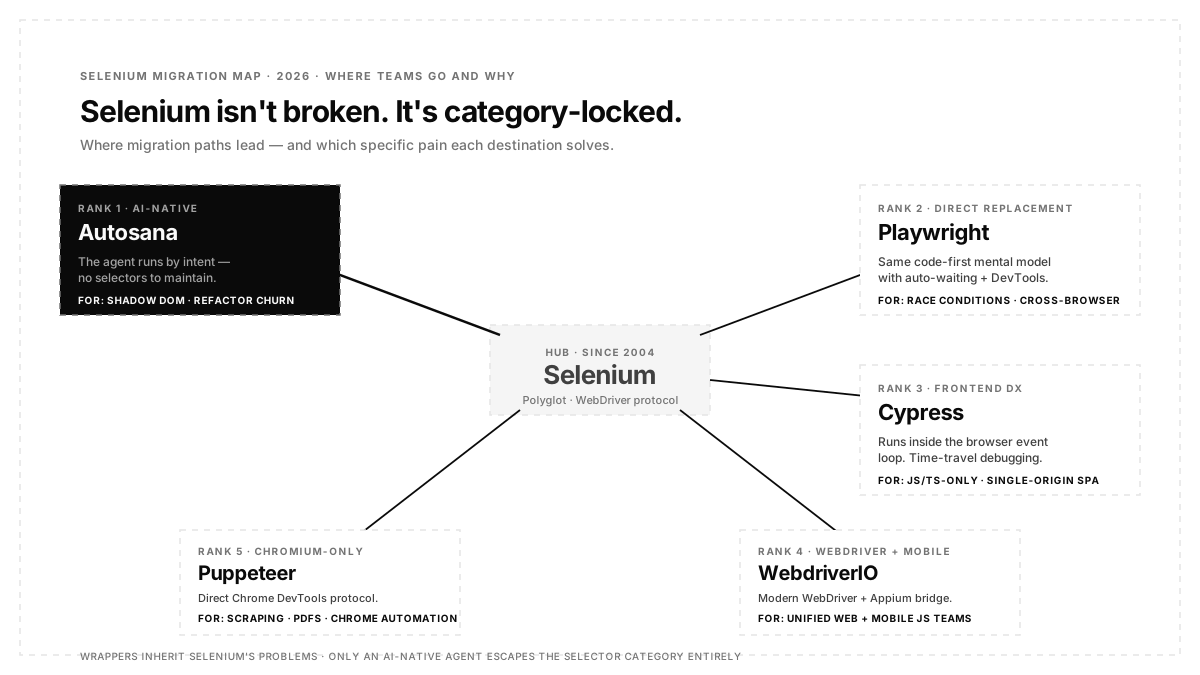
There's no universal winner. Autosana for teams whose Selenium pain is selector maintenance on a modern frontend. Playwright for the direct code-first replacement with auto-waiting and cross-browser. Cypress for JS-first teams that value time-travel debugging. WebdriverIO for unified web + Appium mobile. Puppeteer for Chrome-only scraping. Match the tool to the specific Selenium pain you're escaping.
Is Playwright better than Selenium in 2026?
For modern web frontends, generally yes. Playwright ships auto-waiting, uses the DevTools protocol instead of HTTP WebDriver, supports Chromium + Firefox + WebKit under one API, and reduces flake from race conditions. Selenium still wins on legacy browser support, the widest possible language coverage, and mature bot-detection evasion for RPA workflows.
Is Selenium being deprecated?
No. Selenium 4 is production and Selenium 5 with BiDi-first architecture is in active development. Selenium remains the polyglot standard and is still the default in many enterprise QA orgs. The 2026 answer is rarely "Selenium is dead". It is "Selenium is one option among several, and it's rarely the right pick for a greenfield modern web app."
Can Autosana replace Selenium entirely?
For UI-driven web E2E flows, yes. Autosana authors and runs the same user flows a Selenium suite covers, without selectors or WebDriver setup. For API testing, network mocking at scale, and heavy fixture-based backend integration, keep a code-first framework (Playwright's API testing, Postman, REST-assured). Rule of thumb: if 60%+ of your Selenium suite is user-facing UI flows, Autosana replaces it. If it's mostly API + network testing, keep both.
Does Cypress fully replace Selenium?
For JavaScript teams testing single-origin single-page applications, yes. For polyglot teams on Java, Python or C#, for cross-origin flows, for multi-tab scenarios, or for WebKit and Safari desktop coverage, no. Cypress is opinionated JS-first; Selenium is polyglot.
What's the best Selenium alternative for mobile?
Selenium leaves native mobile to Appium, which you run alongside it. Modern mobile alternatives: Autosana for AI-native cross-platform (web + iOS + Android under one surface), Maestro for YAML-based happy-path flows, Detox for React Native, XCUITest / Espresso for native platform-specific stability.
Do Selenium wrappers with AI actually solve anything?
Sometimes, and honestly. Mabl, CloudQA Vibium, and Katalon have added ML-based self-healing selector logic on top of Selenium engines. These help for cosmetic UI shifts such as a button class rename or a minor layout tweak. They don't help when the entire selector philosophy is the problem (shadow DOM, dynamic components, deep component refactors). AI-native alternatives (Autosana) sit in a different category and solve it structurally.
How long does a Selenium migration actually take?
It scales with suite size and with how much of the suite still earns its keep, so scope it against your own test count rather than a published average. The shape that works is parallel running first, highest-value flows next, the rest after that, and a decommissioning step nobody skips. Teams that attempt a single-sprint swap usually end up running both suites far longer than planned.

.png)
.png)
.png)
.png)