
Retesting: Verifying a Bug Fix Across More Than One Device
Retesting re-runs the failed case after a fix. How it differs from regression testing, the three-ring scoping framework, and why one device leaves the matrix unverified.
Yuvan Sundrani · 11 min read
autosana.ai
TL;DR
- Retesting re-runs the exact test case that failed, after a defect has been fixed, under the same data and environment conditions that produced the original failure.
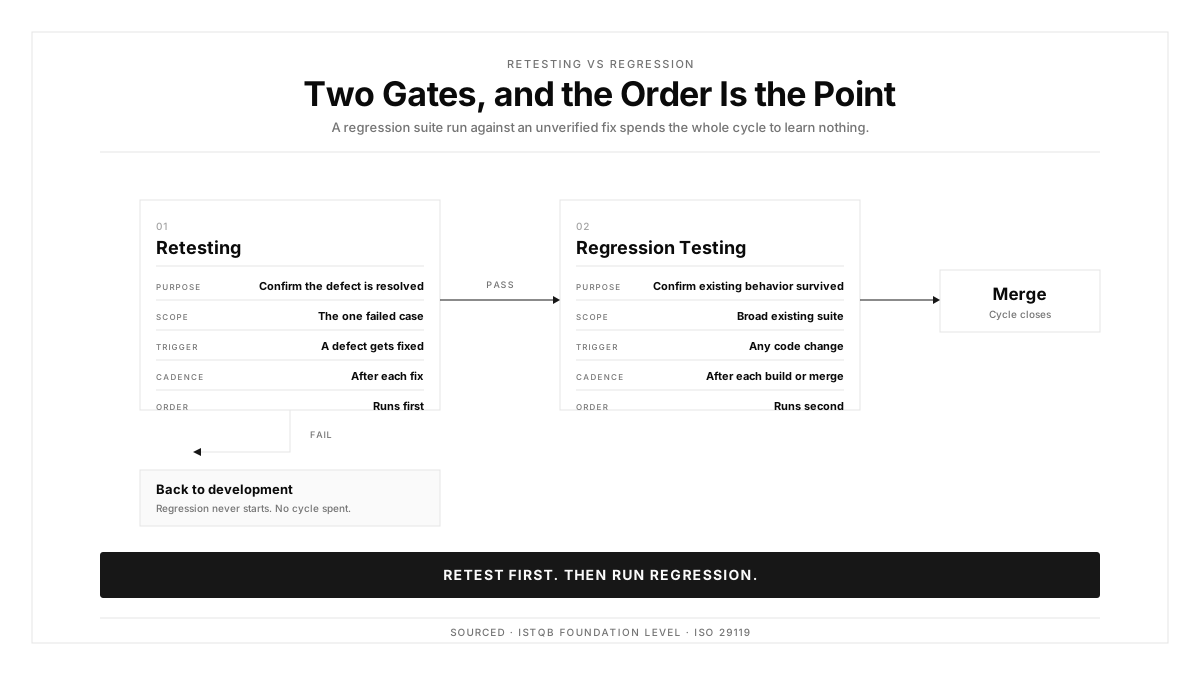
- Retesting confirms the fix works. Regression testing confirms the fix left everything else intact. They run in that order.
- Mobile retesting on the single device from the bug report proves the fix works on that device and says little about the rest of the matrix.
- Autosana runs retest flows on real iOS and Android hardware in parallel from CI, so each fix gets verified across the device matrix rather than one phone.
A deep link from a push notification opens a blank screen on Galaxy devices running Android 13. A developer adjusts how the app handles Samsung's intent routing and pushes the fix.
Re-running that case on the Galaxy S23 from the ticket takes four minutes and establishes one fact: the fix works on a Galaxy S23. Whether it works on a Galaxy A14 running Android 12, or on a Pixel, remains open.
Retesting is the practice of closing that gap deliberately. This guide covers the process, how far to extend scope, and how to run it across a device matrix automatically.
What Retesting Is in Software Testing
Retesting, also called confirmation testing, re-executes a test case that previously failed once the underlying defect has been fixed. The ISTQB Foundation Level syllabus defines it as running a previously failed test to verify the correction resolved the defect.
It answers exactly one question: does this defect still reproduce?
Four properties follow from that. It targets a specific known defect. It re-runs the original failing case rather than a variation. It reproduces the original data and environment. It produces a binary outcome, fixed or still present.
Retesting is deliberately narrow. Wider validation belongs to regression testing, which looks for side effects the fix introduced elsewhere.
Retesting vs Regression Testing
| Dimension | Retesting | Regression Testing |
|---|---|---|
| Purpose | Confirm the defect is resolved | Confirm existing behavior survived |
| Scope | The one failed test case | A broad existing suite |
| Trigger | A defect gets fixed | Any code change |
| Automation priority | Rises with device count | High from the start |
| Cadence | After each fix | After each build or merge |
Order matters. Retesting runs first, because running a 45-minute regression suite against a fix that failed verification wastes the whole cycle. Once the defect is confirmed resolved, regression checks what else moved.
The Retesting Process
Start from the defect report. The issue record carries what broke, where, and under which conditions, and those conditions are the specification for the retest.
Confirm the build under test actually contains the fix. Retesting a stale artifact produces a confident wrong answer, which is worse than a slow one.
Reproduce the original conditions. Same test data, same device model, same OS version, same environment configuration. A defect that appeared on a Galaxy S23 running Android 14 gets retested on that combination first.
Execute the original case with identical steps and record the outcome. Screenshots or video make the result reviewable by someone who was absent.
Extend to adjacent flows. A payment calculation fix warrants retesting discount logic, tax computation, and receipt rendering, since all three read the same values.
Extend to the device matrix. Run the retest across the real devices that represent your traffic, which is where the opening example gets resolved.
Record everything against the original defect ID: pass or fail per device, build number, environment, and recordings. The ISO 29119 standard treats that trail as a required test execution artifact.
Why Single-Device Retesting Falls Apart on Mobile
The same binary behaves differently across devices for three structural reasons.
Device fragmentation is the first. Android spans tens of thousands of active models across screen sizes, densities, and chipsets. A layout fix verified on a Pixel 8 can clip content on a Galaxy A14 with a narrower viewport and different default font scaling.
Vendor OS forks are the second. Samsung One UI, Xiaomi MIUI, and OnePlus OxygenOS each modify rendering, gesture regions, and permission dialogs. A fix resolving a layout problem on stock Android can leave the One UI case untouched, which is exactly the deep link scenario above.
OS version spread is the third. Deprecated APIs, WebView changes, and altered animation timing produce divergent behavior. Retesting only on the newest OS leaves a meaningful share of your install base unverified.
Emulators compound all three, since they run stock images and skip vendor behavior entirely. An emulator retest confirms the fix works in a simulated environment and reports little about hardware.
Retesting Examples
Web
A checkout form accepts expired cards on Firefox, and the fix corrects date parsing for that engine.
Retest scope: the expired card on Firefox where it failed, a valid card on Firefox to confirm the fix left the success path intact, expired card validation on Chrome, Safari, and Edge, and the profile update form which shares the same date component.
Mobile
The deep link failure from the opening, where push notification links open blank on Galaxy devices running Android 13.
Retest scope: Galaxy S23 on Android 13 where it was reported, Galaxy A14 on Android 12 for a lower tier and older OS, Pixel 7 on Android 13 as a stock Android baseline, deep links arriving from browser links and email rather than push, and notification tap handling generally.
The web case needs four browser variants. The mobile case needs five to eight device and OS combinations. Both extend well past the single failing scenario.
How to Scope Retesting
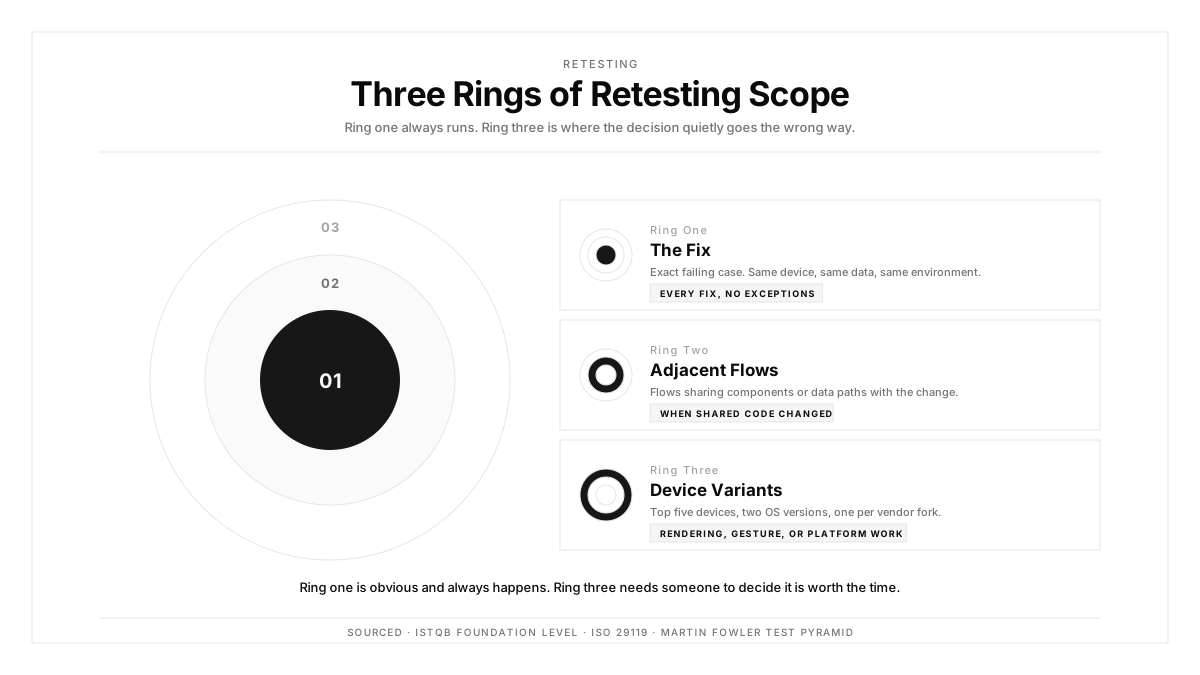
Scope is a balance. Too narrow and defects survive on untested configurations. Too wide and retesting becomes a regression cycle wearing a different name. Think in three rings.
Ring one, the fix
Re-run the exact failing case: same test data, same device, same OS, same environment. Every fix gets this, with no exceptions.
Ring two, adjacent flows
Identify features sharing code, components, or data with the fix. A change to a shared validation library reaches every form calling it, so map those from your test suite. Any flow crossing the modified code path belongs here.
Ring three, device variants
Cover your top three to five devices by traffic, two OS versions spanning the current and previous major release, one device per Android vendor fork you support, and two iPhone generations.
Ring one runs on every fix. Ring two runs when the fix touches shared code. Ring three runs when the fix involves rendering, gestures, or platform behavior, which describes most mobile UI work. Martin Fowler's test pyramid reasoning applies here: keep verification tight where it is cheap and strategic where it is expensive.
Automated Retesting in CI/CD
Manual retesting holds for isolated fixes on small teams. It breaks down once a team ships daily and every merge carries fixes needing verification across a matrix.
Automated retesting puts confirmation inside the CI/CD pipeline. A developer pushes a fix, CI triggers the suite mapped to that defect, the suite runs across the device matrix, and results appear in the pull request before merge.
A workable cadence maps rings to pipeline stages:
- Per commit, ring one on the reporting device
- Per merge, rings one and two together
- Nightly, all three rings across the full matrix for everything merged that day
The limiting factor is stability. Flaky tests undermine automated retesting by producing failures unrelated to the fix, and engineers learn to ignore them. Intent-based flows anchored to user behavior rather than element selectors keep that signal trustworthy. Teams already running end-to-end suites and smoke tests can map defect IDs onto existing flows rather than authoring new ones.
Mobile test automation with real-device execution makes ring three affordable at nightly cadence.
How Autosana Fits
We built Autosana so ring three costs about as much as ring one.
Our flows express retests as user intent, the way a manual tester walks the scenario. When the UI shifts between the original failure and the fix, the flow adapts, because it targets the goal rather than a selector.
We execute each retest across real iOS, Android, and web devices in parallel through real device testing. A fix verified on a Pixel gets simultaneously verified on Galaxy, on an older Android build, and on iPhone.
We trigger from your pipeline via CI/CD integration, running the suite mapped to the defect and posting results to the pull request with session replays and linked issue records.
Every run leaves video per device, so a fix passing on four devices and failing on the fifth is visible immediately rather than after a support ticket. Mobile app testing at this width closes the distance between fixed here and fixed everywhere.
Conclusion
Pull your last twenty closed defects and check how many carry verification evidence from more than one device.
Where that count is low, the gap is procedural rather than technical. Ring one is obvious and always happens. Ring three requires someone to decide it is worth the time, and under deadline pressure that decision goes one way.
Automate ring three and the decision stops being made at all.
.png)
FAQ
What is retesting in software testing?
Retesting re-executes a test case that previously failed, after the underlying defect has been fixed. It uses the same data, device, and environment that produced the original failure, and returns a binary result.
How does retesting differ from regression testing?
Retesting verifies one specific fix by re-running the original failed case. Regression testing verifies that the fix preserved existing behavior across a broader suite. Retesting runs first.
When should retesting happen?
Immediately after the fix reaches the test environment, and before regression testing begins. Confirm the build actually contains the fix first, since retesting a stale artifact gives a confident wrong answer.
How many times should a fix be retested?
Until the defect stops reproducing across the target devices. If a retest fails, the defect returns to development. After three failed cycles, escalate to a root cause review rather than continuing.
Can retesting be automated?
Yes. Map defect IDs to flows, and let the pipeline run the mapped suite across the device matrix on every fix commit. Intent-based flows handle UI changes that occurred between the original failure and the fix.
What is bug fix verification?
Bug fix verification confirms a reported defect has been fully resolved by the applied change. Retesting is the primary method, re-running the original case under identical conditions and checking that expected behavior returned.
How does retesting work across real mobile devices?
Run the failed case across several models, OS versions, and vendor forks. Screen geometry, rendering, and gesture handling differ enough that a single device leaves most of the matrix unverified.
What are the three rings of retesting scope?
Ring one is the exact failing case. Ring two covers flows sharing code or data with the fix. Ring three covers device variants across manufacturers and OS versions.