
Private device cloud versus shared device farm for mobile teams
Shared device farm or private device cloud? Compare re-signing, entitlements, state, interactive debugging sessions, limits and cost for mobile teams.
- Written by
- Gautam Agarwal
- Read time
- 8 min read
- Published


Key Takeaways
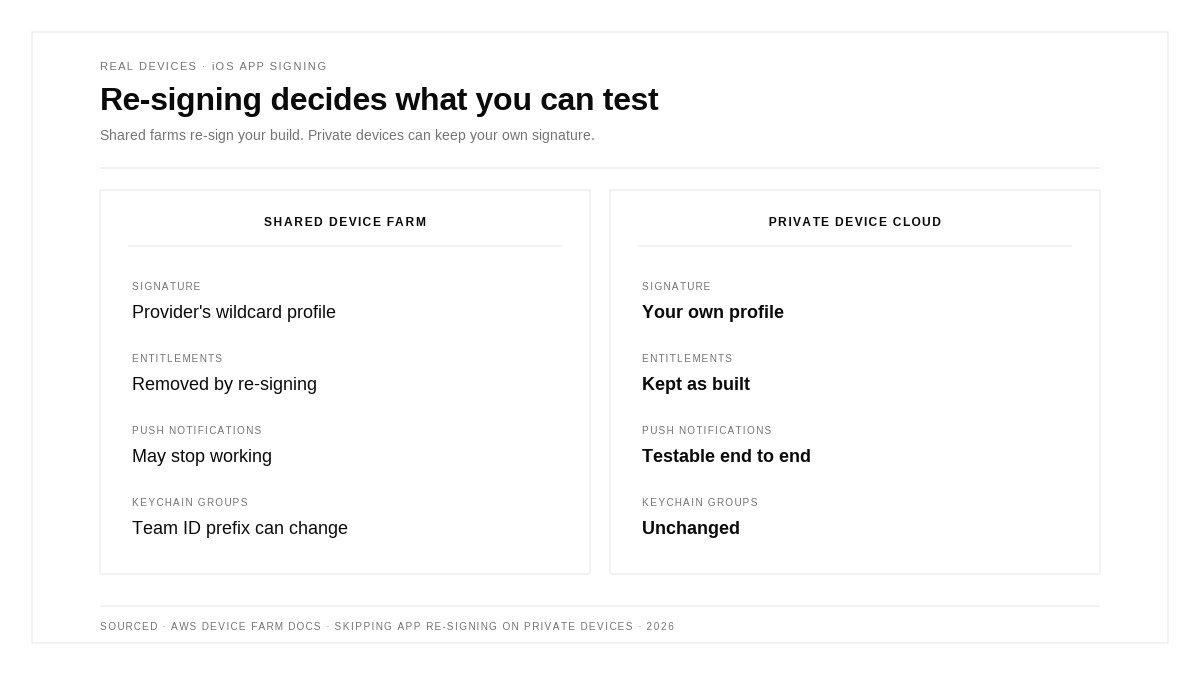
- On shared iOS devices, AWS Device Farm re-signs your app with a wildcard profile, which removes all entitlements.
- Private devices can skip re-signing, which keeps push notifications, keychain groups and other entitled features testable.
- Apple caps registered devices at 100 per product family per membership year, and disabling one leaves the count unchanged.
- AWS limits remote access sessions to 150 minutes and defaults metered concurrency to five devices.
- Ziina automated 69% of its E2E suite on Autosana; the flows left over depend on physical hardware such as tap-to-pay.
A private device cloud is a set of physical phones hosted for one company alone, while a shared device farm rents the same models to many customers by the session. The difference that decides most evaluations sits below pricing: app signing, device state and interactive debugging.
Four layers of a real device cloud
Real device clouds look alike from the pricing page. They differ in four layers, and most buying mistakes come from checking only the first.
The device. A physical phone in a data center, reachable over the network. Shared farms offer breadth across models; private clouds offer the models you choose, reserved.
The signature. The app has to be signed for that phone. Who signs it decides which of your app's features still work during the test.
The session. How a person or a script reaches the device: a live browser session, a WebDriver endpoint, a CI action.
The evidence. Video, device logs and screenshots that explain a failure on the first viewing.
Shared device farm versus private device cloud, side by side
AWS Device Farm documents both modes in one product, which makes it a clean reference.
| Dimension | Shared device farm | Private device cloud |
|---|---|---|
| Tenancy | Many customers per device over time | Devices exclusive to your account |
| Availability | Queues when popular models are busy | Your fleet, sized to your peak |
| iOS app signing | App re-signed by the provider | Option to skip re-signing and keep your signature |
| Device state | Cleaned between sessions | Cleanup rules you control, including packages to keep |
| Network reach | Public internet | Private endpoints into your own network |
| Root access | Standard devices | Rooted Android devices on request |
| Cost model | Metered minutes or device slots | Per dedicated device |
Where a shared farm is the stronger choice. Compatibility across a long matrix of models and OS versions, load that varies month to month, and teams with zero appetite for managing hardware. The question "does this screen break on an older Galaxy" belongs here.
Where a private cloud is the stronger choice. Anything that depends on your app's own signature, persistent accounts between sessions, payment and NFC hardware, strict data isolation, and private networks. The question "does push arrive on a build signed like production" belongs here.
Plenty of teams run both, and the split follows the two questions.
iOS app re-signing on shared device farms
A cloud phone has to accept your build, and shared farms solve that by re-signing every upload. The AWS documentation on skipping app re-signing on private devices spells out the cost on iOS: the embedded provisioning profile is replaced with a wildcard profile, and re-signing removes all entitlements. AWS notes that push notifications might stop working as a result.
Entitlements power push, keychain access groups, App Groups, Apple Pay and Sign in with Apple. A flow that touches one of them is either untestable or misleading on a re-signed build. This comparison of push notification testing tools for iOS shows how each tool handles that gap.
Private devices fix it with your own signature, in one of two ways:
- Ad hoc profile. Register each private device's UDID in your Apple developer account, add it to the profile, re-sign, upload.
- Enterprise profile. Trust the in-house certificate once per device; AWS keeps a placeholder app installed through an instance profile so the trust survives cleanup.
The ad hoc path runs into Apple's own ceiling. Apple's device registration rules allow 100 iPhones per membership year, and disabling a device leaves the count where it was. A private fleet of 30 iPhones plus the team's own phones fits comfortably; a lab that rotates hardware every quarter spends the allowance fast.
Interactive debugging sessions on real devices
Automated runs find the failure; a live session explains it. AWS Device Farm's remote access is a good baseline for what to expect: a real-time session in the browser, installing your own build mid-session, an Appium endpoint inside the session, network shaping, location mocking, screenshots, video and device logs.
Its limits are just as instructive. Sessions have a 150-minute hard limit, concurrency follows the device slots you buy, and AWS recommends test accounts over real credentials because video and logs capture everything typed.
Latency comes from three places: the video stream, the distance to the data center, and the automation layer. AWS private devices run only in its US West (Oregon) region, which a team debugging from Bangalore or Berlin will feel on every tap. Its Appium endpoint runs commands one at a time with a four-minute timeout per command, so scripts that fire commands in parallel need rework before they port.
Mobile tests that earn a real device
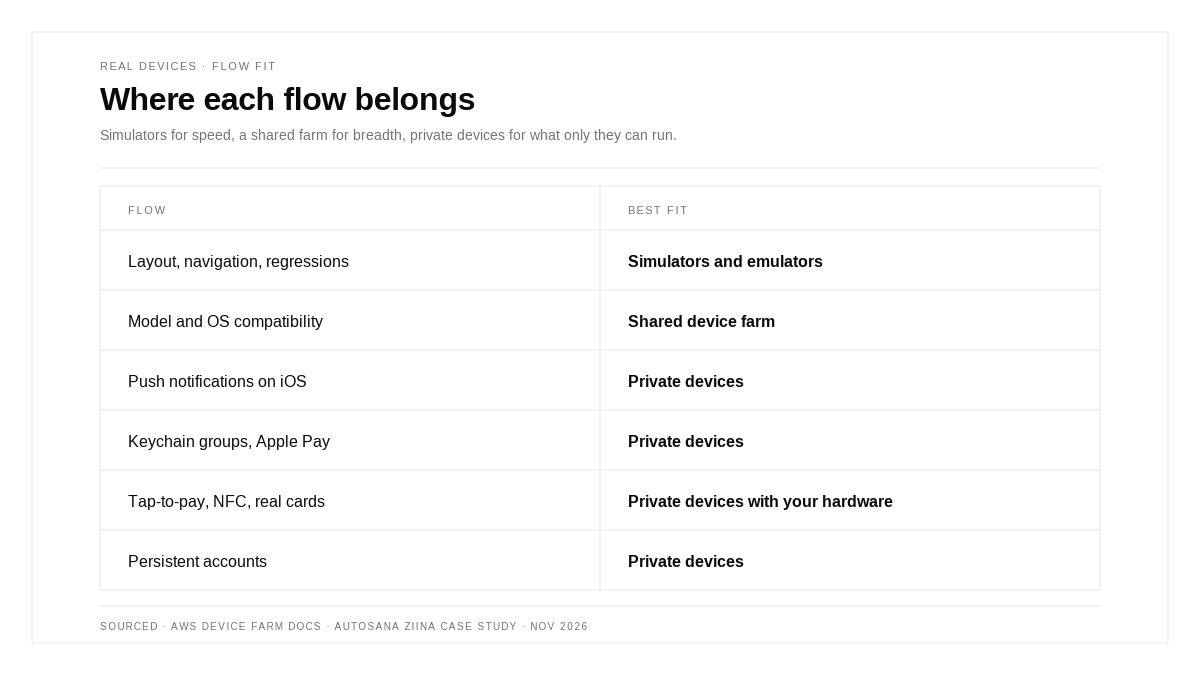
Most of a suite runs well on simulators and emulators. The useful exercise is naming the flows that need a phone, then deciding which of those need a private one.
Ziina, the UAE financial platform, gives a benchmark. It automated 69% of its end-to-end suite with Autosana flows, cut active manual regression from about 12 hours to about 1, and targets 80%. The Ziina case study names what remains: flows that depend on physical hardware, such as tap-to-pay with real cards.
| Flow | Simulator or emulator | Shared real device | Private real device |
|---|---|---|---|
| Layout, navigation, forms, regressions | Yes | Yes | Yes |
| OS-version and model compatibility | Partly | Yes | Within your fleet |
| Push notifications on iOS | Simulator push only | Risky after re-signing | Yes, with your signature |
| Keychain groups, App Groups, Apple Pay | Partly | Risky after re-signing | Yes |
| Tap-to-pay, NFC, real cards | Out of reach | Rarely | Yes, with hardware you control |
| Persistent accounts between sessions | Per run | Cleaned per session | Yes, by your cleanup rules |
A common layout follows from the table: simulators on every pull request, a shared farm nightly for compatibility, and a small private fleet reserved for entitled features, payments and hardware. This breakdown of real device testing goes deeper on what hardware catches.
Evaluating a device cloud in an afternoon
Vendor comparisons on paper miss the problems that only show up with your own app. Six tests surface them quickly.
- Upload a build that uses push. Send a notification during a session. If it arrives, the signing path works for entitled features.
- Open a live session from your own office. Tap through three screens and judge the latency your team will live with.
- Port one Appium script. Count timeouts and failures that come from the endpoint's command limits rather than your app.
- Check state between sessions. Sign in, end the session, start another, and see what survived.
- Force a failure and open the evidence. Time how long the video and logs take to explain it.
- Ask where the devices are. Region decides latency and, for some teams, whether data residency rules allow the vendor at all.
For the AWS service in detail, read this overview of AWS Device Farm.
Autosana real device testing
Autosana runs the same natural-language flows on simulators, emulators and real devices. Per its mobile testing documentation, an .ipa runs on real iPhones and a universal .apk on both emulators and real Android phones. A busy pinned device falls back to the closest free one unless you set the model or OS to match exactly, and the run waits up to five minutes before failing. Each run records full video with screenshots for every agent action, and real-device runs start about one to two minutes later than emulator runs.
For the entitlement problem above, Autosana's push-notification and native in-app purchase testing on physical devices runs on private devices that preserve your original signing and entitlements, under an enterprise contract. Coding agents can also drive a real iPhone or Android phone through a sandbox started with --physical, enabled on request.
Conclusion
Shared device farms win on breadth and price per minute. Private device clouds win wherever your app's signature, entitlements, persistent state or physical hardware decide whether a test means anything.
Map your flows before you compare prices. Run the journey suite on simulators and emulators, send the compatibility matrix to a shared farm, reserve private devices for push, payments, keychain groups and hardware, and spend one afternoon testing a vendor with your own build.
FAQs
What is a private device cloud?
Physical phones hosted by a provider and reserved for one company's tests and sessions.
Why do push notifications fail on shared device farms?
Re-signing with the provider's profile can remove entitlements, including push.
How many iPhones can I register for ad hoc testing?
Apple allows 100 iPhones per product family per membership year.
How long can a remote debugging session last on AWS Device Farm?
AWS sets a 150-minute hard limit per remote access session.
Are private real devices worth the cost?
They pay off for entitled features, payments, hardware flows and strict data isolation.
Does Autosana run flows on real devices?
Yes. The same flows run on real iPhones and Android phones, with video per run.