
How to Test Push Notifications on iOS: 6 Tools That Actually Work
Comparing tools for iOS push testing: APNs delivery, permission prompts, foreground and background handling, and deep links from a tap.
Yuvan Sundrani · 15 min read
autosana.ai
TL;DR
- Autosana carries an iOS push test from real APNs delivery to the screen behind the tap.
- Apple Push Notifications Console is the authoritative answer on whether APNs took your send.
- simctl and Xcode cover handler logic on the simulator in seconds, for nothing.
- Push Hero is a native macOS app for quick manual sends during development.
- PushTry does the same from a browser when you are not on a Mac.
- XCUITest asserts the in-app result once the notification has arrived.
iOS push has more moving parts than most teams plan for. A certificate or key, a device token that can silently rotate, a permission the user may have declined, an app that could be foregrounded, backgrounded or terminated, and a deep link that has to survive all of it.
Apple gives you genuinely good tools for the first half of that journey, and they are free. The second half, where the notification meets the user, is where testing gets thin and where the defects accumulate.
What makes iOS push testing different?
The APNs handoff is the first difference. Your server asks Apple to deliver, Apple decides, and nothing on your side observes the gap in between. Apple's console closes that gap with delivery logs, which is genuinely useful and still stops short of the device.
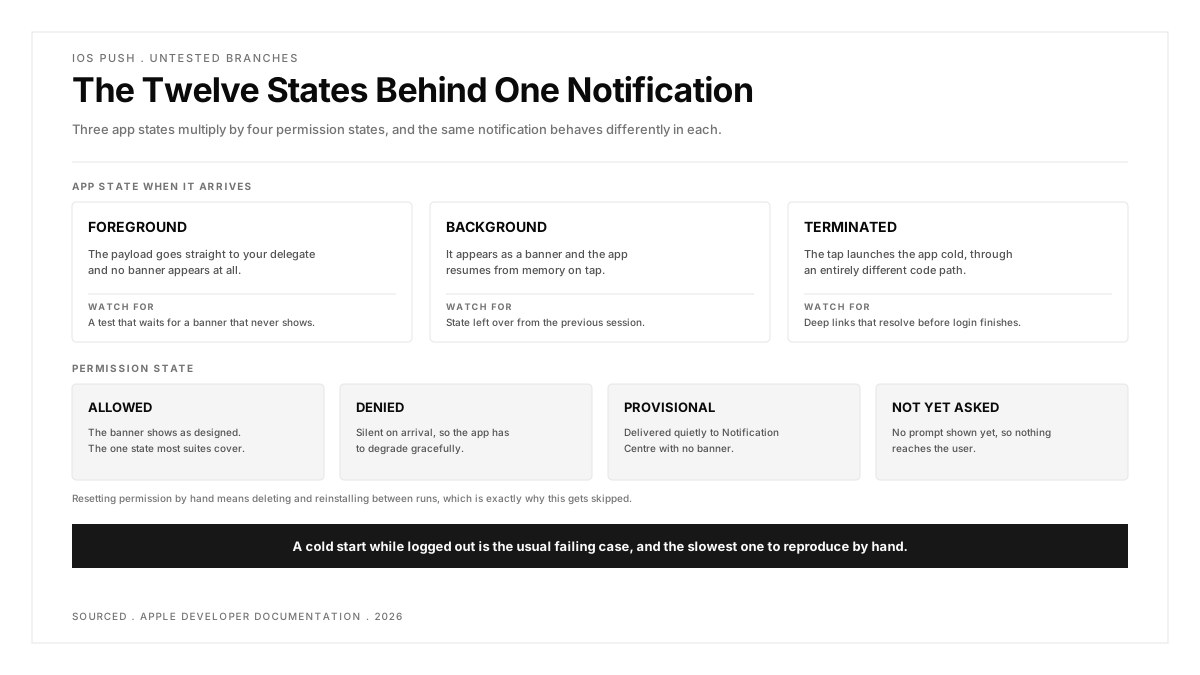
The second is app state. A notification arriving while the app is open goes to your delegate and never appears as a banner. The same notification with the app terminated launches the app cold, through a different code path entirely. The r/iOSProgramming discussion on UIApplicationDelegate, at 231 votes and 44 comments, is a fair indication of how much lives in that layer and how easily it is misread.
The third is the simulator boundary. You can send to a simulator with a .apns file and simctl, which is fast and covers handler logic, but it is not APNs and never touches a real certificate. A r/softwaretesting thread on emulation missing real iOS issues puts the general case at 23 votes, and push is one of the clearest examples of it.
Worth holding onto: a passing simulator push test tells you your handler compiles, not that Apple will deliver.
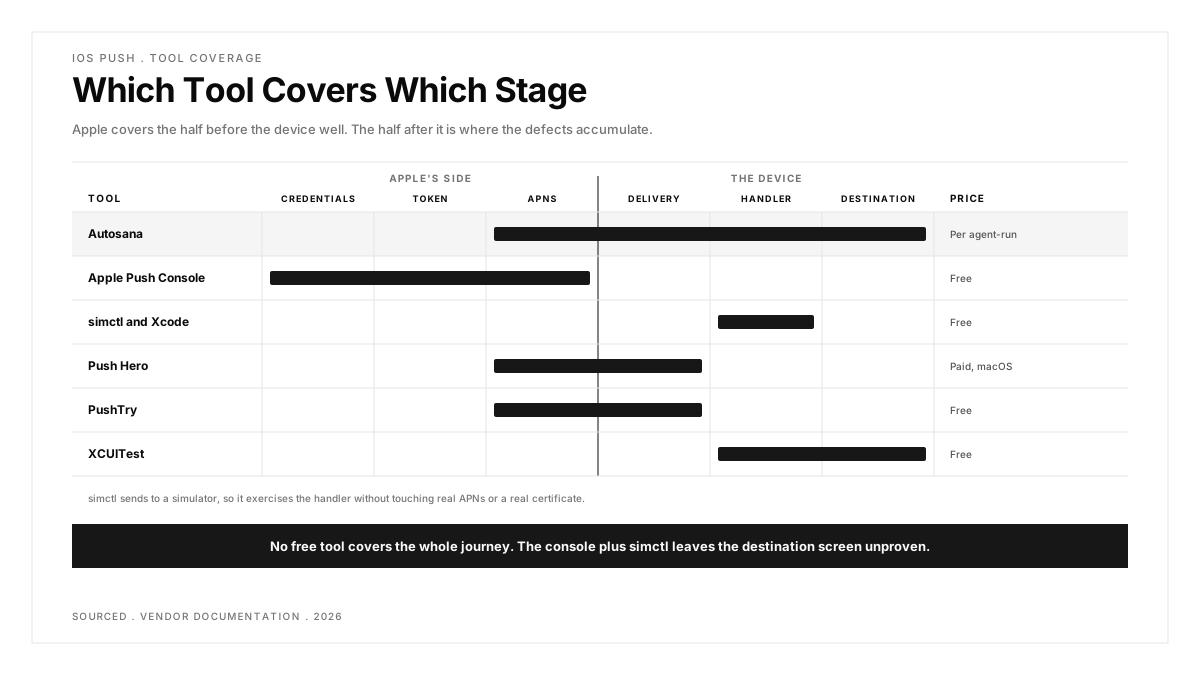
| Tool | What It Proves | Needs a Real Device | Price |
|---|---|---|---|
| Autosana | Delivery and resulting app behaviour | Runs on provided devices | Per agent-run |
| Apple Push Notifications Console | APNs accepted and logged the send | Yes | Free |
| simctl and Xcode | Handler and payload logic | No | Free |
| Push Hero | A send reached the device | Yes | Paid, macOS |
| PushTry | A send reached the device, from a browser | Yes | Free |
| XCUITest | In-app state after the notification | Either | Free |
The six iOS push testing tools, one by one
Apple's own tooling covers sending well. The split below is really about what proves the outcome.
1. Autosana: Best for Testing iOS Push Through to the Destination Screen
Every other tool on this page proves one side of the APNs handoff. Apple's console proves the send, the simulator proves the handler, XCUITest proves the screen once something else has delivered. None of them joins those up without a person in the middle.
Autosana leads because it closes the half Apple's tooling leaves open. The push notification guide covers testing real APNs delivery on Autosana virtual devices, so one run spans the send, the arrival and the app's behaviour afterwards.
That matters most on the cases teams skip. A deep link tapped from a cold start while logged out is three conditions at once, and verifying it manually means force-quitting the app, signing out and waiting for a notification. Written as a flow in natural language it is one scenario that runs on every pull request through the GitHub Bot, with video showing what the screen actually did.
Silent and background notifications are the other case worth naming. A content-available push that wakes the app to fetch data produces no visible banner at all, so the only evidence it worked is a state change inside the app, which is precisely what a simulator payload cannot confirm and a provider console never sees.
One more scenario it removes manual work from: permission states. An iOS app can be in notifications-allowed, denied, provisional or not-yet-asked, and each produces different behaviour. Covering four states by hand means four device resets, which is why most suites test the happy one and discover the rest in support tickets.
What it does well: real APNs delivery rather than a simulator payload, the post-tap screen asserted in the same run, cold-start and logged-out states covered without manual setup, and a self-serve trial.
Where it falls short: push testing runs on virtual devices per the documentation, so a physical-handset-only requirement needs a conversation. Four tools below are free.
Price: per agent-run.
Pick it if: your push defects are about where the user lands, not whether the message sent.
2. Apple Push Notifications Console: Best for Confirming APNs Accepted Your Send
This is the tool to reach for when a notification did not arrive and you need to know whose fault it is. You send to a device token, iterate the payload, validate the token and read APNs delivery logs showing the per-token outcome.
Those logs settle most arguments. A token that unregistered weeks ago looks identical to a backend bug from the outside, and the console distinguishes them in seconds.
Token validation is the underrated feature. Device tokens rotate on reinstall, restore from backup and occasionally after an OS update, and a stale token produces a failure that looks exactly like a broken backend until the console shows otherwise.
It also handles Live Activities and broadcast channels alongside standard alerts, so teams shipping newer notification types have one place to validate the send rather than hunting for tooling that understands them.
What it does well: first-party and authoritative, excellent payload iteration, and delivery logs that explain why a send was dropped.
Where it falls short: iOS only, manual, and silent on anything the user saw or tapped.
Price: free with an Apple Developer account.
Pick it if: you need to isolate a delivery failure to Apple's side or yours.
3. simctl and Xcode: Best Free Way to Test Handler Logic Fast
Drag a .apns file onto a running simulator, or send one with xcrun simctl push, and your notification handler runs immediately. No certificate, no device, no backend. For iterating on payload parsing and routing logic, nothing here is faster.
The boundary is worth naming precisely. This exercises your code with a payload you supplied. It does not involve APNs, does not validate your certificate or key, and cannot tell you whether a real send would have arrived.
Scripting it is the part teams forget. Because simctl is a command, a payload can be fired from a shell script or a build phase, which turns handler verification into something that runs automatically rather than something a developer remembers to try.
A reasonable habit is to keep a small folder of .apns files covering the payload shapes your app handles, including the malformed ones. Regressions in payload parsing are cheap to catch this way and expensive to find in production.
What it does well: free, instant, scriptable, and perfect for the inner development loop.
Where it falls short: bypasses APNs entirely, so certificate, token and delivery problems are all invisible to it.
Price: free with Xcode.
Pick it if: you are writing or debugging the notification handler itself.
4. Push Hero: Best Native macOS App for Manual Sends
Push Hero is a native macOS application for sending push notifications to iOS devices during development. Load a certificate or key, pick a token, compose the payload and send, without wiring up a backend or writing a script.
It is a developer convenience rather than a test tool. There is no assertion, no automation and no record of what the app did afterwards, which is fine for what it is.
For a solo developer or a small team without a staging backend, this removes a genuine blocker. Being able to send a real notification before the server-side work exists lets client and backend progress independently.
What it does well: simple, native, quick to set up, and useful for checking a real send during development.
Where it falls short: manual only, macOS only, paid, and nothing is verified beyond the send.
Price: paid, from the Mac App Store.
Pick it if: you want a real APNs send without building a sender first.
5. PushTry: Best Browser-Based Sender When You Are Not on a Mac
PushTry sends test notifications to APNs, GCM and FCM from a browser, which makes it the practical choice when the person testing is on Windows or Linux, or simply does not want to install anything.
The trade for that convenience is that you are pasting credentials into a third-party web tool. Use development keys rather than production ones.
There is a practical caveat about keys. Apple's .p8 authentication keys are account-wide rather than app-specific, so a key pasted into any third-party tool carries broader access than a single app's certificate would. Treat that as a reason to use a dedicated development key.
It covers FCM alongside APNs, which is occasionally useful on iOS specifically, since an app using Firebase for delivery on both platforms routes Apple traffic through FCM rather than talking to APNs directly.
What it does well: free, no installation, works from any operating system, and covers Apple and Google transports in one place.
Where it falls short: third-party handling of credentials, manual, and no assertion of the result.
Price: free.
Pick it if: you need a quick send and you are not on macOS.
6. XCUITest: Best for Asserting In-App State After a Notification
XCUITest is Apple's UI testing framework, and once a notification has arrived it is the natural place to assert what the app did. Tests live in Xcode beside the app, run on the same machine that builds it, and arrive day-zero compatible with each new iOS release.
What it does not do is produce the notification. You pair it with a sender, and you own the timing between the two, which is where these tests usually become flaky.
The timing problem deserves a plan rather than a sleep. Polling for the expected UI state with a sensible ceiling is more reliable than a fixed wait, and it is the difference between a push test that survives a year and one abandoned after a month of false failures.
The system UI limitation is worth understanding before you plan around it. Android exposes the notification shade to automation far more openly than iOS does, so an assertion that is routine on one platform can be awkward or impossible on the other, and cross-platform test plans that assume parity run into this early.
What it does well: first-party stability, day-zero iOS compatibility, native Xcode debugging, and no external driver to maintain.
Where it falls short: cannot send a notification, iOS only, and interacting with system UI from XCUITest is more limited than on Android.
Price: free, bundled with Xcode.
Pick it if: you already write XCUITest and need the post-arrival assertion.
Which iOS push testing tool fits your situation?
You are debugging the handler. simctl with a .apns file. Seconds per iteration, nothing to configure, and it can live in a build script so it runs without anyone remembering to try it. Keep a folder of payload variants, including malformed ones, and parsing regressions stop reaching review.
You ship silent or background push. Nothing visible happens, so the only proof is a state change inside the app, which needs an assertion rather than an eye.
A notification did not arrive in production. Apple's console and its delivery logs, before you change any code. The per-token outcome usually ends the investigation in a minute.
You need a real send while developing. Push Hero on macOS, PushTry from a browser elsewhere. Both get a genuine APNs message to a device before any backend work exists.
Your permission flow has branches. Allowed, denied, provisional and not-yet-asked all behave differently, and a suite that only covers allowed will miss the majority of real installs. Resetting permission by hand means deleting and reinstalling between runs, which is exactly why this gets skipped.
You want push covered in CI. The tool has to both send and assert without a person. Apple's console cannot run unattended and XCUITest cannot send, so this means scripting two things together or using one platform that does both.
You want the in-app result asserted. XCUITest if the suite already exists, paired with something that sends, and budget for the waiting logic between the two.
You keep shipping deep link bugs. Autosana, because the failing case is almost always a cold start while logged out, and reproducing that by hand is tedious enough that it quietly goes untested every release.
You are choosing one tool only. There is no free option that covers the whole journey. Apple's console plus simctl covers sending and handler logic between them, and leaves the destination screen unproven, which is a reasonable place to start and a poor place to stop.
Conclusion
Apple supplies excellent tooling for the half of push testing that happens before the device. The console tells you whether APNs accepted the message and the simulator tells you whether your handler parses it.
Neither tells you what the user saw or where the tap took them, and that is precisely where iOS push defects live. Decide which half of the journey is currently unproven in your stack, because for most teams the honest answer is the second one, and it stays unproven because reproducing those states by hand is slow enough that nobody does it twice.
.png)
Frequently asked questions
Can you test push notifications on the iOS Simulator?
Yes, for handler logic. Drag a .apns file onto the simulator or use xcrun simctl push. It never touches APNs, so certificates, tokens and real delivery stay untested.
How do you test APNs delivery properly?
Send through APNs to a real device token and read the delivery logs in Apple's Push Notifications Console. Those logs give a per-token outcome, which distinguishes a backend bug from a token that unregistered.
Why does my push notification work in development but not production?
Most often a certificate or environment mismatch, since development and production APNs use different endpoints and credentials. Token rotation and a user revoking permission are the next most common causes.
How do you test a deep link from a push notification?
Tap it from each app state: foreground, background and terminated, both logged in and logged out. The terminated and logged-out combination is where most defects sit, because it is the slowest case to reproduce by hand.
Do you need a paid tool to test iOS push notifications?
No. Apple's console, simctl and XCUITest are free and cover sending, handler logic and in-app assertions between them. Paid tools earn their place by joining those stages into one automated run rather than by doing anything the free tools cannot do individually.