
Mobile App Monitoring Tools: 6 Platforms for Production Visibility
Six mobile app monitoring tools compared by what they measure, how they alert, and what they cost. Covers Firebase, Sentry, Datadog, New Relic, Embrace and Dynatrace.
Yuvan Sundrani · 14 min read
autosana.ai
Mobile app monitoring is the practice of collecting performance, stability and usage data from a production application in real time so that teams can detect degradation before users report it. The core signals are crash-free rate, app startup time, screen rendering speed, network request latency and error rates, broken down by device, OS version and app release.
Monitoring is not the same as crash reporting. A crash report tells you the app stopped. Monitoring tells you the app has been getting slower for three days, on Samsung devices running Android 13, since the Tuesday release. One is reactive. The other gives you a window to fix the problem before the one-star reviews arrive.
This guide covers six monitoring platforms, what each one measures, how it alerts, and which type of team it fits.
Key Takeaways
- Mobile app monitoring tracks five core signals in production: crash-free rate, cold start time, frame rendering, network latency and error rates.
- Firebase Performance Monitoring is free and covers the basics. Sentry and Embrace add deeper diagnostics. Datadog, New Relic and Dynatrace offer full-stack observability with mobile as one component.
- The most useful monitoring configuration sends every production finding back into the test suite. A crash on a specific device model becomes a test case for that device.
- Alert on rate of change rather than absolute thresholds. A crash-free rate of 99.1% may be normal for a given app, but that same rate dropping 0.6 points across two days always warrants attention.
- Monitoring and testing in production are different disciplines. Monitoring observes real user traffic passively. Production testing sends synthetic requests actively. Both are necessary.
How do mobile monitoring tools compare?
| Tool | Free Tier | Starting Price | Monitoring Scope | Best For |
|---|---|---|---|---|
| Firebase Performance Monitoring | Unlimited | Free (part of Firebase) | App startup, network, screen rendering | Teams already using Firebase |
| Sentry | 5K errors, 1 user | $26/mo | Errors, traces, profiling, replays | Teams wanting errors and performance in one tool |
| Embrace | Demo required | Contact sales | Session-level mobile telemetry | Mobile-first teams needing session replay |
| Datadog | 14-day trial | Usage-based (per session) | RUM, traces, infrastructure | Orgs with existing Datadog infrastructure |
| New Relic | 100 GB/mo, 1 user | $0.40/GB beyond free | Mobile, APM, infrastructure, logs | Teams wanting full-stack in one platform |
| Dynatrace | 15-day trial | Usage-based | AI-powered full-stack | Enterprise teams needing automated root cause |
Firebase Performance Monitoring
What it measures: App startup time (cold and warm), HTTP/S network request latency and success rate, and screen rendering time. Custom traces let teams instrument specific code paths (checkout flow completion time, image upload duration) beyond the automatic collection.
How it alerts: Firebase does not include built-in alerting for performance metrics. Teams configure alerts through Google Cloud Monitoring or export data to BigQuery and alert from there. This adds a setup step that the other tools in this list handle natively.
What it costs: Free on both the Spark and Blaze Firebase plans, with no usage caps on performance data collection.
Where it fits: Teams already using Firebase for authentication, analytics or crash reporting (via Crashlytics). Adding Performance Monitoring to an existing Firebase project takes minutes and costs nothing. The limitation is the alerting gap and the lack of session-level diagnostics. You see averages and distributions, not what happened during one specific user's session.
Sentry
What it measures: Errors and exceptions with full stack traces, distributed traces across mobile and backend services, transaction performance (duration, throughput, failure rate), continuous profiling to identify slow functions, and session replays showing a reconstruction of what the user saw. Release health tracks crash-free rate and adoption per release.
How it alerts: Configurable alerts on error frequency, transaction duration, crash-free rate and custom metrics. Alerts route to Slack, PagerDuty, email or webhooks. Anomaly detection flags deviations from baseline automatically.
What it costs: Free for one user with 5,000 errors per month. The Team plan starts at $26/mo with 50,000 errors and unlimited users. Business starts at $80/mo.
Where it fits: Teams that want error monitoring and performance monitoring in a single platform without the complexity of a full infrastructure observability tool. Sentry covers mobile, web and backend with the same SDK pattern, which keeps instrumentation consistent across the stack.
Embrace
What it measures: Session-level telemetry capturing every network call, crash, ANR, tap, screen transition and custom event within a single user session. The session timeline shows the exact sequence of actions and system events that led to a problem, which is the diagnostic detail that aggregate dashboards lose.
How it alerts: Real-time alerts on crash rates, ANR rates, network errors and custom thresholds. Alerts include direct links to the affected sessions, which reduces the time from alert to diagnosis.
What it costs: Embrace operates on enterprise pricing with no public tiers. A demo can be requested through their website. Pricing is based on monthly active users.
Where it fits: Mobile-first companies where the mobile app is the primary product (ride-sharing, food delivery, fintech). The session-level detail is the differentiator: instead of seeing that 3% of sessions crashed, the team sees exactly what each of those sessions did before the crash. Teams building less mobile-critical products may find the setup and cost disproportionate to their needs.
Datadog
What it measures: Real User Monitoring (RUM) captures every user session with screen views, actions, errors, resources and long tasks. Mobile vitals cover app startup, frame rate and resource consumption. Session Replay provides a visual reconstruction of the user's experience. Error tracking groups errors automatically. The platform correlates mobile data with backend APM, infrastructure metrics and log data.
How it alerts: Monitors and alerts configurable across any metric, log pattern or trace attribute. Composite monitors combine multiple conditions. Anomaly, forecast and outlier detection are built in.
What it costs: Usage-based per session, with no permanent free tier (a 14-day trial is available). The exact per-session rate depends on commitment and volume. Current pricing is on the Datadog pricing page. The cost at scale can be difficult to predict for teams with high session counts.
Where it fits: Engineering organizations already using Datadog for infrastructure or backend APM. The value of correlating a mobile crash with the backend trace, the database query and the infrastructure metric that caused it is substantial, but it requires instrumentation across the full stack to realize.
New Relic
What it measures: Mobile crashes, HTTP request performance (response times, error rates, throughput per endpoint), interaction traces measuring screen render and response time, network failures grouped by domain and endpoint, and device-level metrics. The platform connects mobile data to backend APM, browser monitoring, infrastructure and logs.
How it alerts: NRQL-powered alert conditions allow alerting on any queryable metric. Alert policies group conditions and route notifications to Slack, PagerDuty, email or webhooks. Baseline alerts detect deviations from learned patterns.
What it costs: The free tier includes 100 GB of data ingest per month, one full platform user and access to all capabilities including mobile monitoring. Additional data costs $0.40/GB. Paid editions (Standard, Pro, Enterprise) add more users and features.
Where it fits: Teams that want mobile monitoring alongside full-stack observability without committing to a per-seat enterprise license upfront. The 100 GB free tier is generous enough to run mobile monitoring for a small to mid-size app indefinitely, which makes it a practical second tool alongside Firebase.
Dynatrace
What it measures: Automatic and full-stack: mobile crashes, user actions, network requests, third-party API calls, and backend traces, all connected by Dynatrace's automatic dependency mapping (called Smartscape). Davis AI performs automated root cause analysis, identifying the service, deployment or infrastructure change that caused a degradation without manual investigation.
How it alerts: Davis AI generates problem alerts automatically when it detects anomalies, attributing the root cause and affected components. Teams can also configure custom metric alerts. The automated root cause analysis is the primary differentiator from tools that generate alerts requiring manual investigation.
What it costs: Usage-based pricing with a 15-day free trial. Dynatrace prices by capability (infrastructure monitoring, application security, digital experience, etc.) with per-unit rates that depend on commitment. There is no permanent free tier. Exact pricing requires contacting sales or using the online calculator.
Where it fits: Enterprise engineering organizations running complex distributed systems where manual root cause analysis is too slow. The AI-driven automation is most valuable when the system has dozens of services and the number of possible root causes exceeds what a human can investigate quickly. Smaller teams or simpler architectures may find the platform larger than their needs.
What should a mobile monitoring setup measure?
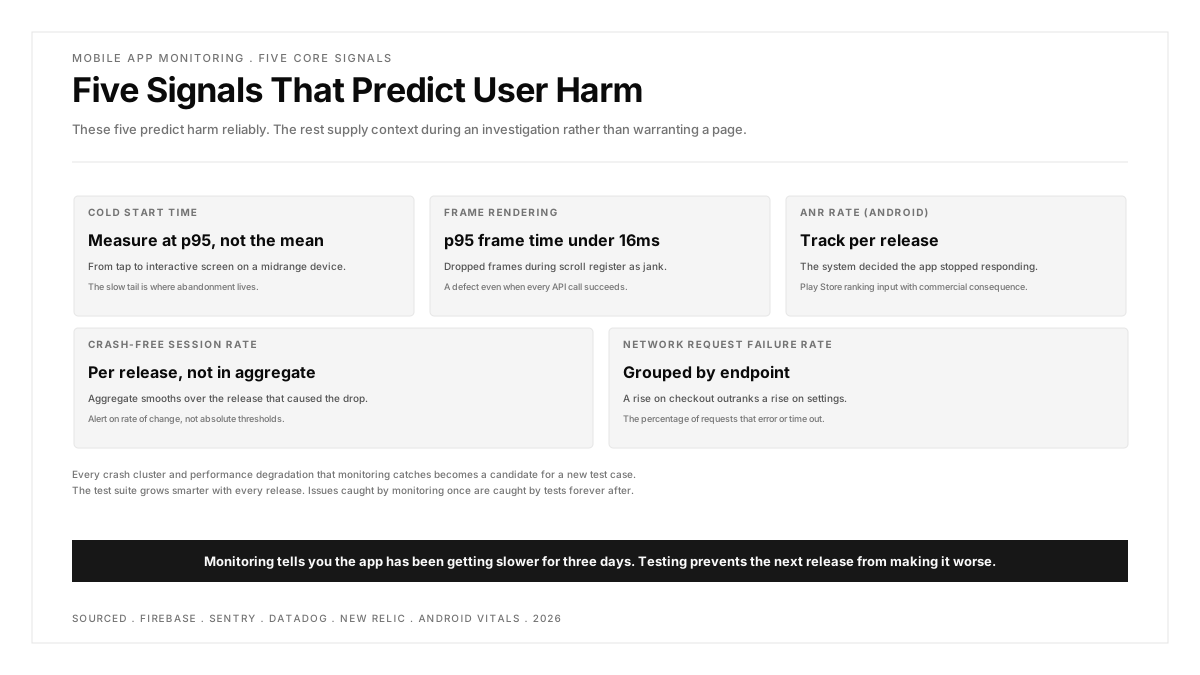
Five signals predict user harm reliably. The rest supply context during an investigation rather than warranting a page.
Cold start time. The interval from the user tapping the icon to the first interactive screen. Android's documentation sets thresholds where startup becomes a problem, and Play Console flags apps exceeding them. Measure at a percentile (p95) rather than a mean, because the slow tail is where abandonment lives.
Frame rendering. Dropped frames during scroll or animation register as jank. A p95 frame time above the display budget (16ms for 60fps) is a genuine defect even when every API call succeeds.
ANR rate on Android. The system has decided the app stopped responding. This is both a user-facing failure and a Play Store ranking input, making it the one signal with a direct commercial consequence.
Crash-free session rate. The headline number, tracked per release rather than in aggregate. Aggregate smooths over the release that caused the drop.
Network request failure rate. The percentage of HTTP requests that return errors or time out, grouped by endpoint. A sudden rise in failures on the checkout endpoint is a higher-priority signal than a rise on the settings endpoint.
How to connect monitoring back to the test suite
Monitoring data is most valuable when it feeds back into the regression testing suite rather than staying in a dashboard.
The pattern: every crash cluster and every performance degradation that monitoring catches becomes a candidate for a new test case. A crash on Samsung Galaxy A14 running Android 13 during the checkout flow becomes a test case that runs on that device and OS combination. A cold start regression after adding a new SDK becomes a startup time assertion in the performance suite.
This feedback loop means the test suite grows smarter with every release. Issues caught by monitoring once are caught by tests forever after.
Teams running mobile app performance testing as part of their pipeline already have the infrastructure for this. The monitoring data tells them which assertions to add.
For teams testing across multiple device models, real device testing provides the hardware variety that monitoring data reveals as necessary, because production crashes are rarely distributed evenly across devices.
.png)
FAQs
What is the difference between mobile app monitoring and APM?
APM (Application Performance Monitoring) is the broader category covering any application, backend or mobile. Mobile app monitoring is APM applied specifically to the client side of a mobile application, where the constraints differ: the agent runs on hardware you do not control, data arrives with delays, fixes take days to reach users through store review, and the device and OS variety is enormous. Tools like Datadog and New Relic offer both backend APM and mobile monitoring. Firebase and Embrace focus exclusively on the mobile side.
How much does mobile app monitoring cost?
The range is wide. Firebase Performance Monitoring is free with no caps. Sentry starts at $26/mo with a free tier. Embrace and Dynatrace require sales conversations. New Relic offers 100 GB/mo of free data ingest. Datadog bills per session. For a small app with under 10,000 daily users, Firebase plus the New Relic free tier provides meaningful monitoring at zero cost.
Should I monitor on real devices or use synthetic monitoring?
Both. Real user monitoring (RUM) captures what actual users experience across the full range of devices, networks and locations. Synthetic monitoring sends scripted requests from controlled environments on a schedule, catching outages and regressions between real user sessions. RUM tells you the truth about production. Synthetic monitoring tells you about production between the truths. Most tools in this list offer RUM. Synthetic monitoring is typically a separate product or add-on.
How do I set monitoring alert thresholds?
Alert on rate of change rather than absolute values. A crash-free rate of 99.1% may be entirely normal for your app, but that same rate falling 0.6 points across two days always warrants attention. Set alerts to require sustained breach (not a single sample) to avoid paging on transient spikes, and scale thresholds to traffic volume to suppress alerts during low-traffic periods when statistical variance is high.
What is the minimum monitoring setup for a new app?
Firebase Crashlytics for crash reporting (free) and Firebase Performance Monitoring for latency and startup metrics (also free). Add Sentry when you need error grouping, tracing and alerting beyond what Firebase provides. This two-tool pattern costs nothing to start and covers the four most critical signals: crash-free rate, startup time, network latency and error rate.
Does monitoring slow down the app?
Every monitoring SDK adds some overhead: binary size (typically 1 to 3 MB), startup time (milliseconds, not seconds), and background data transmission. The impact is measurable but small relative to the diagnostic value. The risk is stacking too many SDKs. Two monitoring tools is common and manageable. Four creates meaningful overhead and conflicting data. Choose one primary monitoring platform and supplement with one specialized tool if needed.