
Jetpack Compose Testing and Accessibility: Where the Resource IDs Went
Compose has no view hierarchy and no resource IDs. It emits a semantics tree. That is why Espresso withId, UiAutomator resourceId, and Appium resource-id all stop resolving after a migration, and what testTagsAsResourceId actually buys you.
Yuvan Sundrani · 19 min read
autosana.ai
.png)
Jetpack Compose does not build a view hierarchy, so there is no R.id for a test to match. Compose emits a semantics tree instead, built from accessibility properties: text, role, content description, and test tag. Espresso's withId, UiAutomator's resourceId, and Appium's resource-id all lose their anchor the moment a screen migrates. The UI did not change. The addressing system was replaced.
Key Takeaways
- Compose migrations break tests at the addressing layer, not the behaviour layer. The flow still works; the test can no longer name the element.
- The failure message blames the element ("no views in hierarchy matching"), which is why teams file this as flake and retry it for a sprint before diagnosing it.
- ComposeTestRule with onNodeWithTag, onNodeWithText, and onNodeWithContentDescription is the in-process answer, and it is the correct one for component-level tests.
- testTagsAsResourceId = true re-exposes test tags to UiAutomator and Appium, but it is opt-in, must be set high in the tree, and only surfaces tags someone remembered to apply.
- Autosana resolves targets from on-screen semantics and visual context at run time, so a Compose migration does not invalidate an end-to-end suite that was never bound to a tag in the first place.
Which Android Testing Framework Survives a Jetpack Compose Migration?
| Framework and Finder | What It Actually Addresses | Where That Identifier Comes From | Survives a Compose Migration? |
|---|---|---|---|
| Espresso onView(withId(R.id.x)) | A View instance in the view hierarchy | android:id in an XML layout | No. There is no View to traverse. |
| Espresso onView(withText("x")) | Text rendered by a TextView | Layout content | No, inside a Compose subtree. |
| UiAutomator By.res("pkg:id/x") | The resource-id attribute on an accessibility node | View ID exported into the a11y node | Only with testTagsAsResourceId = true. |
| Appium resource-id strategy | The same a11y node attribute, read through UiAutomator2 | Same path as above | Only with testTagsAsResourceId = true. |
| ComposeTestRule onNodeWithTag("x") | SemanticsProperties.TestTag | Modifier.testTag("x") in Kotlin | Yes, in-process only. |
| ComposeTestRule onNodeWithContentDescription | The contentDescription semantics property | The composable's accessibility parameter | Yes, and it is the durable one. |
| Autosana agent flow | On-screen semantics plus visual context, resolved per run | Nothing declared ahead of time | Yes. No pre-registered handle to lose. |
Six of those seven rows depend on a string a human typed and a human can rename. The seventh is the contrarian part of this article, and it arrives after the shim everyone reaches for first.
What Actually Changed When Android Moved from Views to Jetpack Compose?
In the View system the unit of UI was an object. LinearLayout held Button held TextView, each inflated from XML, each addressable by an integer generated into R.id. That integer was not a testing feature. It was a side effect of resource compilation that automation adopted as a contract, because it was the only stable handle available.
Everything downstream assumed it. Espresso walked the live view tree and matched on it. The accessibility service read the same tree and exported the ID as resource-id on each AccessibilityNodeInfo, which UiAutomator reads and Appium's UiAutomator2 driver surfaces as the resource-id strategy. One tree, three consumers.
Compose does not produce that tree. Composables emit into a layout node tree with no View objects and no resource identifiers. For anything outside the rendering pipeline Compose produces a parallel structure, the semantics tree, described in Android's documentation as the structure that "describes your UI in a way that is understandable for Accessibility services and for the Testing framework."
Read that again, because it is the whole article. Accessibility and testing now consume the same structure. They did before too, but by accident through the view tree. In Compose it is deliberate, and the semantics tree is the only public description of your UI a non-rendering consumer gets.
It carries text, content description, role, state description, enabled, selected, toggleable state, click actions, and testTag. It does not carry an R.id, because none was ever generated.
Why Do Espresso, UiAutomator, and Appium Tests Fail After a Compose Migration?
Because the finder is pointing at a structure that is no longer populated.
- Espresso throws NoMatchingViewException with "No views in hierarchy found matching: with id". Accurate and completely misleading. The hierarchy it searched is intact; your target was never in it.
- UiAutomator is quieter and worse. device.findObject(By.res("com.example:id/checkout")) returns null, so the next line throws a NullPointerException far from the real cause.
- Appium reports NoSuchElementException on the resource-id strategy, with a page source showing a shallow tree of android.view.View nodes carrying text and content descriptions but no resource IDs.
Three error messages, one root cause, and none say "this screen is Compose now." Each blames the element, which is why this gets misdiagnosed: a failure naming an element looks like a timing problem, so the response is a longer wait, then a retry, then a quarantine label. A QA engineer on r/QualityAssurance described the underlying habit: teams pick an Android selector strategy once, early, then treat it as settled infrastructure rather than something the platform can move underneath them.
The tell that separates this from real flake is that it is not intermittent. It starts at the commit that merged the migration and never passes again. A re-run does not help. The test is correct about the behaviour and wrong about the address.
One wrinkle before you debug. Compose exposes a merged and an unmerged semantics tree. A Button containing a Text collapses to one node in the merged tree, which is what a screen reader wants and what onNodeWithText searches by default. If a finder matches zero nodes when the text is plainly on screen, useUnmergedTree = true is usually the answer.
How Do You Find a Composable in a Test Without a Resource ID?
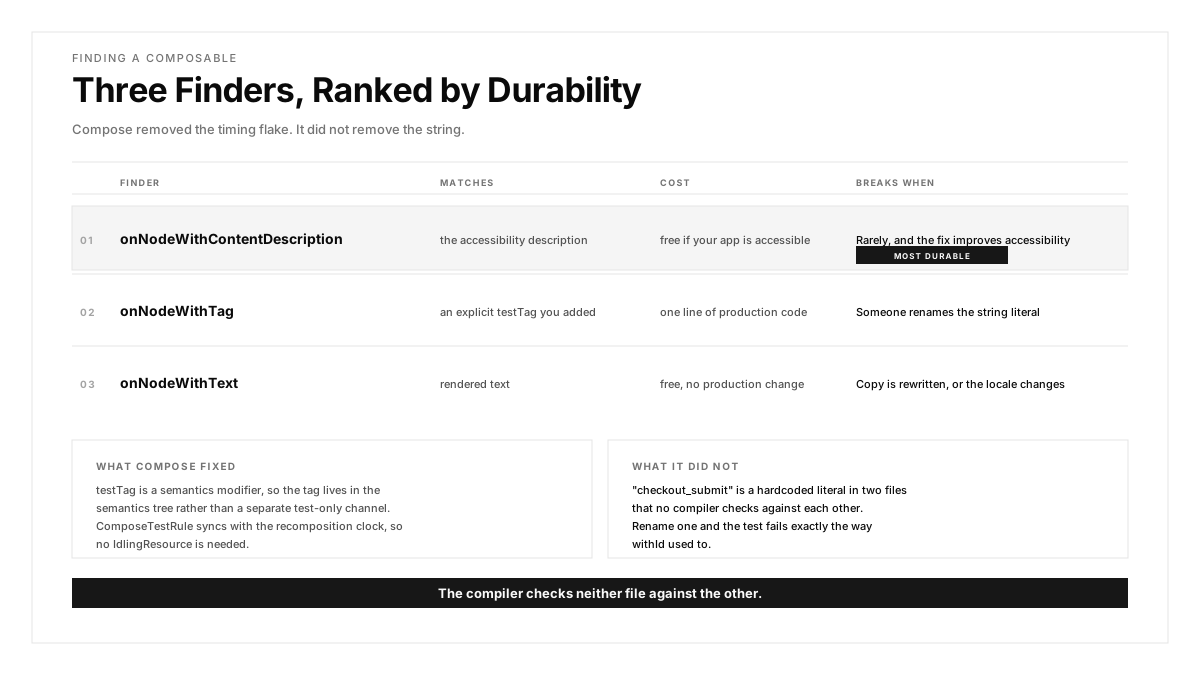
In-process, you use ComposeTestRule. The testing APIs give three finders that matter, ranked here by durability rather than convenience.
onNodeWithText matches rendered text. Free, no production change, and it breaks when copy is rewritten or the app runs in another locale.
onNodeWithContentDescription matches the accessibility description. Also free if your app is accessible, and the finder this article argues for later.
onNodeWithTag matches an explicit test tag you added in production code:
Two things about this that are easy to miss. Modifier.testTag is a semantics modifier, so the tag lives in the semantics tree alongside the accessibility properties, not in a separate test-only channel. And ComposeTestRule synchronises with Compose's recomposition clock, so onNodeWithTag(...).performClick() waits for the UI to be idle without an IdlingResource. That is a genuine improvement over the Espresso era and it removes a whole category of timing flake.
What it does not remove is the string. "checkout_submit" is a hardcoded literal in two files that no compiler checks against each other. Rename one, and the test fails exactly the way withId used to.
What Does testTagsAsResourceId Do, and When Do You Need It?
ComposeTestRule only works in-process. UiAutomator runs across process boundaries, which is why you reach for it: permission dialogs, the notification shade, the share sheet, a deep-link handoff. Appium runs out of process too. Neither sees a testTag by default.
The bridge is a semantics property. Per Android's Compose testing interoperability guide, composables are reachable from UiAutomator "only by their convenient descriptors (displayed text, content description, etc.)" unless you enable testTagsAsResourceId on the subtree:
With that set, UiAutomator resolves the tag as a resource ID again:
val list = device.findObject(By.res("order_list"))
list.scrollUntil(Direction.DOWN, Until.findObject(By.text("Order #4821")))
The catch, in four parts. It is opt-in, so a screen nobody annotated stays invisible to external automation. Set it once, high in the hierarchy, because on a leaf it covers only that leaf's subtree. It exposes only tags actually applied, so an un-tagged composable gains nothing. And it needs Compose 1.2.0-alpha08 or higher, which bites on older modules more often than expected.
It is disproportionately useful on scrollable composables, which the documentation calls out. A LazyColumn has no unique text and no content description of its own, so without a tag there is often no handle at all.
Now the uncomfortable reframe. testTagsAsResourceId is presented as the fix for Compose plus Appium. It is a compatibility shim. It restores the old contract rather than removing your dependency on one. Before the migration you maintained R.id.checkout_submit in XML. After it you maintain "checkout_submit" in Kotlin plus a semantics modifier on an ancestor. The strings under maintenance went up by one and the failure mode is identical. A tester on r/softwaretesting made the general version of the point: durability comes from what a locator is anchored to, not from which syntax the framework prefers this year.
How Do You Test an App That Is Part View and Part Compose?
This is where most teams actually live, and the least written-about part of Compose testing.
Real migrations are incremental. A Fragment hosts a ComposeView. A RecyclerView row renders a composable. A Compose screen embeds a legacy MapView through AndroidView. Nothing is wholly one thing, so a single test class ends up holding three handles at once:
Three addressing systems, one test. The documentation notes no special steps are needed to mix Espresso and ComposeTestRule, which is true of the mechanics and not of the cost. Every assertion requires the author to know whether the thing on screen is a View or a composable at that exact commit. Get it wrong and you get NoMatchingViewException on something clearly visible.
Then ambiguity. The same Compose row rendered in forty RecyclerView positions makes onNodeWithText("Save") fail with "Multiple nodes found." The documented escape scopes the Compose search to a specific View via onRootWithViewInteraction, passing an Espresso ViewInteraction that isolates the container first. It works, and it is a test that now needs an Espresso matcher, a Compose matcher, and the knowledge that one nests inside the other.
A mobile engineer on r/softwaretesting described the shape of this: the new framework is fine in isolation, and the real cost lands in the period where both stacks are live and every test must be correct about which one it is addressing. For a mature app that period is measured in quarters.
The arithmetic is worth stating plainly. During migration your suite carries View-era selectors, Compose test tags, and UiAutomator resource IDs simultaneously, and each migrated screen moves tests from the first bucket to the second. Nothing gets deleted. A QA lead on r/QualityAssurance captured the steady state: suites where keeping tests current through refactors consumes more engineering time than writing new coverage ever did.
Why Does Every Android Testing Framework Break on a Rename?
Step back from Compose, because the pattern is bigger than one toolkit.
- Espresso breaks when a View ID is renamed.
- UiAutomator breaks when a resource-id is renamed.
- Appium breaks when its locator target is renamed.
- Detox breaks when a testID is renamed.
- ComposeTestRule breaks when a testTag is renamed.
Five frameworks, five identifier flavours, one failure mode. The framework choice determines which string breaks, not whether one breaks. Compose did not introduce this problem; it reset everybody's position in it, which is why the migration feels like a regression when it is really an exposure.
The rename is not an edge case either. An engineer renames a composable from SubmitButton to PlaceOrderButton, updates the tag to match, and breaks four tests in a module they have never opened. Nothing user-visible changed. The button still places the order.
A developer on r/Playwright argued the cross-framework version: the debate over which selector strategy is best is mostly a debate about which string you would prefer to maintain, and the teams with the least locator churn are the ones whose assertions describe what the user accomplishes rather than which node they touched.
That is the dividing line, and it is not about Android at all:
- Identifier-bound tests name the element. They break on a rename, a migration, a component extraction, or a design-system swap.
- Behaviour-bound tests name the goal. "Place an order and see a confirmation" survives all four, because the goal is what the product promised and the identifier was only ever an implementation detail of how you reached it.
One honest limit. For component-level tests, naming the element is correct: you are testing that composable in isolation and a tag says so clearly. The argument lands at the end-to-end layer, where the test should be a statement about the product and a testTag is a statement about the code. The same reasoning runs through Autosana's breakdown of why mobile test automation fails so often.
How Does Jetpack Compose Accessibility Make Tests More Durable?
Here is the part that makes Compose better than what it replaced, once you stop grieving the resource IDs.
In the View system, accessibility and testing were separate concerns sharing a tree. A contentDescription was added for TalkBack, usually late and under audit pressure. A View ID was added for layout and reused for tests. Neither knew about the other.
Compose collapses them. Modifier.testTag, contentDescription, Role.Button, stateDescription, and custom semantics actions are all properties in the same semantics tree, consumed by both TalkBack and the test framework. The same node description that makes a screen usable with a screen reader is the node description your test matches on.
Which produces a genuinely unusual alignment:
- A test anchored to contentDescription only works if the content description exists, which means the screen is accessible.
- A test anchored to Role.Button only works if the semantic role is declared, which means assistive tech announces the control correctly.
- A test anchored to testTag works whether or not the screen is accessible at all, because a test tag is invisible to users and carries no accessibility weight.
So the finder that costs nothing in production value has the worst durability profile, and the finders that force you to describe your UI properly are the ones that survive refactoring. You pay for maintainability in accessibility work you should have been doing anyway. Autosana's guide to accessibility heuristics covers evaluating whether those descriptions are good rather than merely present, which matters, because contentDescription = "image" satisfies a lint check and helps nobody.
Two cautions so this does not read as a slogan. Content descriptions are user-facing copy and get rewritten, so they resist structural refactors but not copy changes. And decorative elements should carry contentDescription = null deliberately, so some nodes are correctly unaddressable that way. The claim is directional: anchoring to accessibility semantics survives more kinds of change than anchoring to a tag, and improves the product while doing it. Autosana's comparison of Espresso and UiAutomator covers where each still belongs.
How Autosana Fits
Autosana is an AI-native E2E testing agent for iOS, Android, and web. Flows are written as intent, and the agent resolves the target at run time from the on-screen semantics tree plus rendered visual context, rather than from an identifier registered in advance.
For a Compose migration that changes the failure mode. A flow that says "open the cart, apply the promo code, place the order" references neither R.id.checkout_submit nor "checkout_submit", so nothing in it is invalidated when the screen stops being a View and starts being a composable. The agent reads what is on screen now. Nobody retrofits a tag onto a screen that already shipped and already worked.
That covers the un-tagged case, which is the realistic one. The teams hit hardest are those migrating screens written years ago by people who left, where nobody will retrofit Modifier.testTag across forty composables to unblock a suite. Autosana runs on hosted real devices, posts results through the GitHub integration with session replay attached, and exposes the same flows to coding agents over MCP.
Where it does not fit, plainly. For in-process component testing of a single composable, asserting recomposition behaviour or verifying state hoisting, ComposeTestRule is the right tool and Autosana does not replace it. That layer belongs in your Gradle build and runs in milliseconds. Autosana operates at the end-to-end layer, where the test is a claim about the product rather than about a function. Different rows in the pyramid, not competitors.
Conclusion
Open the next Compose migration PR and grep the test module for withId and By.res. Every match on a screen in that diff is a test that will fail on merge, and none will say why.
Then read one end-to-end flow's assertions out loud. If they name elements, the suite is pinned to your implementation and the next refactor is a bill. If they name outcomes, the migration is a non-event. Start by replacing onNodeWithTag calls in your highest-value flow with onNodeWithContentDescription. If the description is missing, you just found an accessibility bug for free.
.png)
FAQ
Does Jetpack Compose have resource IDs for testing?
No. Compose has no view hierarchy and generates no R.id values for composables. It emits a semantics tree carrying text, role, content description, state, and testTag. The closest equivalent is Modifier.testTag, which only becomes visible as a resource ID to external tools when testTagsAsResourceId is enabled.
Why does Espresso withId fail on a Compose screen?
Because there is no View to match. Espresso traverses the live view hierarchy, and a composable never enters it. The NoMatchingViewException is accurate about the search and misleading about the cause. Use ComposeTestRule finders for Compose content and keep Espresso for the remaining View-based screens.
Can Appium test Jetpack Compose apps?
Yes, with limits. Appium reads accessibility node attributes, so text and content description work by default. The resource-id strategy only resolves to composables when the app sets testTagsAsResourceId = true on an ancestor and the target carries a Modifier.testTag. Without both, the locator returns nothing.
What does testTagsAsResourceId do in Jetpack Compose?
It is a semantics property that exposes Modifier.testTag values as resource-id on the accessibility node, making them visible to UiAutomator and Appium. Set it once high in the hierarchy, typically on a Scaffold. It requires Compose 1.2.0-alpha08 or later and only surfaces tags that were actually applied.
Should you use testTag or contentDescription in Compose tests?
Use contentDescription where the element genuinely needs one, because it serves screen readers and automation at once and survives structural refactors. Use testTag for elements with no user-facing description, such as scrollable containers. A tag is invisible to users, so it adds maintenance without adding product value.
How do you test an app with both Views and Compose?
Mix the handles in one class: Espresso onView for Views, ComposeTestRule for composables, UiAutomator for anything out of process. No special setup is required. When identical composables repeat inside a RecyclerView, scope the Compose search to a specific container View to avoid "Multiple nodes found."
Can Autosana replace ComposeTestRule?
No, and it should not. ComposeTestRule is the right tool for in-process component tests of a single composable. Autosana operates at the end-to-end layer, resolving targets from on-screen semantics at run time, so a Compose migration does not invalidate flows that were never bound to a tag.
Where does an AI testing agent not help with Compose testing?
Anywhere the assertion is about code rather than product behaviour: recomposition counts, state hoisting correctness, slot API contracts, modifier ordering, or @Preview rendering. Those are unit-level claims about a function and belong in the Gradle build. An agent tests what a user can accomplish on screen.