
Gherkin: Syntax, Patterns, and the Scenarios That Rot
Gherkin syntax reference with worked examples. Background, Scenario Outline, Examples, data tables, tags, plus the anti-patterns that turn a feature suite into maintenance.
Yuvan Sundrani · 12 min read
autosana.ai
TL;DR
- Gherkin is a structured plain-text format using a small keyword set to describe system behavior in a form both people and test runners can read.
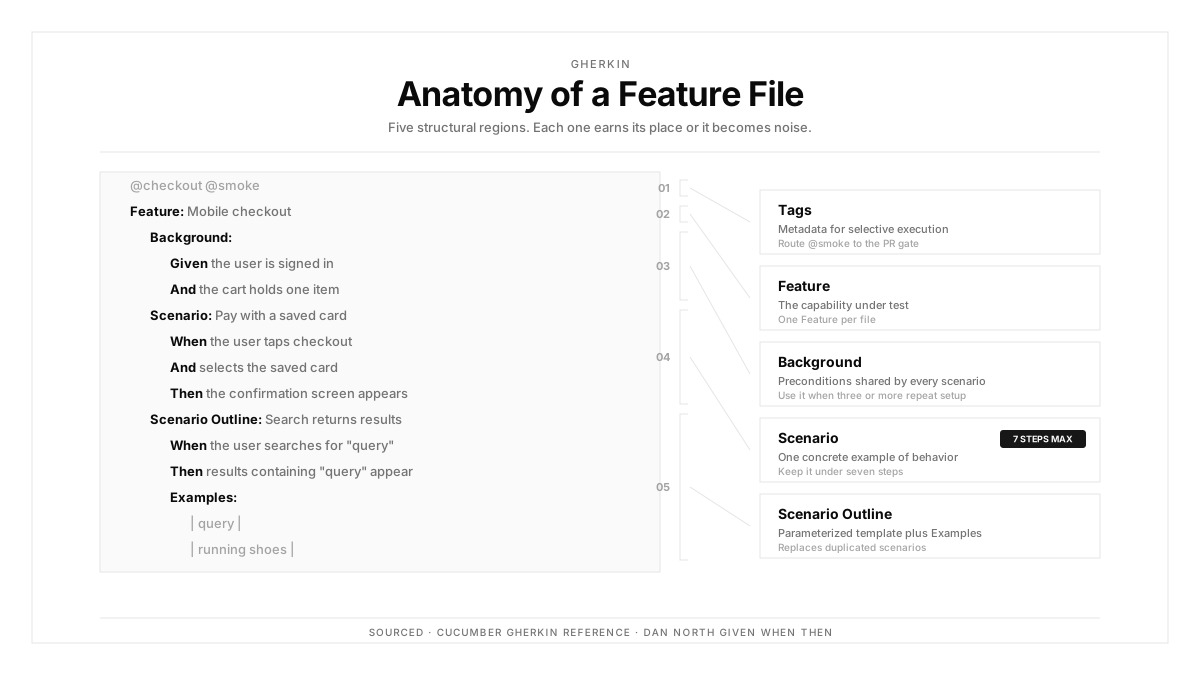
- The full keyword list is short: Feature, Scenario, Given, When, Then, And, But, Background, Scenario Outline, Examples, plus tags, data tables, and doc strings.
- Scenarios rot when they describe clicks instead of outcomes, when Background carries unrelated setup, and when data hides inside step text rather than in Examples.
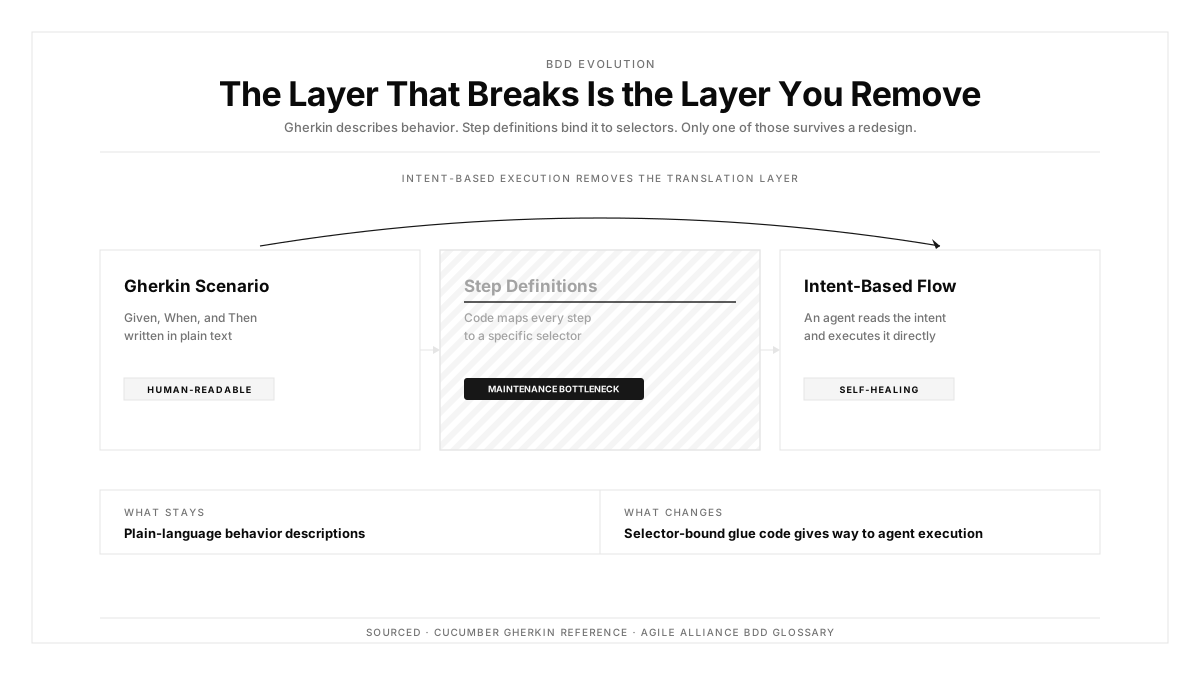
- Autosana executes plain-language flows directly on real iOS, Android, and web devices, removing the step-definition layer between a written scenario and a running test.
A scenario reads: Given the user is on the login page, When the user enters testuser in the username field, And the user enters Pass123 in the password field, And the user clicks the element with id submit-btn, Then the user sees the dashboard.
That is a click script wearing Gherkin keywords. It names an element id, so it breaks on redesign, and the product manager it was supposedly written for has stopped reading by line three.
Gherkin rewards a particular discipline about what belongs in a step. This guide covers the full syntax, the patterns that hold up, and the anti-patterns that turn a suite into maintenance.
What Gherkin Is
Gherkin is a line-oriented plain-text language where each line begins with a keyword and carries a natural-language description after it. Indentation and blank lines organize the file, and everything else is free text.
The Cucumber reference defines the grammar. Martin Fowler's Given-When-Then article covers the reasoning behind the three-part structure, and the Agile Alliance places it inside behavior driven development practice.
The format exists to be readable by someone who writes zero code. Every syntax decision below follows from that constraint.
The Keyword Reference
| Keyword | Purpose | Notes |
|---|---|---|
| Feature | Names the capability the file covers | One per file, with optional free-text description |
| Scenario | A single concrete example | Also spelled Example in newer dialects |
| Given | Establishes starting state | Past or present state, zero actions |
| When | The action under test | One action per scenario where possible |
| Then | The observable expected outcome | Assert what a user can see |
| And | Continues the previous keyword | Reads better than repeating Given three times |
| But | Continues with a contrasting point | Functionally identical to And |
| Background | Steps run before every scenario in the file | Keep it short |
| Scenario Outline | A template run once per Examples row | Placeholders wrapped in angle brackets |
| Examples | The data table feeding a Scenario Outline | Header row names the placeholders |
Two points people get wrong. And inherits the meaning of whichever keyword preceded it, so an And following Then is an assertion. And But carries zero special behavior, existing purely for readability.
Background: Shared Setup
Background runs before every scenario in the file, which removes repetition when several scenarios share the same starting state.
Background: Given a registered customer with a verified email And the catalogue contains a product priced 5001 rupees
Two rules keep it useful. Keep it to three steps or fewer, since a reader has to hold it in mind while reading every scenario below. And include only setup genuinely shared by all scenarios in the file, because setup relevant to half of them belongs in those scenarios.
A Background that grows past five lines is usually a signal the feature file covers two features.
Scenario Outline and Examples
Where the same behavior needs verifying across several inputs, a Scenario Outline replaces near-duplicate scenarios with one template.
Scenario Outline: Discount applies above the order threshold Given a cart totalling <total> rupees When the customer proceeds to checkout Then the discount shown is <discount> percent
Examples: | total | discount | | 4999 | 0 | | 5000 | 0 | | 5001 | 10 | | 9999 | 10 |
Those four rows are boundary value analysis expressed in Gherkin. The table makes the boundary visible to a reader who would miss it in prose, which is where the format earns its keep.
Keep Examples tables focused. A table with twelve columns has become a data fixture, and it belongs outside the feature file.
Data Tables and Doc Strings
A data table attached to a single step passes structured data into that step:
Given the following products exist: | name | price | stock | | Trimmer | 2499 | 12 | | Charger | 899 | 0 |
The distinction from Examples matters. An Examples table runs the scenario once per row. A step data table passes the whole table into one step.
Doc strings carry multi-line text, delimited by three double-quote characters on their own lines. They suit expected email bodies or JSON payloads, though a scenario asserting a full JSON response has usually drifted below the level Gherkin serves well. That verification belongs in API testing.
Tags and Organization
Tags are annotations beginning with an at sign, placed above a Feature, Scenario, or Examples block. They drive selection at run time.
A workable scheme uses three axes. Speed tags such as smoke and slow control which suites run when. Area tags such as checkout and auth let a team run what their change touched. Status tags such as wip and flaky keep unstable scenarios out of the blocking suite.
Resist tagging by author or sprint. Those tags stop being meaningful within a quarter while continuing to clutter every file.
Tag-driven selection is what lets smoke tests and full regression suites live in the same feature files while running on different schedules.
Anti-Patterns That Rot a Suite
Imperative steps. The opening example names an element id, which binds the scenario to the current markup. Write the intent instead: When the customer signs in with valid credentials.
Assertions in Given. A Given establishing state should assert zero things. Mixing the two makes failures ambiguous, since you cannot tell setup failure from behavior failure.
Multiple When blocks in sequence. Two actions with assertions between them is two scenarios. The tell is a scenario title containing the word and.
Data buried in step text. A step reading Given a cart totalling five thousand and one rupees hides the boundary. Put the number in an Examples table where a reader can see the range being covered.
Background doing unrelated work. Setup used by two of seven scenarios belongs in those two, since the other five now carry a cost for state they ignore.
Step definition sprawl. Each slightly different phrasing spawns another glue function. Agreeing a shared vocabulary early is what keeps the definition count sub-linear against scenario count.
Scenarios that outlive their requirement. Every requirement change should retire the scenarios it invalidated, and that work rarely gets scheduled.
Gherkin for Mobile
Three patterns carry their weight on mobile.
Put device and OS conditions in Given. A permission scenario reads differently on Android 13 than on Android 12, so stating the version makes the scenario executable rather than approximate.
Given an Android 13 device with location permission previously denied
Give interrupts their own scenarios. Incoming calls, backgrounding mid-flow, memory-pressure termination, and connectivity loss are user-visible behaviors with legal and illegal follow-on actions.
Keep device variation out of Examples. Running a scenario across eight devices is an execution concern rather than a data concern, so it belongs in suite configuration. Putting device names in an Examples table couples the feature file to your hardware inventory.
Mobile test automation bound to selectors struggles with Gherkin at scale, because vendor OS forks change elements while the described behavior stays identical across all of them.
Gherkin in CI/CD
Tier by tag and runtime. Scenarios tagged smoke run on every commit. Area-tagged sets run on pull requests touching that area. The full set runs before merge or nightly.
Report failures in the scenario's own language. A failure line reading the step Then the discount shown is 10 percent failed is readable by the person who agreed the rule. A stack trace is readable by the engineer alone.
Quarantine using tags rather than deletion. A flaky-tagged scenario stays out of the blocking suite while continuing to run and report, so the signal survives while the gate stays usable.
Teams running end-to-end suites usually find existing flows map onto scenarios with modest rewording, which makes adoption incremental. CI/CD integration and automations handle the scheduling.
How Autosana Fits
We built Autosana to remove the step-definition layer, which is where Gherkin adoption usually accumulates its cost.
Our flows are written in plain language describing user intent. A step reading the customer proceeds to checkout executes directly, with zero glue function mapping that sentence to code.
That changes the economics of phrasing. Under Cucumber, a slightly reworded step spawns another definition. With direct execution, wording variation costs you little, so writers stay free to phrase scenarios the way the business phrases them. Our guide on writing effective flow instructions covers the phrasing that executes most reliably.
One definition runs across real iOS, Android, and web devices, which keeps the device-variation concern in suite configuration where it belongs rather than in Examples tables.
We organize flows into suites that map onto the tag tiering above, so smoke and full regression coexist on separate schedules.
Conclusion
Open your feature files and search for the word and in scenario titles.
Each hit is a scenario doing two things, which means a failure tells you less than it should and the scenario needs splitting. That search takes thirty seconds and usually finds more than expected.
Then search for element ids and CSS selectors inside step text. Those are the scenarios that will break at the next redesign while the product keeps working correctly.
.png)
FAQ
What is Gherkin?
Gherkin is a line-oriented plain-text format where each line starts with a keyword followed by natural-language text. It describes system behavior in a form readable by non-technical stakeholders and executable by a test runner.
What are the Gherkin keywords?
Feature, Scenario, Given, When, Then, And, But, Background, Scenario Outline, and Examples. Tags, data tables, and doc strings provide annotation and structured data.
What is the difference between Scenario and Scenario Outline?
A Scenario is one concrete example. A Scenario Outline is a template with placeholders, executed once per row of its Examples table, which suits verifying the same behavior across several input values.
When should Background be used?
When several scenarios in a file share identical starting state. Keep it to three steps or fewer, and include only setup every scenario in the file genuinely needs.
What is the difference between an Examples table and a data table?
An Examples table under a Scenario Outline runs the scenario once per row. A data table attached to a step passes the entire table into that single step as structured input.
What are common Gherkin anti-patterns?
Imperative steps naming element ids, assertions inside Given, multiple When blocks in one scenario, data buried in step text instead of Examples, and Background carrying setup half the scenarios ignore.
How should tags be organized?
Along three axes: speed such as smoke and slow, product area such as checkout and auth, and status such as wip and flaky. Avoid author or sprint tags, which expire while remaining in the files.
How does Gherkin work for mobile testing?
Put device and OS conditions in Given steps, give interrupt behaviors their own scenarios, and keep device variation in suite configuration rather than in Examples tables.