
DevOps Lifecycle: Where Mobile Pipelines Actually Break
The DevOps lifecycle runs seven phases, and test work appears in all of them. Build times, App Review, selector churn, and emulator flakiness for mobile teams.
Yuvan Sundrani · 13 min read
autosana.ai
TL;DR
- The DevOps lifecycle runs seven phases in a loop: plan, code, build, test, release, deploy, monitor. Test work shows up in all seven, well past the phase that carries the name.
- Mobile changes the arithmetic. An iOS build needs a macOS runner. Android needs Gradle. App Review adds days between merged and shipped.
- Emulator flakiness and selector churn are the two failures that drain the most pipeline time from mobile teams.
- Autosana runs intent-based tests on real iOS, Android, and web devices from your CI, with results posted back to the pull request.
An Android build on a cold Gradle cache takes about 11 minutes. An iOS build needs a macOS runner with an Xcode version your project accepts. Run them in sequence and the pipeline spends 20 minutes compiling before the first test executes.
That arithmetic shapes every decision in a mobile DevOps lifecycle. Web teams tune their pipelines around test duration. Mobile teams tune around compile time, runner availability, and app store review windows.
This guide walks the DevOps lifecycle phase by phase, then covers the four places it falls apart once your product ships through the App Store and Google Play.
What the DevOps Lifecycle Is
The DevOps lifecycle is a loop of seven phases joining development and operations. Each phase feeds the one after it. Monitoring output returns to planning, which closes the loop.
Google's DevOps research ties shorter lead times and faster incident recovery to teams who run this loop tightly. The mechanism is feedback speed. A regression caught 4 minutes after a push costs a fraction of the same regression caught 4 days later in a release candidate.
So the DevOps lifecycle earns its value through loop latency. Everything below is about where that latency comes from.
The Seven DevOps Phases
| Phase | What Happens | Mobile Wrinkle |
|---|---|---|
| Plan | Backlog, sprint scope, acceptance criteria | Device and OS support matrix gets set here |
| Code | Authoring, review, static analysis | Two codebases if you ship native |
| Build | Compile, produce artifacts | IPA for iOS, APK or AAB for Android |
| Test | Unit, integration, E2E, performance | Real devices, many OS versions |
| Release | Version, sign, package | Code signing, keystore, store metadata |
| Deploy | Ship to staging or production | App Review sits in the middle |
| Monitor | Crashes, performance, usage | ANR rates, cold start, store ratings |
Seven phases, one loop. The DevOps lifecycle keeps cycling as long as the product ships.
Test Work Hides in All Seven Phases
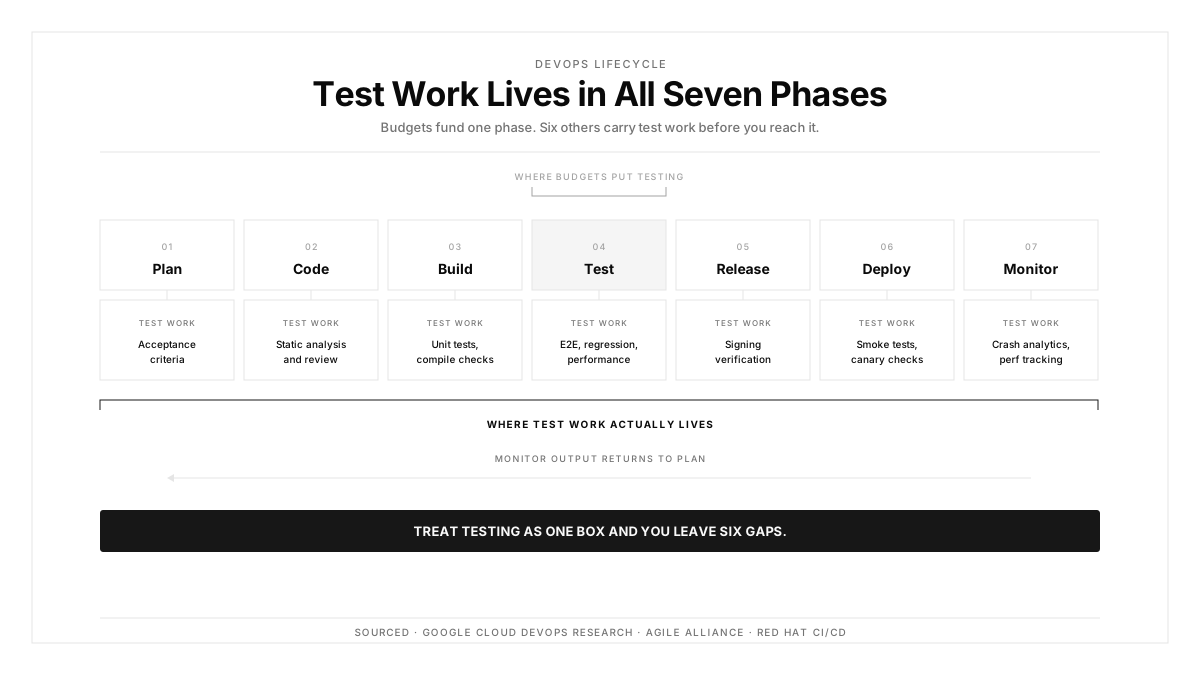
Most write-ups park testing inside phase four. That framing hides where the hours actually go.
Acceptance criteria get written during planning. Static analysis runs during coding. Unit tests gate the build. Signing verification belongs to release. Smoke checks follow deployment. Crash analytics feed monitoring. Six phases carry test work before you reach the one labeled Test.
| DevOps Phase | Test Activity | Cost of Skipping It |
|---|---|---|
| Plan | Acceptance criteria | Features ship against a moving definition of done |
| Code | Static analysis, review | Logic errors survive to the build queue |
| Build | Unit tests, compile checks | Broken artifacts enter the test queue |
| Test | E2E, regression, performance | User-facing defects reach production |
| Release | Signing verification | Misconfigured binaries reach the store |
| Deploy | Smoke tests, canary checks | Incidents run undetected for hours |
| Monitor | Crash analytics, perf tracking | Regressions pile up quietly |
Treat testing as one box and you leave six gaps.
Four Places the DevOps Lifecycle Breaks for Mobile
The DevOps lifecycle grew up around server-side software. Four mobile realities strain it.
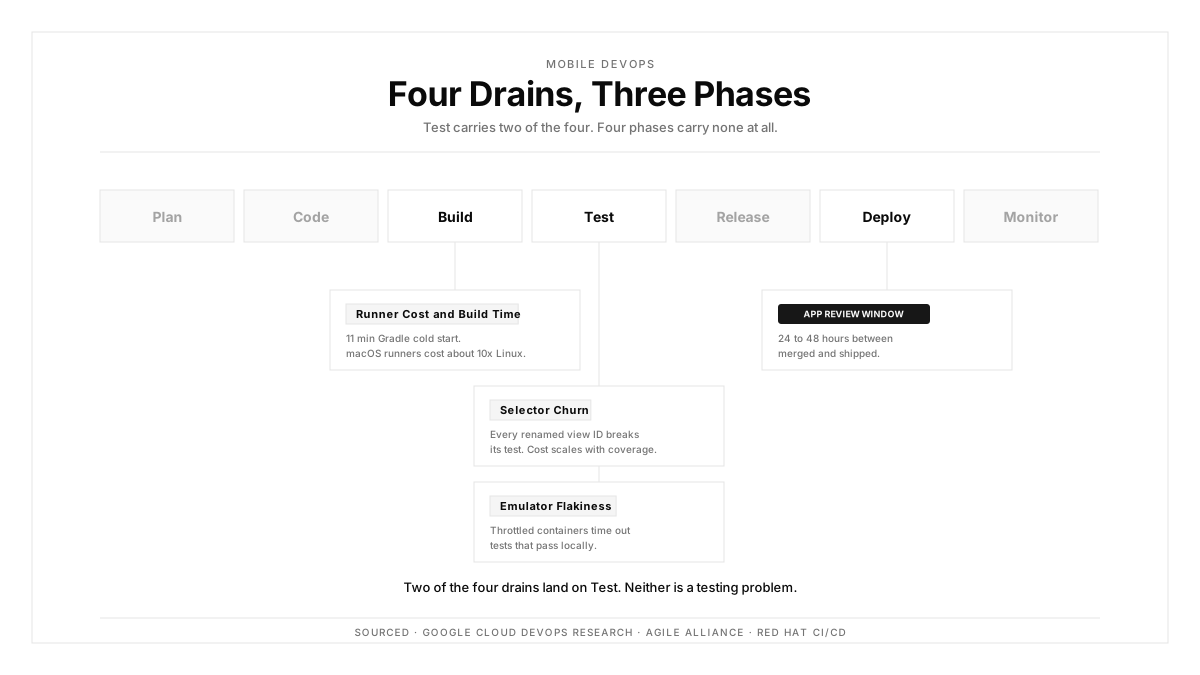
Runner cost and build time
macOS runners cost roughly ten times what Linux runners cost per minute on most CI providers. Gradle cold starts run long. Teams respond by trimming test scope, which is the wrong lever. Parallelize the two platform builds instead, and cache aggressively.
App Review sits inside the deploy phase
Web deploys answer to your pipeline. Mobile deploys answer to Apple and Google. App Review usually clears in 24 to 48 hours, occasionally longer. Continuous deployment in its strict sense stops here for mobile teams.
The knock-on effect matters more than the delay. Review windows push teams toward larger, less frequent releases, so each release carries more change and more risk.
Selector churn taxes every UI test
Rename a view ID and every test anchored to it fails. Ship a new OS version that reshuffles the accessibility tree and the same thing happens. This maintenance cost scales with test count, which punishes teams exactly when their coverage improves.
Mobile test automation built on intent instead of selectors sidesteps this. The test targets the user goal, so a renamed element stays reachable.
Emulator flakiness erodes trust
CI emulators boot slowly inside throttled containers. Timing-sensitive assertions pass locally and time out in the pipeline. Engineers learn to re-run red builds by reflex. Once that habit sets in, your test signal is gone, and the DevOps lifecycle loses the gate it depends on.
Continuous Integration in the DevOps Lifecycle
Continuous integration is the practice of merging to a shared branch several times a day, with each merge triggering a build and a test run. The Agile Alliance treats it as foundational to modern delivery.
Inside the DevOps lifecycle, continuous integration is the first quality gate. Every commit builds. Every build tests.
Mobile CI carries extra weight. Sequential platform builds eat 20 minutes. Fix that with three moves:
- Build iOS and Android concurrently on separate runners
- Split fast checks (lint, unit, types) from slow ones (E2E, API tests)
- Reserve full suites for pull requests targeting main
GitHub integration handles the fan-out, which gives you a sub-5-minute signal on every commit and a deeper run before merge.
Continuous Delivery and Continuous Deployment
Continuous delivery keeps the codebase shippable at all times. A release candidate waits, ready, for a human to push it.
Continuous deployment drops the human. Anything that clears the pipeline ships. Red Hat's CI/CD overview covers how the two differ in risk appetite.
Mobile teams mostly practice continuous delivery. App Review makes strict continuous deployment impractical outside internal test tracks and enterprise distribution. Your artifact stays ready, and a person decides when to submit.
That distinction reshapes the DevOps lifecycle for mobile. Larger batches per release demand deeper pre-submission coverage, because a bad build costs a full review cycle to correct.
Continuous Monitoring Closes the Loop
Continuous monitoring turns a pipeline into a DevOps lifecycle. Production signals feed the next planning session.
Mobile monitoring covers ground web monitoring skips: crash-free session rate, ANR rate on Android, cold start time, store ratings. Read these as production test results, because that is what they are.
The useful move is tying each signal back to coverage. A production crash on a flow your regression suite already covers points at a gap in the test itself. A crash on a flow with zero coverage names your next sprint task.
Building a Testing-First Pipeline
Four structural moves separate teams with fast loops from teams with slow ones.
Write acceptance criteria during planning, before development starts. Ambiguity about done is what turns the test phase into a bottleneck.
Tier the suite by runtime. Under 5 minutes for lint, types, and unit tests on every commit. Under 15 minutes for integration, API, and smoke tests on every pull request. Under 45 minutes for full regression and cross-device E2E before merge or on a schedule.
Anchor tests to intent. Describe the action the user takes, then let the runner locate the element at execution time. Renamed IDs stop breaking runs.
Put results where engineers already are. A failure with a video replay attached to the pull request triages in seconds. The same failure as a CI log line takes minutes.
Then automate the return path: every production regression becomes a test case. That is how the DevOps lifecycle stops repeating itself.
How Autosana Fits
We built Autosana for the test phase of a mobile DevOps lifecycle, with a focus on the two failures above.
Our CI/CD integration and GitHub integration trigger runs on every commit. Tests execute on real iOS and Android hardware, and results land as pull request comments with full session replays.
We anchor by intent, so a renamed button or a restructured screen keeps working as long as the user flow still exists. That removes the selector maintenance tax.
One flow definition covers iOS, Android, and web. Our teams stopped maintaining parallel suites per platform.
For the monitor phase, our performance monitoring tracks startup time, frame rates, and crash-free sessions. Hooks and automations route those signals back into the pipeline.
We are MCP-native, so coding agents like Cursor and Claude Code trigger runs directly from where the code gets written.
Conclusion
Run the numbers on your own pipeline first. Time a cold build on each platform. Count how many red builds got re-run instead of investigated last month. Check how many UI tests broke on your last OS bump.
Those three numbers tell you which phase of your DevOps lifecycle to fix. For most mobile teams the answer is the second one, because a pipeline engineers stop trusting has already stopped working.
.png)
FAQ
What are the phases of the DevOps lifecycle?
Seven phases run in a loop: plan, code, build, test, release, deploy, and monitor. Monitoring output feeds back into planning, which is what makes the DevOps lifecycle continuous instead of linear.
How does continuous integration fit into the DevOps lifecycle?
Continuous integration is the first quality gate. Developers merge to a shared branch several times a day, and each merge triggers a build plus an automated test run, surfacing regressions within minutes.
What separates continuous delivery from continuous deployment?
Continuous delivery keeps the codebase shippable with a human approving each release. Continuous deployment ships automatically once the pipeline passes. App Review pushes most mobile teams toward continuous delivery.
Why does the test phase consume the most time?
Test work appears in all seven phases while budgets treat it as one. Add flaky emulators, slow feedback, and selector maintenance, and the test phase becomes the widest part of the DevOps lifecycle.
How is the DevOps lifecycle different for mobile apps?
Mobile adds macOS runners for iOS, Gradle for Android, a device and OS matrix, code signing, and App Review inside the deploy phase. Each one lengthens the loop.
What does continuous monitoring track for mobile apps?
Crash-free session rate, ANR rate on Android, cold start time, and app store ratings. Treat these as production test results and route them back into planning for the next cycle.
How do self-healing tests help a DevOps pipeline?
They anchor to user intent instead of element selectors. A renamed button or a reshuffled accessibility tree keeps the test valid, which removes one of the largest maintenance costs in mobile CI.
What is a testing-first DevOps lifecycle?
Test activity spreads across every phase: acceptance criteria in planning, static analysis in coding, unit tests in build, E2E in test, signing checks in release, smoke tests in deploy, crash analytics in monitor.