
Test credentials for AI agents that drive mobile apps
Credential proxies protect API tokens, but a mobile test types passwords, reads OTPs and screenshots the screen. Where each secret travels and how to contain it.
- Written by
- Gautam Agarwal
- Read time
- 9 min read
- Published

Key Takeaways
- Credential proxies keep API tokens out of an agent's sandbox by swapping a placeholder for the real value in HTTP headers, after the request leaves.
- A mobile login doesn't go through a header. The password is typed into a field on a device, and Docker's own docs limit replacement to headers.
- Six kinds of secret move through an agent's mobile test loop, and only the first two can be proxied.
- For the rest, the working answer is per-run test accounts created by a hook, leased inboxes and numbers for OTPs, and staging data on screen.
- Keep admin tokens that create accounts in the hook runner, never in the agent's environment or the repo it can read.
Test credentials for AI agents are the accounts, passwords, codes and keys an agent needs to exercise an app, scoped so that a leak costs nothing that matters. On mobile, most of them can't be hidden from the agent. They can only be made disposable.
Credential proxies for coding agents
The best current answer to "how do I give an agent a secret" is not to give it one. Docker Sandboxes shows the pattern clearly. Per its credentials documentation, a proxy on your host intercepts outbound requests from the sandbox, looks up the matching credential on the host, and overwrites the auth header. Inside the sandbox, the variable holds a placeholder, proxy-managed for built-in services or a random sbx-cs- value for custom secrets. The raw value stays in the macOS Keychain, Windows Credential Manager or Linux Secret Service.
So an agent that runs echo $GITHUB_TOKEN gets a placeholder. A prompt injection that tells it to post its environment to a paste site gets the same placeholder. The real token exists only on the host side of the boundary, for the duration of a request.
This works because an API token's whole job is to sit in a header. The proxy can see every header on the way out and swap one string for another.
Then the agent needs to log in to your app.
A mobile login defeats the proxy
To test checkout, the agent has to be a signed-in user, and signing in on a phone means typing an email and a password into two text fields. Those keystrokes travel from the agent to the device as input commands. If the device is remote, they leave the sandbox as part of an API request body. Docker's docs are explicit that custom-secret replacement applies only to HTTP request headers, not request bodies.
Even a smarter proxy wouldn't fix it. The device needs the plaintext password, since that is what a human types. Once it is in the field, it may be on screen, and the agent's next screenshot goes to its model provider. Then the app gets a session token and stores it in the device's keychain, where the agent's device commands can reach the app's state.
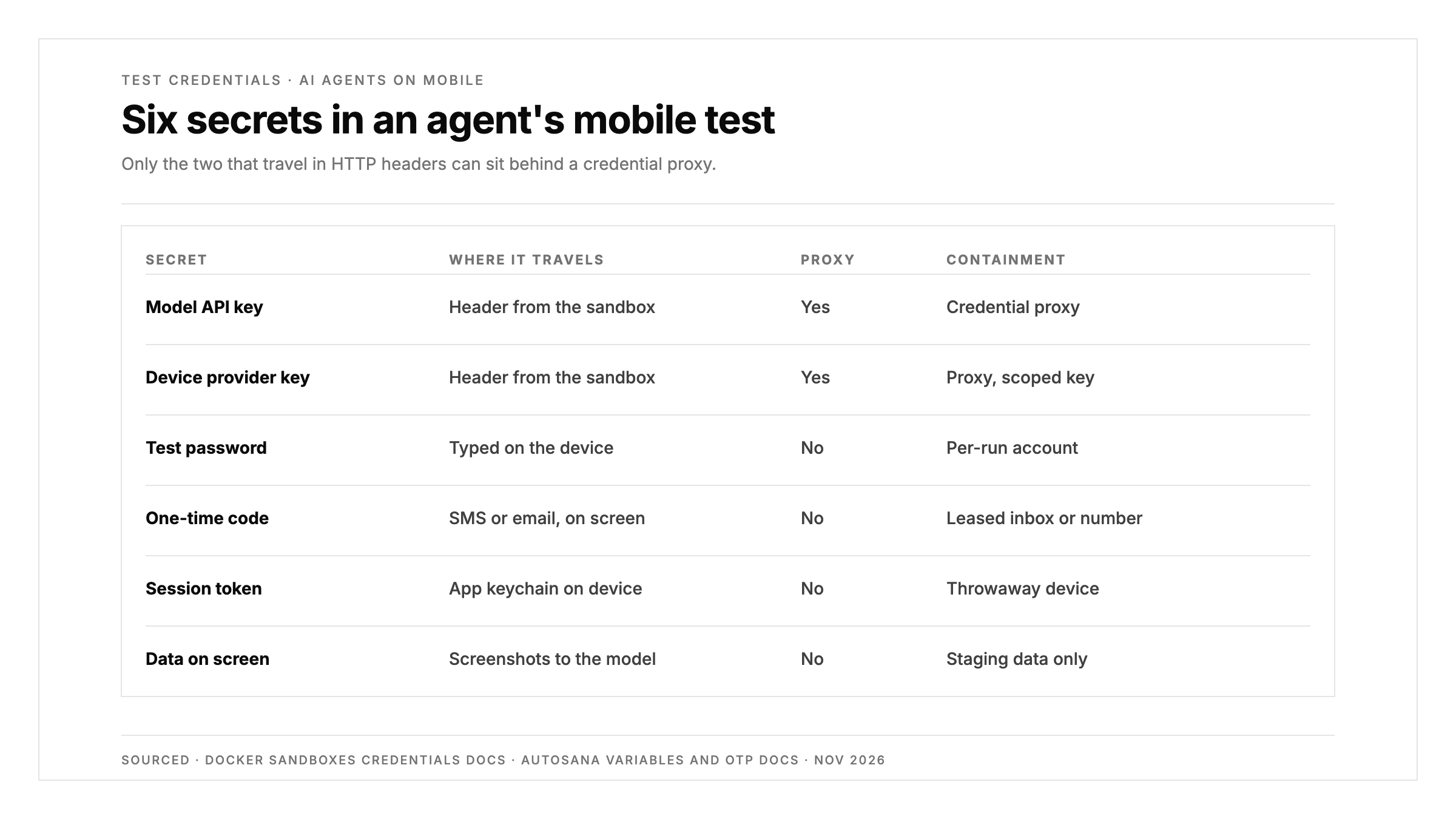
Mobile tests carry more secrets than a login, too. Here is the full set, by where each one travels:
| Secret | Where it travels | Proxy can help | Containment |
|---|---|---|---|
| Model provider API key | Header from the sandbox | Yes | Credential proxy |
| Device provider API key | Header from the sandbox | Yes | Credential proxy, scoped key |
| Test account password | Typed into the app on the device | No | Per-run account |
| One-time code | SMS or email, then onto the screen | No | Leased inbox or number |
| Session token | The app's keychain on the device | No | Throwaway device |
| Data on screen | Screenshots to the model provider | No | Staging data only |
Signing certificates and provisioning profiles are missing from the list on purpose. They belong on the build machine, and the agent's sandbox never needs them.
Per-run test accounts instead of shared secrets
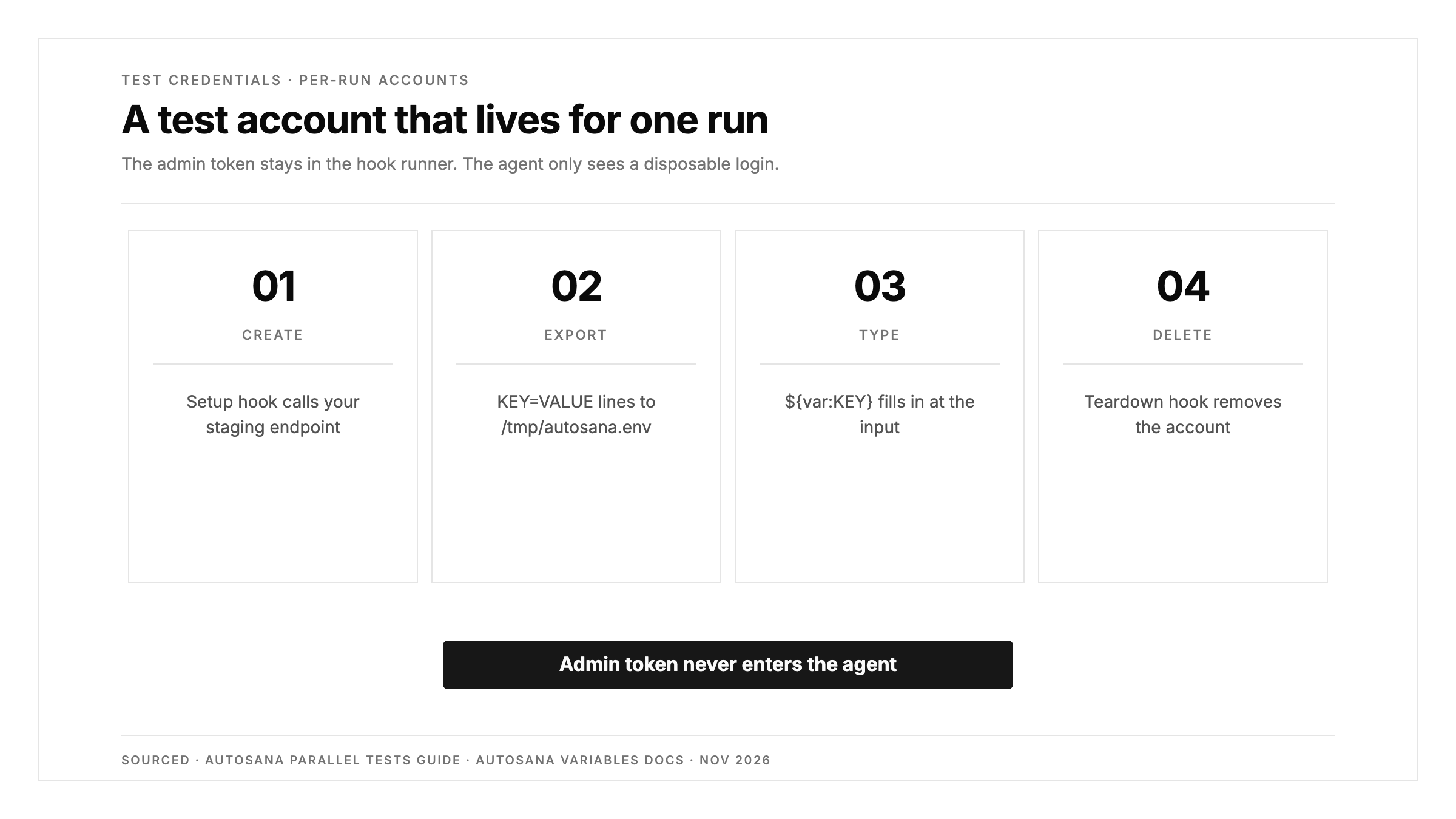
If the password will be seen, make it worthless. The pattern that does this is an account created for one run and deleted at the end, so the credential the agent typed authenticates nothing by the time anyone could misuse it.
Autosana's guide to isolated, parallelizable tests describes the shape: an internal endpoint creates an account and seeds its data, a setup hook exports the credentials, the flow's auth instructions use them, and a teardown hook deletes the account. Hooks export values by writing KEY=VALUE lines to /tmp/autosana.env.
A setup hook for a staging backend looks like this. The endpoint is yours; this one is illustrative:
#!/usr/bin/env bash
set -euo pipefail
resp=$(curl -sf -X POST "$STAGING_API/internal/test-accounts" \
  -H "Authorization: Bearer $TEST_ADMIN_TOKEN" \
  -d '{"seed": "checkout-with-saved-card"}')
echo "TEST_EMAIL=$(jq -r .email <<<"$resp")"       >> /tmp/autosana.env
echo "TEST_PASSWORD=$(jq -r .password <<<"$resp")" >> /tmp/autosana.env
echo "TEST_USER_ID=$(jq -r .id <<<"$resp")"        >> /tmp/autosana.env
The important line is the Authorization header. TEST_ADMIN_TOKEN can create accounts on staging, which makes it the most valuable secret in the loop. It lives in the hook runner's environment, stored as an encrypted secret, and the agent never sees it. The agent sees a short-lived test password, which is the trade you want.
Two details are easy to get wrong:
Export, don't print. Values that are only echoed to the log never reach the flow. They also defeat run caching: per the caching docs, printed values make every run look unique. Exported values that change every run are handled, and the cache takes three passing runs to settle on them.
Parallel runs need parallel accounts. With parallel execution on, the suite's hooks run independently in each session, so each concurrent run gets its own account. If your backend can't create accounts on demand, the fallback is a pool of dedicated automation accounts with a different one reserved per concurrent session. Sharing one login across parallel agents brings back every collision problem: shared carts, revoked sessions, rate limits.
Keeping passwords out of the agent's instructions
How the credential reaches the flow matters too. Autosana's variables documentation describes two forms.
${env:KEY} is resolved once, before the agent starts, and the value is substituted into the step text. That also means it can't see values a hook exports during the current flow.
${var:KEY} is filled in at the moment the step runs, and only where the agent types text, opens a URL or deep link, or sets the clipboard. It reads a value the agent saved, or a hook export. The value is inserted where it is typed, so the step text keeps the placeholder. It is the same idea as the credential proxy, moved from the HTTP boundary to the typing boundary.
Log in with email ${var:TEST_EMAIL} and password ${var:TEST_PASSWORD}.
Add the saved-card item to the cart and complete checkout.
Verify the order confirmation screen appears.
One limit to know: ${var:KEY} isn't for checking a value on screen. To verify that a saved value appears, the docs point to the Get Variable action.
Neither form makes the value invisible once it is on screen. An email field shows its text, and a screenshot captures it. Password fields mask their input on iOS and Android, which helps for the password and nothing else. That is why disposable accounts come first and placeholder handling second.
One-time codes without a real phone
Two-factor login is where teams most often reach for something unsafe: a developer's real phone number, or an inbox that receives codes for every environment.
Autosana's OTP guide replaces both with leased addresses. A built-in lease-email-address hook provides AUTOSANA_EMAIL_ADDRESS, and lease-phone-number provides AUTOSANA_PHONE_NUMBER. Email addresses are minted fresh for each run and never reused, and no two runs hold the same address at once. When the agent reads a code from the leased inbox or number, it saves it as AUTOSANA_OTP_CODE.
Phone numbers are the constraint. They come from a shared pool, so at high concurrency, runs that need one can queue behind each other. If most of your suite needs SMS codes, a staging-only bypass is often the better design: your own server returns a magic link or code through a hook, and SMS is tested in a smaller dedicated set. This overview of OTP testing covers the trade-offs between the approaches.
For tools that handle login and two-factor flows end to end, see this roundup of login and 2FA testing tools.
The agent's own sandbox
The agent's own environment should hold almost nothing:
- Model and device provider keys, behind a credential proxy where your sandbox supports one, and scoped. Autosana's API Keys API shows which key started each sandbox, which makes a per-agent key worth the setup.
- No admin tokens. Docker's isolation documentation notes that its clone mode protects the host repository from modification, not from inspection, and files such as
.envremain readable by the agent. Anything in the repo's env files is in scope for the agent, so keep account-creation tokens in the hook runner. - No production anything. Staging backend, staging data, test accounts. Whatever appears on screen is going to a model provider.
For the device-side isolation that pairs with this, the remote-device pattern for sandboxed agents is covered in a companion post on sandboxing coding agents. For the broader security testing picture, see mobile app security testing.
Conclusion
Credential proxies solved secrets for the part of an agent's work that happens in HTTP headers. A mobile test also types passwords, reads one-time codes and screenshots the result, and no proxy sits in that path.
So contain by making things disposable. Create an account per run with a hook that holds the admin token, pass credentials through placeholders that fill in at the point of input, lease inboxes and numbers for codes, and keep production data off any screen an agent can see.
FAQs
Can a credential proxy protect a mobile app login?
No. Proxies replace HTTP headers; a login password is typed into the app as input.
Should AI agents use real user accounts for testing?
No. Use per-run test accounts on staging, created and deleted by hooks.
Does the model see passwords the agent types?
It can, through instructions or screenshots. Disposable accounts make that exposure harmless.
How do AI agents handle OTP codes?
Through leased email inboxes or phone numbers, or a staging bypass returning the code.
Where should account-creation tokens live?
In the hook runner's encrypted secrets, outside the agent's sandbox and repository.
How does Autosana insert credentials during a flow?
${var:KEY} values fill in only where the agent types, opens a link or sets the clipboard.
Sources